EEvlarSoft

Barcode Label Generator for Windows

Generate barcodes for a whole product list or asset range, print them at true size on rolls or sheets, and check them with your webcam or phone.

Buy for $1.99
One payment. No subscription.
14-day money-back guarantee.
5.0
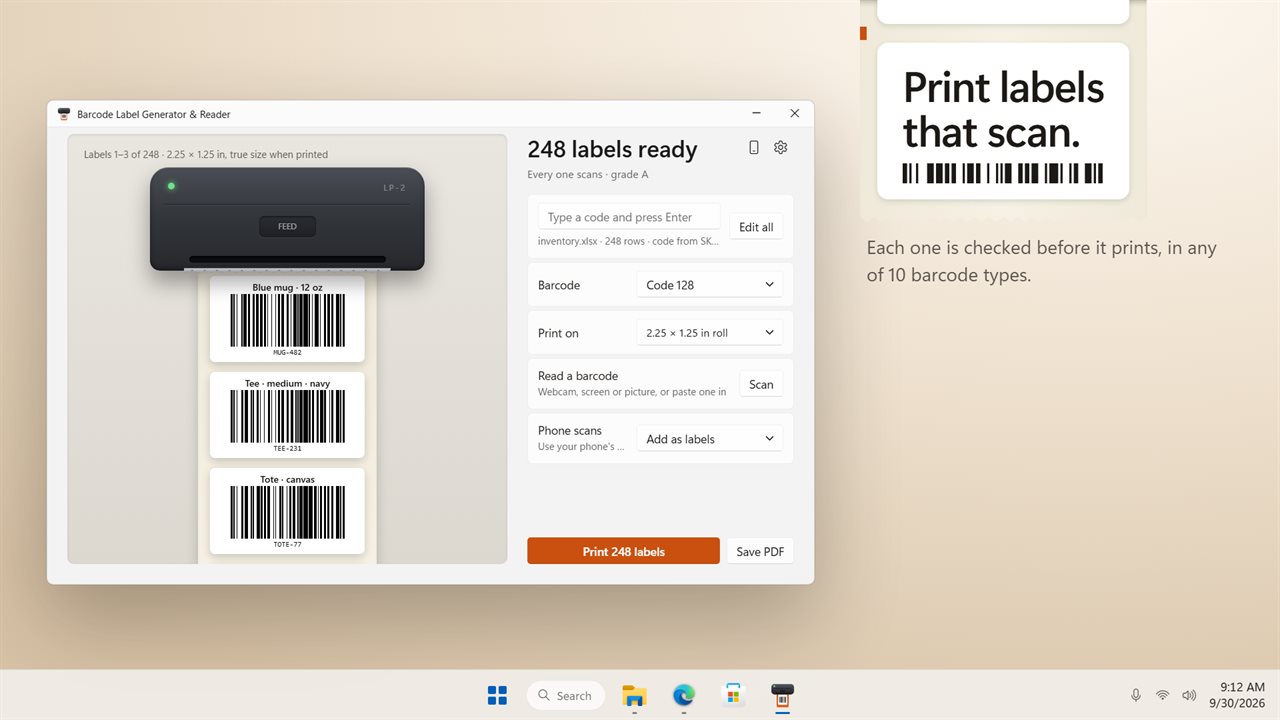
Print barcode labels that scan. Each one is checked before it prints.
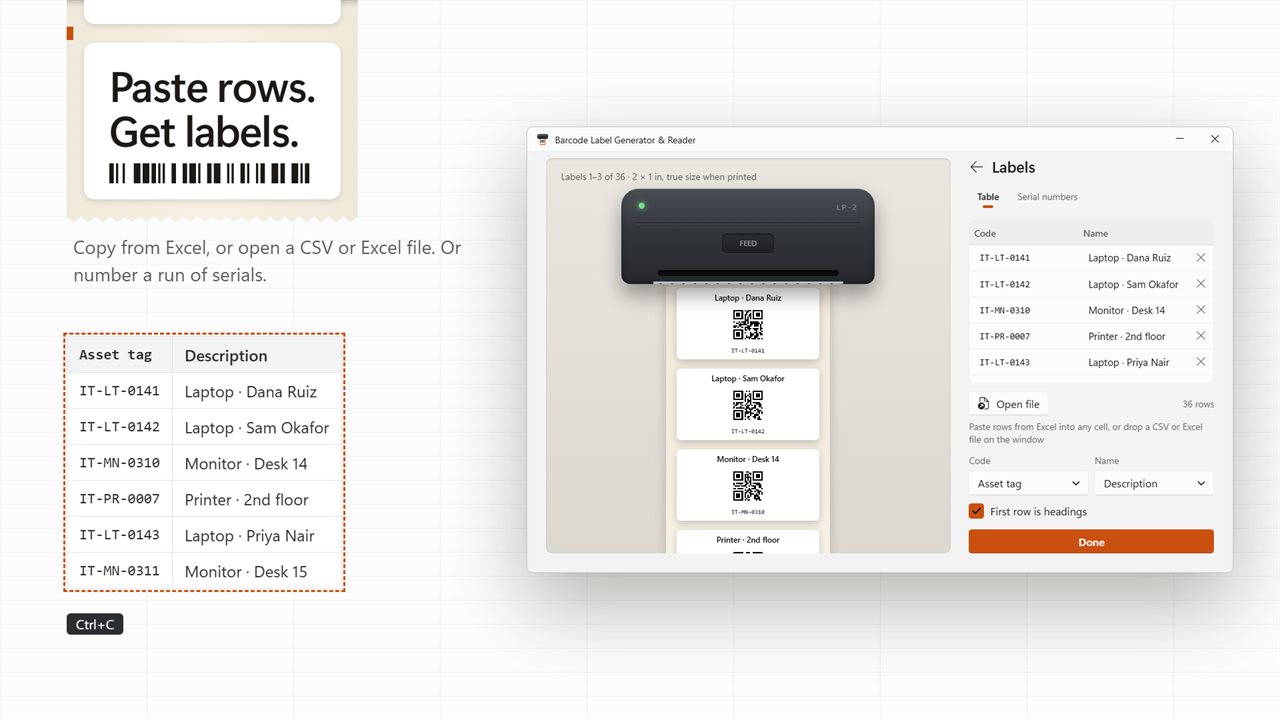
Paste rows from Excel, and get a label for every one.
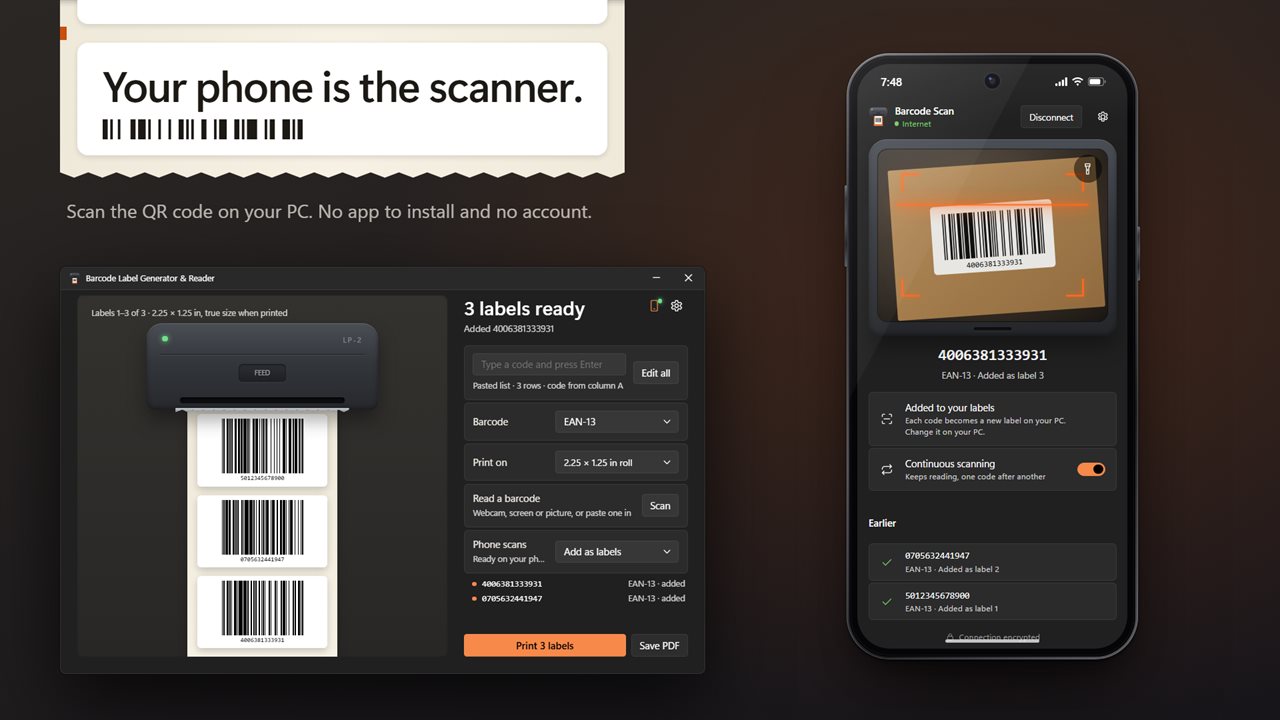
Your phone is the scanner. No app to install and no account.
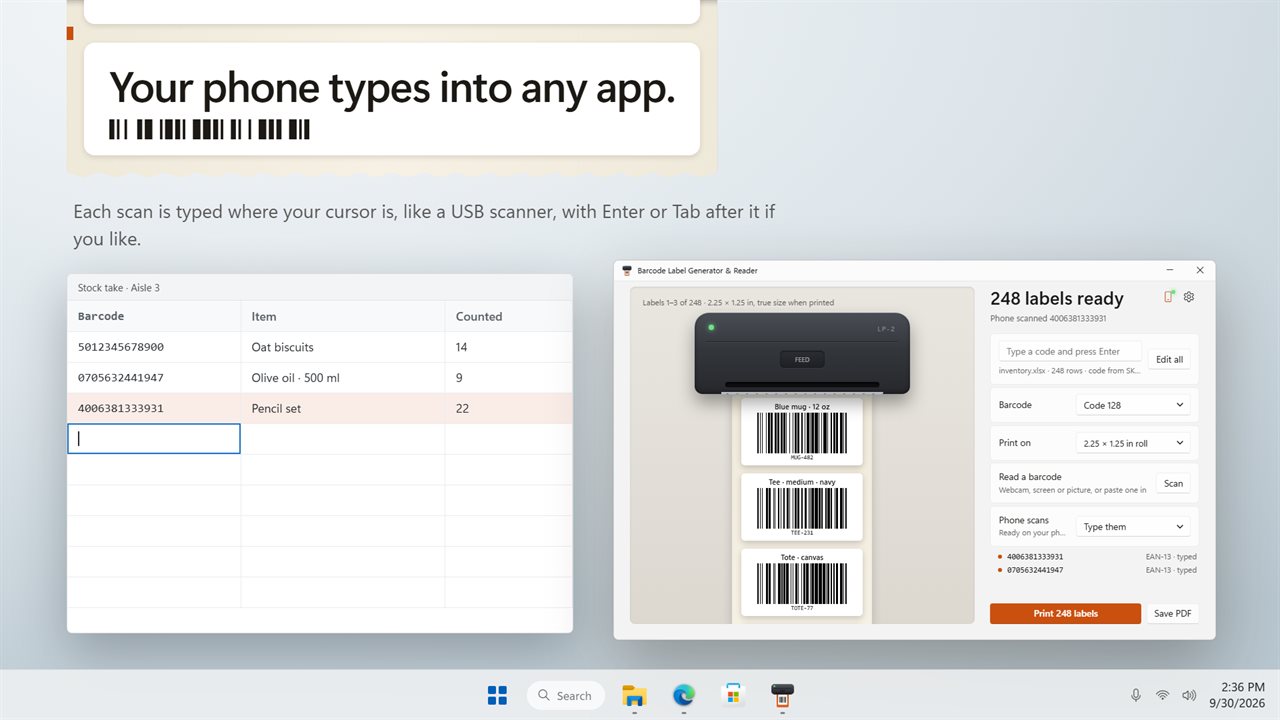
Scans from your phone type into any app, like a USB scanner.
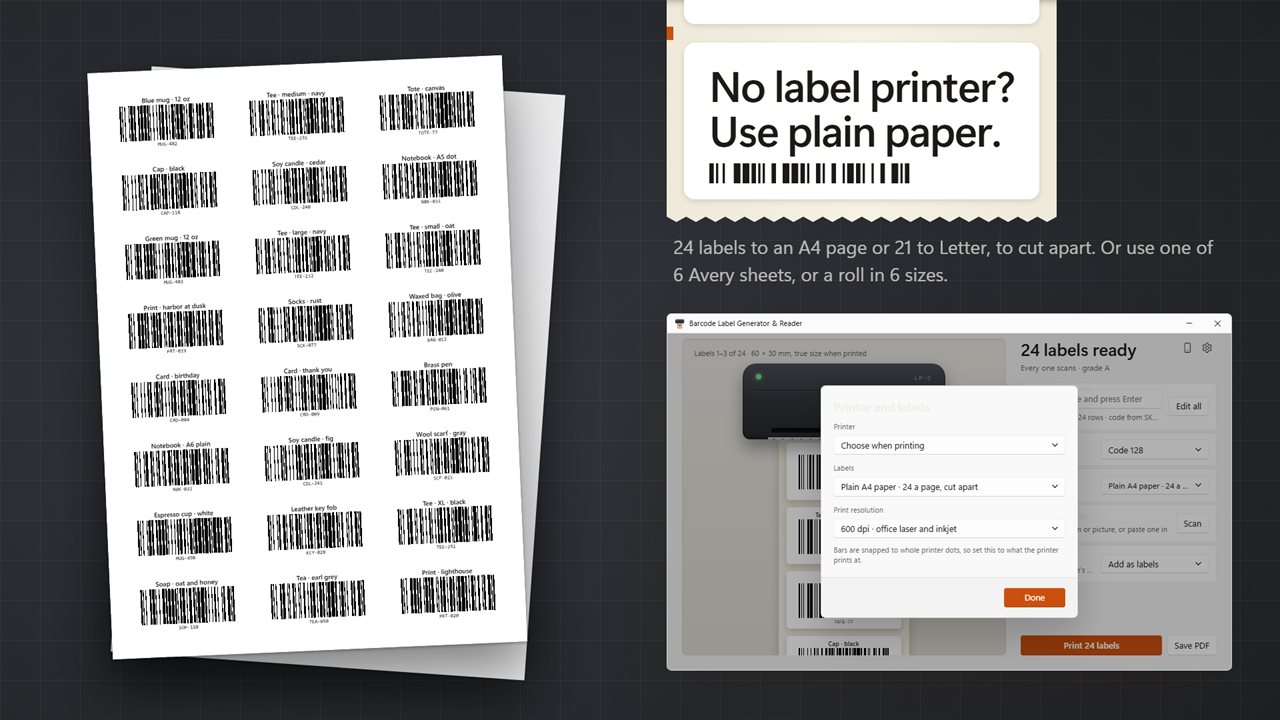
No label printer? Print 24 to an A4 page or 21 to Letter, or use Avery sheets.
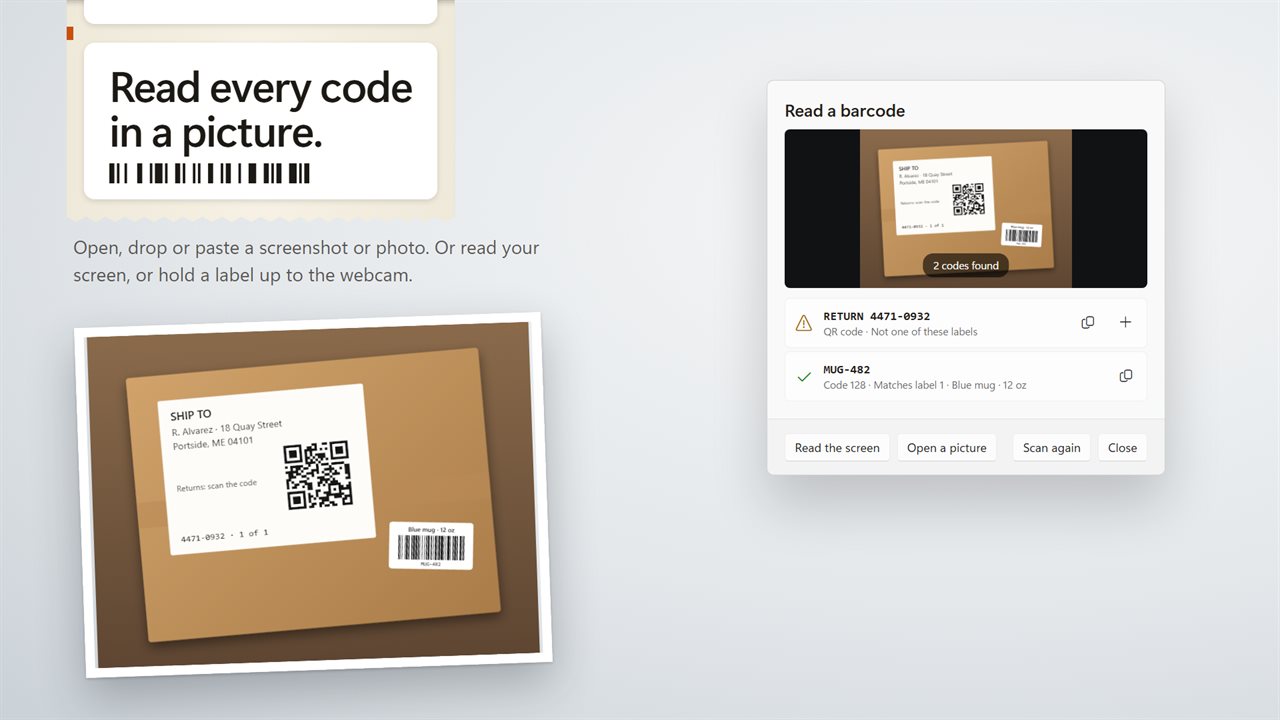
Read every barcode in a screenshot or photo.

Print barcode labels that scan. Each one is checked before it prints.

190,000+downloads of EvlarSoft apps
Signed by EvlarSoftVerified US publisher
14-day money-backNo questions asked
Updates includedNo upgrade fees

A barcode generator that checks every label will scan

An online barcode generator is fine for one code. Shelf tags for a whole catalog, asset stickers for an office or a run of numbered tickets need something that takes a list, lays it out on the stock you actually own, and tells you before you waste a roll whether the scanner will read it.

Barcode Label Generator & Reader draws the labels as a strip coming out of a printer, each one shown at the size it will print. While you work it checks every code and gives the batch a grade from A to F. When a label falls short, the headline says which one and why: the code is too long for the label, the bars are only one printer dot or a few mils wide, they are too short for a hand scanner, or there is no quiet zone around the code. If you print with failures in the batch, it asks first.

Under Printer and labels, set Print resolution to 203, 300 or 600 dpi. Bars are snapped to whole printer dots at that setting, which is why the edges come out crisp on a thermal printer.

Bulk barcode generator from an Excel or CSV list

Under Labels, the Table view accepts rows pasted from a spreadsheet into any cell, or a file you open or drop: CSV, TSV, TXT, XLSX, XLSM, XLSB, XLS or ODS. Tick First row is headings, then point Code and Name at the right columns. Only a slice of a long table is listed on screen, but every row prints.

Switch to Serial numbers for stock with no list behind it. Set a Prefix such as ASSET-, a Start at number, How many and the number of Digits, and you get ASSET-0001 onward, up to 10,000 labels in one run. Name on every label adds a fixed line above each code.

UPC, EAN, Code 128 and QR barcode types

Pick the symbology under Barcode. The hint beside each says what it will accept:

  • Code 128 and Code 93: letters, digits and punctuation, the usual choice for SKUs and asset tags
  • UPC-A (11 or 12 digits), UPC-E, EAN-13 and EAN-8 for retail products, with the check digit filled in
  • Code 39: capitals, digits and - . $ / + %
  • ITF: an even number of digits, common on cartons
  • QR code and Data Matrix: any text, links included

Read barcodes from an image, your screen or a webcam

Read a barcode opens a scanner with three sources: Open a picture, Read the screen, or hold a code up to the webcam. Every code found is listed with Copy and Add to labels, and when it matches one in your batch you see Matches label 14 with its name, which makes it a quick spot check on a fresh print.

Scan with your phone shows a pairing code. Point the phone's camera at it and the phone becomes a wireless scanner, either adding each read as a label or, with Type them, typing it into whatever window you have open, followed by Enter or Tab if you set that.
Printing and saving

  • Roll stock2.25 × 1.25, 2 × 1, 1.5 × 1 and 3 × 2 in, 4 × 6 in shipping, and 62 × 29 mm
  • Sheet layouts 5160 (30 a sheet), 5161, 5163, 5167 (80 a sheet), L7160 and L7651
  • Plain paper24 labels on A4 or 21 on Letter, ready to cut
  • Any installed printer, chosen up front or when printing
  • Save PDF with every label at true size, or SVG and PNG with one label per file
  • Click a label on the strip to edit its code or name, or delete it
  • Name above the bars and readable text beneath, both optional

Who prints with it

Online sellers

Paste a SKU export, print Code 128 tags on a thermal roll, and scan a few back with the webcam before boxing.

IT and facilities teams

Number a run of ASSET-0001 stickers on letter sheets, then use a phone as the scanner during the audit walk.

Small shops

Make UPC-A or EAN-13 shelf labels from a price list, with check digits worked out for you.

What's new in 2.0.3

  • New: print labels at true size on label rolls, Avery sheets or plain A4 and Letter paper
  • New: every label is checked to scan before it prints
  • New: paste rows from Excel, open a CSV or Excel file, or number a run of serials
  • New: Code 93, ITF and Data Matrix, for 10 barcode types in all
  • New: read barcodes from a picture, your screen or your webcam
  • New: use your phone as a barcode scanner, adding labels or typing into any app
  • Save every label in one PDF at true size, or as SVG or PNG pictures

Questions

Anything else? Ask us

Which barcode types can it make?

Code 128, EAN-13, UPC-A, UPC-E, EAN-8, Code 39, Code 93, ITF, QR code and Data Matrix. For EAN and UPC codes a missing check digit is added, and a wrong one is pointed out with the digit it should be.

Can I make barcode labels from an Excel or CSV file?

Yes. Open or drop a CSV, TSV, TXT, XLSX, XLSM, XLSB, XLS or ODS file, or paste rows copied from Excel, and every row with a code becomes a label. You pick which column holds the code and which holds the name, or number a run of serials with your own prefix, up to 10,000 labels.

What label sizes and sheets does it print on?

Label rolls of 2.25 × 1.25, 2 × 1, 1.5 × 1, 3 × 2 and 4 × 6 inches and 62 × 29 mm, and Avery 5160, 5161, 5163, 5167, L7160 and L7651 sheets. Without label stock it prints 24 labels to a plain A4 page or 21 to a Letter page. Printing goes through the Windows print dialog, or you can save one PDF, or SVG or PNG files with one label each.

Will it tell me if a barcode will not scan before I print?

Yes. Each label is graded from A to F, and the app says why a label falls short: the code does not fit, its bars are too thin, or it has no blank margin. If some labels will not scan, it asks before printing them anyway.

Can I use my phone as a barcode scanner for my PC?

Yes. Scan the code the app shows with your phone's camera, and the phone opens a scanner page in its browser with no app to install. Each code read becomes a new label, or is typed into the window in front like a USB scanner, with Enter or Tab after it if you choose. The phone reads the code itself and sends only the code and its type.

Can it read barcodes from a picture or the screen?

Yes. Open, drop or paste a PNG, JPG, BMP, GIF or WebP picture and every code in it is read, or read whatever is on your screen, or hold a label up to your webcam. It tells you which of your labels a code matches.

What is the difference between a UPC and an EAN barcode?

UPC-A holds 12 digits and is the retail code in the US and Canada; EAN-13 holds 13 and is used almost everywhere else. A UPC-A is the same number as an EAN-13 that starts with 0. Both are on the Barcode list, and you can leave off the last digit for the app to work out.

Do I need to buy a number to make a UPC barcode?

Only to sell through retailers. The generator will draw any valid digits you type, which is fine for in-house stock, but stores expect a UPC or EAN issued from a GS1 company prefix registered to you.

What dpi should I print barcode labels at?

Set the dpi your printer actually prints at: 203 for most thermal label printers, 300 for finer ones, 600 for office laser and inkjet printers. The bars are fitted to that dot grid.

Which versions of Windows does it run on?

Windows 10 (version 1809 or later) and Windows 11.

Is it a subscription?

No. Barcode Label Generator & Reader is a one-time purchase of $1.99, and updates are included.

How do I get it?

Buy it on this page and your license key arrives by email. If the button says Notify me, Barcode Label Generator & Reader is not on sale here yet; leave your email and we will tell you when it is.