EEvlarSoft

Color Palette Maker

Turn one color into a matching five-color palette, sample colors from anywhere on screen, and paste the result straight into your code.

Buy for $2.99
One payment. No subscription.
14-day money-back guarantee.
5.0
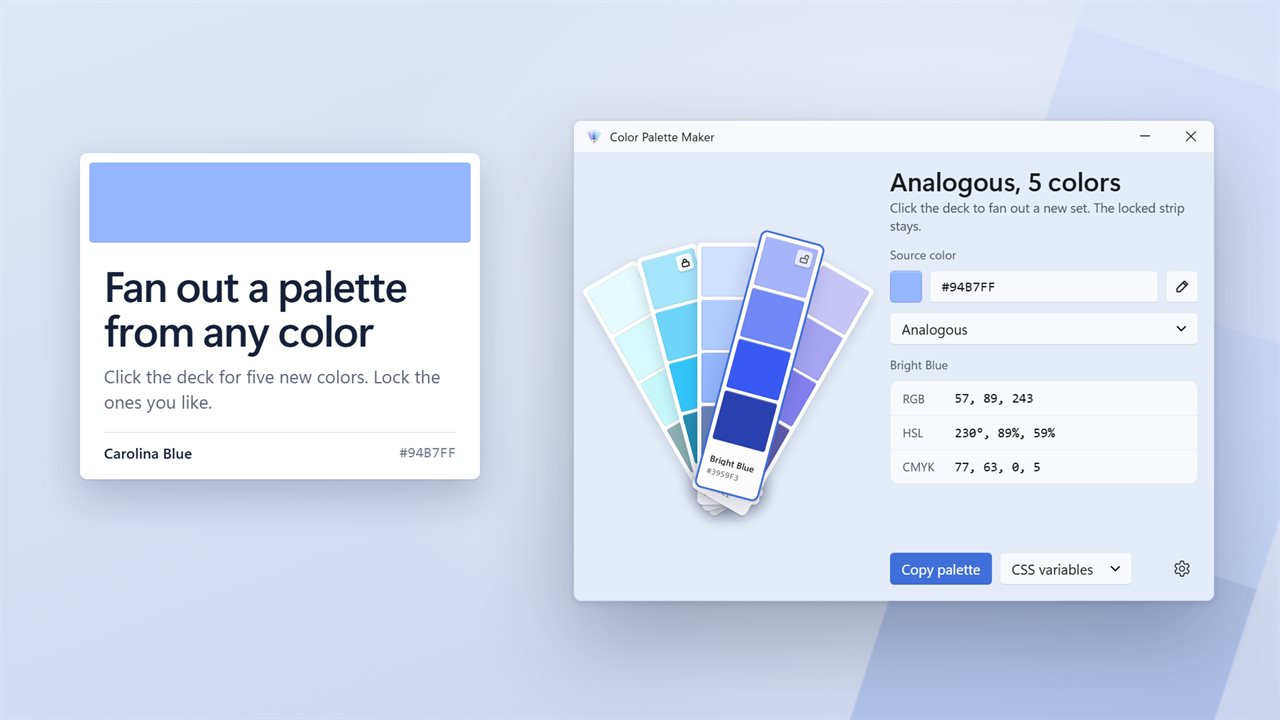
Fan out a palette of five from any color.
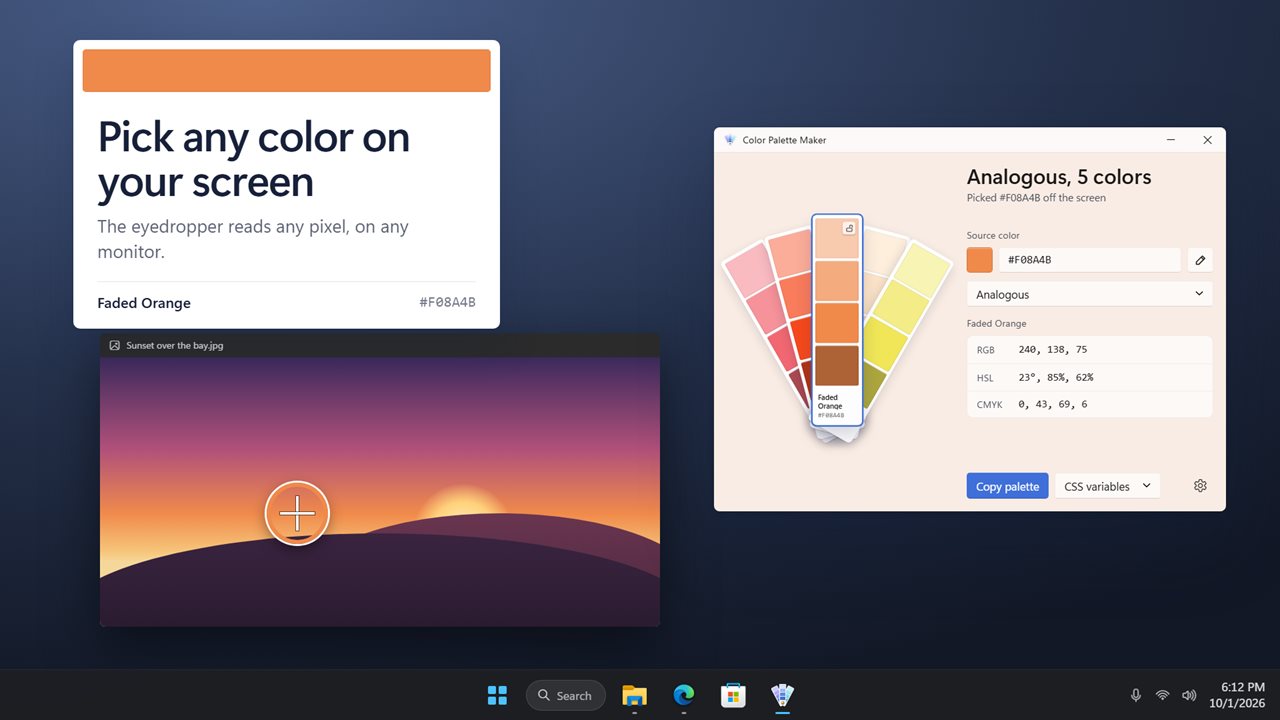
Pick any color off your screen.
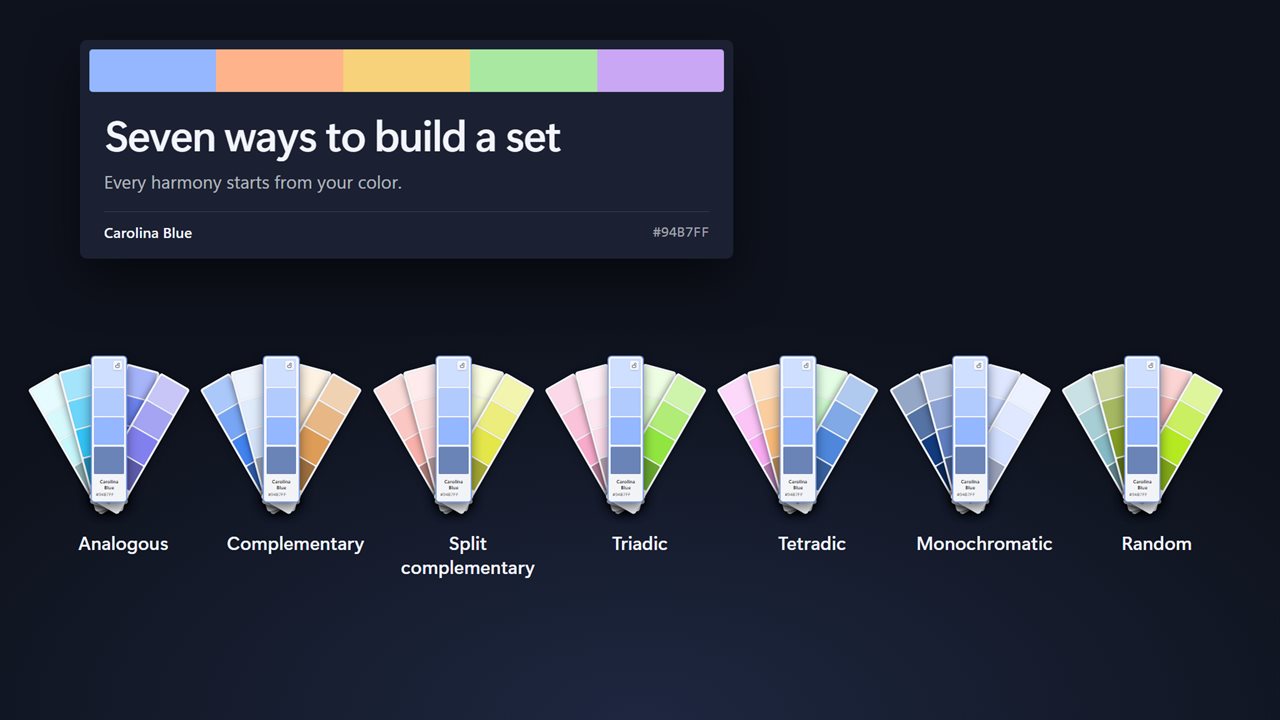
Seven harmonies, from analogous to random.
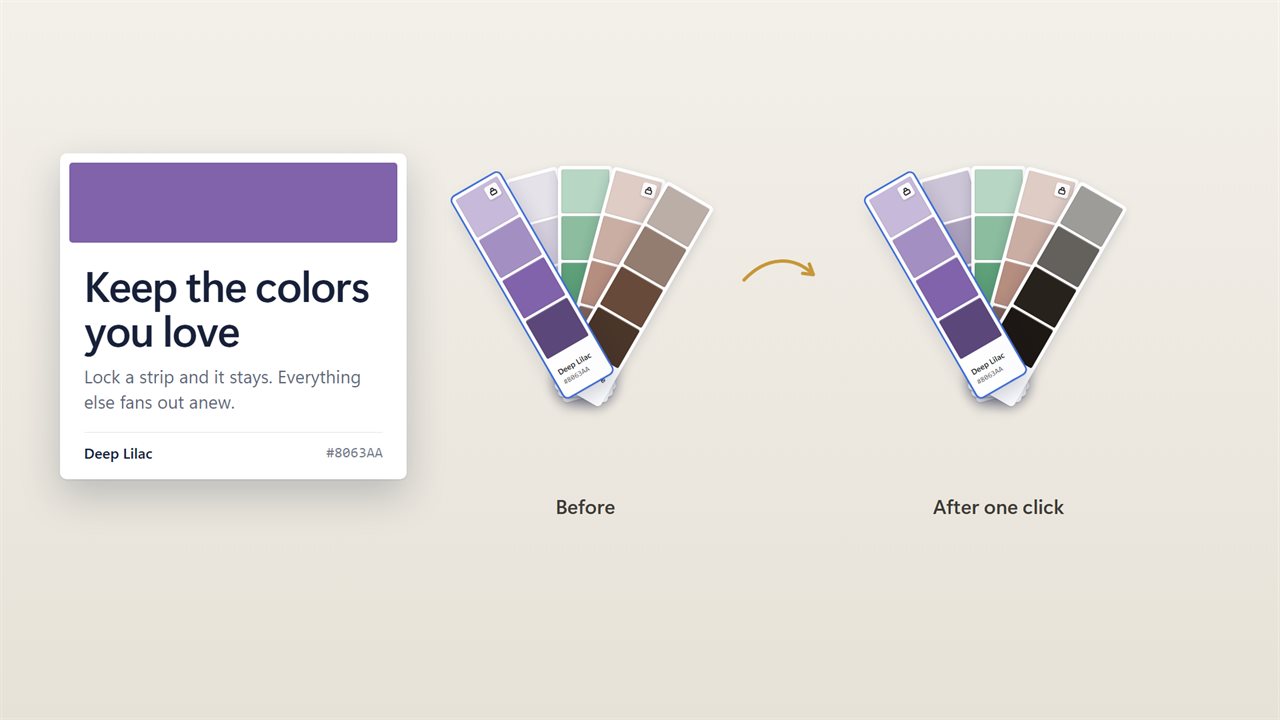
Lock the colors you like. The rest fan out anew.
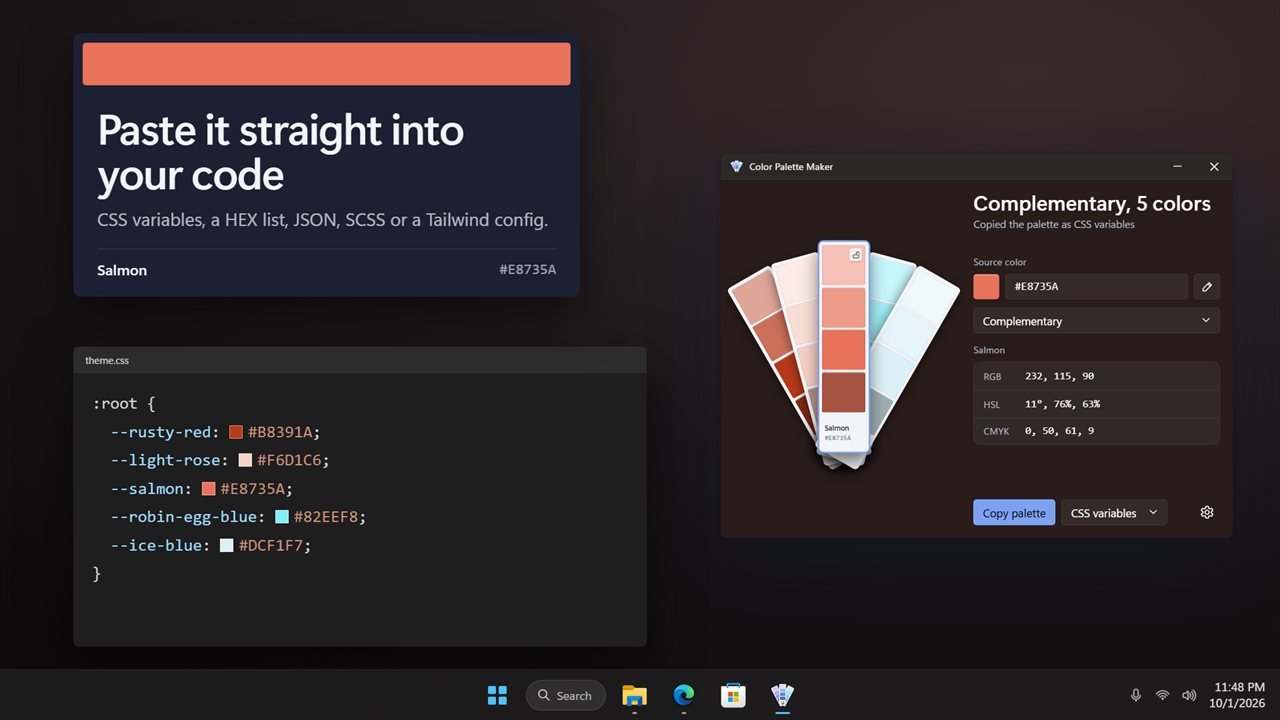
Copy the palette as CSS, SCSS, JSON, Tailwind or hex.
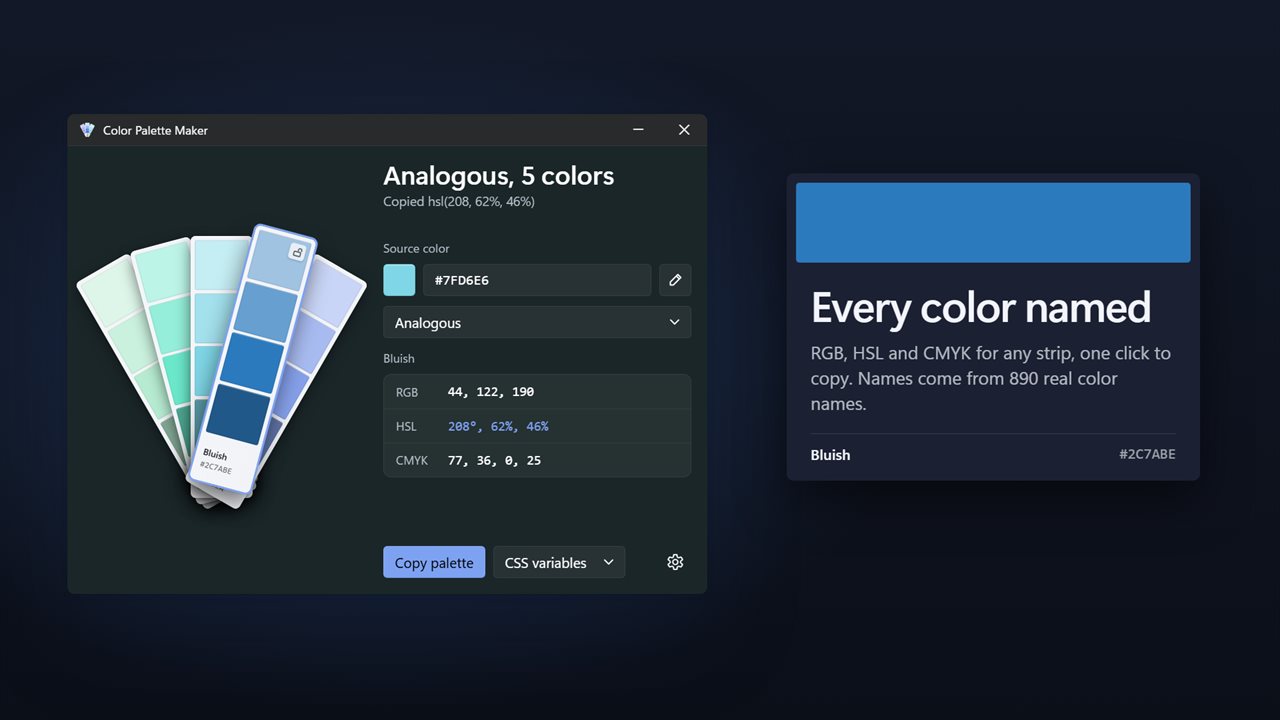
Every color named, with RGB, HSL and CMYK one click away.

Fan out a palette of five from any color.

190,000+downloads of EvlarSoft apps
Signed by EvlarSoftVerified US publisher
14-day money-backNo questions asked
Updates includedNo upgrade fees

A color palette maker that starts from your color

Most palette generators open with something random and leave you to hunt for a scheme that happens to include your brand blue. Color Palette Maker begins at the other end. You give it a Source color, by typing a hex code or RGB values, by opening the Windows color dialog, or by sampling a pixel with the eyedropper, and it builds a set of five colors around it.

The palette is drawn as a fan deck of paint chips. Your source sits on the middle strip, and each strip carries four lighter and darker shades of its color plus a name and a hex code. Every color is named from a table of 890 entries, matched by how different two colors look to the eye rather than by raw numbers.

Not quite right? Click the deck, or press F5 or the Space bar, and it fans out a fresh set from the same rule. Each pass varies the colors a little, so you can keep going until one clicks.

Color scheme generator with seven harmonies

Under Harmony, choose the color theory rule the palette follows:

  • Analogous: neighbors on the color wheel, calm and cohesive.
  • Complementary: the opposite hue for strong contrast.
  • Split complementary: the two hues 30 degrees either side of the opposite, softer than a straight complement.
  • Triadic: three hues spaced 120 degrees apart.
  • Tetradic: four hues 90 degrees apart, which makes two complementary pairs.
  • Monochromatic: variations of a single hue.
  • Random: anything goes, while the strips you have locked stay put.

Lock the colors you like, then reshuffle the rest

Every strip has a padlock, Keep this strip in new sets, so a chip you like survives the next fan-out while the others change. Double-click any strip and it becomes the new source, with a whole palette rebuilt around it. That makes it quick to walk from one idea to the next without losing what is working.

Keyboard users can move between strips with the Left and Right arrow keys, press L to lock or unlock, and press Ctrl+C to copy the selected strip's hex code. The palette, its locks and your settings are restored the next time you open the app.

Screen color picker and copy-ready code

Pick a color from the screen turns the pointer into an eyedropper that works on every monitor, including colors inside other apps, photos and web pages. Click a pixel to use it or press Esc to back out.

Select a strip to read its RGB, HSL and CMYK values, and click a value to copy it. When the palette is done, use Copy palette with Copy as set to CSS variables, HEX list, JSON, SCSS or Tailwind. The CSS option writes a :root block and the Tailwind option places the colors under theme.extend.colors, ready to paste. In Settings, Letters in hex codes switches between uppercase and lowercase, and Copy hex codes with # decides whether the hash comes along.

What it gives you

  • Five-color palettes built around your chosen source color
  • Seven harmony rules from analogous to tetradic
  • Four shades per strip, each selectable and copyable
  • A name for every color from an 890-name table
  • An eyedropper that samples any pixel on any monitor
  • Hex, RGB or Windows color dialog as a starting point
  • Locks that keep chosen strips through a reshuffle
  • RGB, HSL and CMYK readouts with click-to-copy
  • Export as CSS variables, HEX list, JSON, SCSS or Tailwind config
  • Keyboard controlArrows, L to lock, Ctrl+C, F5 or Space for a new set

Who reaches for it

Front-end developers

Sample a color from a mockup, generate a scheme around it and paste it into a stylesheet or Tailwind config in one copy.

Brand and slide design

Start from an existing logo color and find supporting accents that sit correctly next to it on the color wheel.

Painting and decorating

Type in a paint chip's hex value and try analogous or monochromatic schemes before buying sample pots.

What's new in 2.0.3

  • New: a paint-chip fan deck of five colors, each with four shades, a name and its hex code
  • New: seven harmonies to build a palette from
  • New: lock the colors you like and fan out the rest
  • New: copy the palette as CSS variables, a HEX list, JSON, SCSS or Tailwind
  • New: HSL values alongside RGB and CMYK, each one click to copy
  • New: your palette and locks are kept between sessions
  • Fixed: CMYK values now read correctly

Questions

Anything else? Ask us

Can Color Palette Maker pick a color from another app or a second monitor?

Yes. The eyedropper works across every monitor and shows each pixel as you move over it. Click to take that color, or press Esc to cancel.

Which color harmonies can it make?

Seven: analogous, complementary, split complementary, triadic, tetradic, monochromatic and random. Your starting color stays in the middle strip, and every new fan-out varies the others a little, so clicking again gives a different set from the same rule.

Can I make a palette with more or fewer than five colors?

No. A palette is always five strips. Each strip also shows four shades of its color, from light to dark, and any of those shades can be selected and copied.

What code formats can I copy the palette as?

CSS variables in a :root block, a plain HEX list, JSON with names and hex codes, SCSS variables, or a Tailwind config with the colors under theme.extend.colors. Hex codes can be uppercase or lowercase, with or without the #.

Can I save several palettes or export them as a swatch file?

No. The app keeps one palette, with its locked strips, and it is still there the next time you open it. Palettes leave the app by copying them as text, not as a file.

How are the colors named?

Each color takes the closest name from a table of 890 color names, measured the way the eye sees color difference rather than by raw RGB values.

How do I make a color palette from one color?

Set it as the Source color by typing its hex code, choosing it in the Windows color dialog or sampling it with the eyedropper, then pick a Harmony. The five-strip palette is built around it, with your color in the middle.

What is the difference between triadic and tetradic color schemes?

Triadic uses three hues spaced 120 degrees apart on the color wheel. Tetradic uses four hues 90 degrees apart, which is two complementary pairs, so it gives more variety and usually wants one color to lead.

What is a split complementary color scheme?

Instead of the hue directly opposite your color, it uses the two hues 30 degrees either side of that opposite. You keep strong contrast with less clash than a straight complementary pair.

Which versions of Windows does it run on?

Windows 10 (version 1809 or later) and Windows 11.

Is it a subscription?

No. Color Palette Maker is a one-time purchase of $2.99, and updates are included.

How do I get it?

Buy it on this page and your license key arrives by email. If the button says Notify me, Color Palette Maker is not on sale here yet; leave your email and we will tell you when it is.

Prefer widgets? The Color Palette widget on WidgetSpark does a similar job, alongside over 100 other desktop widgets in one app.