EEvlarSoft

ImageRotate

Turn a pile of sideways photos the right way up in one go, mirror or flip them, or level a crooked horizon to a tenth of a degree.

Buy for $2.49
One payment. No subscription.
14-day money-back guarantee.
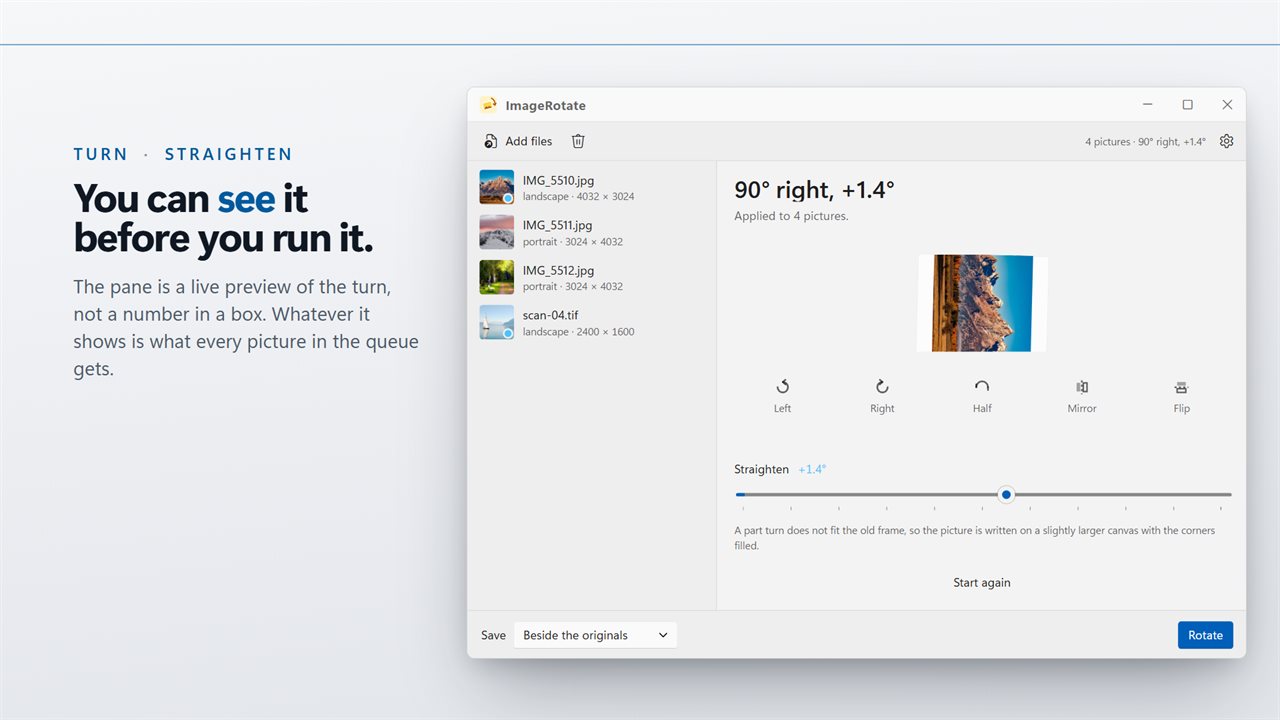
Turn or straighten, and see it before you run it.
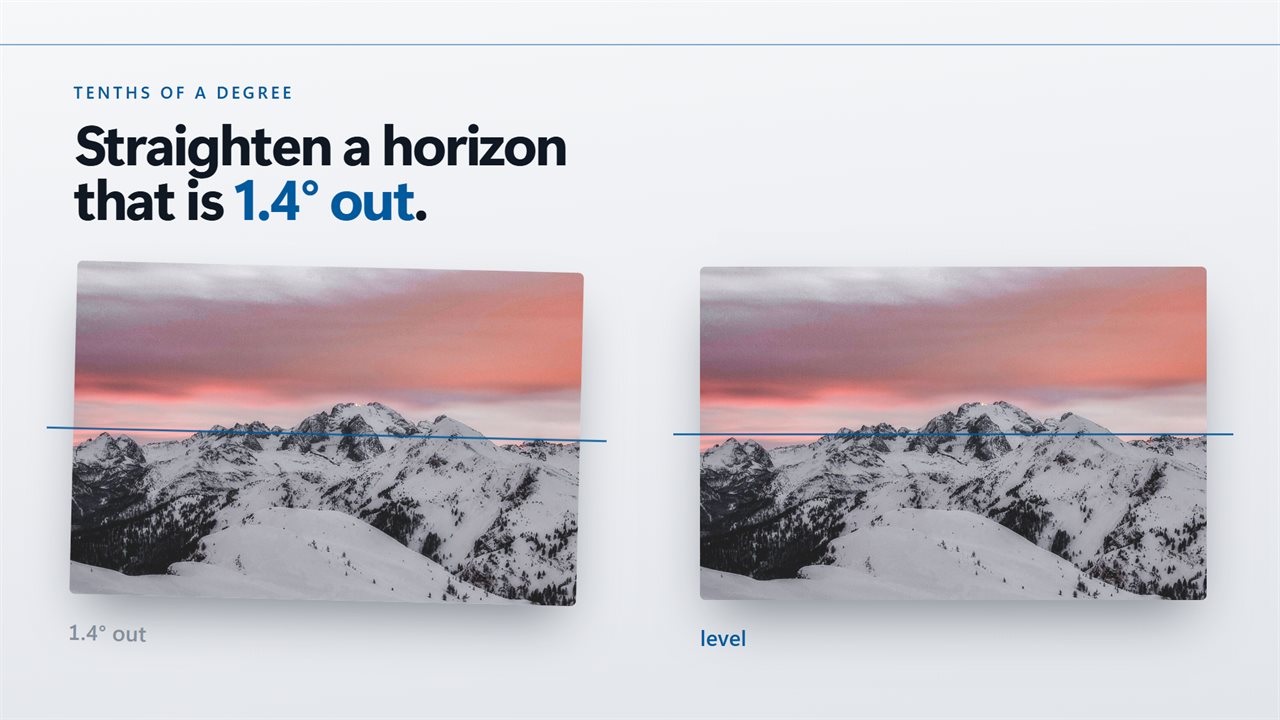
Tenths of a degree — straighten a horizon that is 1.4° out.
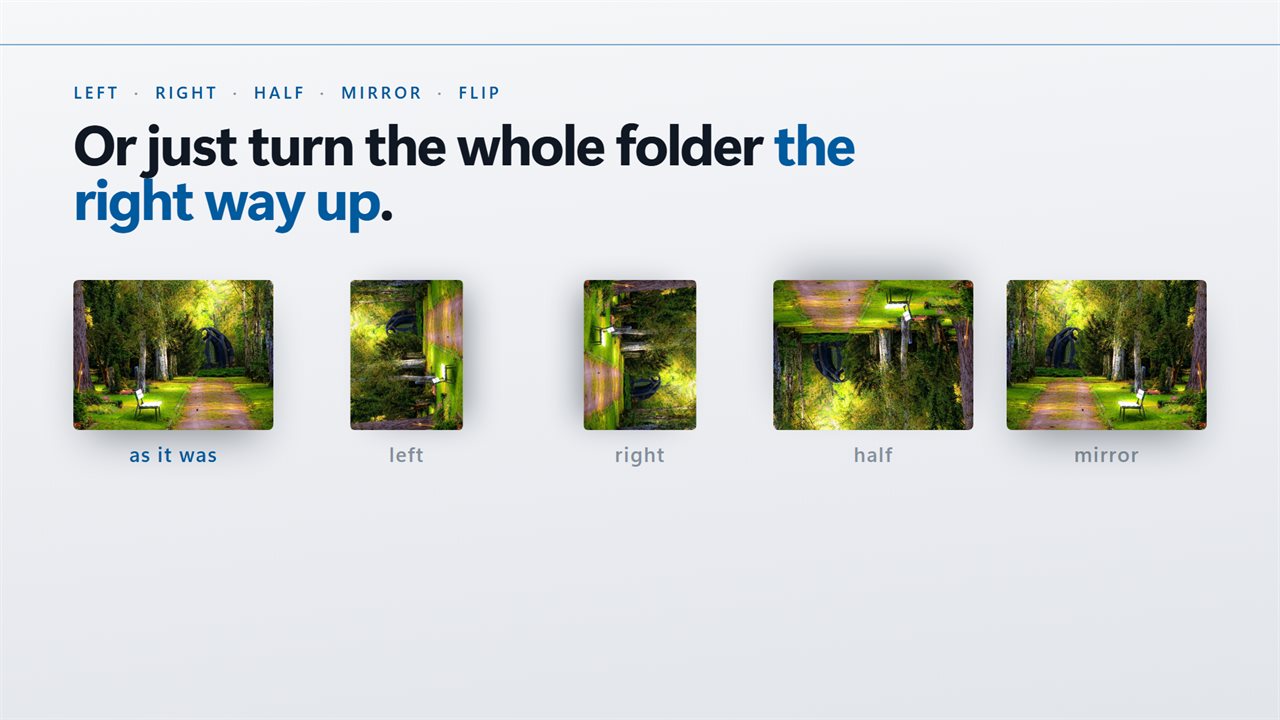
Left, right, half, mirror, flip, or turn a whole folder upright.
It reads the flag your camera wrote, so it will not turn a photo twice.
Nothing is uploaded to turn a picture.

Turn or straighten, and see it before you run it.

190,000+downloads of EvlarSoft apps
Signed by EvlarSoftVerified US publisher
14-day money-backNo questions asked
Updates includedNo upgrade fees

Rotate an image, or a hundred, with one setting

Most ways to rotate an image on Windows assume you have one picture open. ImageRotate assumes you have a queue. You set the turn once, watch it on a live preview, and every picture you loaded gets the same treatment when you press Rotate.

There are two kinds of fix here, and they are kept apart. Five buttons handle the coarse jobs: Left and Right for a quarter turn, Half for upside-down shots, Mirror to swap left and right, and Flip to swap top and bottom. Below them, the Straighten slider moves from -15° to +15° in steps of 0.1°, for the beach photo where the sea runs downhill.

Each row in the list shows whether a picture is portrait, landscape or square, with its pixel dimensions, so the shots lying on their side are easy to spot before anything runs.

How to rotate a picture batch, step by step

The header always spells out what is about to happen, for example "90° right, +1.4°, mirrored". Click any file in the list to preview the turn against that picture instead of the first one loaded, and use Start again to clear every setting at once.

Write as also lets one pass do two jobs. Rotate a stack of TIFF scans and write them out as PNG, or straighten a set of PSD exports and save them as JPEG, without opening a second program. Leave it on Same as the original to keep each file's own type.

  • Choose Add photos, or drop pictures onto the window.
  • Press Left, Right or Half until the preview stands the right way up. Presses add up, so Right twice is the same as Half.
  • Use Mirror or Flip if the picture also needs reversing.
  • Drag Straighten if the horizon is tilted. The readout next to the label shows the exact angle.
  • Pick a Save location and a Write as format, then press Rotate.

Straighten a photo with a tilted horizon

Explorer's right-click menu can turn a selection left or right, but only in 90° steps. A horizon that is off by two degrees needs something finer, and that is what the slider is for.

A part turn cannot fit the original rectangle, so the picture is written onto a slightly larger canvas with the corners filled rather than cropped. You lose no pixels; trim the edges afterwards if you want a clean frame. A note under the slider appears whenever this applies.

Flip an image horizontally, and fix phone photos that turn twice

Mirror is a horizontal flip, the one you want for selfies that came out reversed or text that reads backwards. Flip turns the picture upside down along its horizontal axis. Either can be combined with a turn.

Phones often store a photo sideways and add a tag that tells viewers to rotate it. Tools that ignore the tag end up turning the picture a second time. Here the camera's own orientation is applied first, so what you see in the preview is what you get.

Features

  • Left, Right and Half buttons for quarter and half turns
  • Mirror and Flip switches that combine with any turn
  • Straighten slider from -15° to +15° in 0.1° steps
  • Live preview that turns as you change the settings, on any picture you pick
  • Reads 26 image types, including JPEG, PNG, TIFF, WebP, HEIC, AVIF, PSD, EXR and DDS
  • Write as Same as the original, JPEG, PNG, WebP, TIFF or Bitmap
  • Saves beside the source with "(rotated)" in the name, into another folder, or over the originals
  • Honors the camera's orientation tag before applying your turn

Questions

Anything else? Ask us

Can it straighten a crooked horizon, not just turn photos 90 degrees?

Yes. Next to the Left, Right, Half, Mirror and Flip buttons there is a Straighten slider that goes from -15 to +15 degrees in tenths of a degree. The turn you set is applied to every picture in the queue.

Does straightening crop my photo?

No. A turn that is not a quarter turn does not fit the old frame, so the picture is written on a slightly larger canvas with the corners filled in. Nothing is cut off, so you may want to crop it afterwards in another app.

Will it turn a phone photo twice if the camera already marked it as rotated?

No. The orientation the camera recorded is applied to the pixels first, and your turn is added after that. A photo that already looks upright in Windows starts from upright.

Is rotating a JPEG lossless?

No. Every picture is decoded and saved again, at quality 92 for JPEG and WebP, even for a plain 90 degree turn. The difference is hard to see after one pass, but it is not a lossless rotation.

What happens to my originals and their EXIF data?

By default the turned copy is saved beside the original with "(rotated)" added to its name. You can also save into another folder or replace the originals. The copies keep their color profile but not their EXIF, XMP or IPTC data, so camera details, dates and GPS location are not carried over.

Can it rotate HEIC photos from an iPhone?

Yes, it reads HEIC and HEIF, but it cannot write them. Set Write as to JPEG, PNG, WebP, TIFF or Bitmap, because Same as the original fails for a HEIC file.

How do I rotate multiple pictures at once in Windows?

Load them all into ImageRotate, set the turn once with Left, Right, Half, Mirror, Flip or Straighten, and press Rotate. Every picture in the list gets the same change.

Can I rotate an image by a custom angle such as 3 degrees?

Yes, up to 15 degrees either way. Drag Straighten to the angle you want, in tenths of a degree, and combine it with a quarter turn if needed.

Can I rotate some pictures one way and others another way?

Not in the same run, because one setting applies to the whole queue. Rotate the first group, clear the list, then load the next group with a different turn.

Which versions of Windows does it run on?

Windows 10 (version 1809 or later) and Windows 11.

Is it a subscription?

No. ImageRotate is a one-time purchase of $2.49, and updates are included.

How do I get it?

Buy it on this page and your license key arrives by email. If the button says Notify me, ImageRotate is not on sale here yet; leave your email and we will tell you when it is.