EEvlarSoft

Text Case Converter

A case converter that lives on your PC, so you can turn ALL CAPS into lowercase, fix a headline into Title Case, or name variables in snake_case from any window.

Buy for $1.99
One payment. No subscription.
14-day money-back guarantee.
5.0
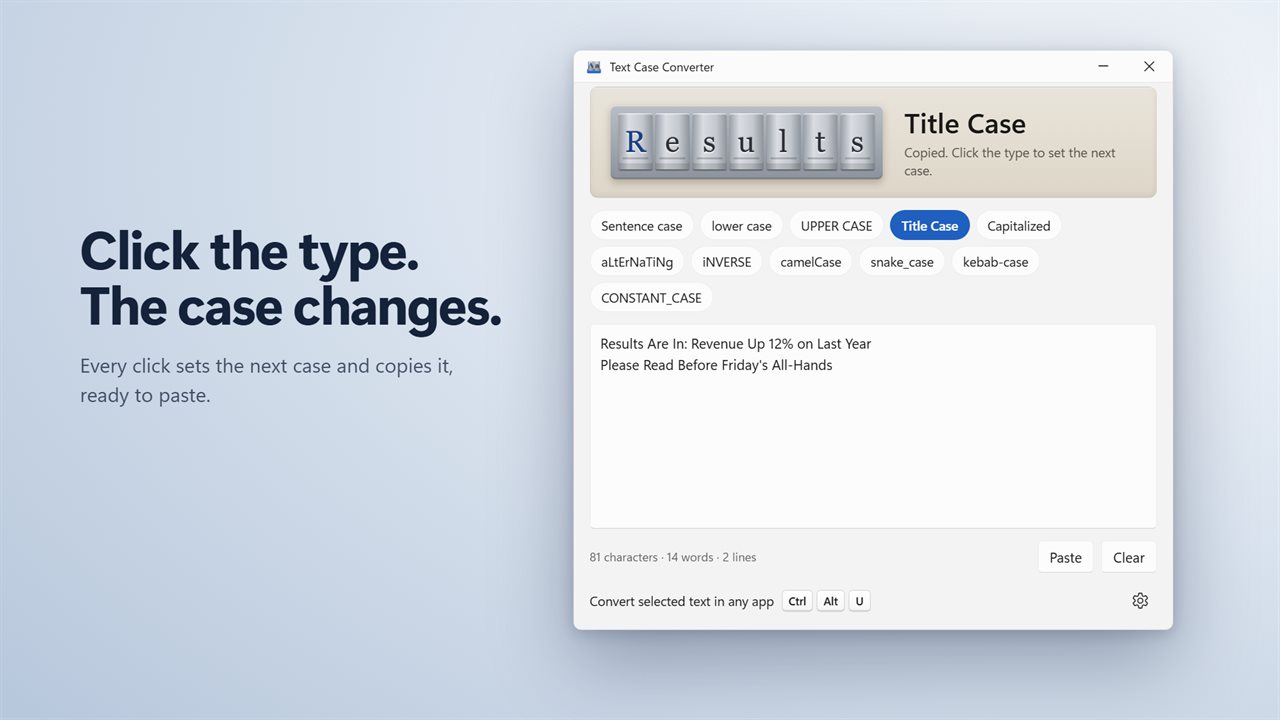
Click the type to set the next case. The result is copied.
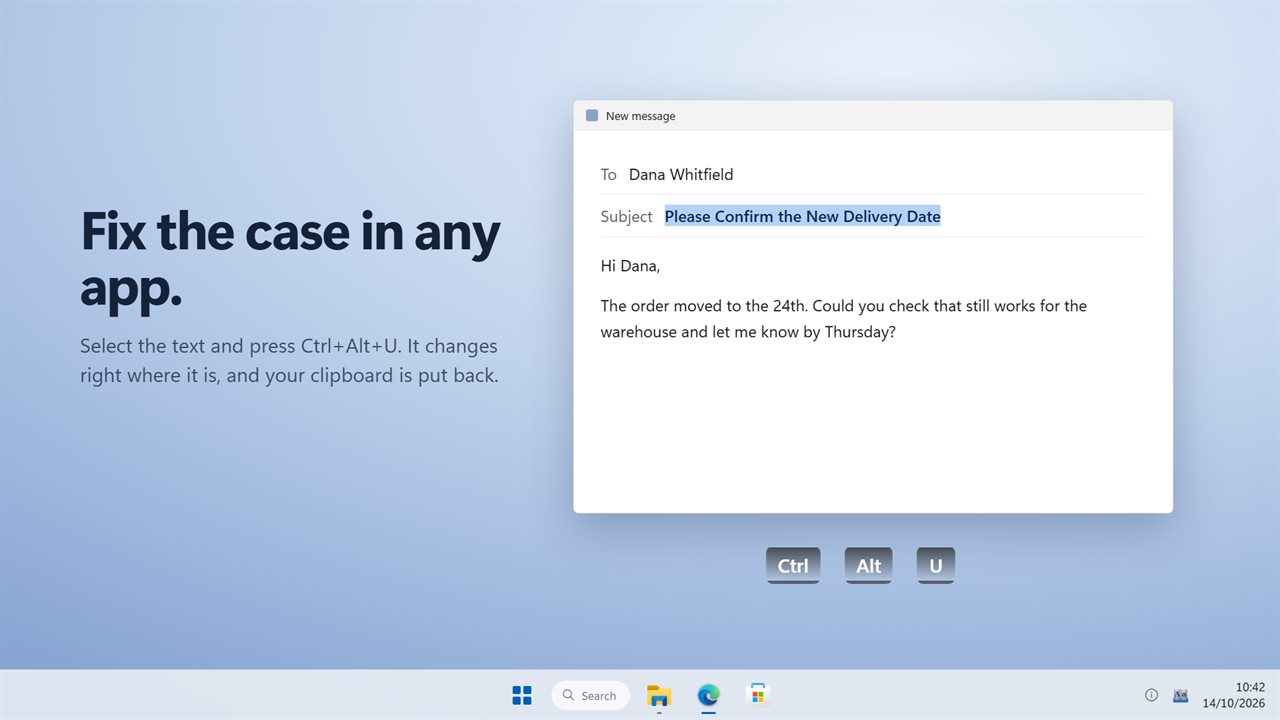
Select text in any app and press Ctrl+Alt+U.
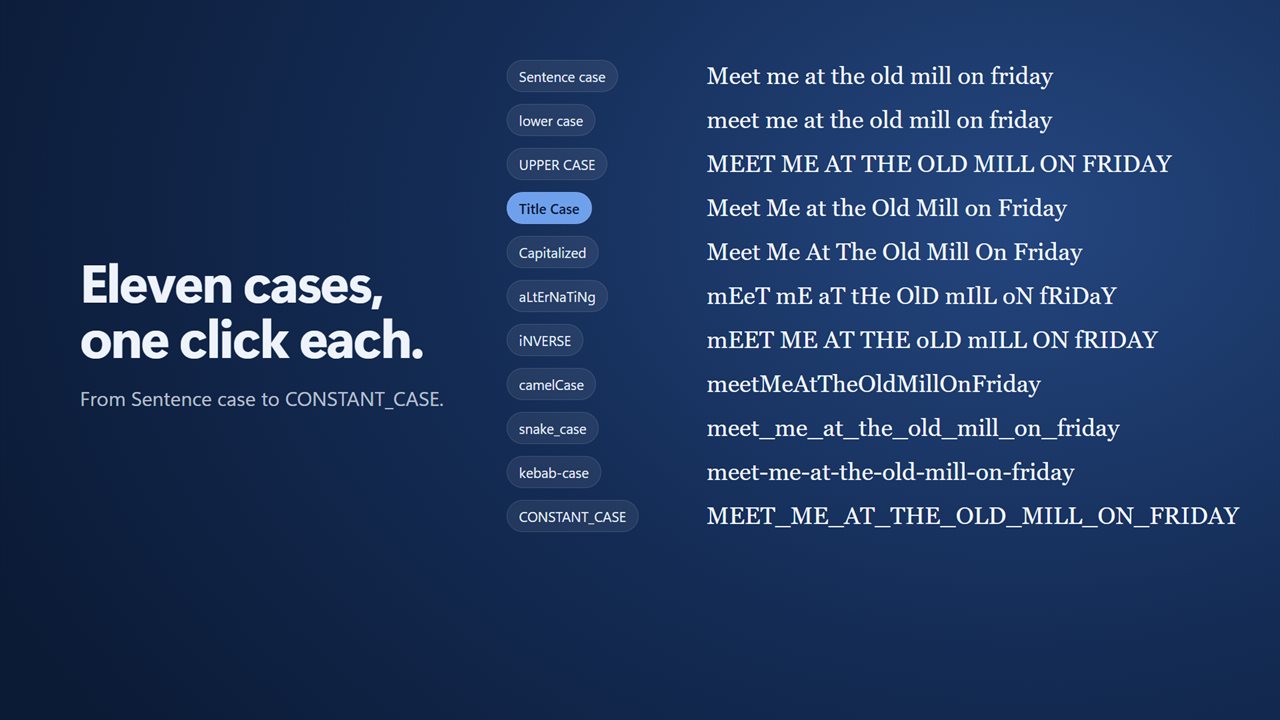
11 cases, one click each.
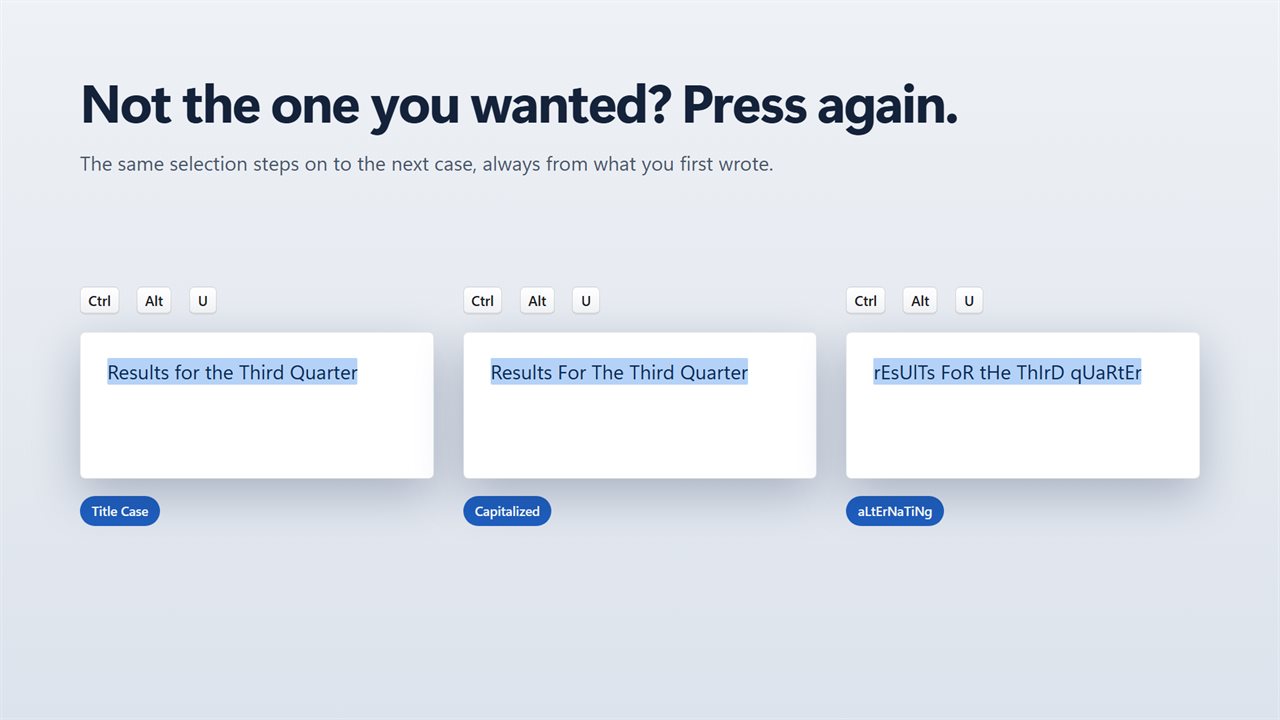
Press again to try the next case.
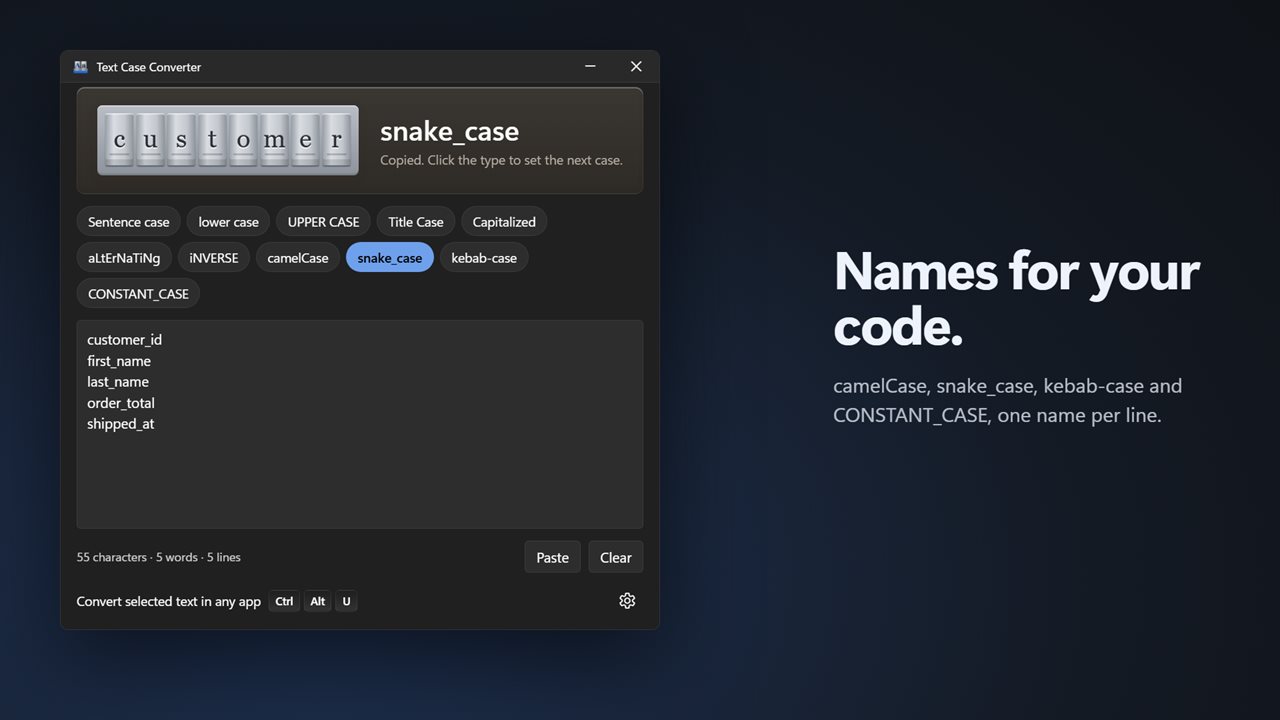
camelCase, snake_case and kebab-case for your code.
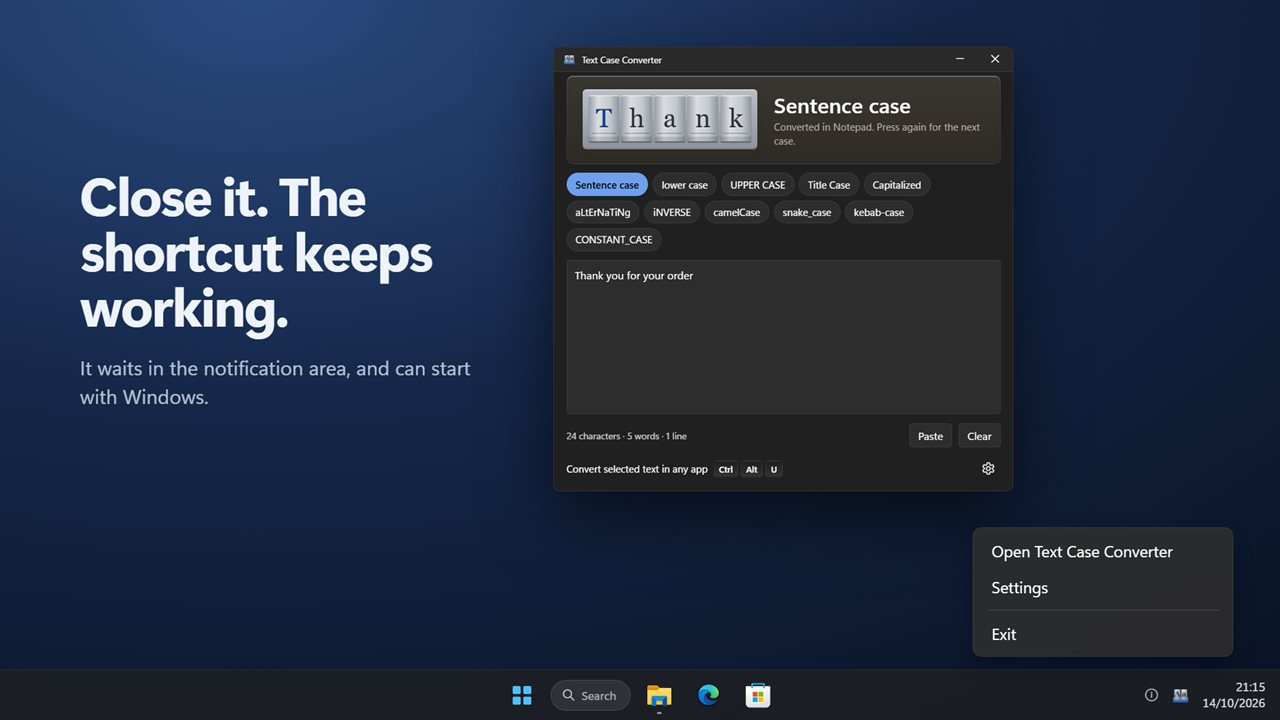
Waits in the tray, and can start with Windows.

Click the type to set the next case. The result is copied.

190,000+downloads of EvlarSoft apps
Signed by EvlarSoftVerified US publisher
14-day money-backNo questions asked
Updates includedNo upgrade fees

A case converter that works where your text already is

Most people find a case converter as a web page: copy the text, switch to the browser, paste, pick a button, copy again, switch back. Text Case Converter cuts that loop down to one shortcut. Select the words in your email, document, chat box or code editor, press Ctrl+Alt+U, and the selection is replaced with the converted version where it sits.

Press the shortcut again on the same selection within a few seconds and it moves on to the next case, so you can cycle until it looks right. Whatever was on your clipboard beforehand is restored afterward.

When you would rather see the options side by side, open the window, paste into the Your text box, and click any of the eleven case buttons. The result is copied for you, and a counter shows characters, words and lines as you edit.

What is title case, and what is sentence case?

Title case capitalizes the main words of a heading and leaves short connecting words in lowercase: A Tale of Two Cities, not A Tale Of Two Cities. In this app, articles, short conjunctions and prepositions such as a, and, of, on, the and to stay small unless they open or close the title or come after a colon. Words already written in capitals, like NASA or HTML, are left as they are.

Sentence case writes text the way a normal sentence reads: one capital at the start and lowercase after it. Here it also capitalizes the first letter after each period and on each new line, and turns a stray lowercase i into I. It is the usual style for interface labels, captions and many style guides' headings.

If you need every word capped, small ones included, use Capitalized instead of Title Case.

Uppercase to lowercase, and all caps back to normal

Text that arrives in all caps from a form, a PDF or a hurried message is hard to read and harder to retype. Choose lower case for a clean lowercase version, Sentence case to restore normal capitals, or UPPER CASE to go the other way. iNVERSE flips each letter, which fixes a paragraph typed with Caps Lock left on, and aLtErNaTiNg exists for the times you want that effect on purpose.

Every button works from the text as you originally entered it, not from the previous conversion. Trying UPPER CASE and then Title Case gives you the same title as going to Title Case first.

camelCase, snake_case and kebab-case converter for code

Four cases are meant for identifiers. camelCase joins words and capitalizes each one after the first, snake_case joins them with underscores, kebab-case uses hyphens, and CONSTANT_CASE gives capitals with underscores. Each line is converted separately, so pasting a column of field labels returns one identifier per line, ready for a schema, a CSS file or an enum.

  • user first name becomes userFirstName in camelCase
  • Order Total becomes order_total in snake_case
  • Main Nav Link becomes main-nav-link in kebab-case
  • max retry count becomes MAX_RETRY_COUNT in CONSTANT_CASE
Features

  • Eleven cases, from Sentence case and Title Case to camelCase and CONSTANT_CASE
  • Global shortcut that converts a selection in place in other apps
  • Repeat the shortcut to step through cases on the same selection
  • Clipboard contents put back after each in-app conversion
  • Click the metal type at the top of the window to move to the next case
  • Paste and Clear buttons, plus live character, word and line counts
  • Shortcut can be changed or switched off in Settings
  • Optional tray mode so the shortcut keeps working after you close the window, plus Start with Windows

What's new in 2.0.2

  • New: convert selected text in any app with Ctrl+Alt+U. Press again for the next case
  • New: camelCase, snake_case, kebab-case and CONSTANT_CASE
  • New: click the type to step through the cases. Every result is copied
  • Title Case now keeps small words in lower case and leaves acronyms alone
  • Word and line counts are now correct for text over several lines
  • Dark theme, and it can start with Windows

Questions

Anything else? Ask us

Can Text Case Converter change the case of text in Word, Outlook or my browser?

Yes. Select the text in any app and press Ctrl+Alt+U, and it is replaced in place with the last case you used. Press the shortcut again within a few seconds to try the next case on the same text, and you can choose a different shortcut in Settings.

Does converting in another app keep bold, fonts and other formatting?

No. The selection is copied and pasted back as plain text, so the case changes but formatting inside the selection takes on whatever the app applies to pasted text.

What happens to what I had on the clipboard?

It is put back after each conversion, format by format. The converted text is also kept out of Windows clipboard history, and if you copy something else in the meantime, your new copy is left alone.

Does Title Case keep acronyms and small words like "of" and "the"?

Yes. Words such as a, and, of, on, the and to stay lower case unless they start or end the title or follow a colon or full stop, and words in all capitals like NASA are left as they are. If the whole text is in capitals, it is treated as shouting and every word is converted.

Does Sentence case keep acronyms?

No. Sentence case lowers every letter, then capitalizes the start of each sentence and each line and a lone i, so NASA becomes nasa. Use Title Case if you need acronyms kept.

Can it turn a list of names into camelCase or snake_case?

Yes. camelCase, snake_case, kebab-case and CONSTANT_CASE convert each line on its own, so a list of phrases becomes one identifier per line. Apostrophes are dropped and existing camel humps are split into words first.

Can I turn the global shortcut off?

Yes. Switch off Convert selected text in any app in Settings. The window keeps working as a paste-and-click converter, and the shortcut stays free for other programs.

What if Ctrl+Alt+U is already used by another app?

The window tells you another app holds the shortcut. Pick a different combination under Shortcut in Settings.

How many cases can it convert to?

Eleven. Seven are for prose, including Title Case, Sentence case, UPPER CASE, lower case and Capitalized, plus the novelty aLtErNaTiNg and iNVERSE. Four are for code: camelCase, snake_case, kebab-case and CONSTANT_CASE.

Which versions of Windows does it run on?

Windows 10 (version 1809 or later) and Windows 11.

Is it a subscription?

No. Text Case Converter is a one-time purchase of $1.99, and updates are included.

How do I get it?

Buy it on this page and your license key arrives by email. If the button says Notify me, Text Case Converter is not on sale here yet; leave your email and we will tell you when it is.