EEvlarSoft

PDFSlim

Find out whether a heavy PDF is photos or fonts and structure, then shrink it with the settings that will actually make a difference.

Buy for $3.89
One payment. No subscription.
14-day money-back guarantee.
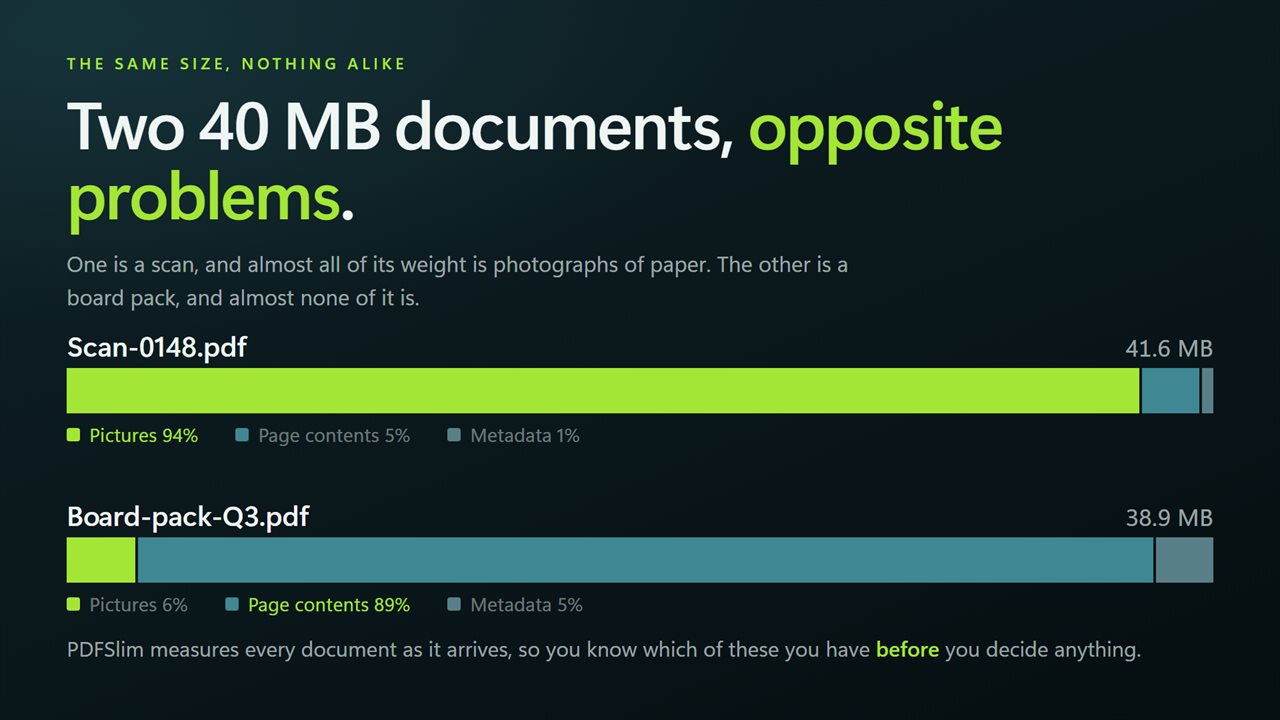
Two 40 MB documents can need opposite treatment. This tells you which one you have.
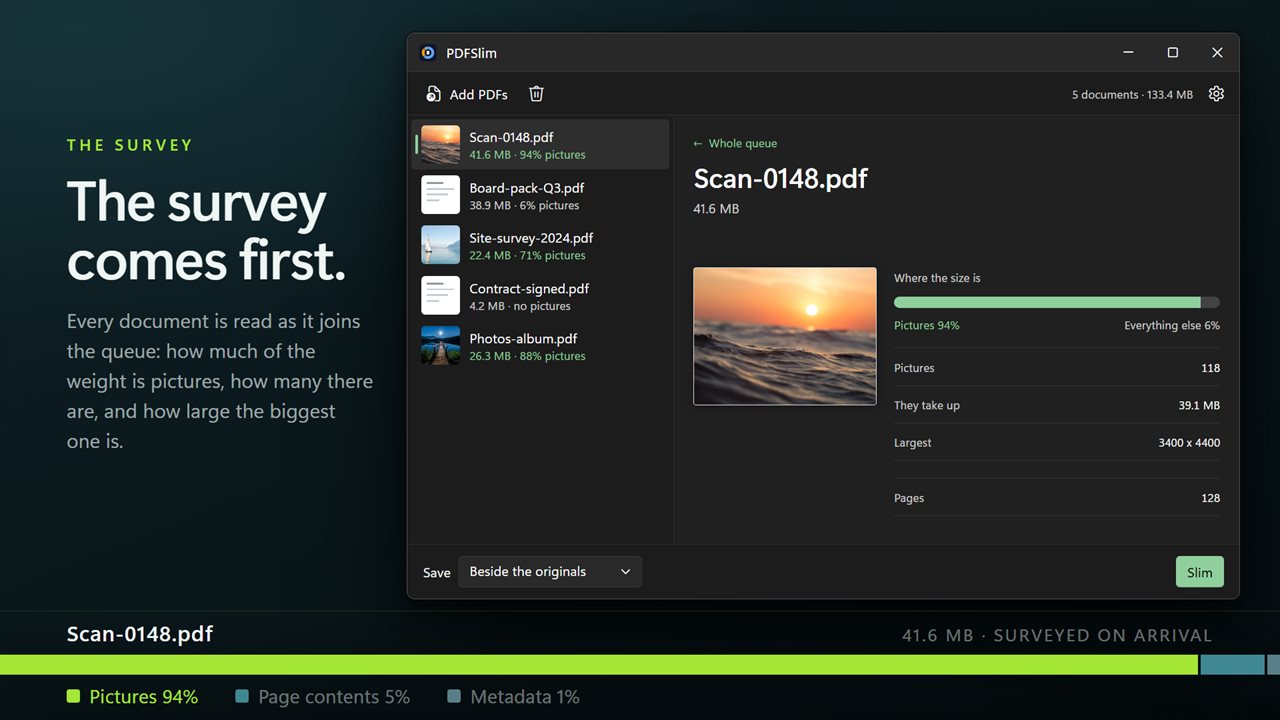
The survey: how much of the file is pictures, how much is contents, how much is metadata.
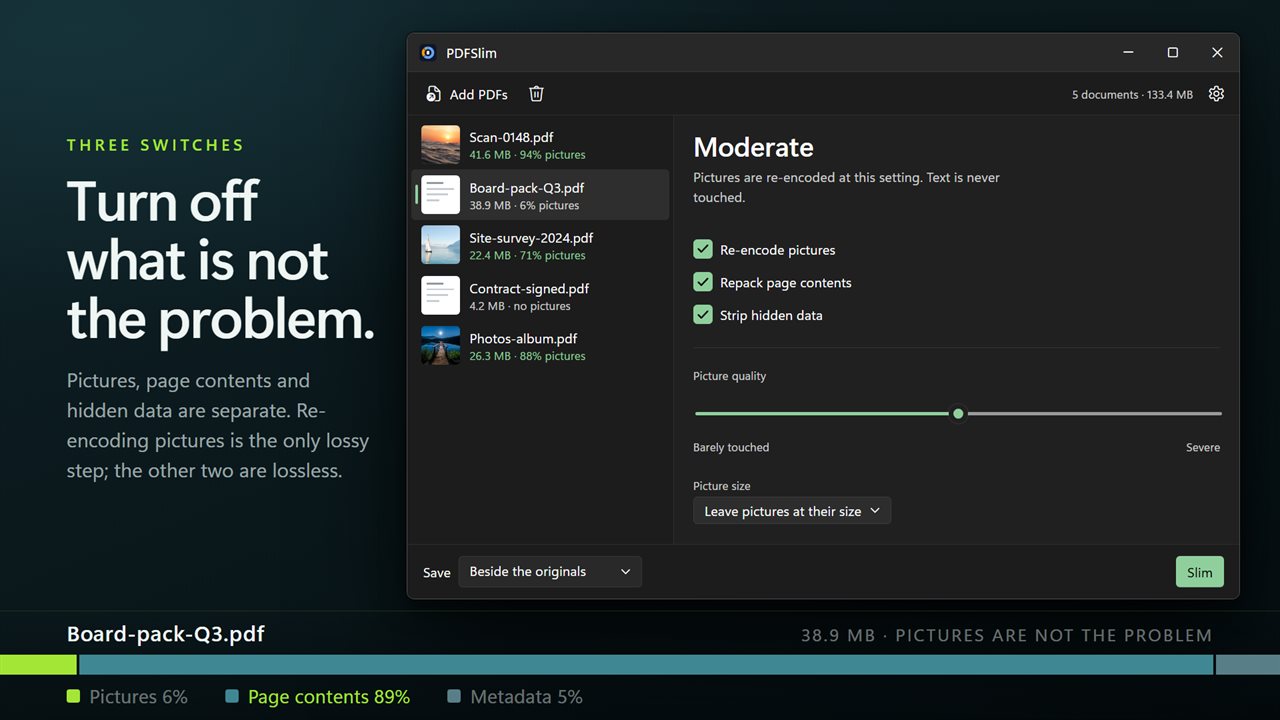
Pictures, contents and metadata as three separate switches — turn off what is not the problem.
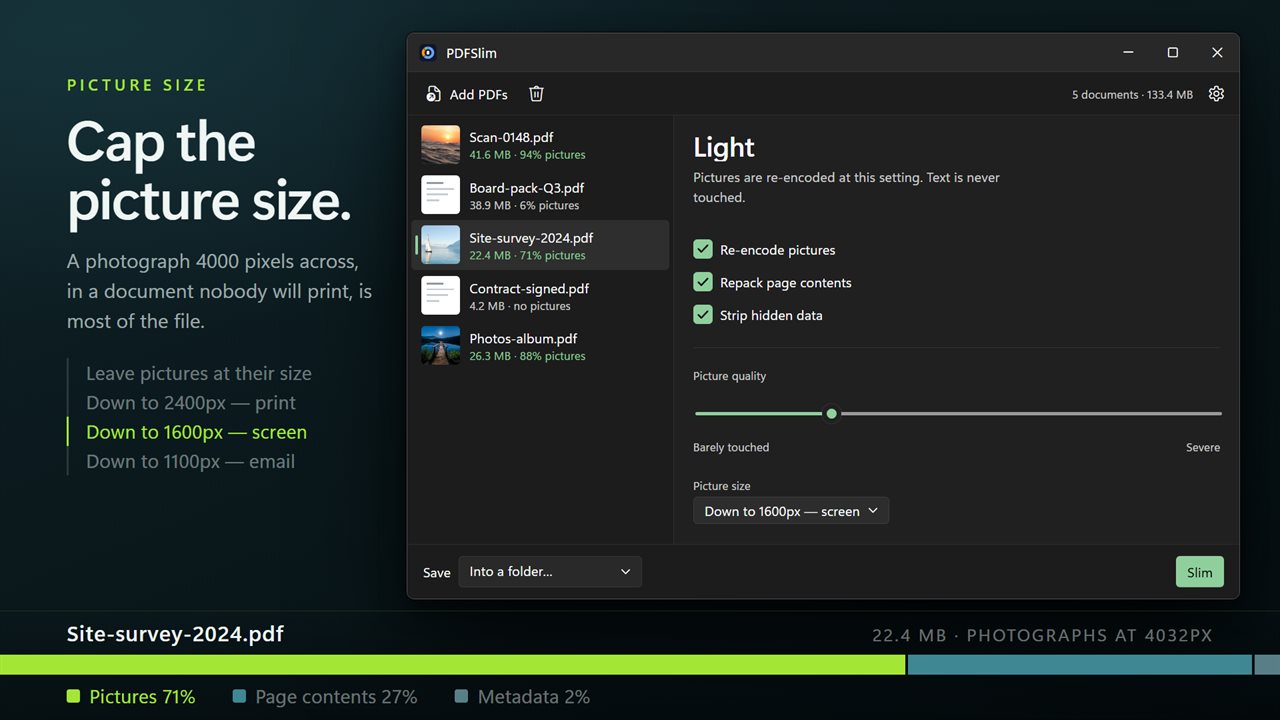
Cap pictures at 2400px for print, 1600px for screen or 1100px for email.
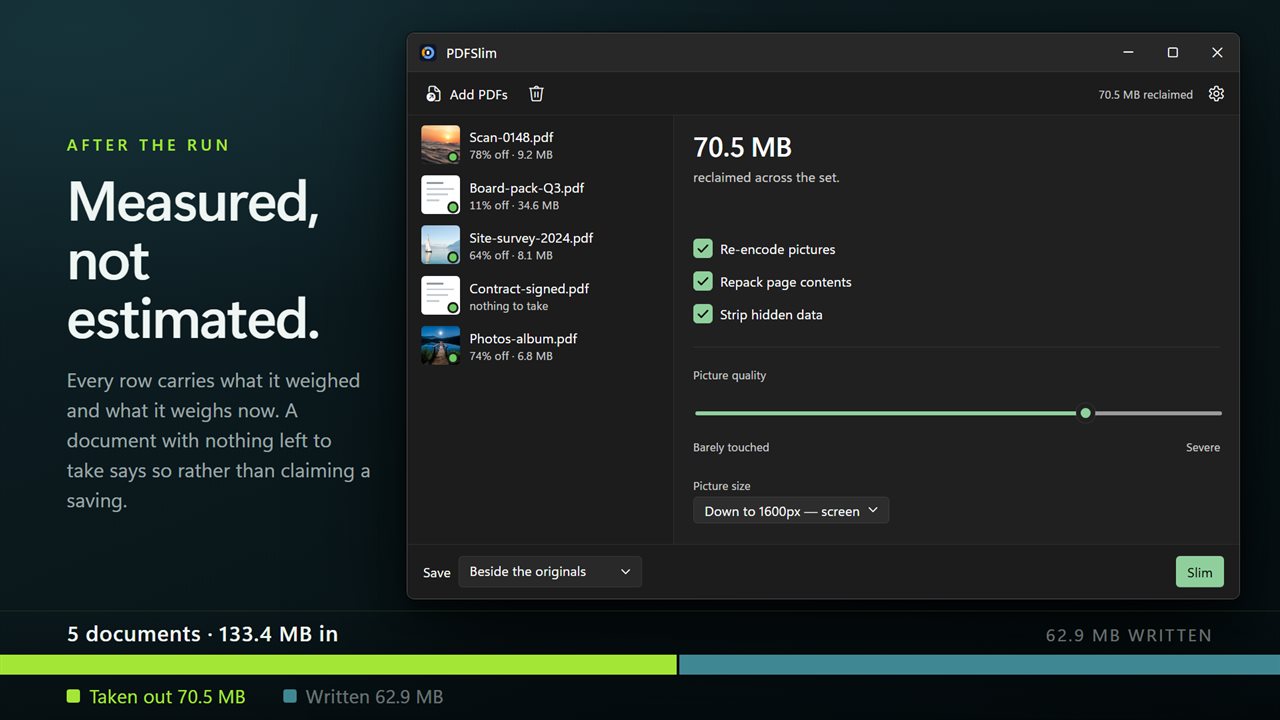
Before and after, per document and across the whole batch. Measured, not estimated.
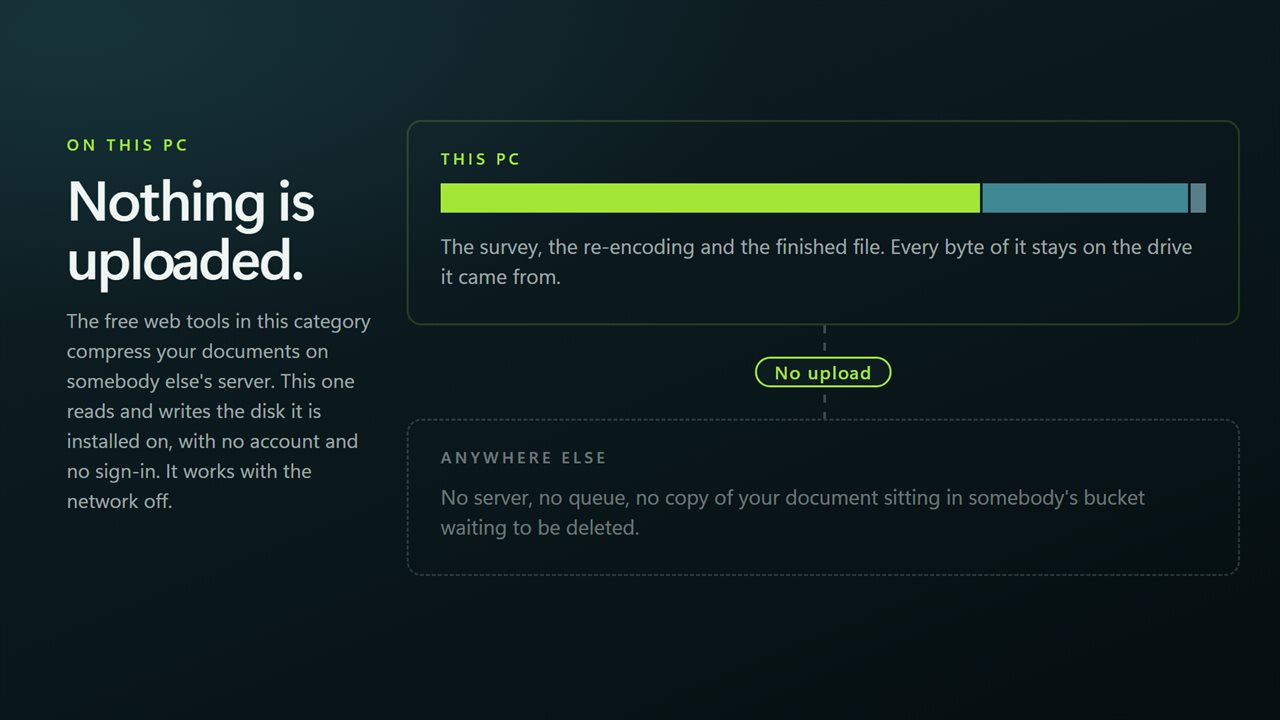
Nothing is uploaded to be compressed. It works with the network off.

Two 40 MB documents can need opposite treatment. This tells you which one you have.

190,000+downloads of EvlarSoft apps
Signed by EvlarSoftVerified US publisher
14-day money-backNo questions asked
Updates includedNo upgrade fees

Reduce PDF file size by fixing the right thing

Most attempts to reduce PDF file size start with a single Compress button and end with a file that is barely smaller. The reason is usually that the button guessed wrong. A scanned contract and a designed annual report can both weigh 40 MB, but the first is almost entirely photographs of paper and the second is mostly fonts, vector artwork and page structure. Squeezing pictures helps the first and does nearly nothing for the second.

PDFSlim measures each document as it is added. The row reads something like "38.2 MB · 91% pictures", and the detail pane draws a bar splitting Pictures from Everything else, with the number of pictures, the space they take and the pixel size of the largest one. You see where the weight is before you decide what to do about it.

Then the settings are the actual operations rather than a preset named Medium, so you can switch off the steps that will not help.

Why is my PDF file so big?

Three things account for nearly every oversized PDF, and the survey separates the first from the rest:

  • Pictures stored at camera or scanner resolution. A photo 4000 pixels across placed in a page that will only be read on screen is mostly wasted bytes.
  • Page contents a program wrote without compression. Some generators save drawing instructions as plain text, which packs down well with no visible change.
  • Hidden data such as the author, the producing software and edit history. Usually small, but worth removing before a file is shared.

Compress a PDF without losing quality

Turn off Re-encode pictures and only the lossless steps run. Repack page contents compresses anything left uncompressed, and Strip hidden data removes the author and editing trail. Every picture stays exactly as it was, and the header changes to Lossless only so there is no doubt.

Text is never converted to an image in any mode, so the slimmed document stays searchable and selectable.

Reduce PDF resolution and picture quality for email or screen

When pictures are the weight, two controls decide the result. Picture quality is a five-step slider from Barely touched through Moderate, where it starts, to Severe. Picture size caps each picture's longest edge at 2400 px for print, 1600 px for screen or 1100 px for email, or leaves pictures at their size.

The size cap is often the bigger lever. Dropping an oversized photo to 1600 pixels removes far more than turning quality down, and nobody reading on a laptop will see the difference. A picture whose new version would come out larger is kept as it was.

Features

  • Size survey per documentPicture count, share of the file and largest picture
  • Three independent switchesRe-encode pictures, Repack page contents, Strip hidden data
  • Five-step Picture quality slider from Barely touched to Severe
  • Picture size caps of 2400, 1600 or 1100 pixels on the longest edge
  • Lossless-only mode that leaves every picture untouched
  • Real before and after sizes per row and a total reclaimed for the batch
  • Copies saved with "(smaller)" in the name, into a folder, or over the originals after confirmation
  • Password-protected documents reported and skipped while the batch continues

Common situations

A color scan too big to attach

Color and grayscale scans are nearly all picture. Cap them at 1100 or 1600 pixels and they usually shrink a long way. Black-and-white scans stored as 1-bit images are left as they are, and the survey shows how many a file holds.

A design export that will not shrink

If the survey shows only a small share is pictures, skip re-encoding and run the lossless steps instead.

Tidying a folder of PDFs for archive

Slim the whole folder in one pass and read the total reclaimed in the command bar.

What's new in 2.0.4

  • Every document is now surveyed before you decide anything: how much of its size is pictures, how much is page contents, how much is metadata
  • Pictures, page contents and metadata are now three separate switches rather than one setting
  • Added a resolution cap — 2400px for print, 1600px for screen, 1100px for email — which is usually the setting that matters most
  • Five compression strengths, from Barely touched to Severe
  • Now takes a whole folder in one pass, with before and after sizes per document and across the batch
  • A redesigned interface that follows your Windows light or dark theme

Questions

Anything else? Ask us

How does PDFSlim show what is making my PDF large?

Each document is measured as it is added. It shows how many pictures the file holds, how much space they take as a share of the file, and the pixel size of the largest one. Everything that is not a picture, such as text, fonts and structure, is shown together as one figure.

Can I compress a PDF without losing any picture quality?

Yes. Turn off Re-encode pictures and only the lossless steps run: page contents that were stored uncompressed are packed, and author and edit-history data is removed. Every picture is kept exactly as it was.

What quality and resolution settings are there?

Picture quality has five steps, from Barely touched to Severe, with Moderate as the default. Picture size can stay as it is or be capped at 2400, 1600 or 1100 pixels on the longest edge. Both apply only to pictures, and text is never turned into an image.

Why did some pictures in my PDF not get smaller?

PDFSlim only re-encodes JPEG pictures and plain 8-bit grayscale or RGB pictures. Pictures with transparency, JPEG 2000 pictures and CMYK, palette or 1-bit black-and-white pictures are left exactly as they are, and the survey tells you how many of those a document has. A picture whose new version would not be smaller is also kept as it was.

Does it work on password-protected PDFs?

No. A protected document is reported as "Password protected, unlock it first" and is skipped, while the rest of the batch carries on.

What happens to the original PDF files?

By default they are left alone and the new copy is saved beside each one with "(smaller)" added to the name. You can also save into a folder you choose, where the original names are kept, or replace the originals; you are asked to confirm before anything is replaced.

How much smaller will my PDF get?

It depends on what the document is made of, which is why the survey comes first. Picture-heavy files shrink the most; files with few or no pictures only gain from the lossless steps. After the run each row shows the actual result.

What settings should I use to email a PDF?

If the survey shows most of the file is pictures, set Picture size to Down to 1100px — email and leave Picture quality on Moderate. Keep Repack page contents and Strip hidden data on as well. If pictures are only a small share, the lossless steps are all that will help.

Can I reduce the size of many PDF files at once?

Yes. Add a folder or as many documents as you need; the same settings are applied to the whole queue in one run.

Which versions of Windows does it run on?

Windows 10 (version 1809 or later) and Windows 11.

Is it a subscription?

No. PDFSlim is a one-time purchase of $3.89, and updates are included.

How do I get it?

Buy it on this page and your license key arrives by email. If the button says Notify me, PDFSlim is not on sale here yet; leave your email and we will tell you when it is.