EEvlarSoft

PDF/A Compliance Converter

Turn ordinary PDFs into PDF/A archive copies, and see rule by rule what each document needed and whether it could be put right.

Buy for $2.99
One payment. No subscription.
14-day money-back guarantee.
3.3
PDF/A conformance is a checklist. Here it is, rather than hidden behind one button.
Every rule with its state: already met, fixed here, or not fixable from inside the file.
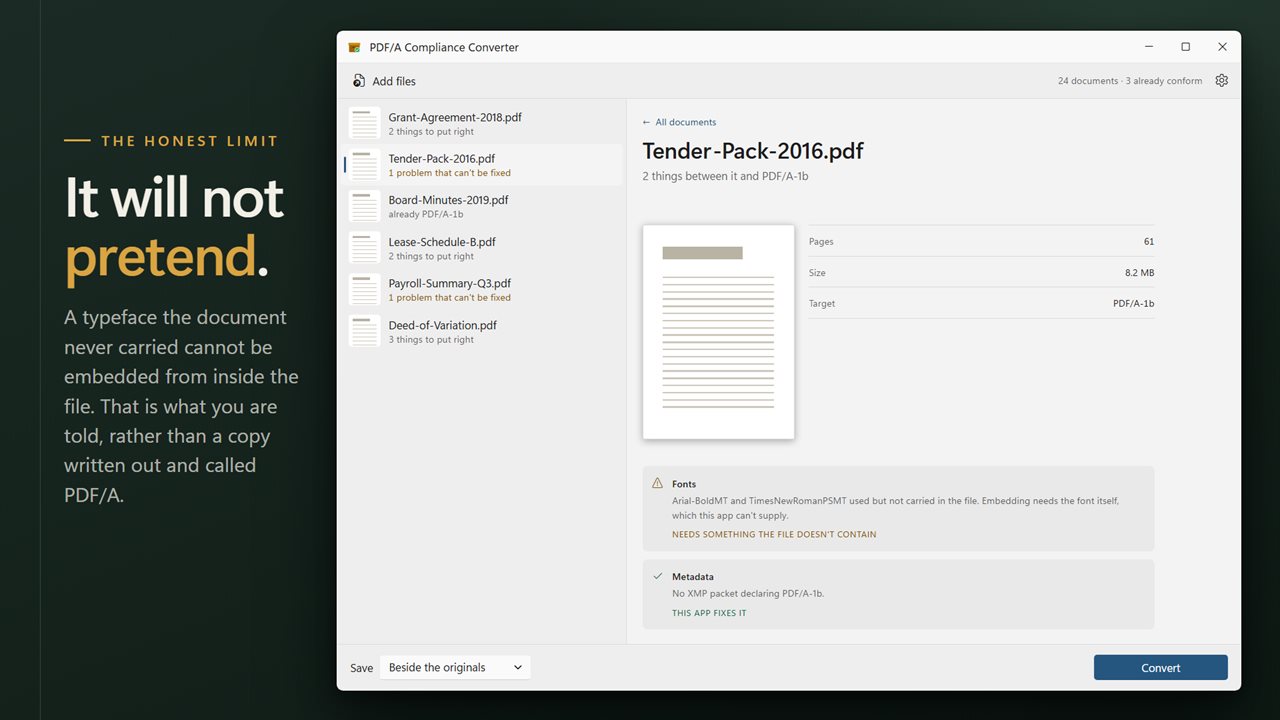
A document needing fonts it does not carry is said to be exactly that. No false success.
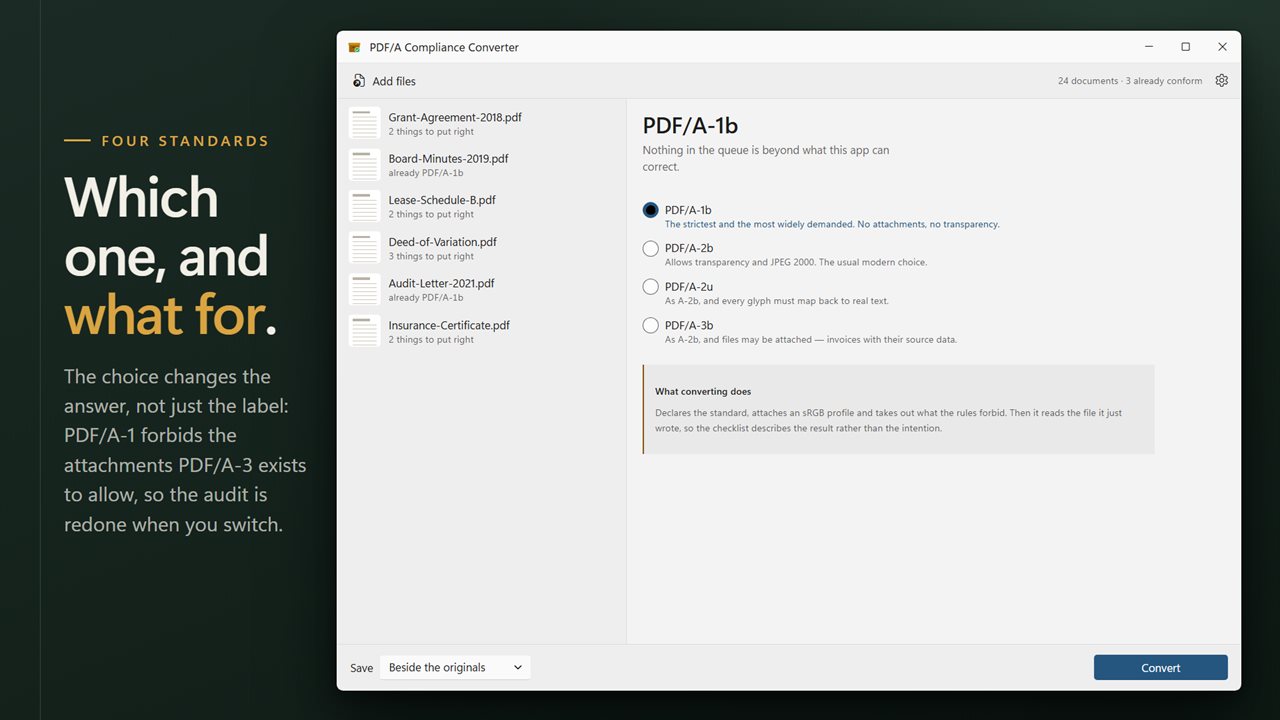
PDF/A-1b, A-2b, A-2u and A-3b, each with a note on what it is actually for.
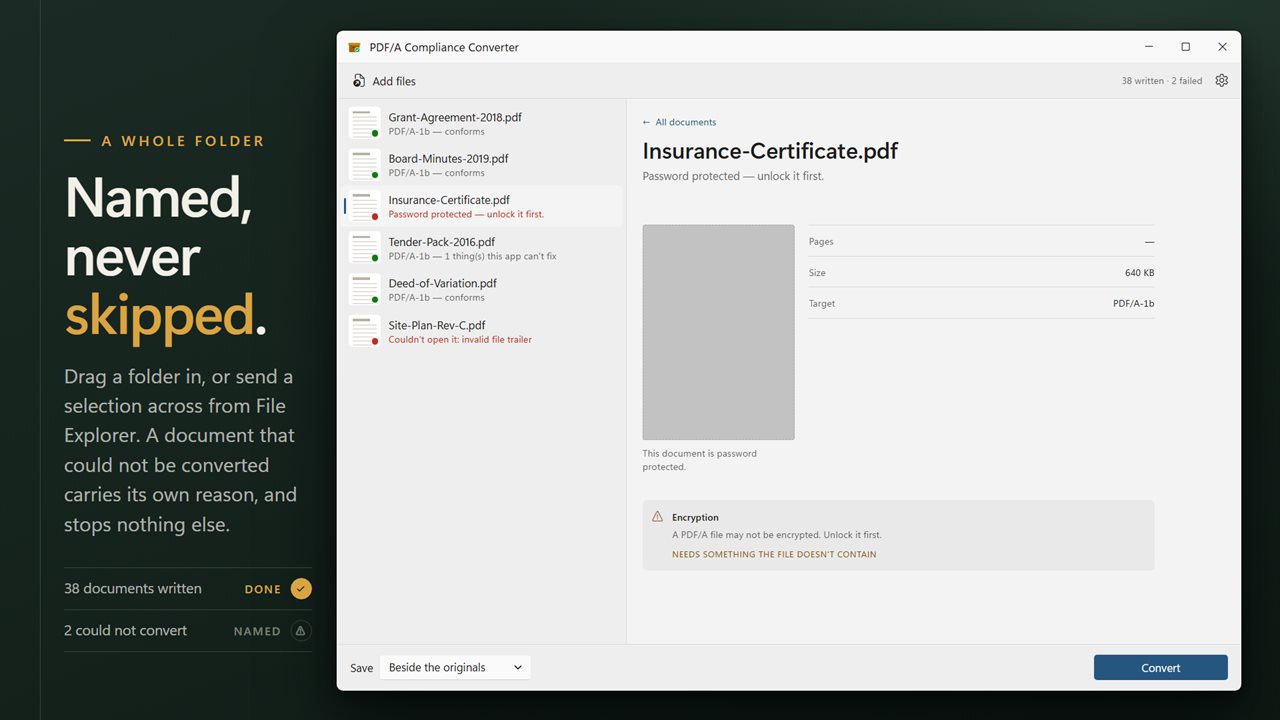
A whole folder in one pass, with anything that could not convert named individually.
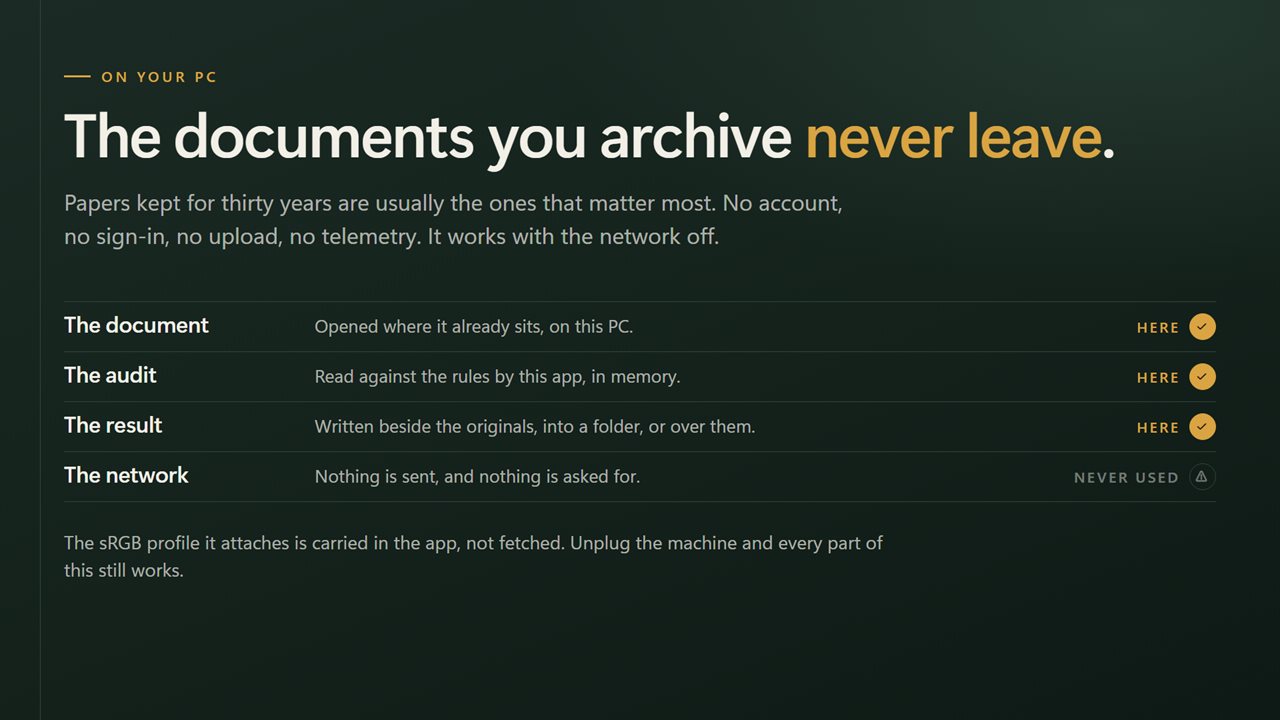
Documents being archived are the ones that matter most. Nothing is uploaded.

PDF/A conformance is a checklist. Here it is, rather than hidden behind one button.

190,000+downloads of EvlarSoft apps
Signed by EvlarSoftVerified US publisher
14-day money-backNo questions asked
Updates includedNo upgrade fees

Convert PDF to PDF/A and know what actually changed

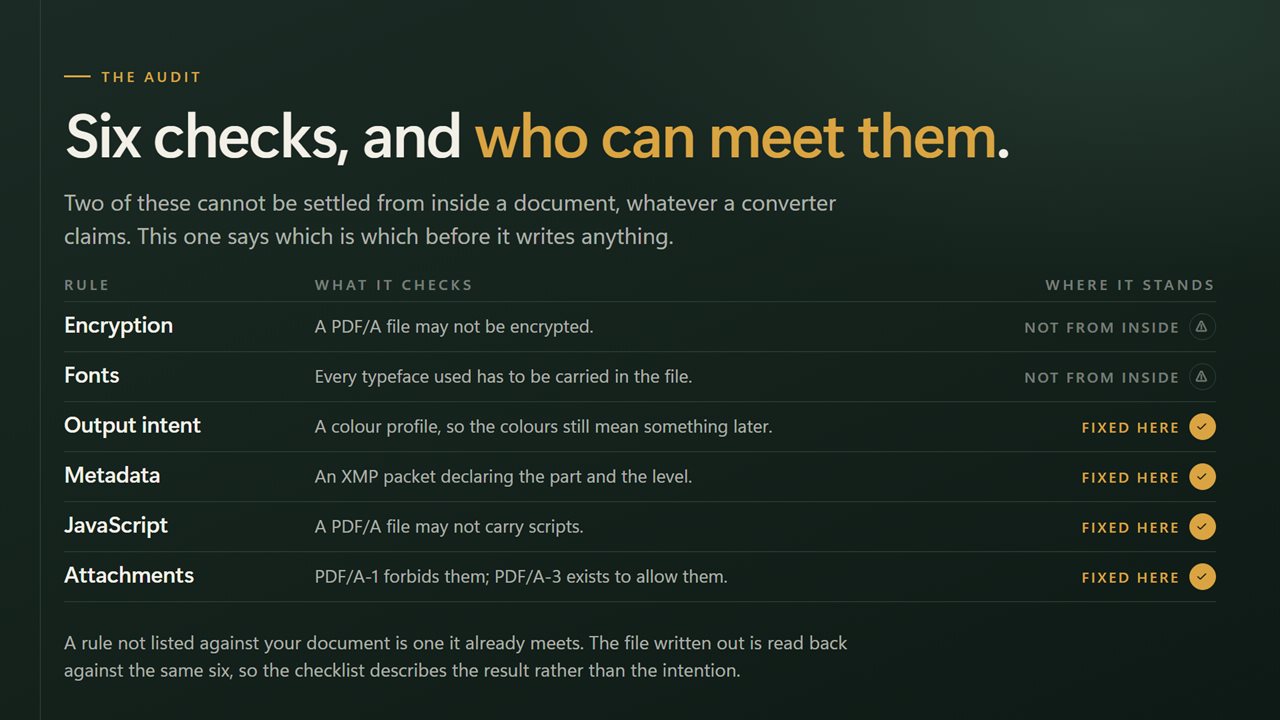
Courts, government agencies, libraries and records departments often ask you to convert PDF to PDF/A before they will accept a file. The request sounds like a format change. In practice it is a list of rules: the file must declare the standard in its metadata, carry a color profile, contain no scripts, not be encrypted, and embed every font it uses.

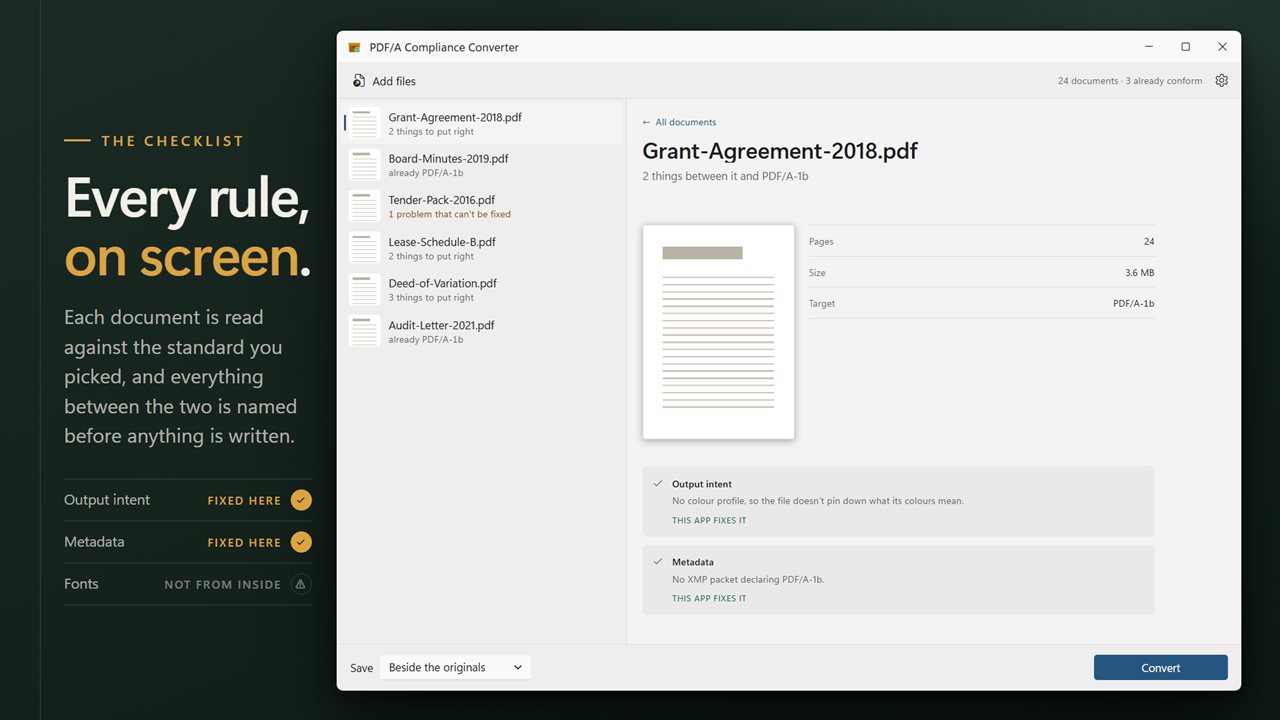
PDF/A Compliance Converter checks each document against that list before it writes anything. Rows in the queue read "already PDF/A-1b", "3 things to put right" or "1 problem that can't be fixed", and clicking a document shows every finding with a plain verdict: This app fixes it, or Needs something the file doesn't contain.

After converting, the app reads the copy it just wrote, so the checklist describes the result rather than what was intended.

What is PDF/A, and which level should you choose?

PDF/A is the archiving profile of PDF, published as ISO 19005. Its purpose is that a file opened decades from now looks exactly as it does today, which is why everything a page needs has to live inside the file. Four levels are offered, and the checklist is redone whenever you switch:

  • PDF/A-1b, the default: the oldest and strictest, still the one most often demanded. No attachments and no transparency.
  • PDF/A-2b: permits transparency and JPEG 2000 images. The usual modern pick when nothing specific is required.
  • PDF/A-2u: the same as 2b, plus each character has to be traceable to Unicode, so the text can be searched and copied.
  • PDF/A-3b: the same as 2b, but other files may ride along inside, which is how e-invoices carry their source data.

How to convert a batch of PDFs to PDF/A

Each document's detail view shows a preview of its first page with Pages, Size and Target, above the rule list. Originals are never overwritten; there is no option to replace them.

  • Click Add PDFs, or drop documents or a whole folder on the window.
  • Choose a level under Which standard.
  • Read the queue. The header tells you how many documents already conform and how many have a problem the app cannot fix.
  • Pick Save: Beside the originals, or Into a folder.
  • Press Convert.

PDF/A and fonts that are not embedded

This is where most conversions quietly fall short. If a PDF refers to a typeface without carrying it, the shapes of the letters are simply not in the file, and no amount of rewriting can add them. Some tools substitute a different font and call the result PDF/A; others fail with a cryptic error.

Here the missing fonts are named one by one and marked as something the app cannot fix. The copy is still written, and its result line says how many problems remain, so you know to go back to the source document, embed the fonts when exporting, and convert again.

Features

  • Converts to PDF/A-1b, PDF/A-2b, PDF/A-2u or PDF/A-3b
  • Per-document audit before conversion, repeated when the level changes
  • Adds an sRGB color profile when a document has none and keeps an existing one
  • Writes metadata declaring the chosen PDF/A level
  • Strips document-level JavaScript, and attached files for PDF/A-1b
  • Names every font a document uses but does not embed
  • Re-reads the written copy so the checklist reflects the result
  • Copies saved with "(pdfa)" in the name beside the source, or into a chosen folder under the original name

Who needs PDF/A

Court and agency filings

Many e-filing systems reject a PDF that is not PDF/A. Check a whole set of exhibits before the deadline rather than after a rejection.

Records retention

Contracts, minutes and policies that must stay readable for years belong in a self-contained format.

Theses and dissertations

University repositories commonly require PDF/A. The font check catches the usual reason a submission bounces.

What's new in 2.0.5

  • The conformance checklist is now on screen. Every rule is shown with its state, marked as already met, fixed here, or not fixable from inside the file
  • The app no longer reports success when what it achieved was partial conversion. A document needing fonts it does not carry is now said to be exactly that
  • Added PDF/A-2b, PDF/A-2u and PDF/A-3b alongside PDF/A-1b, each with a note on what it is for
  • Now converts a whole folder in one pass
  • A redesigned interface that follows your Windows light or dark theme

Questions

Anything else? Ask us

Which PDF/A levels can it convert to?

PDF/A-1b, PDF/A-2b, PDF/A-2u and PDF/A-3b. PDF/A-1b is selected by default, and each document is checked again whenever you change the level.

Can it convert a PDF whose fonts are not embedded?

No. It names each font the document uses without carrying, and marks it as something the app cannot fix, because the font itself is not in the file. The copy is still written, and its result line says how many problems are left.

What does converting actually change in the file?

It adds an sRGB color profile if the document has none, keeping one that is already there, and writes metadata that declares the chosen level. It also removes document-level JavaScript and, for PDF/A-1b, attached files.

Is it a full PDF/A validator?

No. It checks for encryption, missing fonts, a missing color profile, missing PDF/A metadata, JavaScript and, for PDF/A-1b, attachments. It does not test transparency, text mapping for PDF/A-2u or the other rules a dedicated validator checks, so use one if an archive needs proof of conformance.

What happens to my original PDFs?

They are left alone. Copies are saved beside them with "(pdfa)" added to the name, or into a folder you choose under the original name. There is no option to replace the originals.

Does it work on password-protected PDFs?

No. A PDF/A file may not be encrypted, so a protected document is reported as needing to be unlocked first and is not converted.

What is the difference between PDF and PDF/A?

PDF/A is a restricted kind of PDF for archiving. It must embed its fonts, include a color profile, declare the standard in its metadata, and leave out things like encryption and JavaScript, so it displays the same way in the future without outside resources.

Can a PDF/A file still be opened in a normal PDF reader?

Yes. A PDF/A document is a valid PDF, so any PDF reader opens it.

Which PDF/A level do courts usually ask for?

It varies by court and agency, so check the filing rules. PDF/A-1b is the most widely accepted, which is why it is the default here.

Which versions of Windows does it run on?

Windows 10 (version 1809 or later) and Windows 11.

Is it a subscription?

No. PDF/A Compliance Converter is a one-time purchase of $2.99, and updates are included.

How do I get it?

Buy it on this page and your license key arrives by email. If the button says Notify me, PDF/A Compliance Converter is not on sale here yet; leave your email and we will tell you when it is.