EEvlarSoft

Quick Clipboard

Your copy and paste history, one shortcut away: everything you copied today, searchable, with your most-used lines pinned and ready to paste.

Buy for $2.49
One payment. No subscription.
14-day money-back guarantee.
4.0
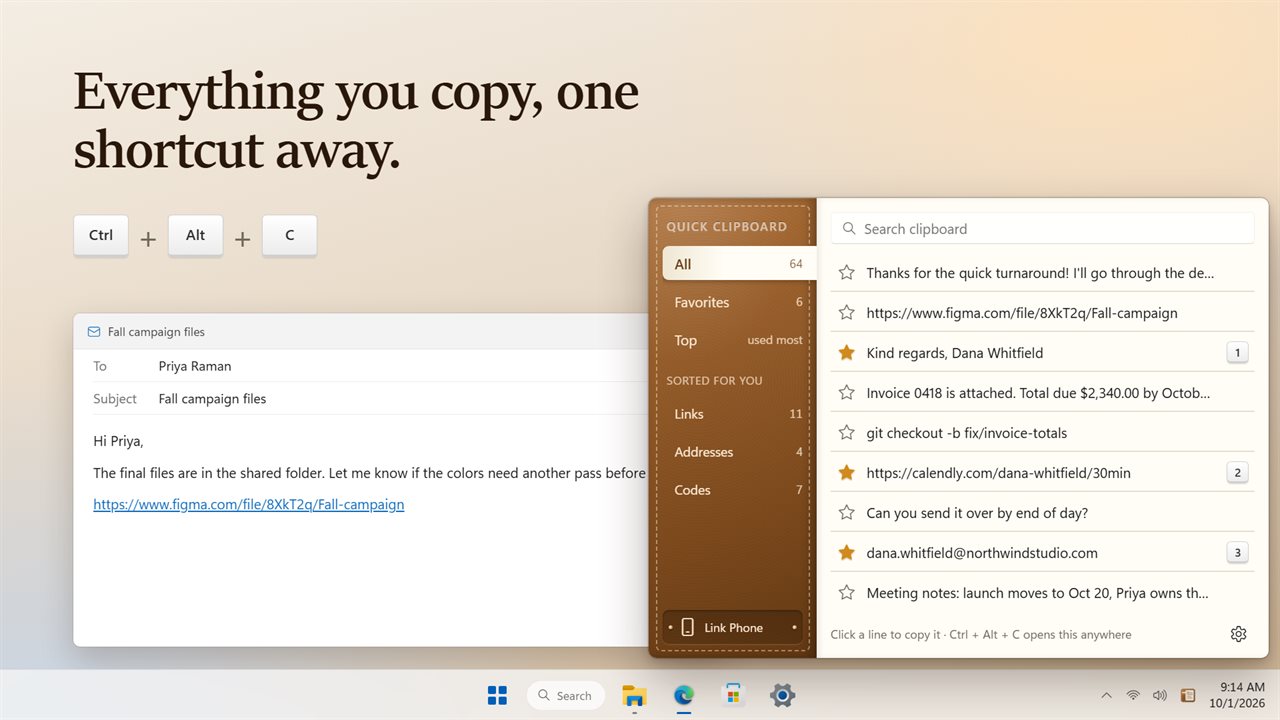
Everything you copy, one shortcut away.
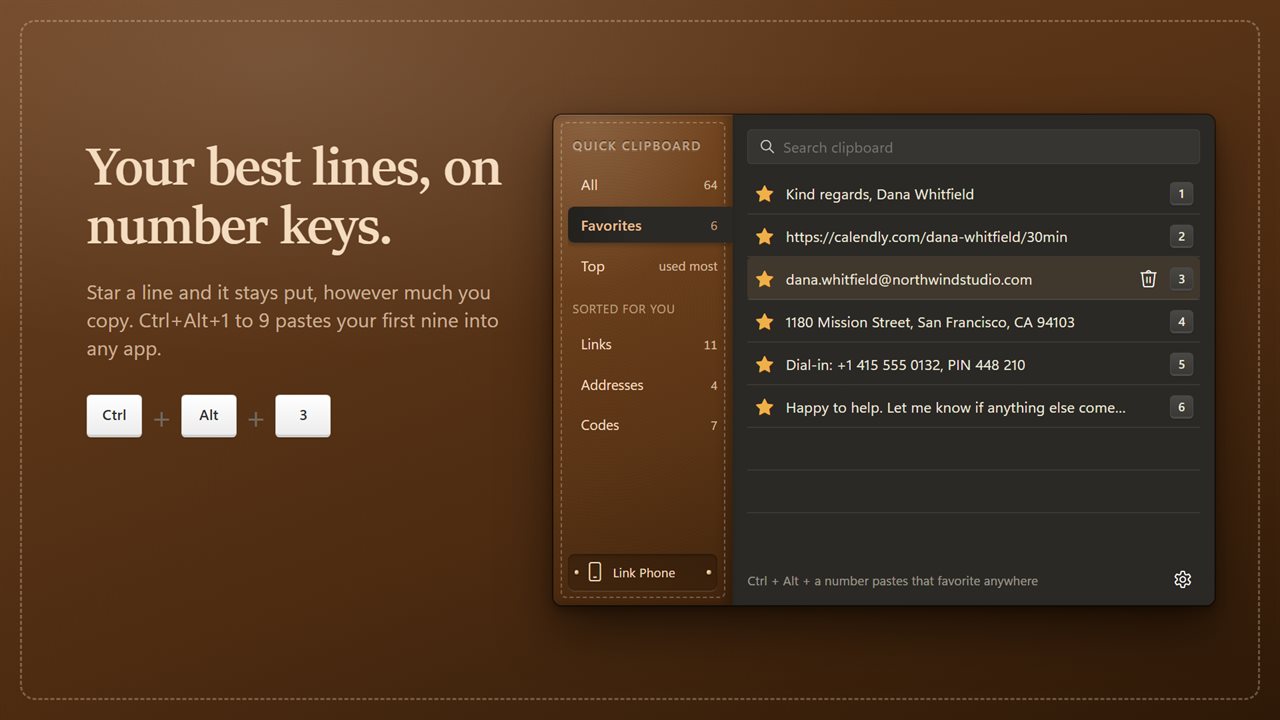
Favorites stay put. Ctrl+Alt+1 to 9 pastes them anywhere.
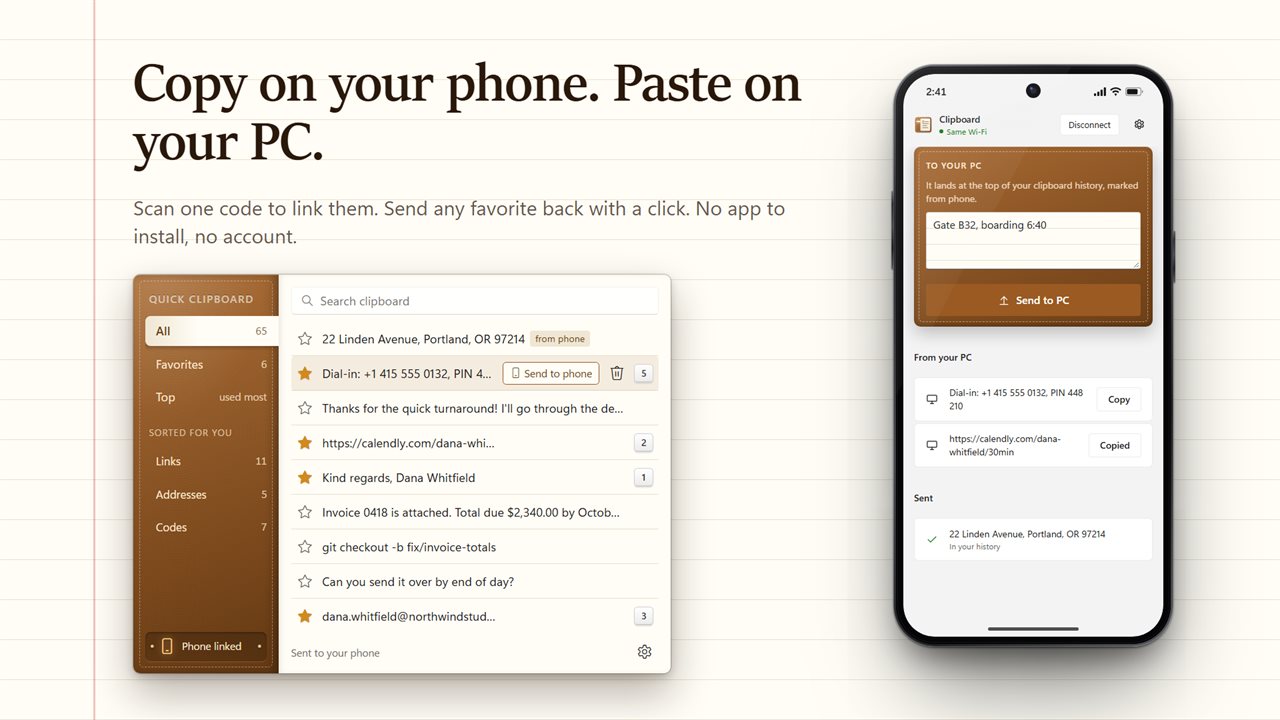
Copy on your phone and it lands on your PC.
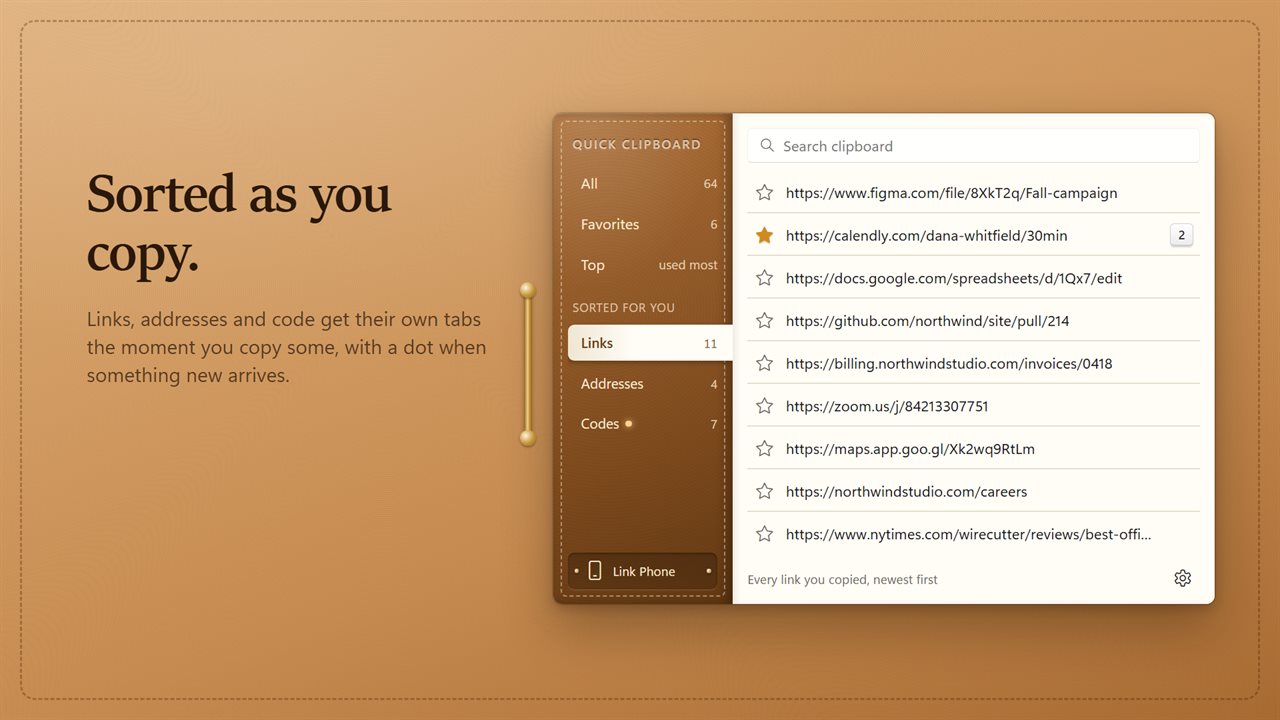
Links, addresses and code, sorted into their own tabs.
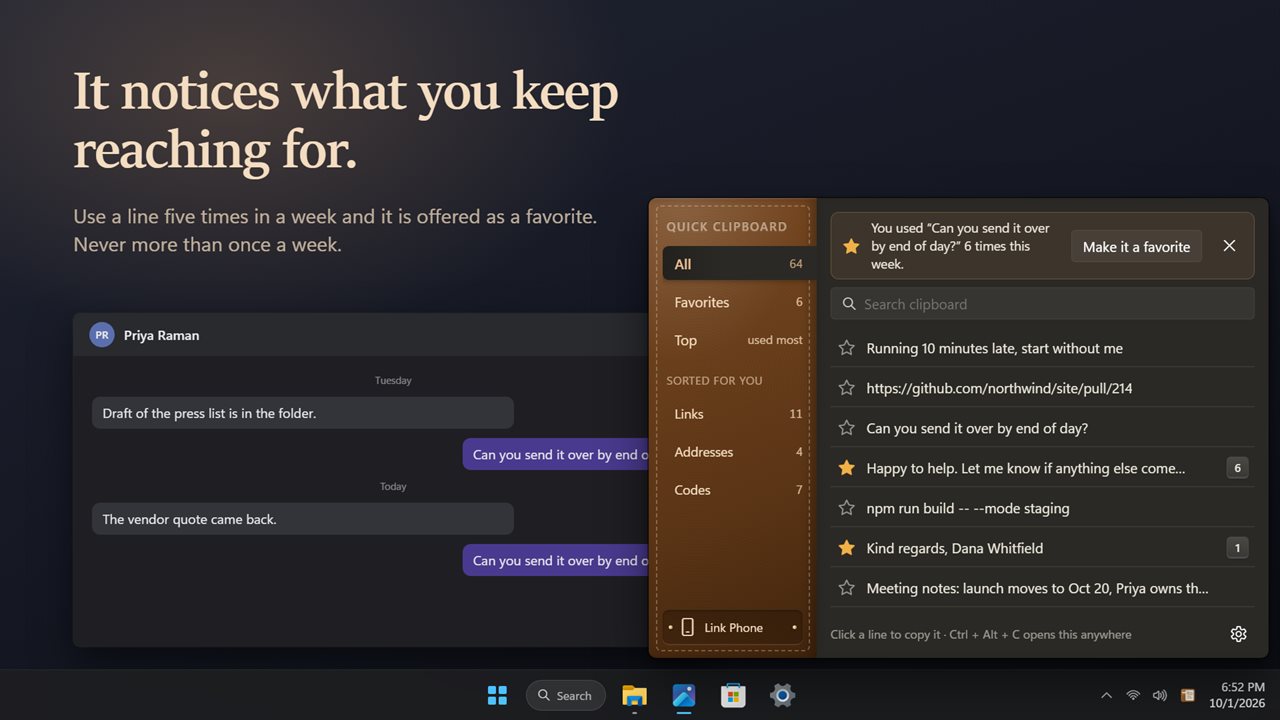
Use a line all week, and it is offered as a favorite.
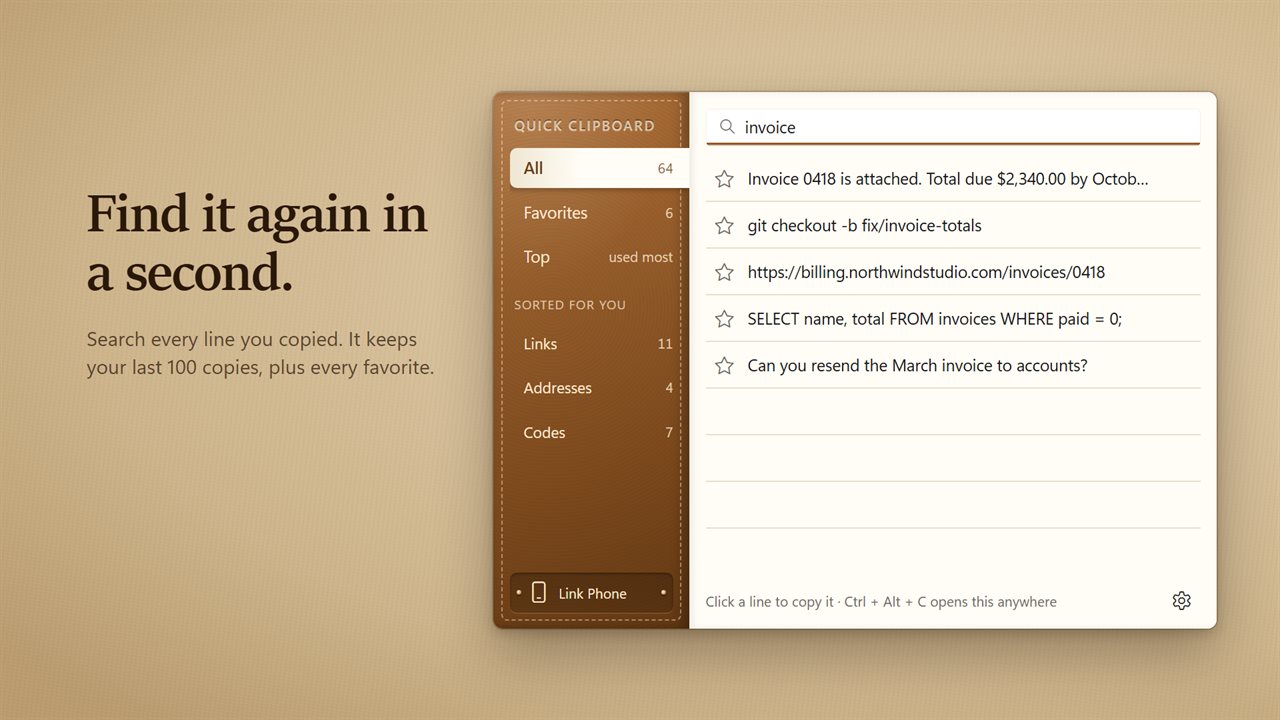
Search everything you copied.

Everything you copy, one shortcut away.

190,000+downloads of EvlarSoft apps
Signed by EvlarSoftVerified US publisher
14-day money-backNo questions asked
Updates includedNo upgrade fees

Copy and paste history that remembers more than the last thing

The Windows clipboard holds one item. Copy a second thing and the first is gone, which is exactly when you discover you still needed it. Quick Clipboard keeps a running copy and paste history of the text you copy, the last 100 entries, so the line you lost ten minutes ago is still there.

From any program, Ctrl+Alt+C opens the history as a small pad at the edge of your desktop, with the cursor already in Search clipboard. Type a few letters, click the line you want, and it goes back on the clipboard. Esc, or a click anywhere else, puts the pad away. If you would rather skip the paste step, switch on Paste when I pick a line and the text lands directly in the window you had open.

Copying something that is already in the list moves it back to the top rather than filling the history with duplicates.

How to see your clipboard history in Windows 11

Windows has its own Win+V panel with a short list. With Quick Clipboard running, Ctrl+Alt+C opens a longer, searchable one. Your shortcut can be changed under Open your history from anywhere in Settings, and Start with Windows keeps the app waiting in the notification area from the moment you sign in.

The pad sorts what you copy into tabs so you do not have to scroll: All, Favorites, Top for your most-used entries, and Links, Addresses and Codes, which appear automatically once you have copied something of that kind. A dot marks a tab with entries that are new since you last looked.

Favorites you can paste without opening anything

Some text you paste every day: an email sign-off, a postal address, a meeting link, a ticket template. Click the star beside a line and it becomes a favorite. Favorites never fall out of the history, no matter how much you copy afterwards, and Clear history leaves them in place.

Your first nine favorites are numbered. Hold Ctrl+Alt and press 1 to 9 and that favorite is pasted at the cursor, in any app, without the pad appearing at all. If Suggest favorites is on, a line you keep reusing is offered as a favorite, no more than once a week.

Copy text from your phone to your PC

Choose Link Phone, then scan the code with your phone's camera. A page opens in the phone's browser, with nothing to install and no sign-up. Paste or type something there, send it, and it appears first in the PC list, tagged as from phone. Going the other way, Send to phone on any favorite pushes it to the linked phone.
Features

  • A text history of 100 recent copies, favorites kept on top of that
  • Global shortcut, Ctrl+Alt+C by default, to open the pad
  • Search across everything in the current tab
  • Starred favorites with Ctrl+Alt+1 to 9 quick paste
  • Separate tabs that sort out links, addresses and code
  • Optional paste-on-click into the previous app
  • Phone link by QR code, both directions
  • Leave out passwords skips copies a password manager marks as private
  • History and favorites from earlier versions carried over

Where it saves time

Writing and research

Collect quotes, links and figures from several sources, then search the history and paste each one where it belongs.

Customer support

Keep standard replies and links as favorites and drop them into chats with Ctrl+Alt and a number.

Developers

Commands, IDs and snippets you copied earlier sit in the Codes tab, newest first.

What's new in 2.0.2

  • New: Ctrl+Alt+1 to 9 pastes your favorites into any app
  • New: tabs for links, addresses and code, sorted for you
  • New: copy on your phone and it lands in your history. Send favorites back to your phone
  • New: a weekly suggestion when a line you use a lot is not a favorite yet
  • New: paste a line straight into the app you were in, and pick your own shortcut
  • Fixed: the history now keeps your last 100 copies, not just 10
  • Fixed: deleting a line now stays deleted
  • Your history, favorites and counts carry over

Questions

Anything else? Ask us

Does Quick Clipboard keep copied images or files?

No. It keeps text only. A single copy longer than 100,000 characters is left out, since that is a document rather than a snippet.

How many copies does it remember?

Your last 100 copies, plus every line you star as a favorite, which never drops off. Copying something that is already there moves it back to the top instead of adding it twice, and Clear history removes everything except your favorites.

Can I paste a saved line without opening the history?

Yes. Ctrl+Alt+1 to Ctrl+Alt+9 paste your first nine favorites, in the order you starred them, into whatever you are typing in. You can turn those shortcuts off in settings.

Does clicking a line paste it, or only copy it?

By default it copies the line so you can paste it yourself. Turn on Paste when I pick a line and it is pasted straight into the app you were in.

Does it save passwords I copy from a password manager?

No. Copies that the password manager marks as private are left out of the history. You can switch Leave out passwords off if you want them kept.

How does the phone link work?

Scan the code in the app with your phone's camera and a page opens in the phone's browser, with no app to install. Paste or type text into the box and tap Send to PC, and it lands at the top of your history marked from phone. Favorites can be sent the other way with Send to phone.

Where is my clipboard history stored?

In a history.json file beside the app's settings on your PC, so it is still there after a restart. Clear history in Settings removes everything except your favorites, and Delete from history removes a single line.

What is the shortcut for clipboard history?

In Windows the built-in panel is Win+V. Quick Clipboard opens its own longer, searchable history with Ctrl+Alt+C from any program, and you can set a different combination under Open your history from anywhere in Settings.

Which versions of Windows does it run on?

Windows 10 (version 1809 or later) and Windows 11.

Is it a subscription?

No. Quick Clipboard is a one-time purchase of $2.49, and updates are included.

How do I get it?

Buy it on this page and your license key arrives by email. If the button says Notify me, Quick Clipboard is not on sale here yet; leave your email and we will tell you when it is.