EEvlarSoft

Keyboard Soundboard for PC

Build a custom soundboard on your PC keyboard: drop clips onto pads, give each one a hotkey, and fire them from any app without switching windows.

Buy for $2.99
One payment. No subscription.
14-day money-back guarantee.
A soundboard on your keyboard: press a key, hear its pad.
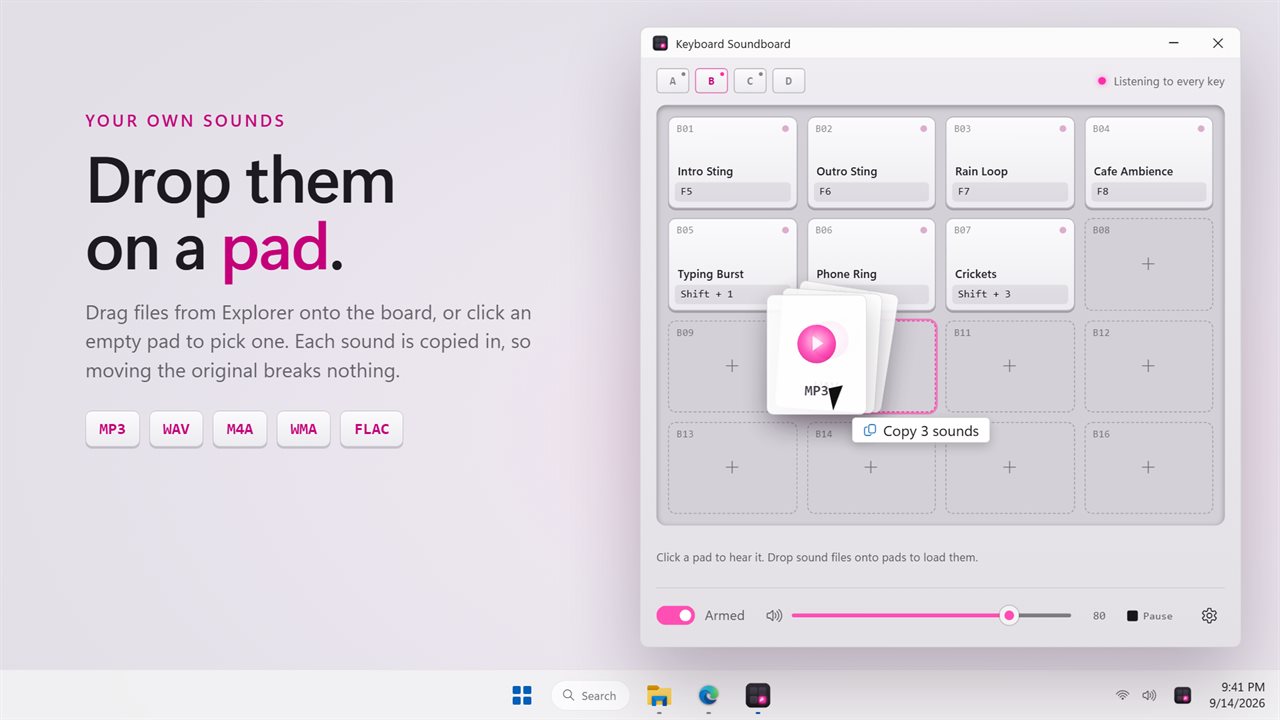
Drop sound files onto the pads. MP3, WAV, M4A, WMA and FLAC.
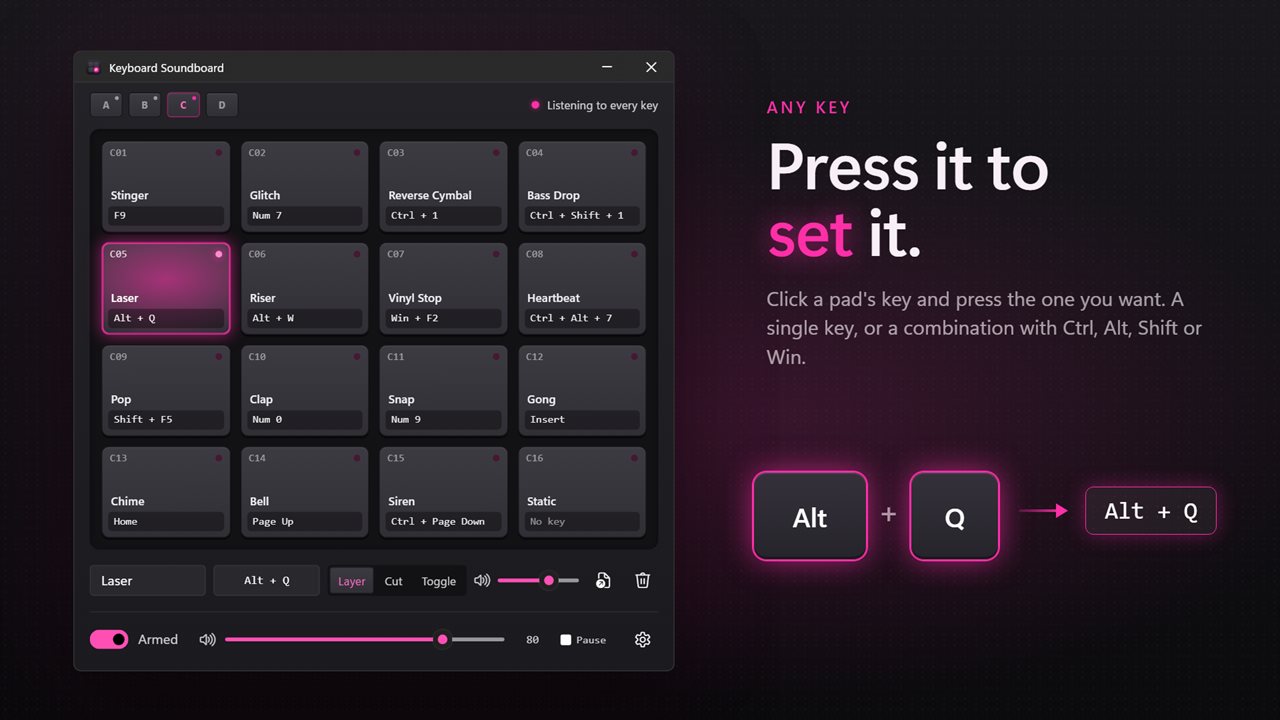
Any key or combination, set by pressing it.
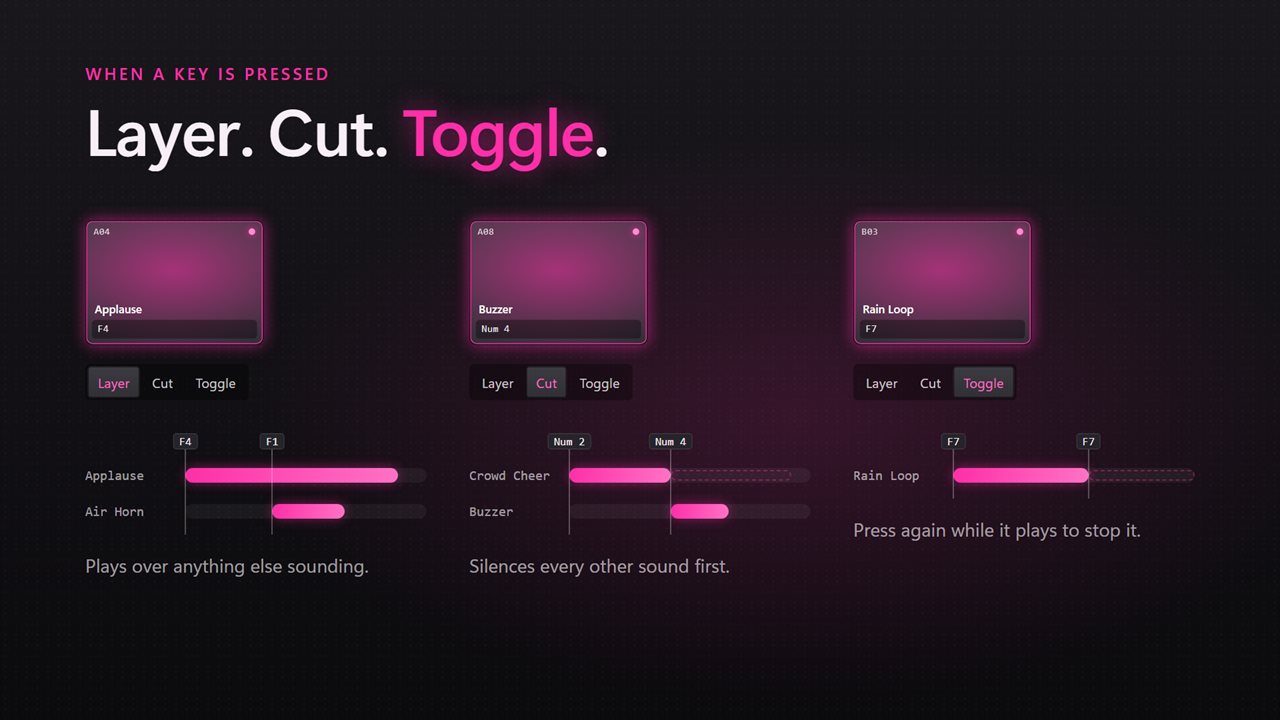
Layer sounds, cut the rest, or stop a long one with a second press.
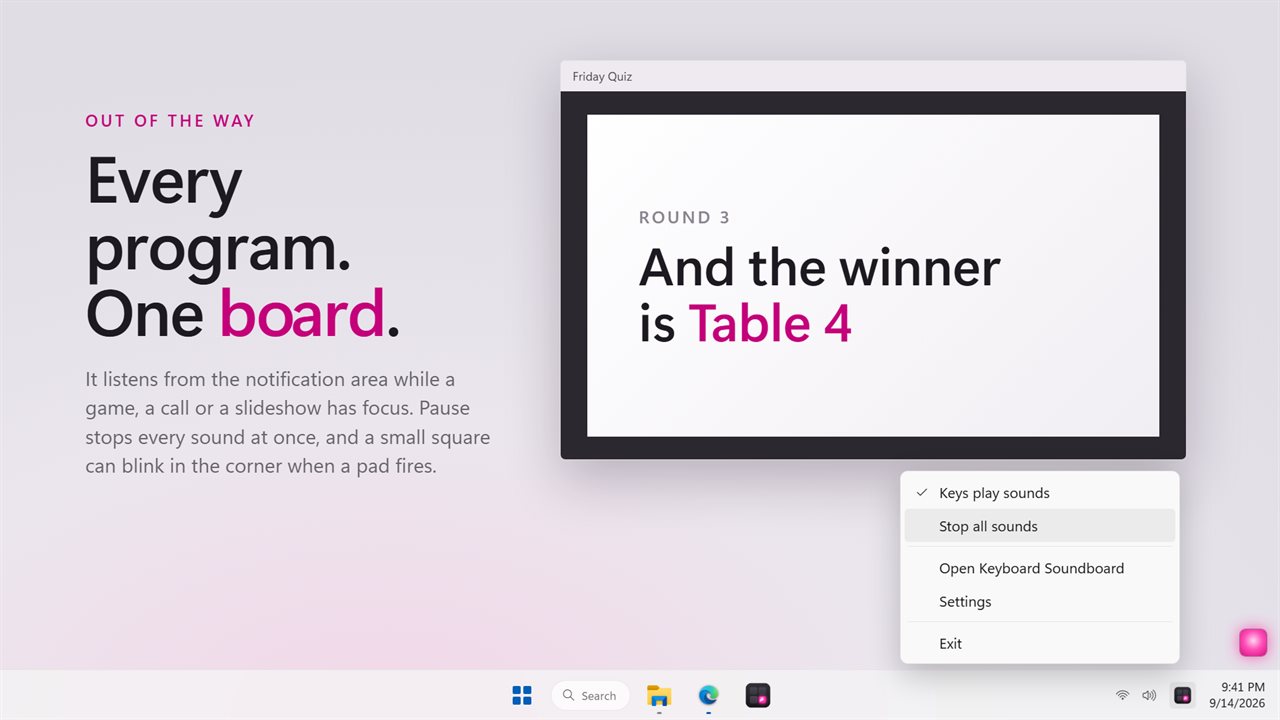
Works in every program, from the notification area.

A soundboard on your keyboard: press a key, hear its pad.

190,000+downloads of EvlarSoft apps
Signed by EvlarSoftVerified US publisher
14-day money-backNo questions asked
Updates includedNo upgrade fees

A soundboard for PC that you play from the keyboard

A soundboard on a PC is only useful if you can reach it mid-game, mid-meeting or mid-stream without alt-tabbing to a window full of buttons. Keyboard Soundboard listens for hotkeys system-wide, so a clip plays the instant you press its key, whatever program has focus.

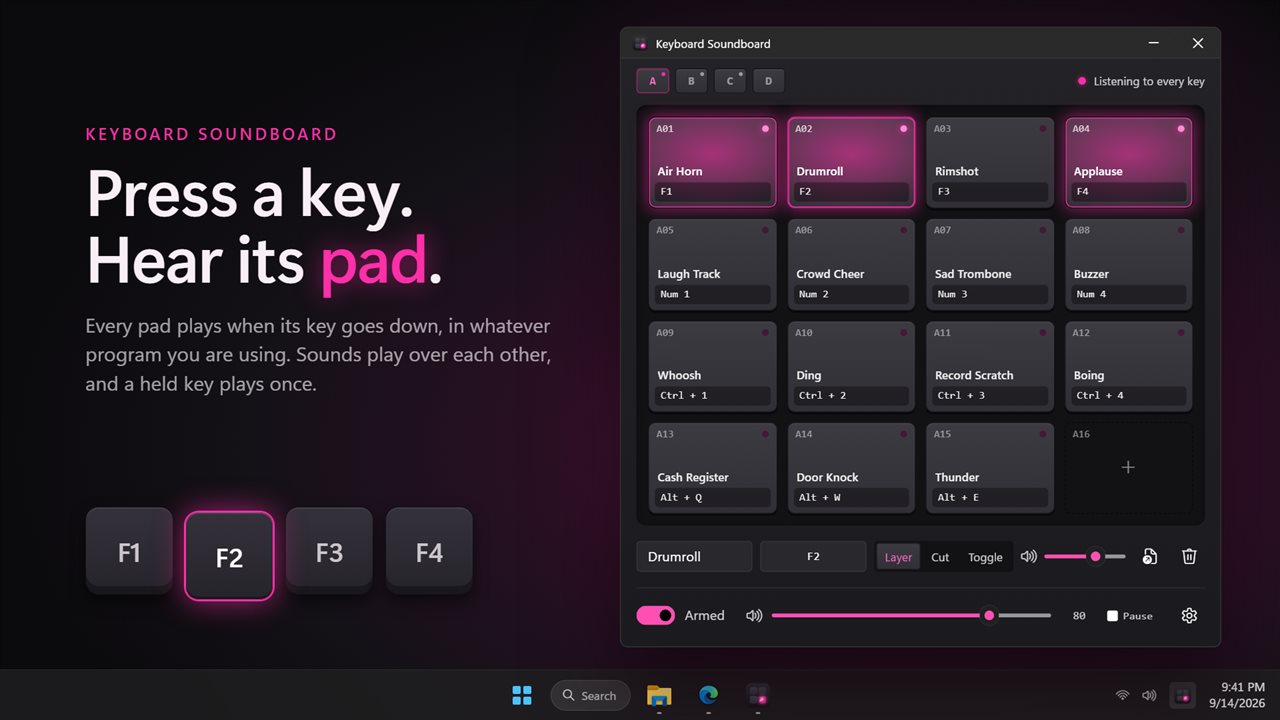
The window is laid out like a hardware sampler: 16 pads per bank and four banks, A to D, for 64 sounds in total. Each pad shows its name, its key and a light that flashes while it plays. Clicking a pad auditions it, so you can check a clip before you ever bind it.

Assigned keys are not swallowed. The app only listens, which means a key keeps doing its normal job in your game or editor as well as triggering the sound, so pick keys and combinations you do not otherwise use.

How to make a soundboard with your own sounds

Setting up a pad takes three steps:

  • Drag an MP3, WAV, M4A, AAC, WMA or FLAC file onto an empty pad, or load one from the file dialog. The file name becomes the pad name, with dashes and underscores turned into spaces, and you can rename it in the Pad name box.
  • Click the key label under the pad, then press the key that should fire it. Plain keys and combinations with Ctrl, Alt, Shift or Win all work, and matching is exact, so 1, Ctrl+1 and Alt+1 can trigger three different clips.
  • Choose what happens under When pressed, and set the pad's level with its own slider.

Layer, Cut or Toggle: hotkey soundboard playback modes

Every pad has one of three behaviors. Layer plays over anything already sounding, for quick stingers and reactions. Cut silences every other sound first, which suits a dramatic entrance or a hard scene change. Toggle starts the clip on the first press and stops it on the second, the right choice for background music or a long ambience loop.

Holding a key down plays its clip once rather than retriggering on key repeat. The Stop all sounds key, Pause by default and changeable in Settings, kills every pad at once from any app. The master level at the bottom of the window scales the whole board.

A catch-all pad for every unassigned key

Tick Any key on a pad and it plays for every key that has no pad of its own. Turn the keyboard into a sound-effect machine for a party game, or bind one soft click so each keystroke you make outside your hotkeys gives audible feedback. Keys that do have their own pad still play only their own sound, and the stop key never triggers anything.

Running in the background from the notification area

Closing the window leaves the board armed in the notification area, ready for the next press. Turn on Start with Windows and it launches straight there at sign-in; Start in the notification area does the same when you open it yourself. The Keys play sounds switch hands every key back to normal when you need to type in peace, while the pads stay clickable.

If you want visual confirmation, Flash when a key plays a pad blinks a small magenta square in the bottom-right corner of the screen your pointer is on, without taking focus from the app you are in.

Board features

  • 64 pads in four banks of 16
  • System-wide hotkeys with Ctrl, Alt, Shift and Win combinations
  • Drag and drop loading of common audio formats, files up to 60 MB
  • Each pad keeps its own copy of the clip, so moving the original changes nothing
  • Layer, Cut and Toggle modes per pad
  • Per-pad level plus a master level
  • No retriggering while a key is held
  • Global Stop all sounds key
  • Any key catch-all pads
  • Notification-area operation, start with Windows, optional on-screen flash, Light, Dark or Match Windows theme

Who builds one

Live events and parties

Put an applause track, a drum roll and a walk-on sting on the number keys, and keep background music on Toggle, all playing through the room's speakers.

Tabletop and party game nights

Load door creaks, thunder and monster roars into bank B, with a rain loop you can start and stop with one key.

Teachers and presenters

A correct-answer chime, a buzzer and a timer bell on function keys, triggered while slides stay full screen.

What's new in 2.0.4

  • Fixed: pressing a key stopped every other sound. Sounds now play over each other, or cut the rest if you choose
  • Fixed: combinations with Alt never played
  • Fixed: holding a key replayed its sound over and over
  • Fixed: moving or deleting a sound file broke its key. Each pad now keeps its own copy
  • New: a grid of 64 pads in four banks, with drag and drop
  • New: combinations with Ctrl, Alt, Shift and Win
  • New: a level for every pad, a master level, and a key that stops everything
  • New: M4A, WMA and FLAC files
  • New: the on and off switch is remembered, and the app can start with Windows
  • Your existing keys and sounds are carried over

Questions

Anything else? Ask us

Which sound file formats can I load onto a pad?

MP3, WAV, M4A, AAC, WMA and FLAC. Sounds are decoded by Windows itself, so a file Windows cannot play will not load.

Is there a limit on how long a sound can be?

Yes. A file must be under 60 MB, and only its first two minutes are played. Each pad keeps its own copy of the file, so moving or deleting the original does not break it.

Does the key still do its normal job when it plays a sound?

Yes. The app only listens to the keyboard and never blocks a key, so F9 still reaches your game as F9. Use a key or combination nothing else needs, or switch off "Keys play sounds" when you want the keys back to themselves.

Can people on my voice call or stream hear the sounds?

Only through your speakers. Sounds play on your default Windows output device, and there is no setting to pick another device or send them into a microphone.

Can a pad play on Ctrl+1 while a different pad plays on 1?

Yes. A key combination has to match exactly, so 1, Ctrl+1 and Alt+1 can each have a pad of their own. There are 64 pads in four banks of 16.

How do I stop a sound that is still playing?

Press the Stop all sounds key, which is Pause unless you choose another, to cut every pad at once from any app. A pad set to Toggle also stops when its key is pressed a second time.

Can I use a soundboard while playing a full-screen game?

Yes. Hotkeys are picked up system-wide, so pressing a pad's key plays its clip while a game has focus. Choose keys the game does not use, since the key still reaches the game too.

How many sounds can the board hold?

64, as four banks of 16 pads. Switch banks with the A, B, C and D buttons; hotkeys work across all banks at once, whichever bank is on screen.

Which versions of Windows does it run on?

Windows 10 (version 1809 or later) and Windows 11.

Is it a subscription?

No. Keyboard Soundboard is a one-time purchase of $2.99, and updates are included.

How do I get it?

Buy it on this page and your license key arrives by email. If the button says Notify me, Keyboard Soundboard is not on sale here yet; leave your email and we will tell you when it is.