EEvlarSoft

Push To Talk Mic

Push to talk that works everywhere on your PC at once: hold one key to open the microphone for every call, game and recorder, and stay muted otherwise.

Buy for $2.99
One payment. No subscription.
14-day money-back guarantee.
3.0
Stay muted, and go on air only while you hold the key.
Hold to talk, hold to mute, or tap to toggle.
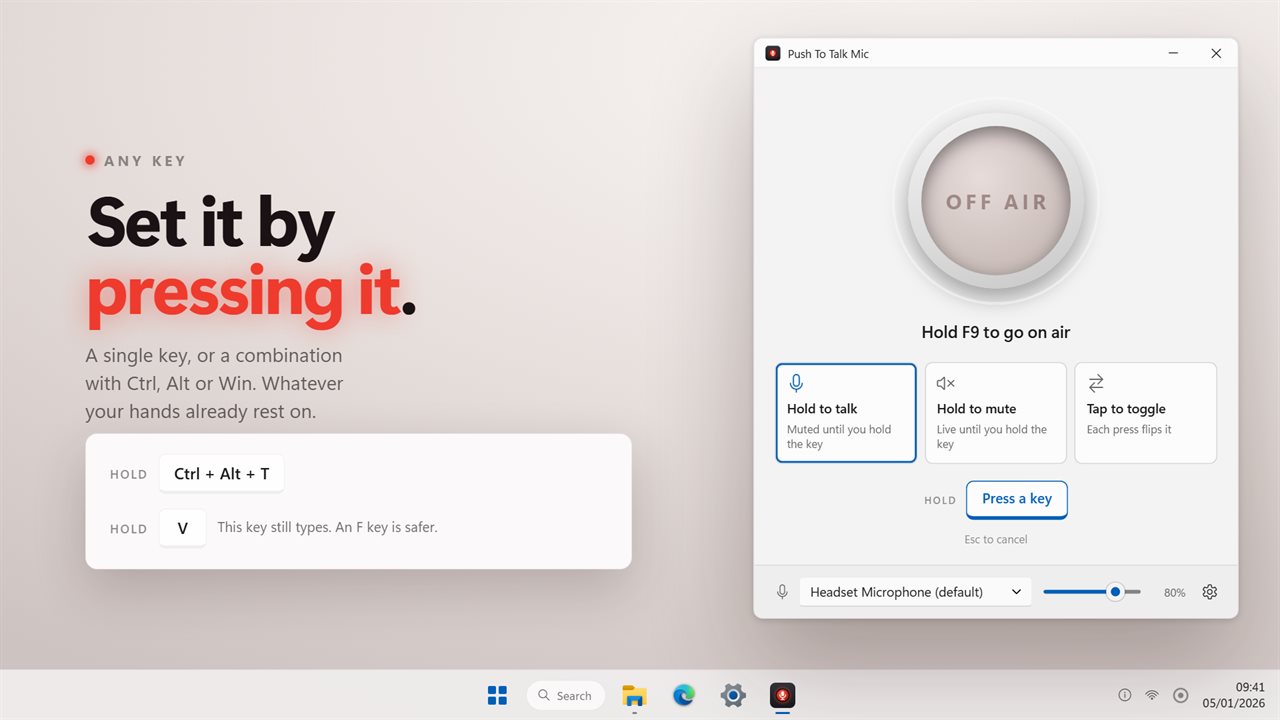
Any key or combination, set by pressing it.
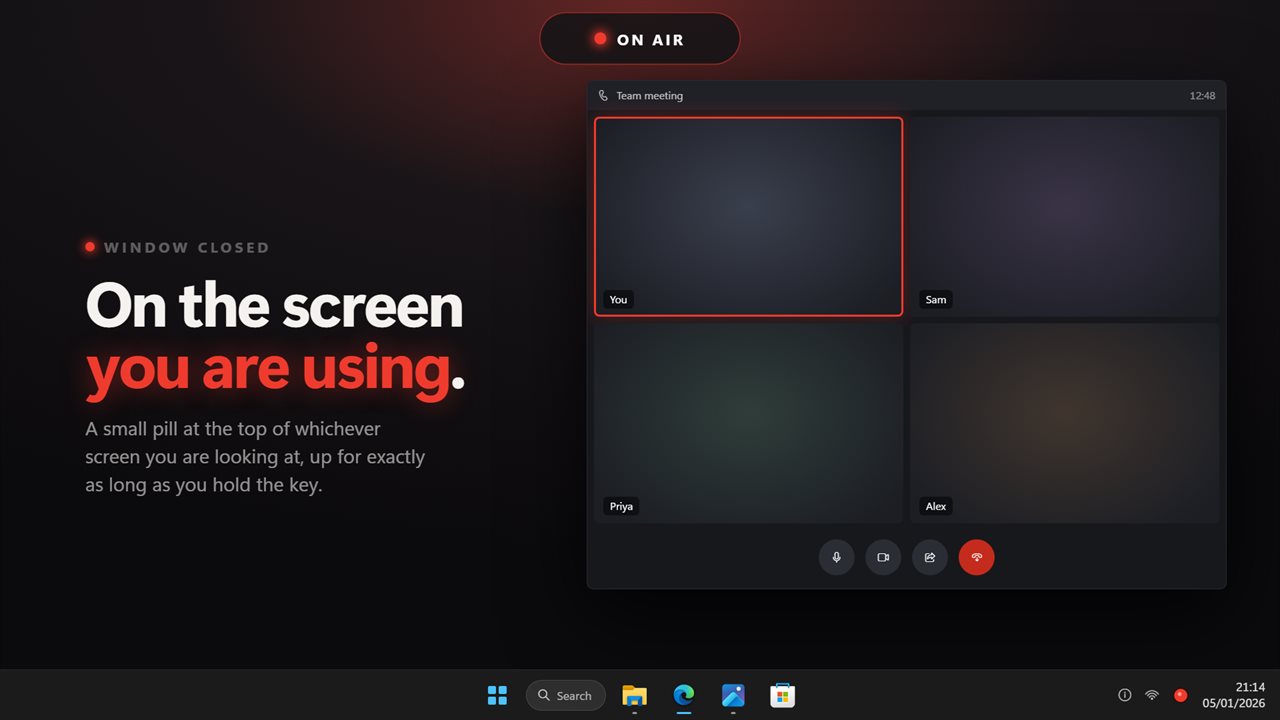
A small ON AIR pill at the top of the screen you are using.
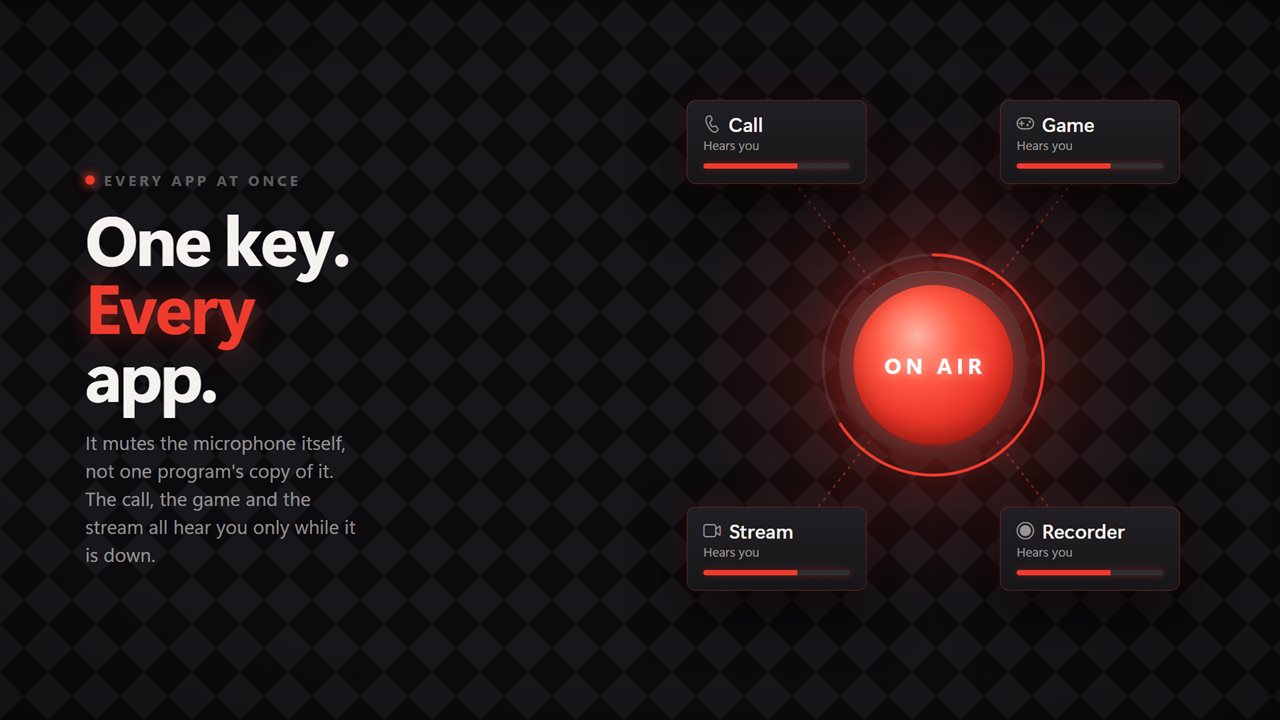
Works in every app at once, because it mutes the microphone itself.

Stay muted, and go on air only while you hold the key.

190,000+downloads of EvlarSoft apps
Signed by EvlarSoftVerified US publisher
14-day money-backNo questions asked
Updates includedNo upgrade fees

Push to talk on Windows, for every app at once

Push to talk is usually a setting inside one voice app. Join a meeting in a second program, start a recording, or open a game with its own chat, and each has its own key, or none at all. Windows itself does not offer a push-to-talk key for the whole system.

This app works one level lower. It mutes and unmutes the Windows recording device, so every program using that microphone gets the same answer at the same moment. Hold F9, the default, and they all hear you; let go and they all get silence.

Because the mute is the system's own, it also stays in sync the other way. If a headset button or a meeting app flips the mute, the app notices and its lamp follows.

Three push-to-talk modes

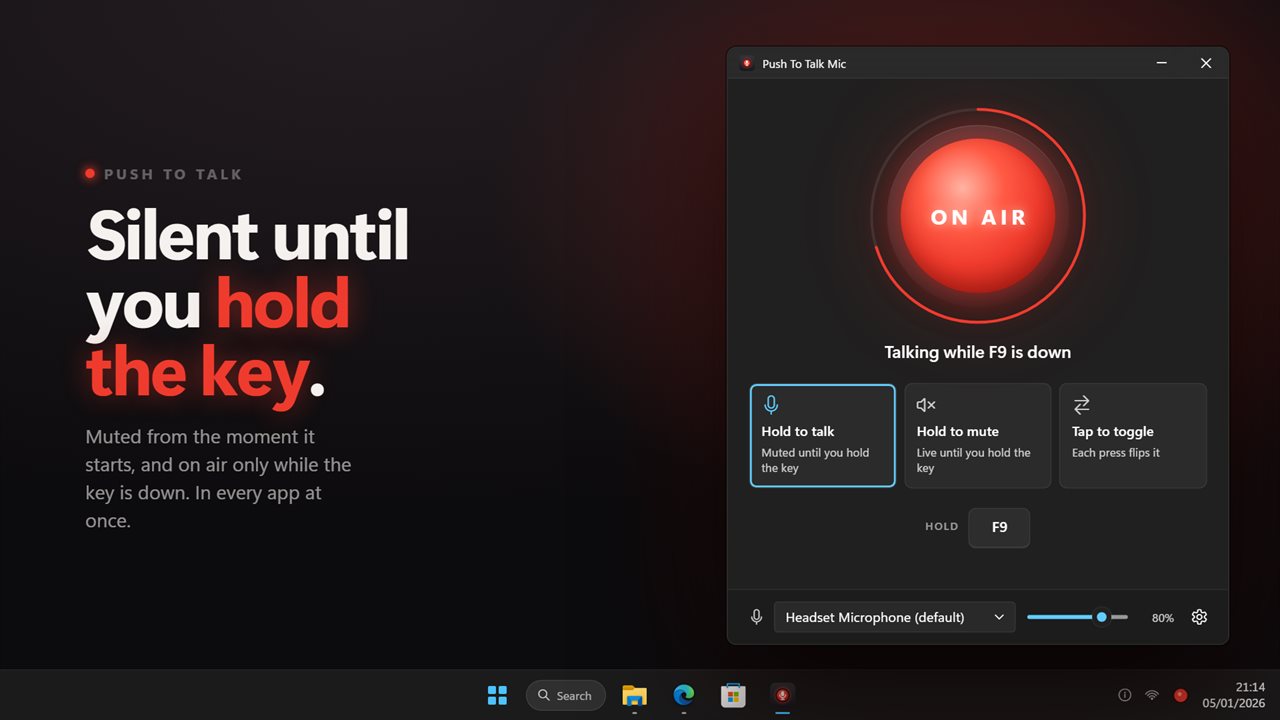
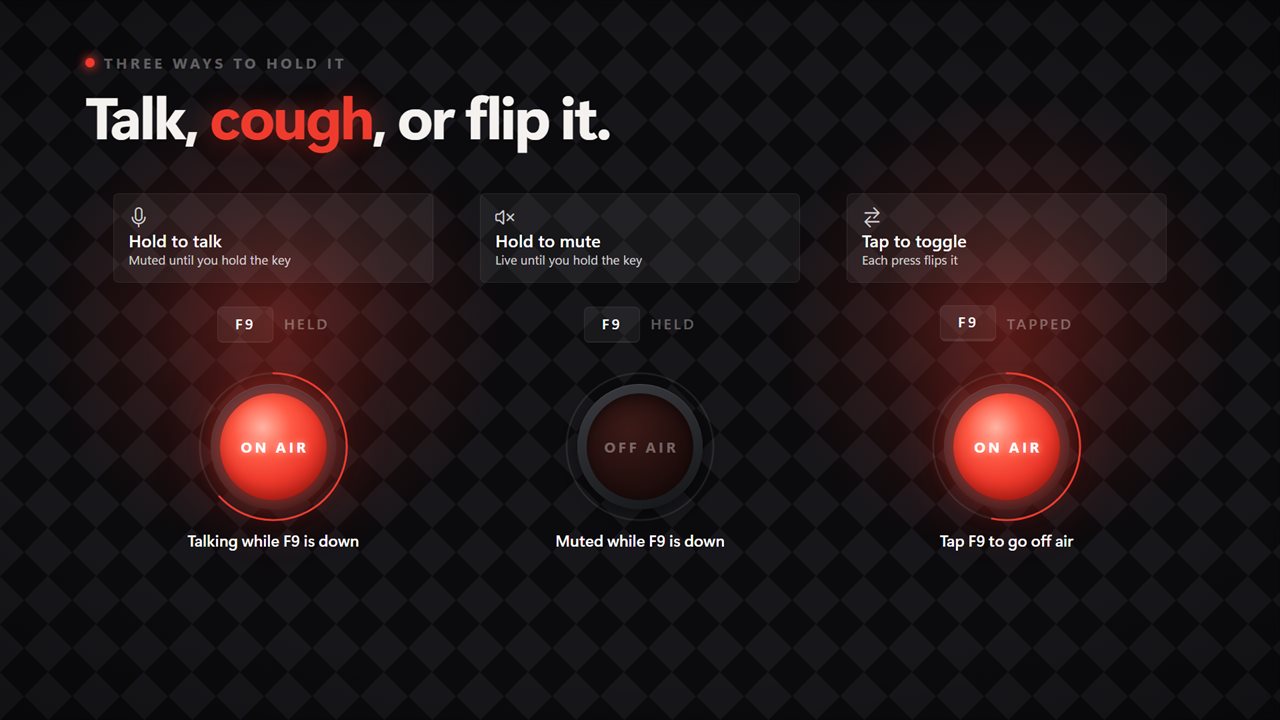
The three mode buttons under the lamp decide what your key means:

  • Hold to talk: muted until you hold the key. The microphone is closed as soon as the app opens, and with Start with Windows on it is closed from sign-in, before you join anything.
  • Hold to mute: the reverse. The microphone is open, and the key cuts you off for a cough, a sip of water or a word to someone in the room.
  • Tap to toggle: every press alternates between on air and off air, for long stretches of talking without holding anything.

How to set a keyboard shortcut to mute your mic

Click the key cap in the middle of the main window. It reads Press a key; press the key or combination you want, or Esc to cancel. A single key works, and so do combinations with Ctrl, Alt, Shift or Win.

The key is not swallowed, so it still reaches whatever program is in front. Pick a letter or the space bar and the window tells you This key still types. An F key is safer, because a function key rarely does anything in a call or a game.

A live microphone indicator you can trust

The main window is built around a studio tally lamp. It lights red and reads ON AIR when you can be heard and OFF AIR when it is closed, and a ring around it tracks the level the microphone is picking up. Click the lamp itself to flip the mute by hand.

Show the on-air pill puts a small click-through pill along the upper edge of whichever monitor you are working on, above any app. In the hold modes it stays up exactly as long as the key is down; in Tap to toggle it flashes. Radio chirp adds a rising blip when you go live and a falling one when you are cut, so you can hear the state without looking.

Choosing the microphone and its input level

The bar along the bottom of the window lists your recording devices and sets the input volume of the one selected, from 0 to 100%. If the chosen microphone is unplugged, control moves to the Windows default device, and if no microphone exists at all the lamp reads NO MIC.

Features

  • Mutes the Windows recording device, covering every app at once
  • Hold-to-talk, hold-to-mute and toggle modes
  • Any key or Ctrl, Alt, Shift or Win combination, F9 by default
  • Warning when the chosen key also types
  • Tally lamp with a live input level ring, clickable to mute
  • Click-through on-air pill at the top of the screen you are working on
  • Optional rising and falling chirp
  • Microphone picker and input volume slider
  • Key-up safety check that closes the mic if a release is missed
  • Notification-area icon with the three modes, and optional start with Windows

Who it helps

Gamers in voice chat

One key covers party chat, in-game voice and a recording running in the background, so nobody hears your keyboard between callouts.

Remote workers in back-to-back calls

Stay muted by default in every meeting program, and talk only while your finger is on the key, whichever call window is open.

Streamers and podcasters

Use Hold to mute as a cough button that silences the microphone for every program capturing it, not only the one you remembered to set up.

What's new in 2.0.5

  • Fixed: in hold to talk, the microphone was live until the first press
  • New: tap to toggle, alongside hold to talk and hold to mute
  • New: set the talk key by pressing it, including combinations
  • New: an on-air pill that stays up while the key is held
  • New: the microphone closes if the key-up is lost to an administrator window

Questions

Anything else? Ask us

Does Push To Talk Mic work in Discord, Teams and games at the same time?

Yes. It mutes the Windows recording device itself rather than one program's copy of it, so every app that uses that microphone hears you only while the key allows it. If Teams or a headset button changes the mute, the app sees that and updates too.

Which key does it use, and can I pick a key combination?

F9 by default. Click the key on the main window and press any key, alone or with Ctrl, Alt, Shift or Win. The key still reaches the app you are using, so the window warns you when you pick one that types, such as a letter or the space bar.

What are the three modes?

Hold to talk keeps you muted and opens the microphone while the key is down, and it mutes as soon as the app starts. Hold to mute is the reverse, live until you hold the key. Tap to toggle flips the microphone on or off with each press.

Can the microphone get stuck open if I let go of the key over an administrator window?

No. Windows does not report a key-up over an elevated window or a sign-in prompt, so the app checks the physical key four times a second and closes the microphone if it is no longer down.

Can I choose which microphone it controls?

Yes. Pick it from the list on the main window and set its input volume there while a level ring shows what it is hearing. If that microphone is unplugged, the app switches to the Windows default instead.

What happens to the microphone when I close or exit the app?

Closing the window only hides it to the notification area, and the key keeps working. Choosing Exit leaves the microphone exactly as it is, so if you exit while muted in hold to talk, it stays muted until you unmute it in Windows.

Does Windows 11 have a push to talk key built in?

Not for the whole system. Push To Talk Mic adds one by muting the microphone device itself, which every program on the PC respects.

Can I hear when the microphone opens and closes?

Yes. Turn on Radio chirp in Settings. You get a rising blip going live and a falling one going quiet.

Can I mute without pressing the key?

Yes. Click the lamp in the main window to flip the mute, or right-click the notification area icon to change modes.

Which versions of Windows does it run on?

Windows 10 (version 1809 or later) and Windows 11.

Is it a subscription?

No. Push To Talk Mic is a one-time purchase of $2.99, and updates are included.

How do I get it?

Buy it on this page and your license key arrives by email. If the button says Notify me, Push To Talk Mic is not on sale here yet; leave your email and we will tell you when it is.