EEvlarSoft

Mouse and Key Press Counter

Count keystrokes and mouse clicks together across every app, then see each day stacked in a weekly chart so you know whether today was busy.

Buy for $2.99
One payment. No subscription.
14-day money-back guarantee.
3.6
Today's total, and the seven days behind it.
Lifetime keystrokes and clicks, kept across restarts.
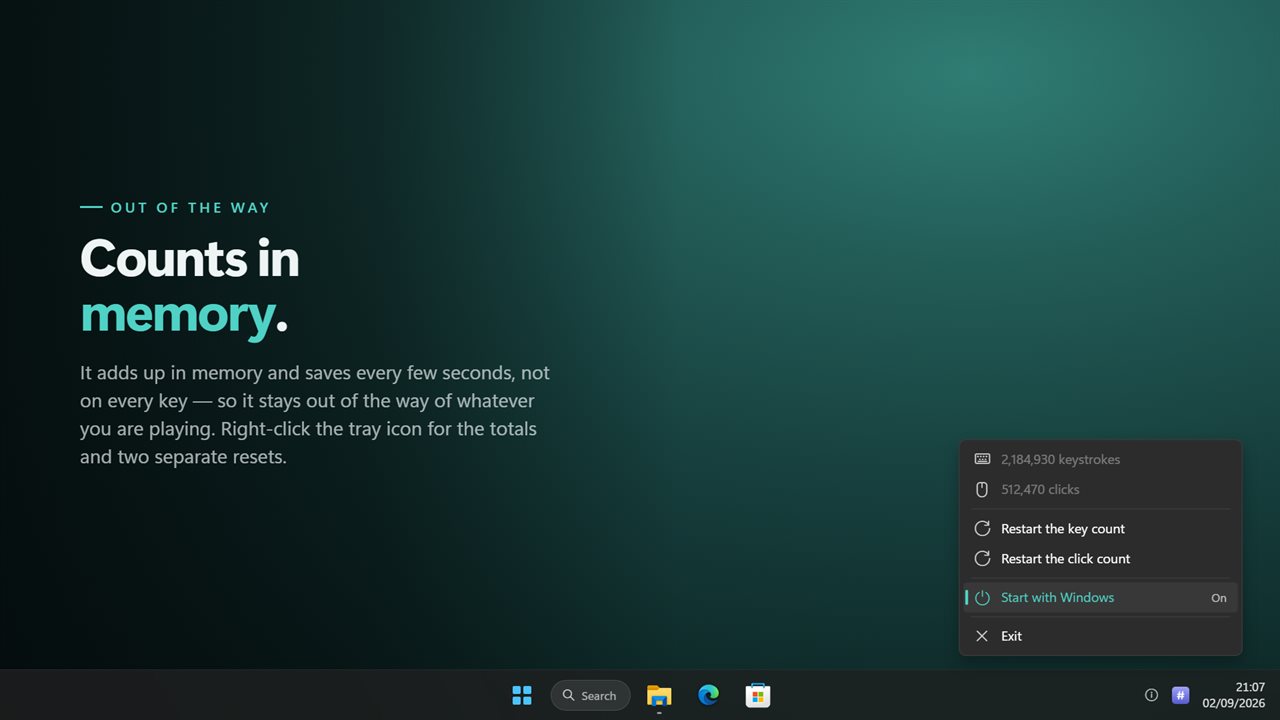
It lives in the notification area and starts with Windows.

Today's total, and the seven days behind it.

190,000+downloads of EvlarSoft apps
Signed by EvlarSoftVerified US publisher
14-day money-backNo questions asked
Updates includedNo upgrade fees

A keyboard counter that keeps going outside the browser tab

Most keyboard counter tools are web pages, and a web page can only hear the keys you press while its tab is in front. Mouse and Key Press Counter is a keyboard counter that runs on Windows itself. It counts every keystroke and every mouse click in any program or game, from the tray, whether or not its panel is open.

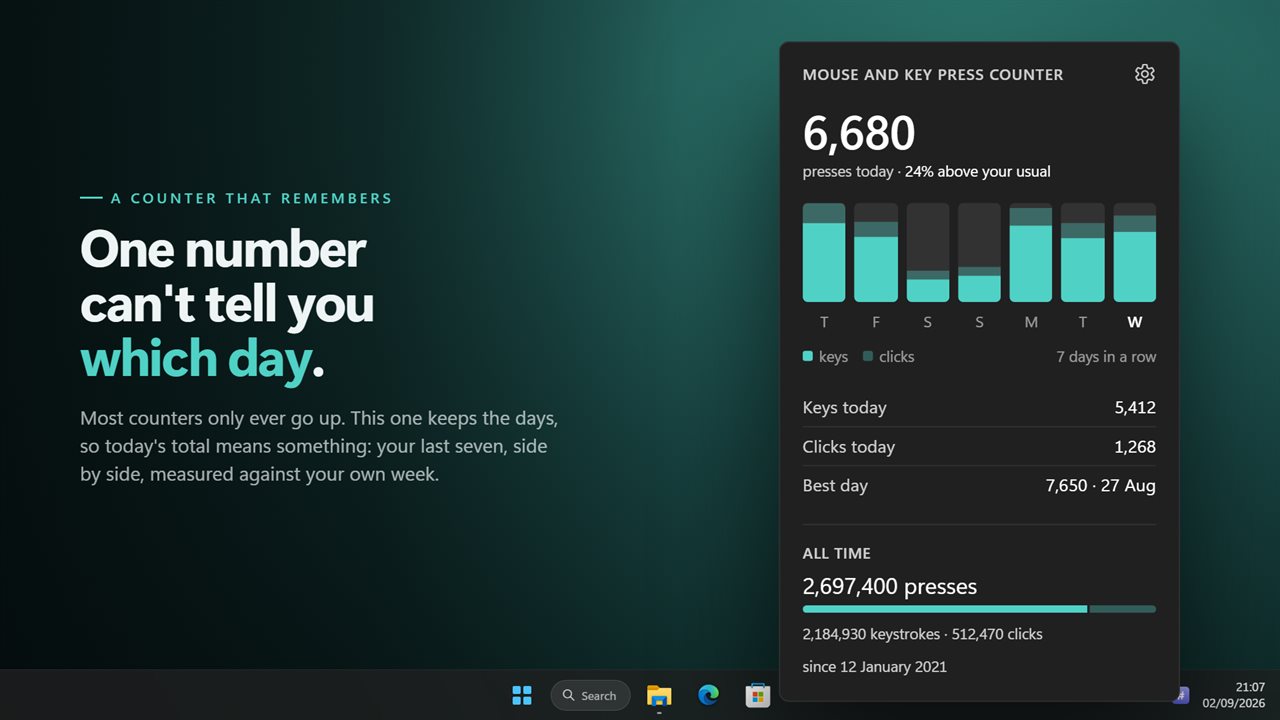
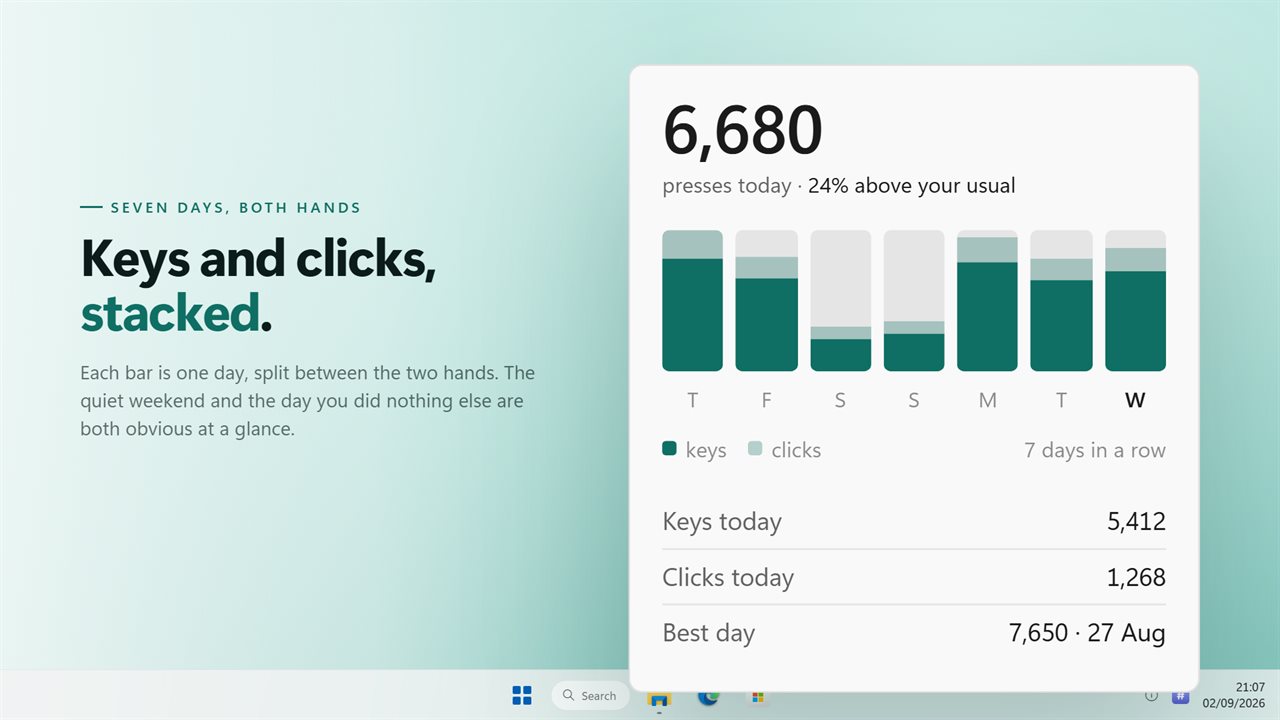
The panel leads with a single figure: presses today, keys and clicks added together. Under it, a short line compares today with your recent days, such as 18% above your usual, once there are at least two earlier days to compare against. Then comes a bar chart of the last seven days, each bar split into a keyboard part and a mouse part, scaled to the busiest day in view so even a quiet week has shape.

Beneath the chart are Keys today, Clicks today and your Best day with its date. The All time section gives lifetime presses with the keystroke and click split and the date counting began.

Keyboard click counter and mouse tracker in one

Clicks from the left, right and middle buttons and both side buttons all count. Scrolling the wheel does not, so a long page of reading leaves the click figure alone. On the keyboard side every key press is one count, and Windows' own key repeat while a key is held adds to it the way a held key adds letters to a document.

The two sides are kept apart, which matters when hardware changes. Swap in a new mouse and you can zero the click figure while years of keystrokes stay where they are.

Use it as a PC usage tracker

Keystrokes and clicks are a rough but honest measure of how much hands-on time a day held. Read the seven bars side by side and a heavy Monday or a light Friday shows at a glance, without any timer running.

The streak line beside the chart turns that into a habit record: it reads, for example, 12 days in a row. Your Best day row names the busiest date on file, so you know what a big day looks like for you.

Setting it up

For a glance without opening anything, right-click the tray icon: the top two lines of the menu show your lifetime keystrokes and clicks, such as 1,204,880 keystrokes and 311,042 clicks.

  • Launch it once. It lives in the notification area beside the clock rather than on the taskbar.
  • Right-click the icon and switch on Start with Windows so no day is missed.
  • Left-click the icon to open the panel; it closes again when you click away.
  • Choose Keep the counts on top to leave the panel above other windows. It can then be dragged by its title.
  • Restart the key count and Restart the click count sit in the same menu, each with its own confirmation.

What you get

  • Keystrokes and mouse clicks counted together in any app or full-screen game
  • Today's combined total, compared against your usual day
  • A seven-day chart with keys and clicks stacked in each bar
  • Keys today, Clicks today and your best day, with its date
  • A streak of consecutive days with activity
  • Lifetime presses split into keystrokes and clicks, with a start date
  • Separate resets for the keyboard count and the mouse count
  • Auto, Light or Dark theme, plus an option to start with Windows
  • Counts from the older CountMe version carry over on upgrade

What's new in 2.0.8

  • New: a real window. Click the tray icon and the numbers are there. The old version had no window at all
  • New: a seven-day chart, today's total, your busiest day and your daily streak. It used to keep no dates whatsoever
  • Fixed: it no longer writes to disk on every key and every click, which is what caused the delay in games
  • Keyboard and mouse counts still reset separately
  • Your existing counts are carried over
  • Redesigned to match Windows 11, and follows the light and dark themes

Questions

Anything else? Ask us

Which mouse buttons count as clicks?

Left, right, middle and the two side buttons. Turning the scroll wheel is not added to the click count.

Can I see more than the last week?

No. The chart covers the last seven days, with keystrokes and clicks stacked for each day. Older days still count toward your busiest day, going back up to two years, but are not charted.

Can I reset clicks without losing my keystroke count?

Yes. Restart the key count and Restart the click count are separate, and each one also clears that side from the daily history while leaving the other alone.

How is the streak counted?

It is the number of days in a row, ending today, with at least one keystroke or click. A day the app was not running breaks it, because nothing was counted that day.

Does it show which keys I press the most?

No. This app shows totals for keys and clicks by day. A ranking of individual keys is what Key Press Counter does.

Does it record what I type or where I click?

No. It counts that a key or button was pressed and adds it to that day's total. It stores no text and no click positions.

Why does my online keyboard counter stop counting?

A counter in a browser tab only receives keys while that tab has focus. Switch windows and it stops. A desktop counter like this one reads input for the whole PC, so it keeps counting in every program.

What does "above your usual" mean on the panel?

It compares today's presses with the average of the earlier days in the past week that had any activity. Within 5% either way it reads "about your usual".

Does it count clicks and keys in games?

Yes. It counts input for the whole PC, so full-screen games and every other program all add to the same daily totals.

Which versions of Windows does it run on?

Windows 10 (version 1809 or later) and Windows 11.

Is it a subscription?

No. Mouse and Key Press Counter is a one-time purchase of $2.99, and updates are included.

How do I get it?

Buy it on this page and your license key arrives by email. If the button says Notify me, Mouse and Key Press Counter is not on sale here yet; leave your email and we will tell you when it is.