EEvlarSoft

Subnet Master

A VLSM calculator and subnet planner: enter one address block and the hosts each network needs, and get a gap-free plan you can paste into a spreadsheet.

Buy for $2.99
One payment. No subscription.
14-day money-back guarantee.
5.0
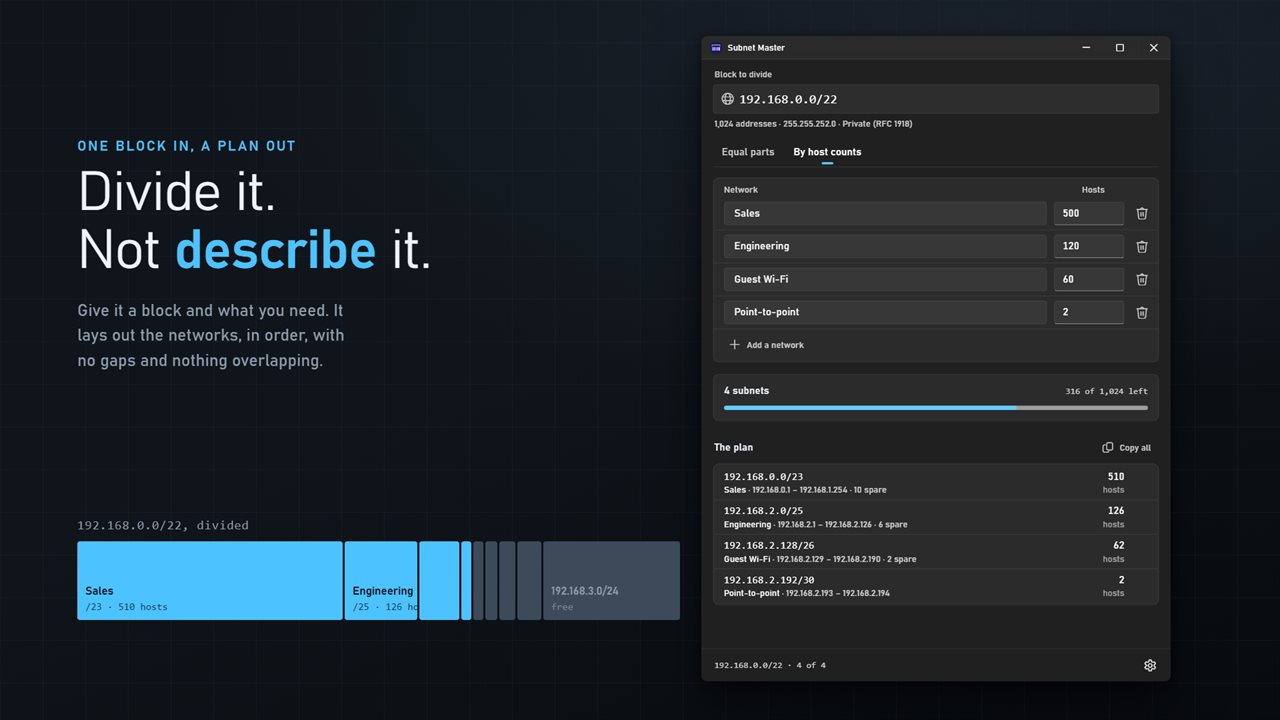
One block in, a plan out — the networks laid out in order, with nothing overlapping.
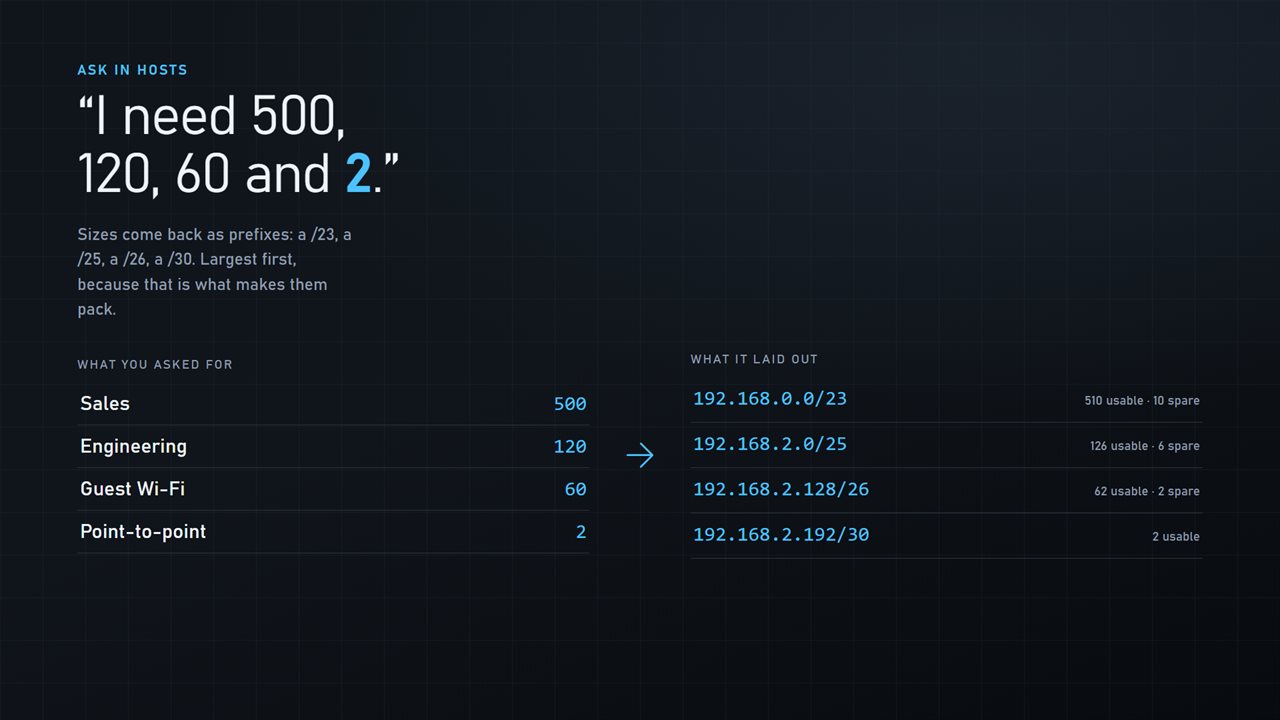
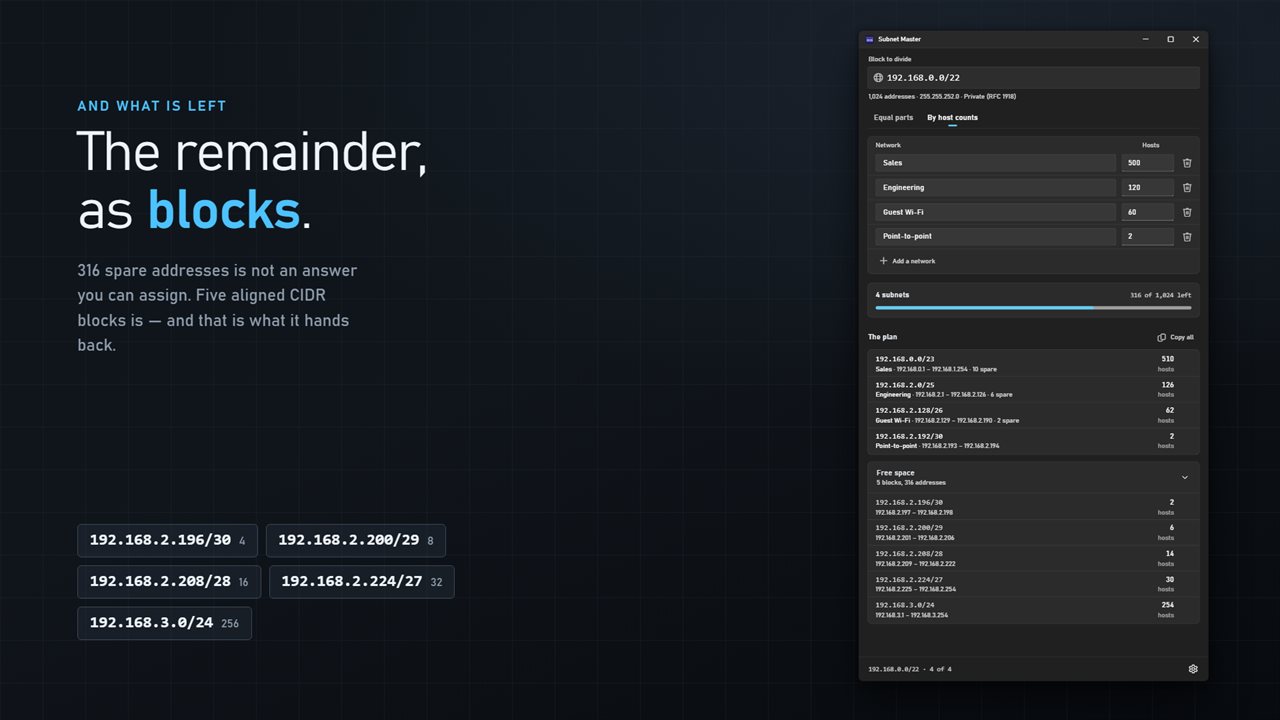
Ask in hosts. 500, 120, 60 and 2 come back as a /23, a /25, a /26 and a /30.
What is left, as aligned CIDR blocks you can actually assign — not a count of spare addresses.
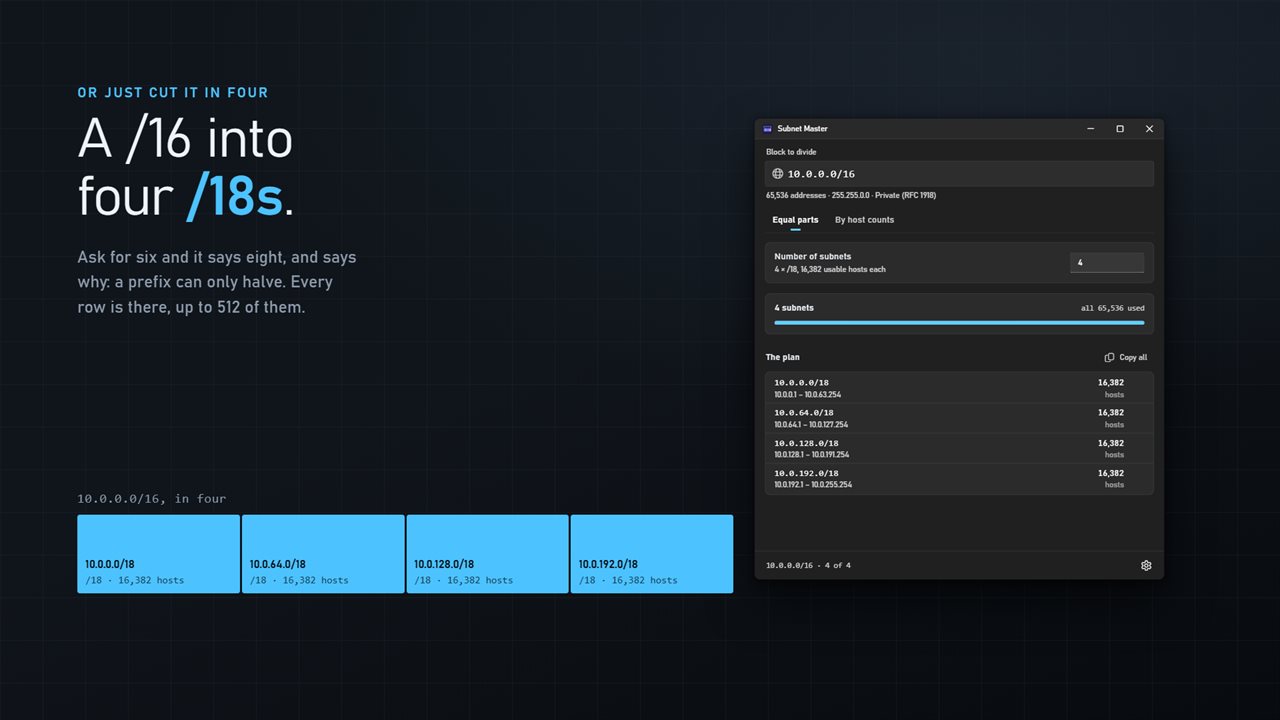
Or just cut it in four. Ask for six and it says eight, and says why.
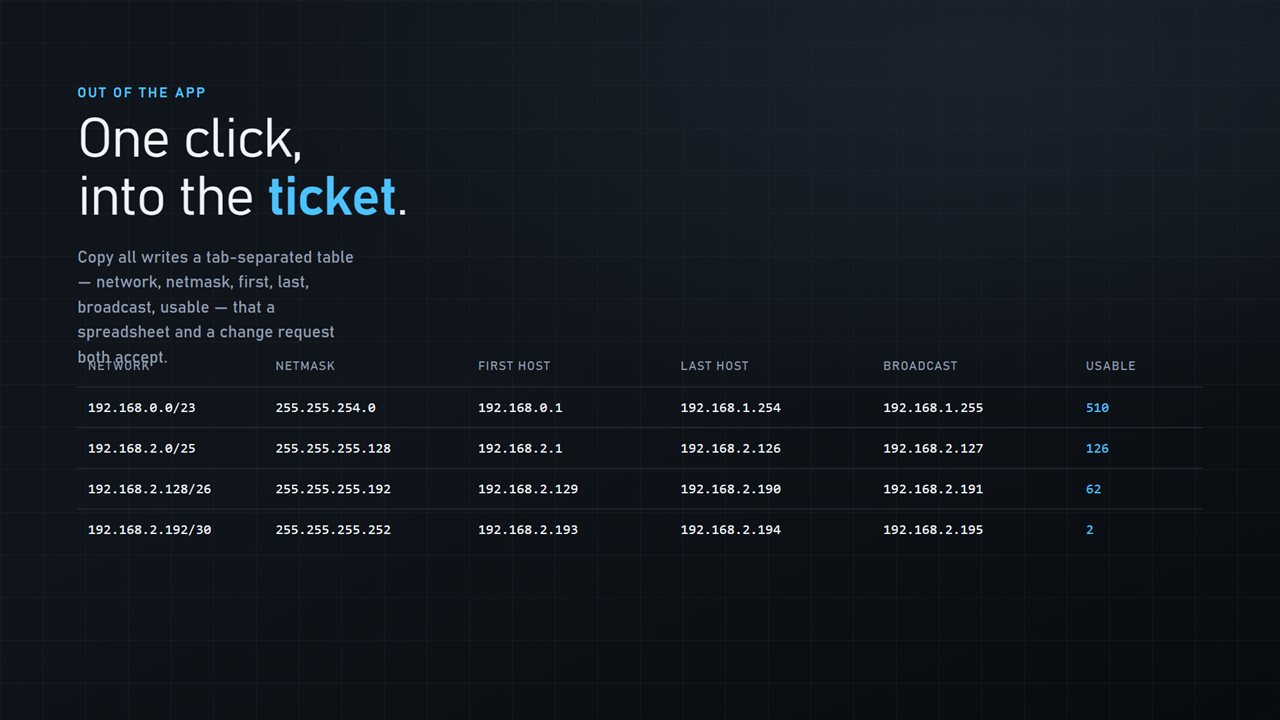
Copy all writes a table a spreadsheet and a change request both accept.

One block in, a plan out — the networks laid out in order, with nothing overlapping.

190,000+downloads of EvlarSoft apps
Signed by EvlarSoftVerified US publisher
14-day money-backNo questions asked
Updates includedNo upgrade fees

What a VLSM calculator does that a subnet calculator does not

A regular subnet calculator answers a question about one network: given 10.0.0.0/16, what is the mask, the range, the broadcast. Planning a site is the opposite problem. You have one block and a list of needs, a sales floor with 500 devices, a lab with 120, guest Wi-Fi with 60, a router link with two, and you need to carve the block so each gets a network of the right size without overlaps or wasted gaps.

That is variable length subnet masking, or VLSM, and a VLSM calculator does the carving. Subnet Master sizes each network to the smallest prefix that holds its hosts, then allocates them biggest first. Order matters: put a /30 at the start of a block and the /23 that follows can no longer begin on its required boundary, so space is lost. Sorting by size is what lets every network sit flush against the last.

The plan updates as you type. Each row shows the network, its name, the prefix and the spare addresses inside it, so an oversized allocation stands out before it reaches a router.

VLSM subnetting example, worked by the app

Take 192.168.10.0/24 and five needs: Office 60 hosts, Lab 28, Guest 12, Cameras 12, Uplink 2. Choose By host counts, type the block into Block to divide, and use Add a network for each row. The result:

The plan totals 132 addresses, about half of the /24, and every network begins where the previous one ended. Copy all then puts the five rows on the clipboard with netmask, first and last host, broadcast and usable count for each.

  • Office: 192.168.10.0/26, 62 usable
  • Lab: 192.168.10.64/27, 30 usable
  • Guest: 192.168.10.96/28, 14 usable
  • Cameras: 192.168.10.112/28, 14 usable
  • Uplink: 192.168.10.128/30, 2 usable
  • Free space: 192.168.10.132/30, .136/29, .144/28, .160/27 and .192/26

Leftover space as CIDR blocks you can actually assign

In that example 124 addresses remain, but a number like that is no help when the next request arrives. A subnet has to start on a multiple of its own size, so the app breaks what is left into the largest aligned pieces, exactly the five blocks listed above. Hand the /26 to a new department tomorrow and the plan still holds.

If a need will not fit at all, the app names it instead of leaving it off the list, and a utilization bar shows how much of the parent block the plan consumes.

Split a subnet into equal parts

For a quick split, choose Equal parts and enter the Number of subnets. Prefixes divide by halves, so asking for 6 gives 8 and the app says why. Very large splits list the first 512 networks and count the rest.

Under Settings, Reserve a network and broadcast address controls point-to-point links: turned off, a two-host network becomes a /31 with both addresses usable, as RFC 3021 defines. Show the usable range and Show the broadcast address tidy each row to what your firewall or router config needs.

Planning tools in one window

  • By host counts mode for VLSM plans with named networks
  • Equal parts mode with power-of-two rounding explained
  • Largest-first packing with every subnet on its own boundary
  • Spare addresses shown per network
  • Free space returned as aligned CIDR blocks
  • Unfittable networks listed by name
  • Utilization bar for the parent block
  • Copy all as a tab-separated tableNetwork, netmask, first host, last host, broadcast, usable
  • Single-subnet copy in CIDR form
  • Correct /31 and /32 handling; IPv4 only

Questions

Anything else? Ask us

Does it do VLSM, sizing subnets by the number of hosts each one needs?

Yes. List each network with a name and a host count, and it picks the smallest prefix for each and packs them into the block largest first, so every subnet starts on its own boundary. For 500, 120, 60 and 2 hosts it gives a /23, a /25, a /26 and a /30.

What happens if I ask for a number of equal subnets that is not a power of two?

It rounds up to the next power of two and says so, because a prefix can only halve. Asking for six gives eight subnets. When a split has more than 512 subnets, the first 512 are listed and the rest are counted.

Does it support IPv6?

No. It works with IPv4 blocks only.

Does it show the address space left over after a plan?

Yes. Whatever a host-count plan does not use is listed as whole, aligned CIDR blocks you can still assign, not just a count of spare addresses. Any network that does not fit in the block is named rather than dropped.

How does it handle /31 point-to-point links?

A /31 is shown with both addresses usable and no network or broadcast address, as in RFC 3021, and a /32 as a single host. Turn off Reserve a network and broadcast address and a 2-host network is sized as a /31 instead of a /30.

Can I copy the plan into a spreadsheet?

Yes. Copy the whole plan as a tab-separated table with network, netmask, first host, last host, broadcast and usable count, or copy any single subnet in CIDR form.

What is the difference between FLSM and VLSM?

FLSM, fixed length subnet masking, cuts a block into equal subnets that all share one mask, which is the Equal parts mode here. VLSM gives each subnet its own mask sized to its host count, which wastes far less space when networks differ in size.

How many hosts fit in each prefix?

A prefix of /n holds 2 to the power of (32 minus n) addresses, minus two for the network and broadcast. So a /26 has 62 usable hosts, a /27 has 30 and a /28 has 14. A /31 is the exception, with both addresses usable on a point-to-point link.

Which versions of Windows does it run on?

Windows 10 (version 1809 or later) and Windows 11.

Is it a subscription?

No. Subnet Master is a one-time purchase of $2.99, and updates are included.

How do I get it?

Buy it on this page and your license key arrives by email. If the button says Notify me, Subnet Master is not on sale here yet; leave your email and we will tell you when it is.