EEvlarSoft

ARP Table Manager

See the Windows ARP table as a live patch board, find out which device sits behind each IP, and get warned the moment something starts impersonating your router.

Buy for $1.99
One payment. No subscription.
14-day money-back guarantee.
5.0
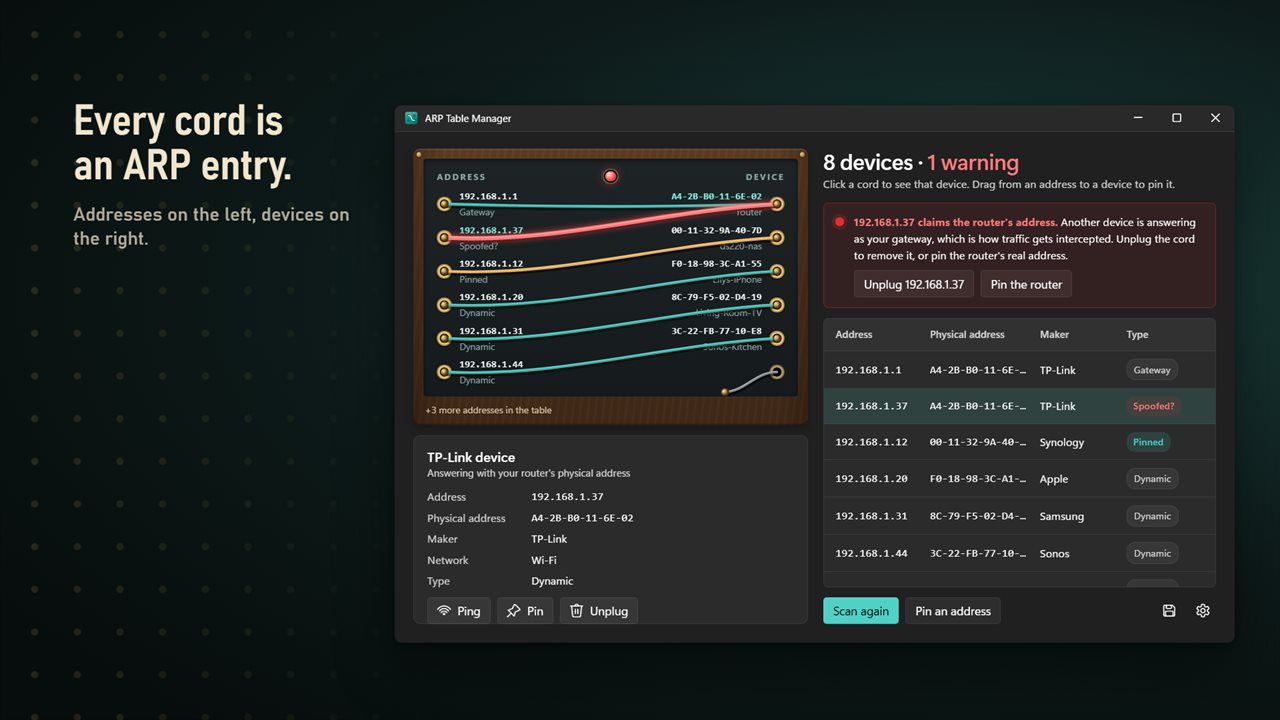
Your ARP table as a switchboard. Every cord is an entry.
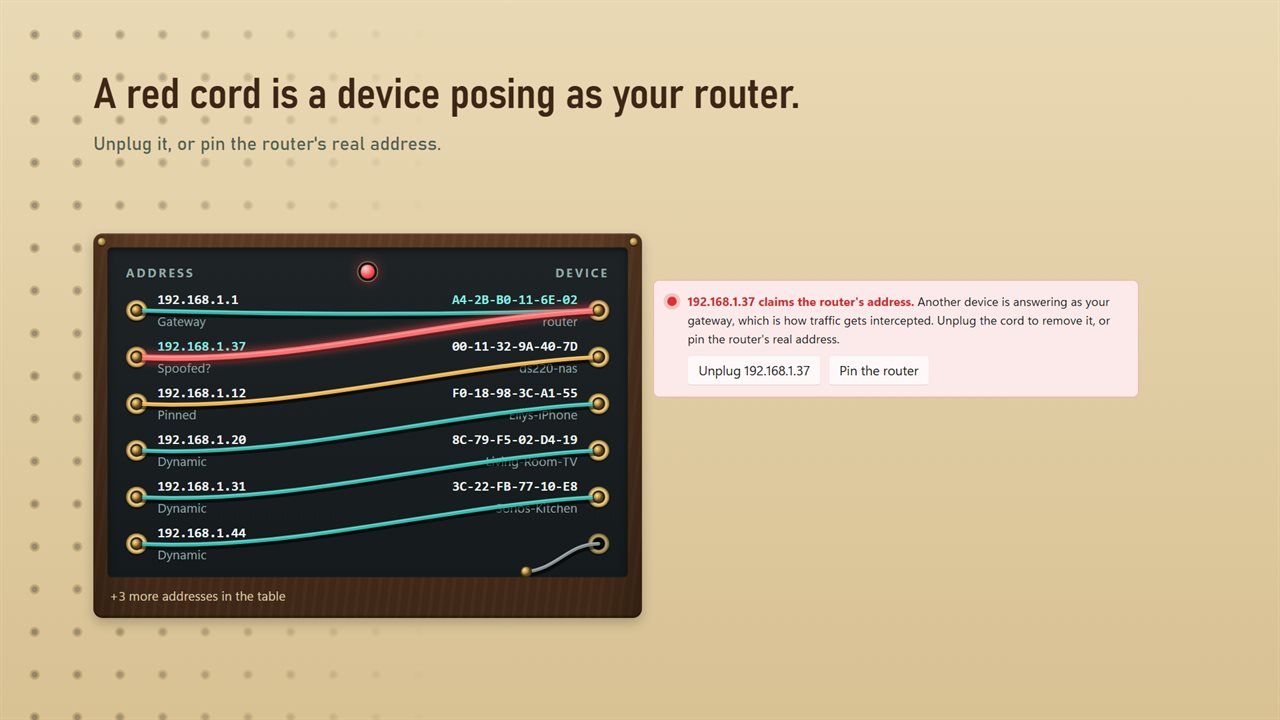
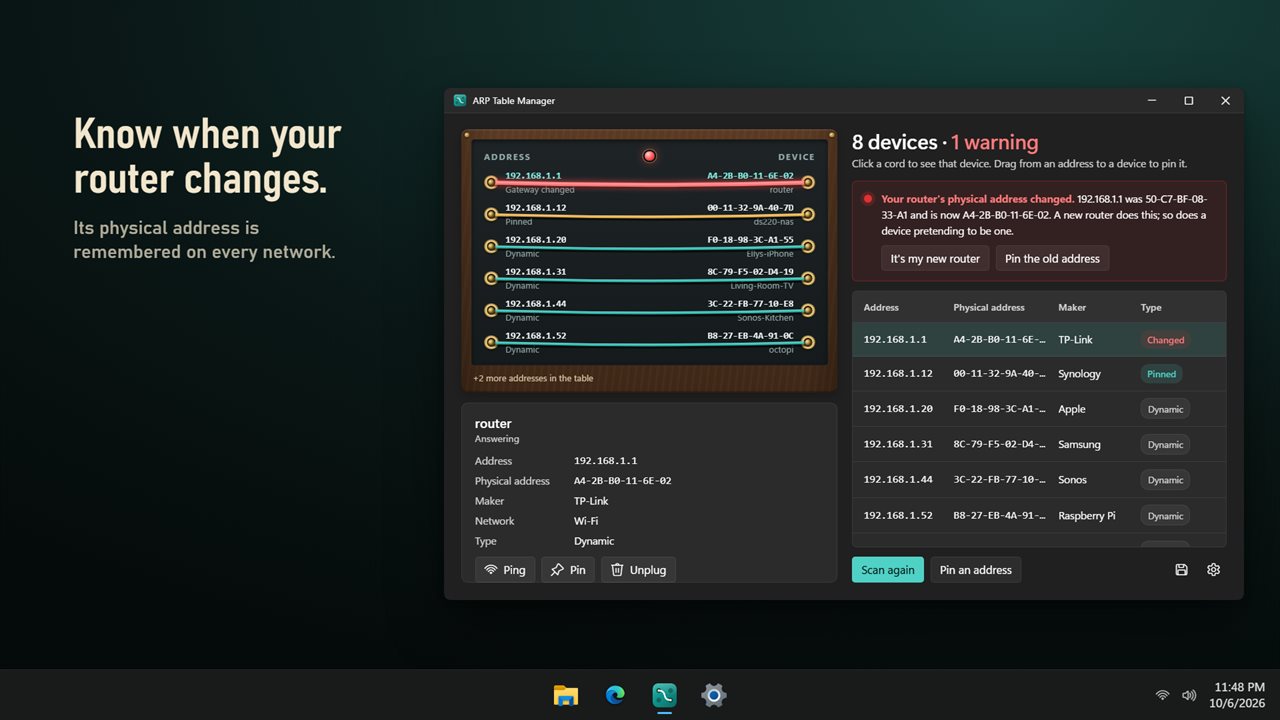
A red cord means a device is answering as your router.
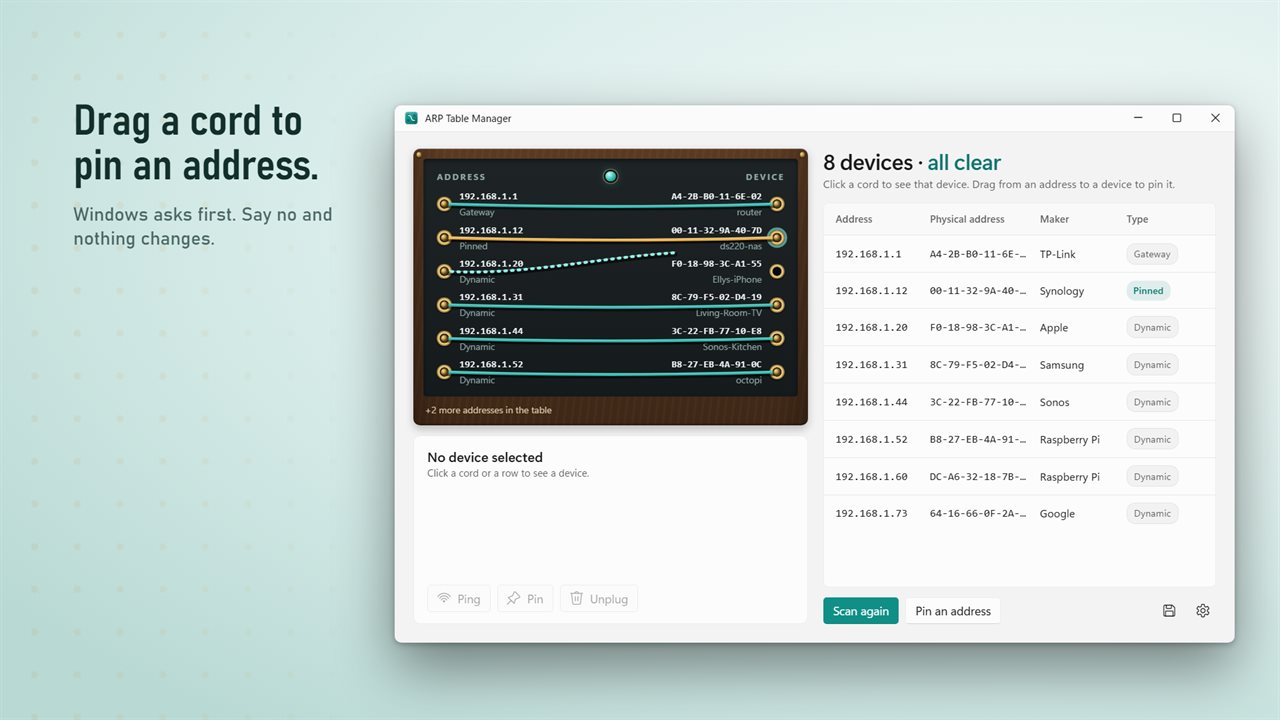
Drag a cord from an address to a device to pin it.
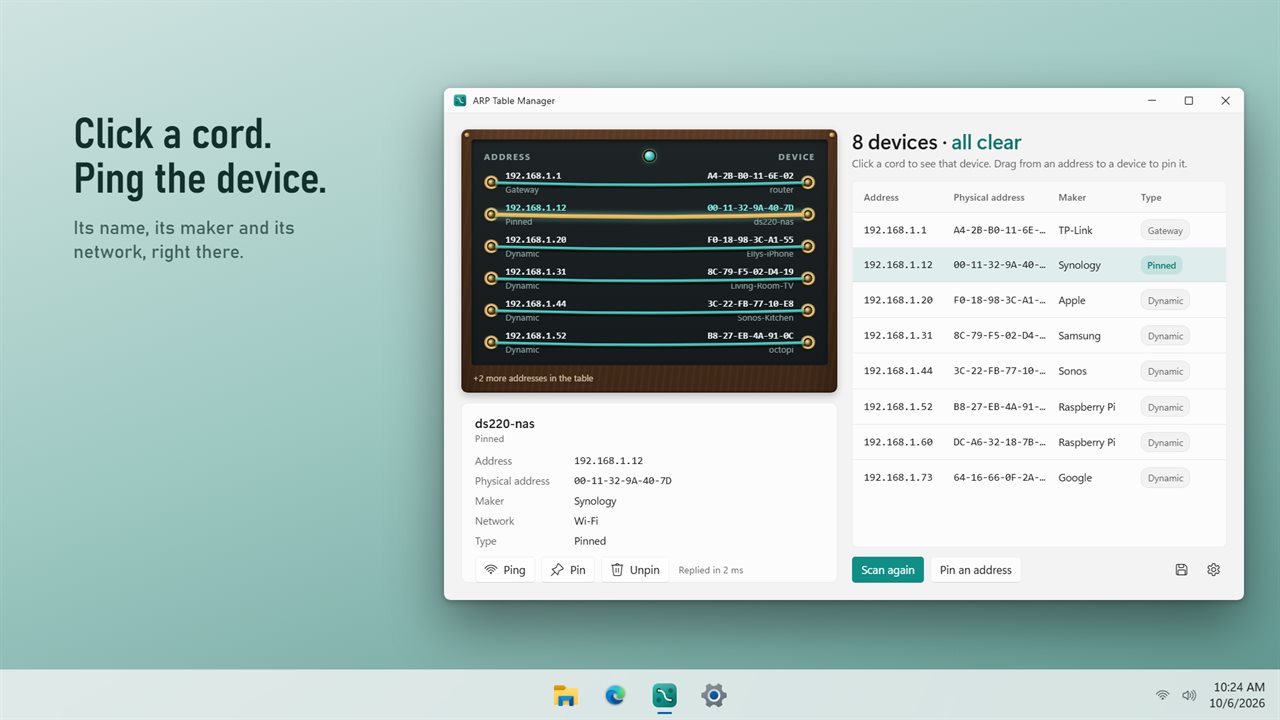
Click a cord to see the device, and ping it right there.
Know when your router's physical address changes.
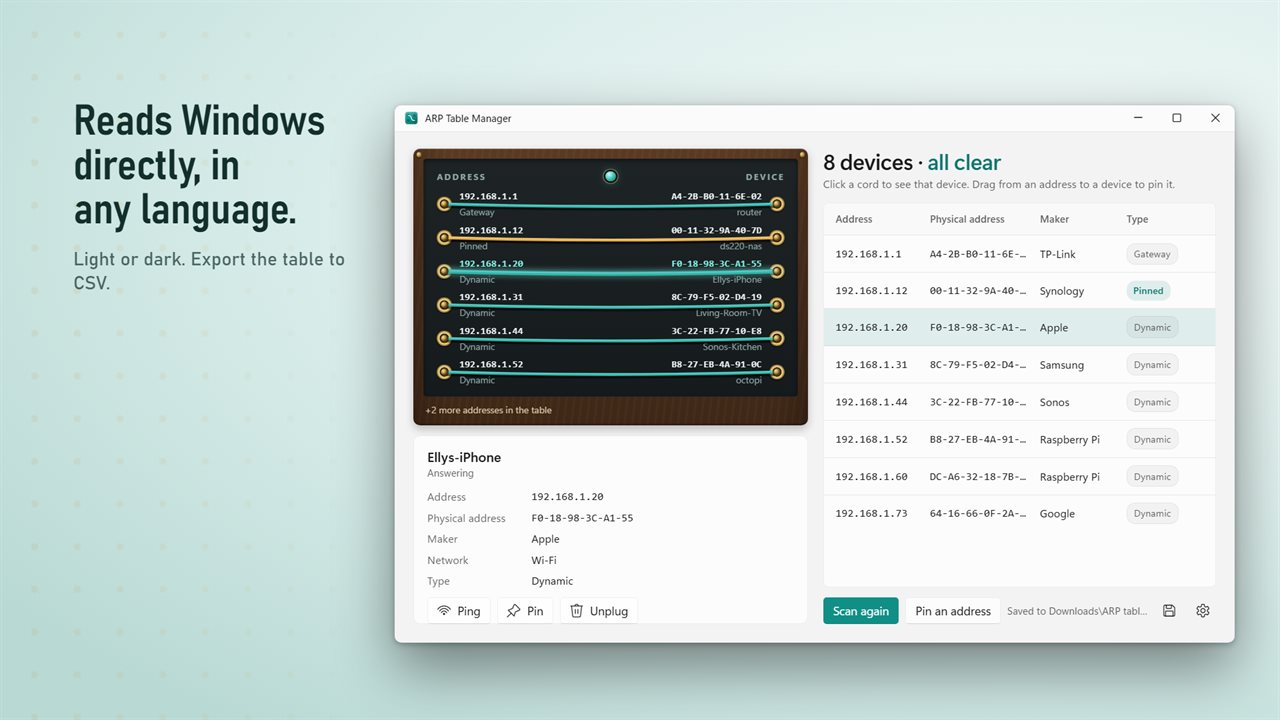
Light or dark, in every Windows language.

Your ARP table as a switchboard. Every cord is an entry.

190,000+downloads of EvlarSoft apps
Signed by EvlarSoftVerified US publisher
14-day money-backNo questions asked
Updates includedNo upgrade fees

Read the ARP table without a command prompt

The ARP table is Windows' short list of which hardware address answers for each IP address on your local network. The usual way to see it is arp -a in a command prompt, which prints a column of numbers per interface with no hint of what each device is or whether anything looks wrong. Changing it means remembering netsh syntax, the exact adapter name and the dash-separated MAC format Windows insists on.

ARP Table Manager draws the same data as a switchboard. Each IP address is a jack on one side, each device a jack on the other, and each table entry is a patch cord joining them. Teal marks a dynamic entry Windows learned by itself, gold marks a pinned one, and red means look closer. Click any cord or row to see the device's name, its maker, the network it is on and whether it is answering.

It reloads on launch and then on the interval chosen under Read the table every, 10 seconds unless you change it. Reading it sends nothing onto the network; it is the list Windows already holds.

How to detect ARP spoofing on your network

ARP spoofing, also called ARP poisoning or ARP cache poisoning, is when a device on the same network replies to ARP requests with its own MAC address in place of the router's. Your PC then sends traffic to the impostor, which can read it and pass it on. On café, hotel or shared office Wi-Fi it is one of the oldest tricks there is.

With Warn about ARP spoofing switched on, the app looks for the two signs that give it away. If a second IP in the table reuses the gateway's MAC, that connection goes red with the label Answering with your router's physical address. And because the app remembers the router's MAC for each network, it warns The router's physical address changed if that ever shifts. Replaced the router yourself? Choose It's my new router and the new address is stored. Otherwise, Pin the old address puts the genuine router back in charge.

Add a static ARP entry in Windows

A static, or pinned, entry fixes an IP address to one physical address so Windows ignores anything the network claims about it. It is a common defense for the gateway, and a fix for printers and lab devices that answer ARP badly.

  • Pull a line across the board between an IP and a device to pin that pairing directly, or choose Pin an address.
  • Type the IP and the physical address. Colons, dashes or no separators all work, and the address is tidied and checked before anything is changed.
  • Choose the Network the entry belongs to and select Pin.
  • Approve the Windows permission prompt. If you decline it, nothing changes.

Clear an ARP cache entry you do not trust

Select an entry and choose Unplug to delete it, so Windows asks the network afresh next time. Unpin turns a pinned entry back into an ordinary one. Both use the built-in netsh tool behind a permission prompt; looking at the table needs no administrator rights at all.

For troubleshooting, Ping checks whether a device is replying and how quickly, right in the window. Copy address and Copy physical address put either value on the clipboard, and Export to CSV writes the whole table to a CSV file in Downloads. Turn off Show devices that have gone quiet to hide entries Windows is keeping for devices that have stopped answering.

What ARP Table Manager does

  • Live view of the IPv4 ARP table, refreshed every 5, 10, 30 or 60 seconds
  • MAC address vendor lookup from a built-in IEEE list, with no internet needed
  • Dynamic, pinned and quiet entries shown in different colors
  • Spoofing alert when another IP uses the router's physical address
  • Per-network memory of the router's MAC, with a warning if it changes
  • Pin static entries by drag and drop or by typing them in
  • Unplug and Unpin entries through a Windows permission prompt
  • Built-in ping with response time
  • CSV export of the full table
  • Reads the neighbor table straight from Windows rather than parsing arp -a text

What's new in 2.0.2

  • New: the ARP table as a switchboard, with a patch cord for every entry
  • New: ARP spoofing warnings, including a change to your router's physical address
  • New: device makers and names
  • New: drag a cord to pin an address, and unplug entries you don't trust
  • New: ping a device right in the window
  • The table is read at launch and every 10 seconds, and works in every Windows language
  • Export to CSV is still here

Questions

Anything else? Ask us

How does it detect ARP spoofing?

It flags two signs: another address in the table answering with your router's physical address, and your router's physical address changing from the one it remembered for that network. If you replaced the router, click It's my new router and the new address is remembered.

Does it need administrator rights?

Only to change the table. Viewing it needs no rights, while pinning or unplugging an entry runs the Windows netsh tool with a permission prompt. If you decline the prompt, nothing changes.

Does it show IPv6 neighbors?

No. It reads and edits the IPv4 ARP table only, and pinning accepts IPv4 addresses only.

How does it know who made each device?

It looks up the first half of each physical address in a built-in copy of the IEEE manufacturer list, about 28,000 entries, so no internet connection is needed. Devices that use a randomized address show as Unknown.

Does it scan my network?

No. It reads the table Windows already keeps, every 10 seconds by default or every 5, 30 or 60 seconds. It only sends traffic when it looks up device names or when you ping a device, and the ping waits up to 1.5 seconds for a reply.

Can I export the ARP table?

Yes. Export saves a CSV file to your Downloads folder with the address, physical address, maker, name, network, type, status and any warning for each entry.

What does arp -a show in Windows?

It lists the ARP cache for each network interface: the IP addresses your PC has talked to recently, the physical (MAC) address that answered for each, and whether the entry is dynamic or static. This app shows the same table with device makers and names added.

Can ARP spoofing happen on home Wi-Fi?

Yes, but it needs a device already on your network, so it is far more common on public or shared networks. A spoofing warning at home usually means a compromised device or, harmlessly, a newly replaced router.

Is it safe to clear the ARP cache?

Yes. Deleted dynamic entries are simply relearned the next time your PC contacts those devices, usually within a second. Only remove pinned entries you added on purpose if you no longer need them.

Which versions of Windows does it run on?

Windows 10 (version 1809 or later) and Windows 11.

Is it a subscription?

No. ARP Table Manager is a one-time purchase of $1.99, and updates are included.

How do I get it?

Buy it on this page and your license key arrives by email. If the button says Notify me, ARP Table Manager is not on sale here yet; leave your email and we will tell you when it is.