EEvlarSoft
No upload. Files stay on your PC

JSON Validator

Validate JSON as you type, have the common syntax errors repaired and marked for you, then format, compare or turn the result into types and a schema.

Buy for $1.99
One payment. No subscription.
14-day money-back guarantee.
4.0
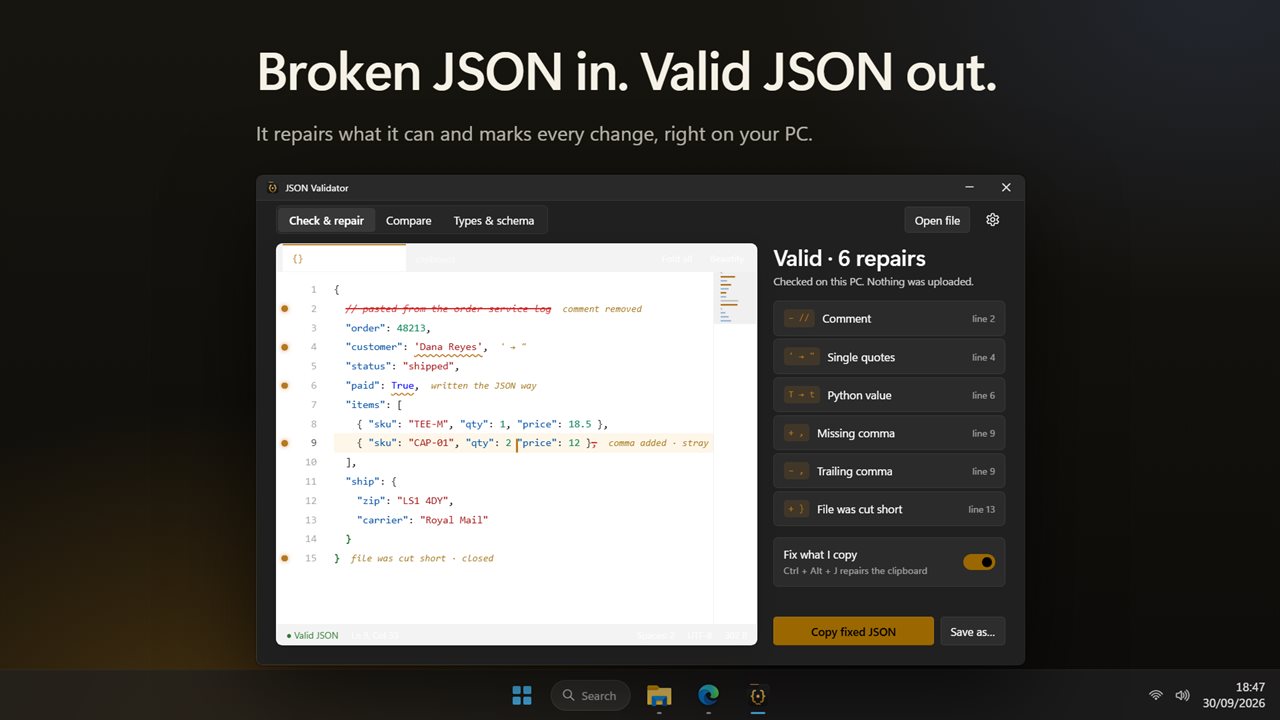
Broken JSON in, valid JSON out, with every repair marked.
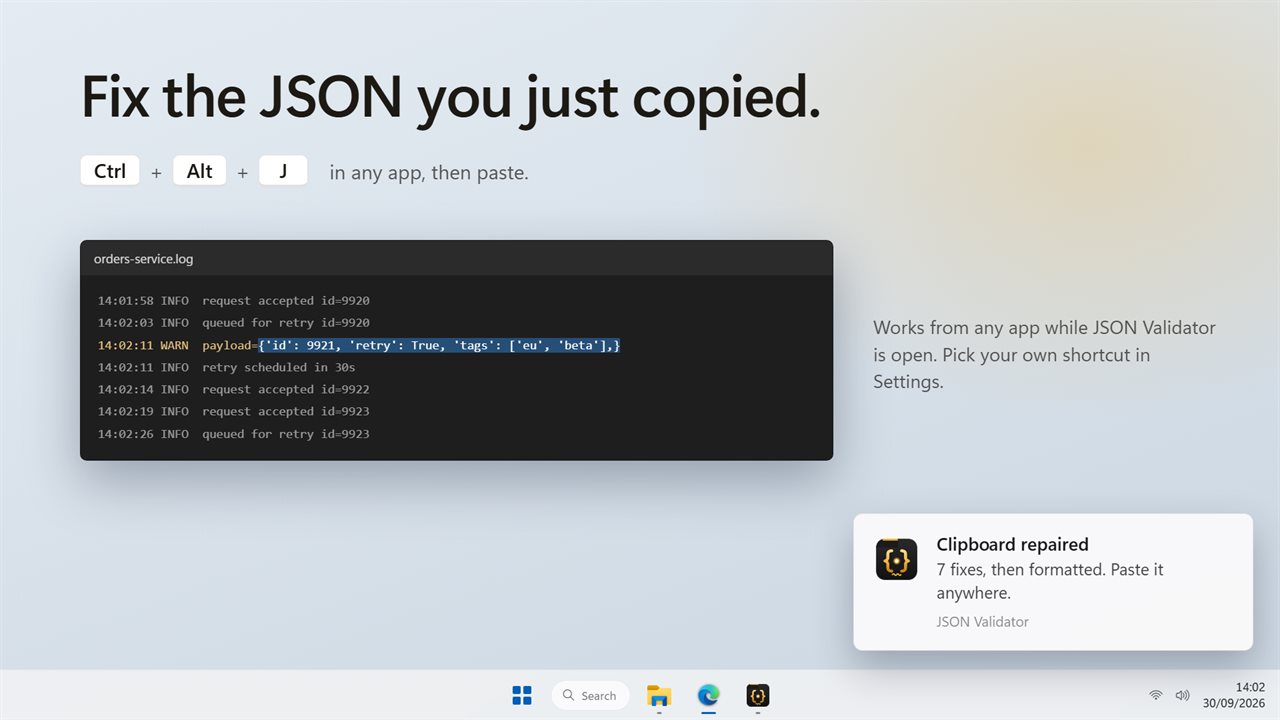
Press Ctrl+Alt+J in any app to fix the JSON you just copied.
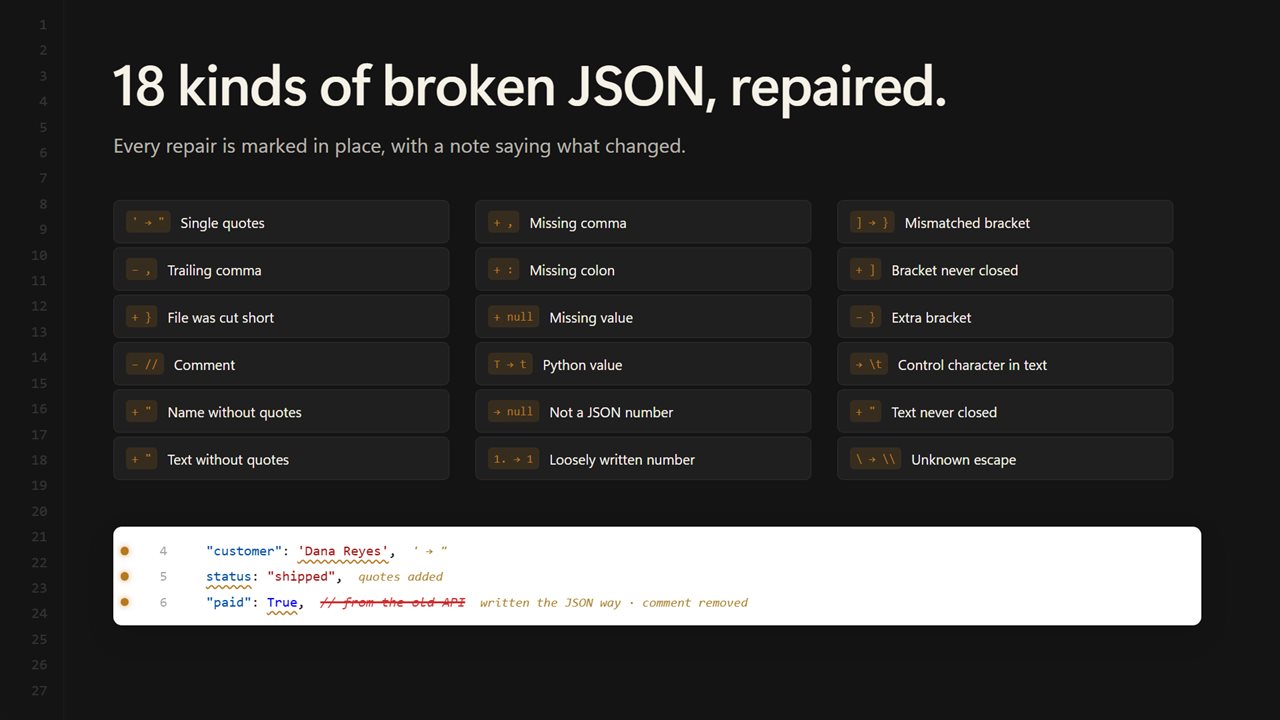
18 kinds of mistake, repaired and explained.
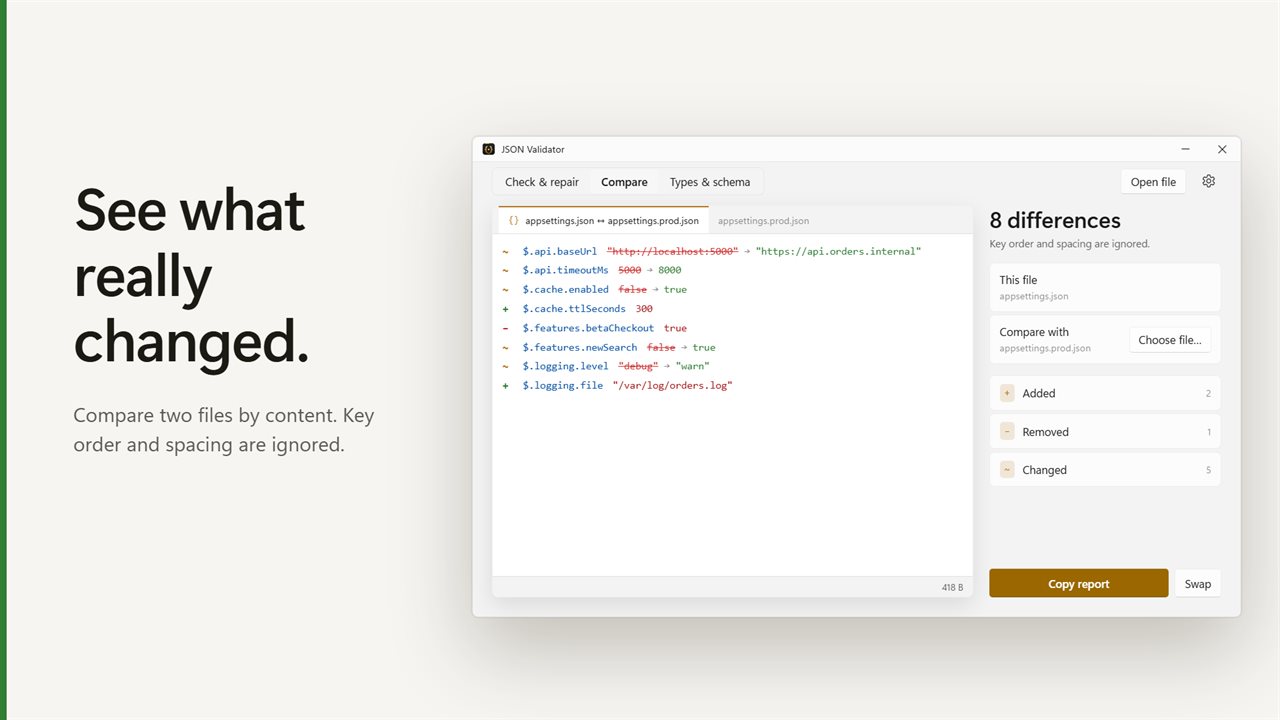
Compare two files and see what really changed.
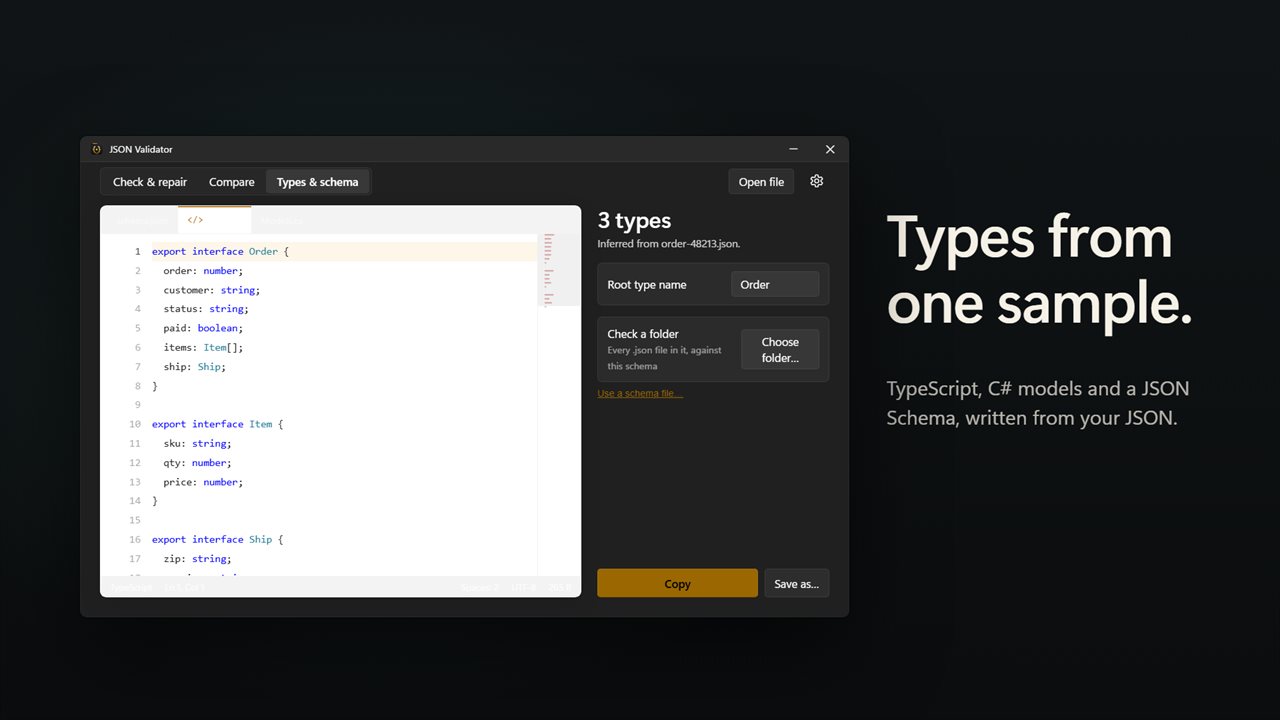
TypeScript, C# and a JSON Schema from one sample.
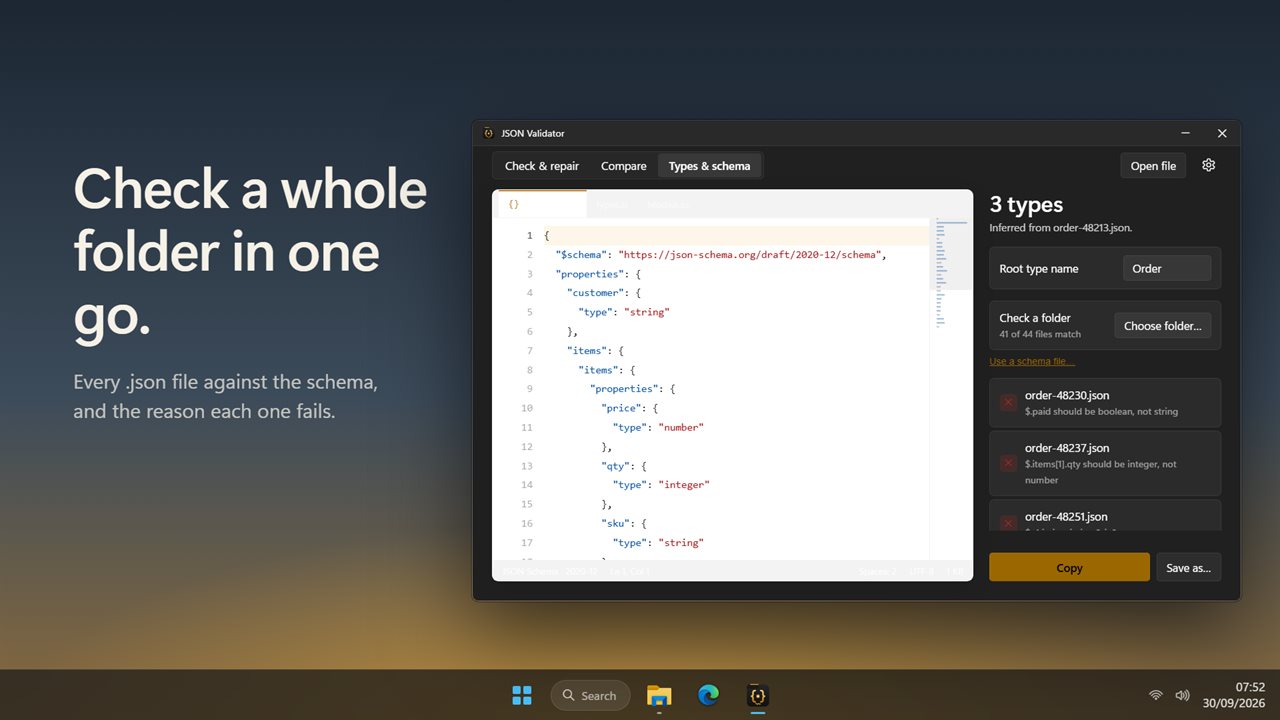
Check a whole folder of files against the schema.
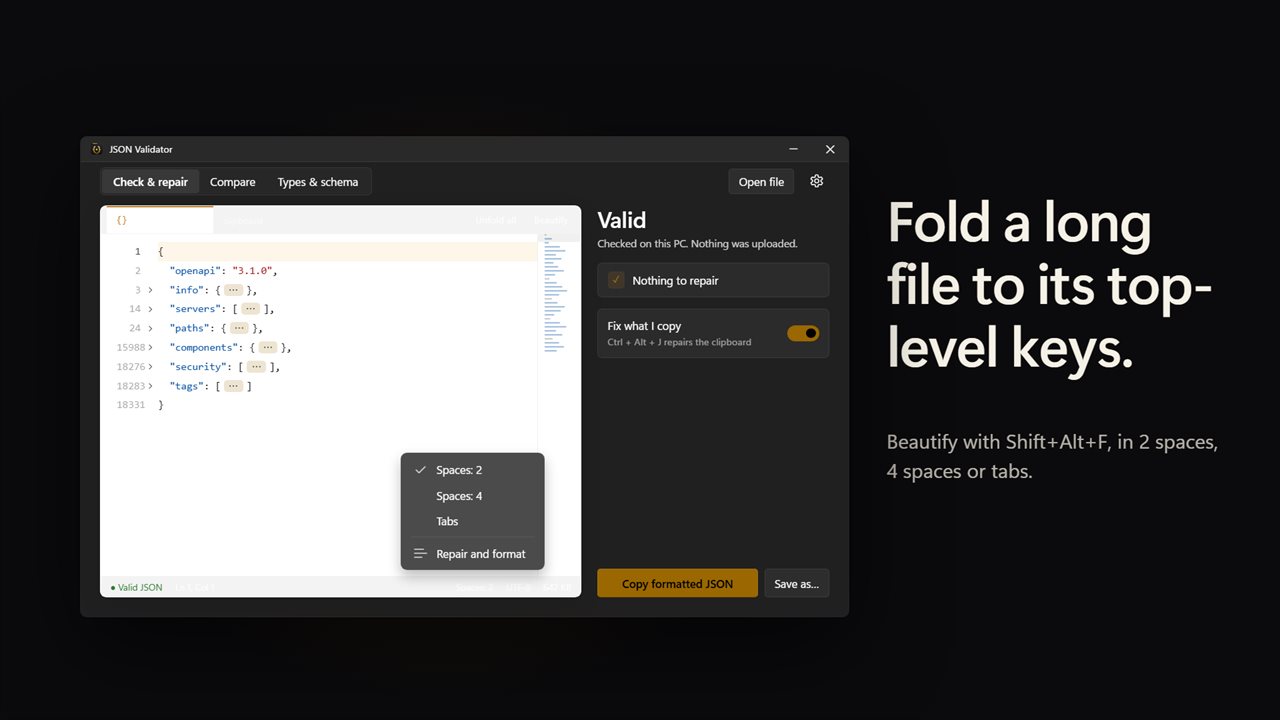
Fold a long file down to its top-level keys.

Broken JSON in, valid JSON out, with every repair marked.

190,000+downloads of EvlarSoft apps
Signed by EvlarSoftVerified US publisher
14-day money-backNo questions asked
Updates includedNo upgrade fees

A JSON validator that repairs the error instead of just pointing at it

A typical JSON validator stops at the first problem, reports a line and column, and leaves you to fix it, then re-run, then find the next one. That is fine for one stray comma and miserable for a config file someone hand-edited or a payload pasted from a log.

JSON Validator checks while you type and repairs every problem it can safely interpret, all in one pass. Each change is drawn in the editor (struck through for a removal, underlined for a rewrite, highlighted for an insertion) with a short note at the end of the line, and the full list of repairs sits beside the text. Click an entry to jump to it. Nothing is changed silently, which is the usual objection to auto-fixing.

When a fault has no safe interpretation, the status bar turns to Invalid with the line number and a plain sentence about what should come next, such as "A comma or a closing bracket should come next." The checking is done by the app's own parser on your PC, not by a web page.

Common JSON errors it fixes automatically

The repair engine recognizes 18 kinds of mistake. The ones you will hit most:

  • Trailing commas after the last item in an object or array
  • Single-quoted strings and keys, rewritten with double quotes
  • // and /* */ comments, removed
  • Keys and text values with no quotes at all
  • Missing commas, missing colons and missing values (filled with null)
  • Python's True, False and None, written as true, false and null
  • NaN and Infinity, which JSON has no way to express, turned into null
  • Mismatched, extra or unclosed brackets, and a file that was cut short partway through
  • Raw tabs or newlines inside a string, and unknown backslash escapes

JSON formatter and beautifier with real editing

Beautify, or Shift+Alt+F, lays the document out with an indent of 2 spaces, 4 spaces or tabs; the choice sits in the status bar and under Indent in Settings. Minified JSON pasted into an empty editor is formatted on arrival. Fold all collapses the document to its top-level keys, and any single block folds from the arrow in the gutter. The status bar always shows Ln and Col so you can match an error message from another tool.

Copy fixed JSON puts the repaired text on the clipboard, and Save as… writes it to a new file, named fixed.json unless you choose otherwise. Very large documents open read-only so scrolling stays smooth, and the fixed version can still be copied or saved.

Compare two JSON files and see the diff by key path

The Compare tab sets the open document against a second one, typed, pasted or picked with Choose file…. The result lists every value under Added, Removed or Changed with its full path, so a renamed field in a nested array is easy to spot. Reordered keys and whitespace are not counted as differences. Swap flips the sides, and Copy report puts the list on the clipboard for a pull request or a ticket.

Convert JSON to TypeScript, C# and a JSON Schema

Types & schema works out types from the sample in Check & repair: TypeScript interfaces, C# classes for System.Text.Json, and a JSON Schema. Set Root type name to the name you want at the top, then copy each result or save it.

Check a folder then runs the schema against every .json file in a directory and reports how many match, with the reason each failing file fails. Use a schema file… swaps in a schema you already maintain instead of the generated one.
Feature summary

  • Live validation with a Valid, Valid · n repairs or Invalid · line n status
  • 18 repair types, each marked inline and listed beside the editor
  • Fix what I copyA global shortcut, Ctrl+Alt+J by default, that repairs and formats JSON on the clipboard and confirms with a notification
  • Beautify with Shift+Alt+F, indent of 2, 4 or tabs
  • Fold all, Unfold all and per-block folding
  • Tabs for several open documents, including one for the clipboard
  • Structural JSON diff that ignores key order and spacing
  • TypeScript, C# and JSON Schema generation from one sample
  • Batch schema validation of a whole folder
  • Open file, drag and drop, or paste; dark theme by default with Light and Match Windows options

Where it saves time

API responses copied from logs

A truncated body from a log line is closed off and becomes valid JSON, so you can read its structure without hand-counting brackets.

Hand-edited config files

Comments and trailing commas left in a settings file are removed and shown, so you know exactly what to clean up in the source.

Starting a typed client

Paste one real response, generate the TypeScript or C# models, then check the rest of your fixtures against the schema.

What's new in 2.0.2

  • New: broken JSON is repaired, not just rejected, with every repair marked in the editor
  • New: press Ctrl+Alt+J in any app to fix the JSON on your clipboard
  • New: compare two JSON files and see what changed
  • New: generate TypeScript, C# and a JSON Schema from a sample, and check a folder against it
  • New: fold all, beautify with your choice of indent, and fast read-only viewing for large files

Questions

Anything else? Ask us

Can it fix broken JSON, not just find the error?

Yes. It repairs 18 kinds of mistake, including single quotes, trailing commas, comments, unquoted names, missing commas and colons, Python's True, False and None, mismatched brackets and files that were cut short. Each repair is marked in the editor, and when something cannot be repaired it shows the line and what should come next.

Does fixing JSON change my original file?

No, not unless you choose to. You copy the fixed JSON or save it with Save as, and you pick the file name. A save is written to a temporary file first and then renamed, so a failed save never leaves half a file.

How large a JSON file can it open?

Files up to 4 MB and 200,000 lines open in the editor. Larger files open read-only so they stay fast, and you can still copy or save the fixed version of them.

Can it fix JSON on the clipboard without switching to the app?

Yes, while JSON Validator is open. Press Ctrl+Alt+J in any app and the JSON on the clipboard is repaired and formatted in place, then a notification says how many fixes it made. You can choose a different shortcut or turn it off in Settings.

Can it validate JSON against a schema?

Yes. Choose a folder and it checks every .json file directly inside it, up to 5,000, against a schema generated from your sample or a schema file of your own. It supports the parts real schemas use most: types, properties, required, items, enums, bounds, combinators and $ref within the same schema, but not $ref links to other files or URLs.

Can it compare two JSON files?

Yes. It lists added, removed and changed values by key path, and ignores key order and spacing. Both sides are repaired before comparing, so a file with a trailing comma can still be compared.

Why is my JSON invalid when it looks fine?

The usual culprits are a comma after the last item, single quotes instead of double quotes, a comment, or a key without quotes. JSON allows none of these. Paste the text into JSON Validator and each one is repaired and marked so you can see which applied.

Can JSON have comments?

No. The JSON standard has no comment syntax, so // or /* */ makes a file invalid even though some tools accept it. JSON Validator strips them and lists each removal as a repair.

What is the difference between a JSON validator and a JSON formatter?

A validator checks that the text follows JSON syntax; a formatter re-indents valid JSON so it is readable. This app does both, and repairs common errors in between so the formatter has valid input.

Which versions of Windows does it run on?

Windows 10 (version 1809 or later) and Windows 11.

Is it a subscription?

No. JSON Validator is a one-time purchase of $1.99, and updates are included.

How do I get it?

Buy it on this page and your license key arrives by email. If the button says Notify me, JSON Validator is not on sale here yet; leave your email and we will tell you when it is.