EEvlarSoft

Trip Cost Calculator for Windows

A road trip gas calculator that prices every leg of your route on a map and splits the bill fairly, even when friends hop in or out partway through.

Buy for $5.99
One payment. No subscription.
14-day money-back guarantee.
5.0
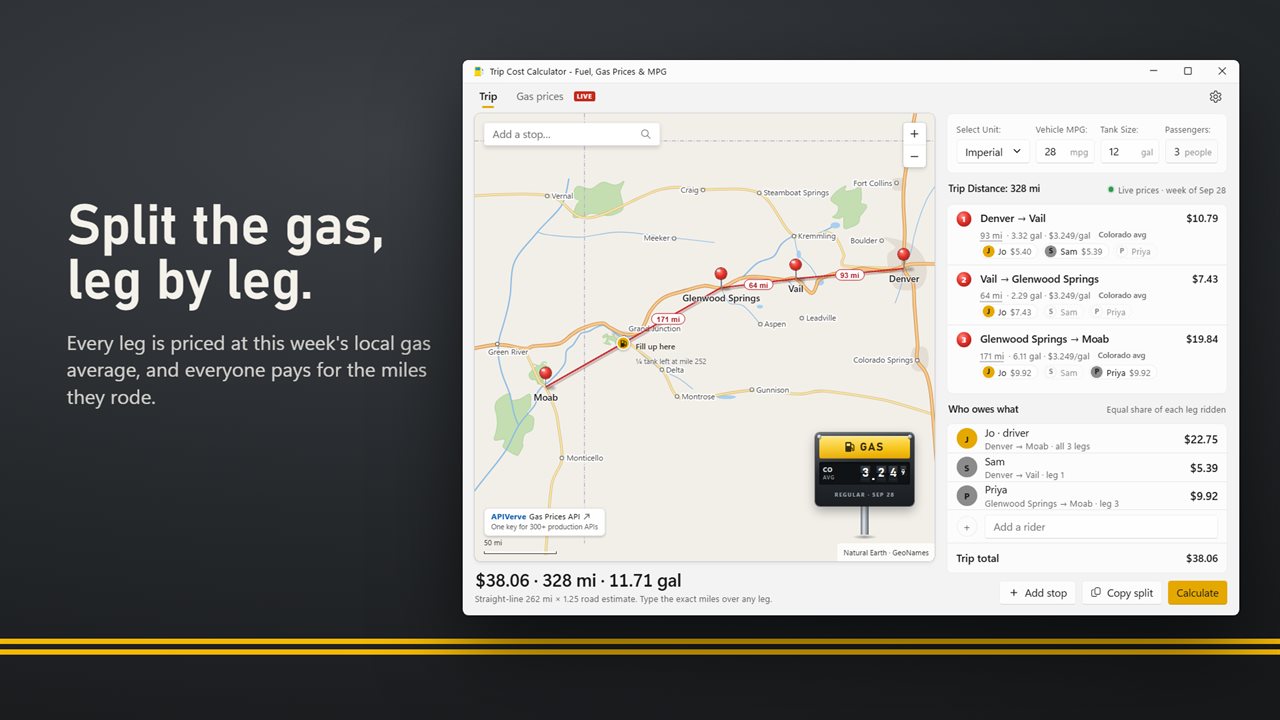
Pin your road trip and see what the gas costs, leg by leg.
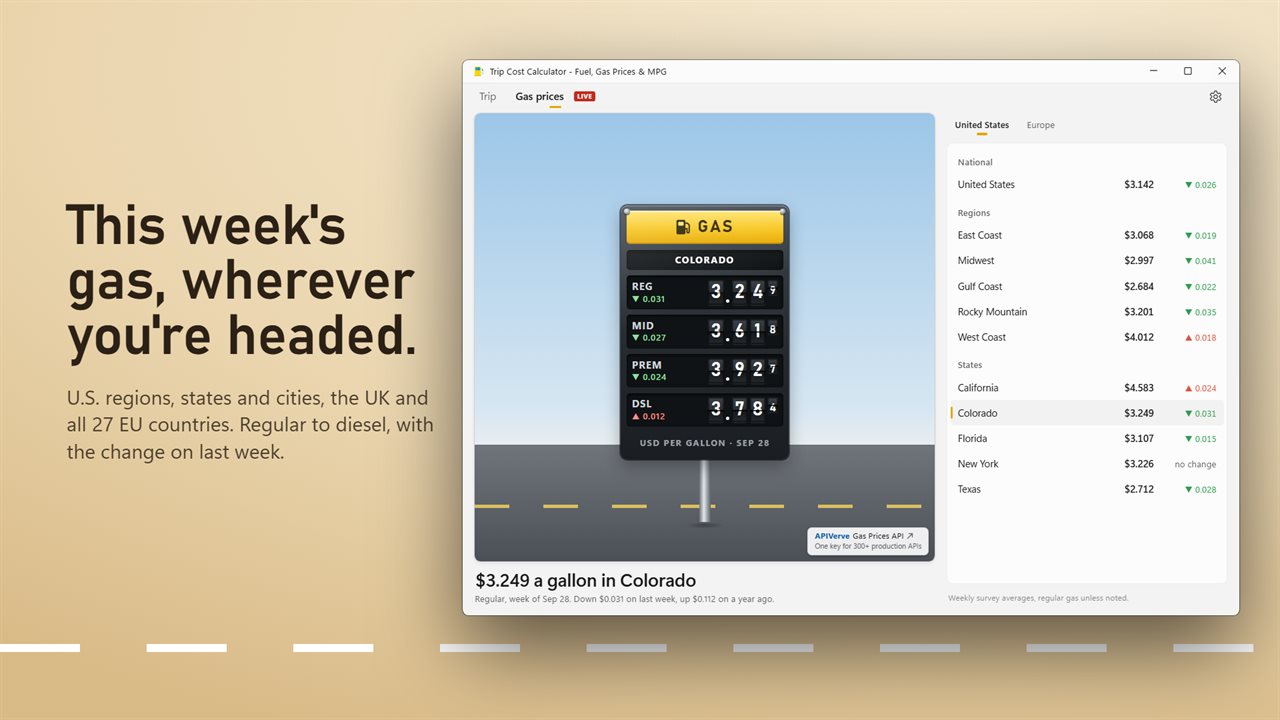
This week's gas prices, regular to diesel, wherever you're headed.
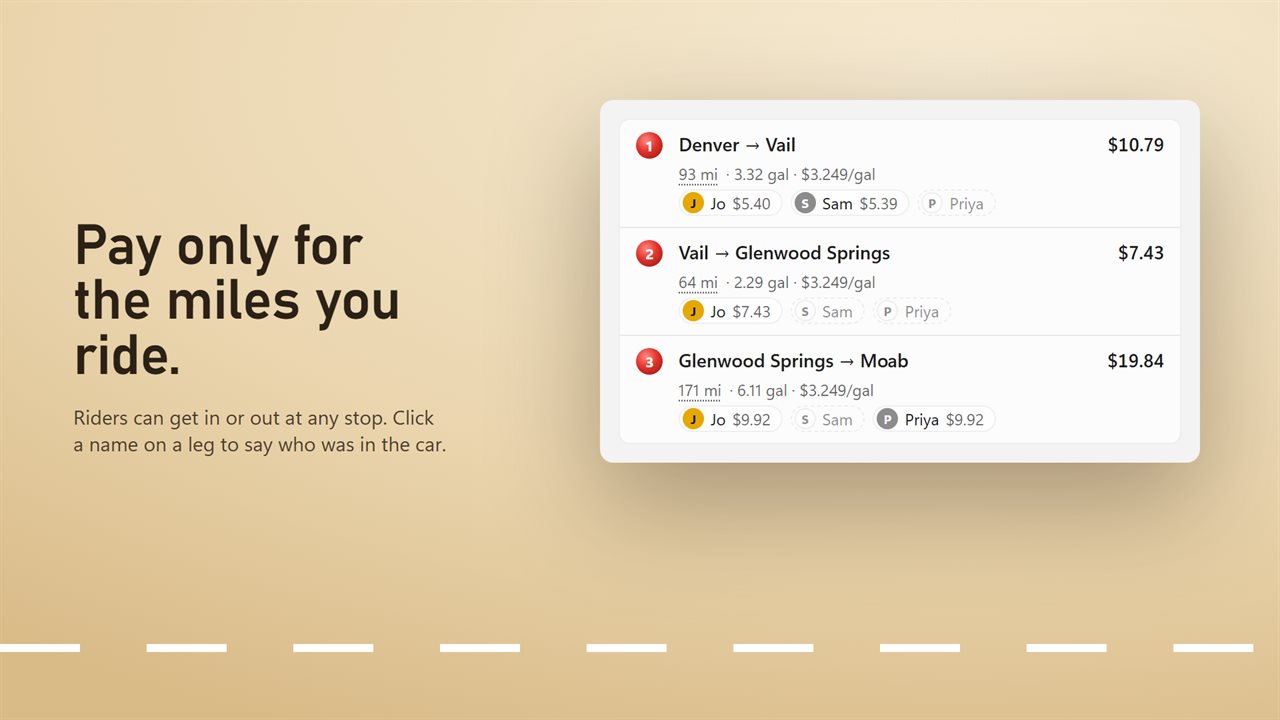
Riders join and leave at any stop. Each pays for the legs they rode.
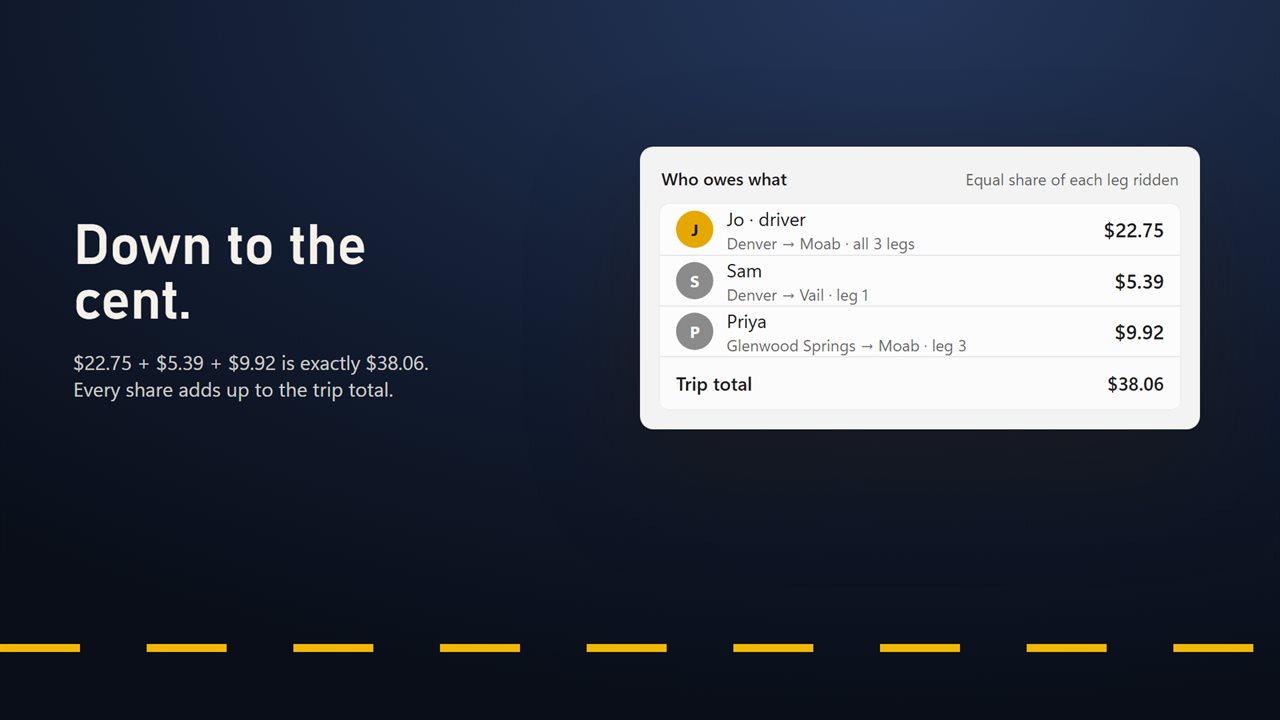
Every share adds up to the trip total, to the cent.
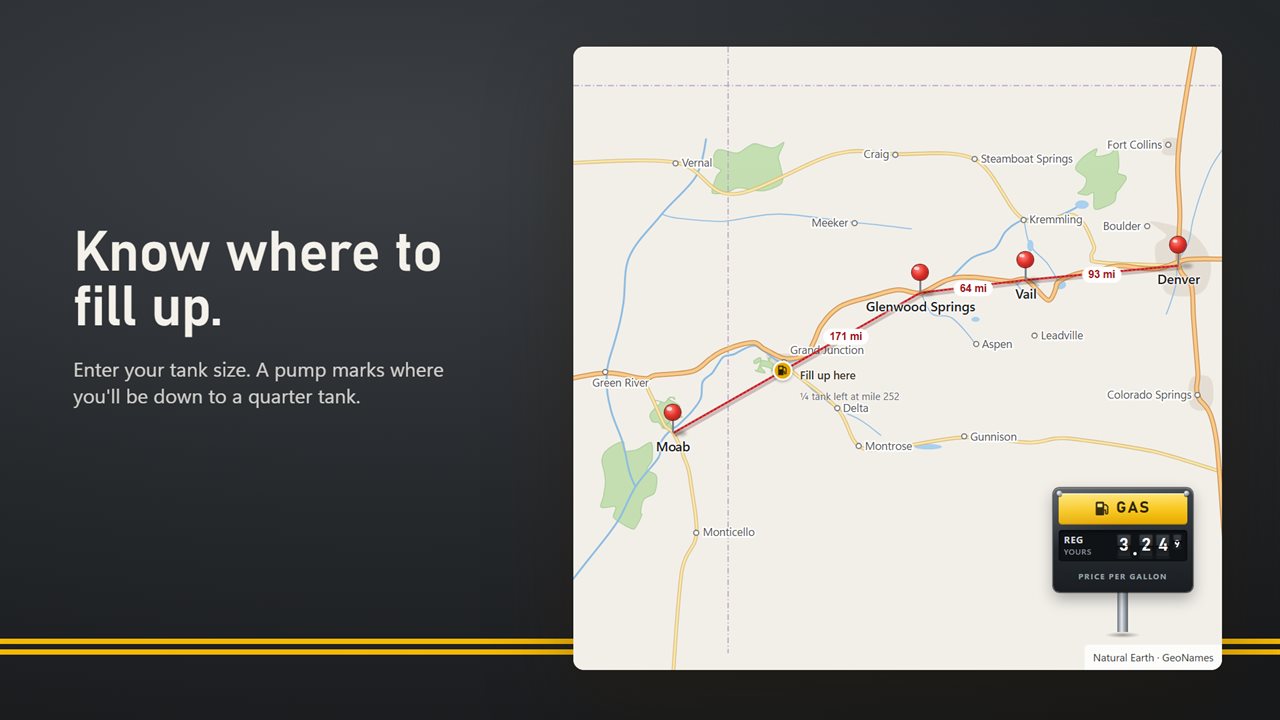
Know where you'll need to fill up.
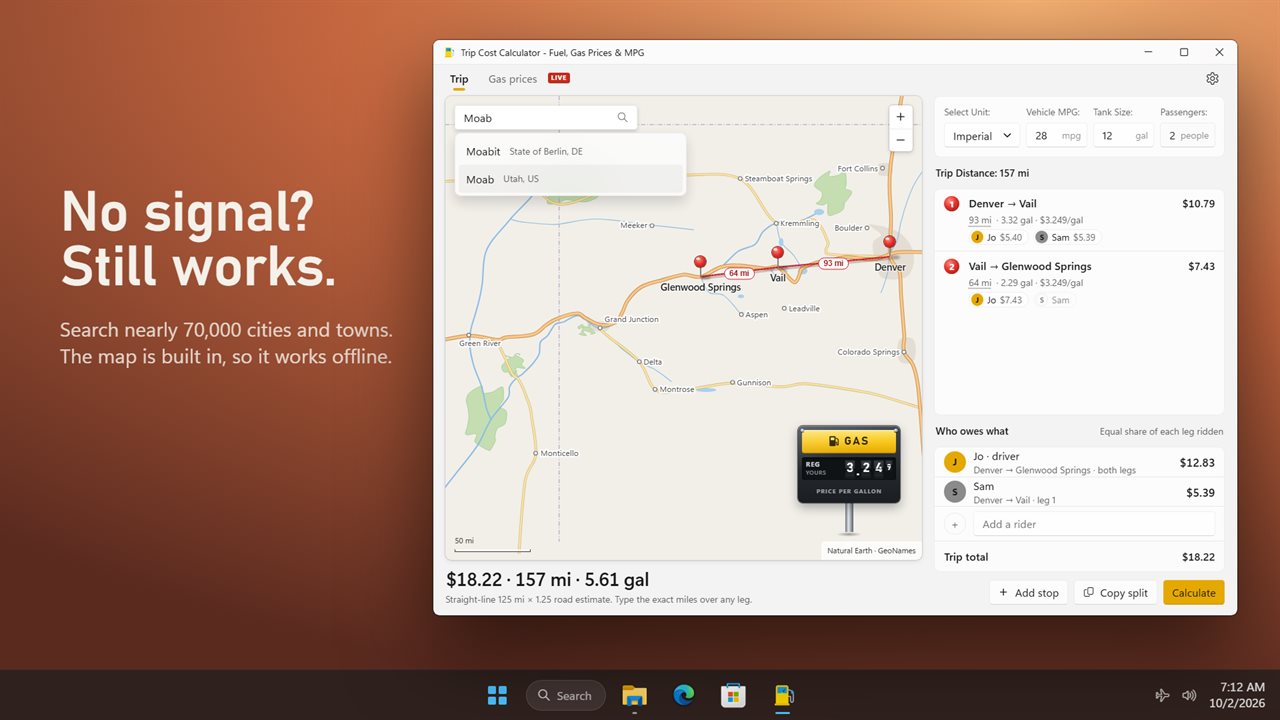
Search nearly 70,000 cities and towns. No internet needed.
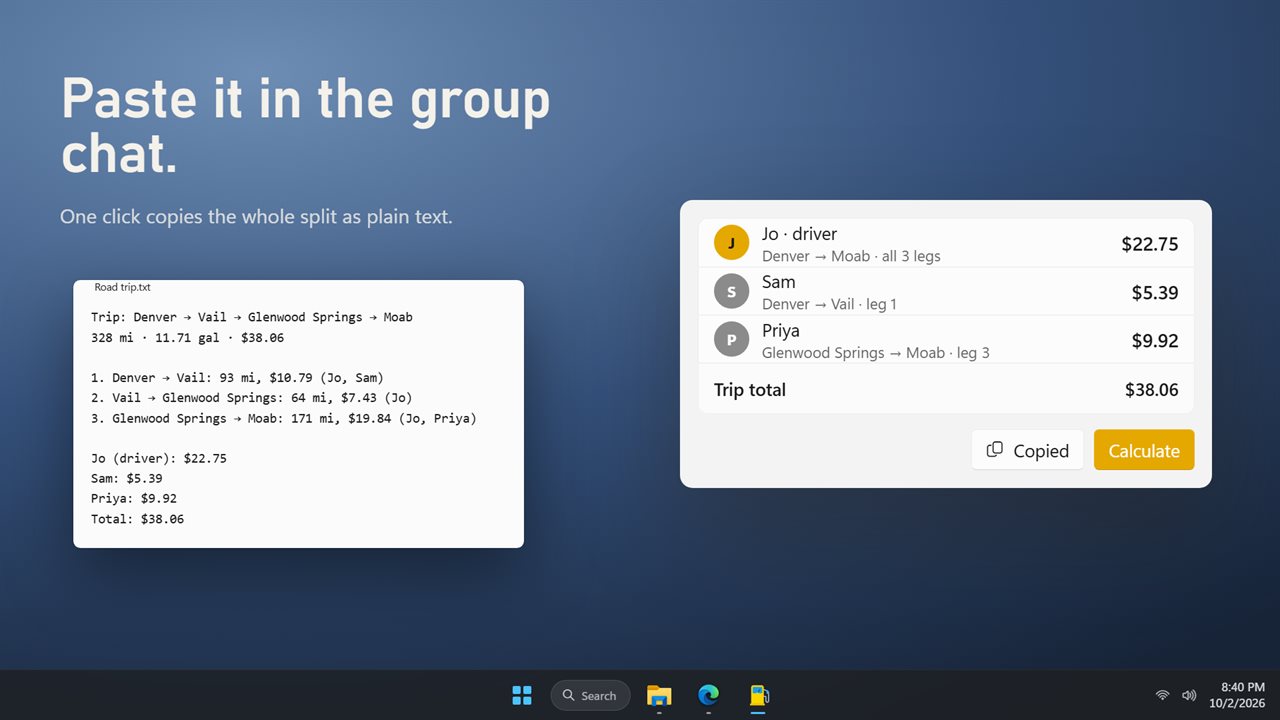
Copy the split and paste it into the group chat.
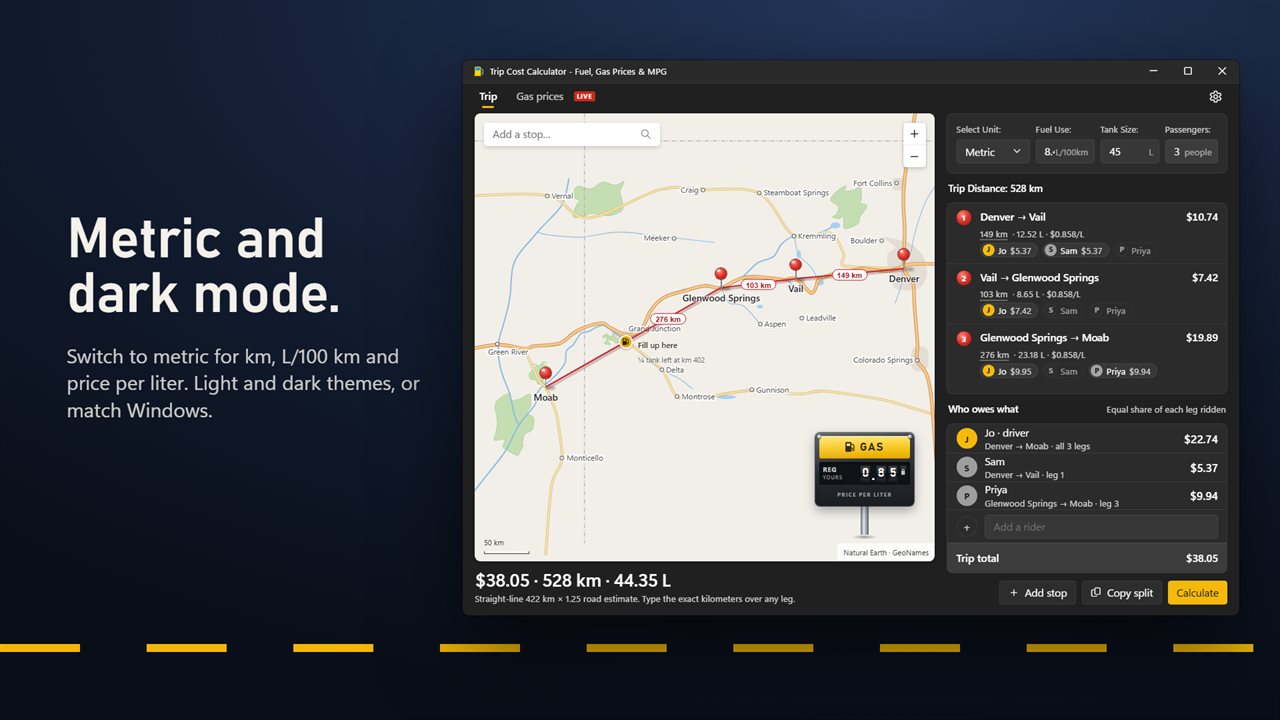
Light or dark, miles or kilometers.

Pin your road trip and see what the gas costs, leg by leg.

190,000+downloads of EvlarSoft apps
Signed by EvlarSoftVerified US publisher
14-day money-backNo questions asked
Updates includedNo upgrade fees

How much will gas cost for my road trip?

A road trip gas calculator should answer two questions: what the fuel will cost, and how to divide it without an argument at the last stop. Trip Cost Calculator does both on a map, so you plan the route and the money in one place.

Type a place into Add a stop or click the map to drop a pin. Each pair of pins becomes a leg, joined by a red string, and the leg list shows the distance, the fuel it burns, the price used and the cost. Enter your Vehicle MPG, click the gas sign to set a price per gallon, and the Trip total appears in the panel under Who owes what.

The map, the city search and the highway routing are built in, so a trip can be planned with no signal. When you are online, legs in covered areas are priced from that week's average instead of the single price you typed.

How to calculate gas cost for a trip

The arithmetic behind every leg is simple: distance divided by MPG gives gallons, and gallons times the price gives the cost. A 180-mile leg in a car that gets 30 MPG burns 6 gallons; at $3.30 a gallon that is $19.80.

What makes the estimate good or bad is the distance. Where a major highway on the built-in map links two stops, the leg follows it. Elsewhere the straight-line distance is stretched by the Road estimate in Settings, from Straight line up to Winding roads. If your odometer or a navigation app says otherwise, click the leg's distance and type the real number; everything downstream recalculates.

Gas money calculator for riders who join part of the way

Dividing the total by the number of people is unfair the moment someone gets picked up halfway. Here, each leg is split equally among the people riding that leg. Add riders under Add a rider, then mark who was aboard on each leg.

Take the 180-mile leg above plus a 120-mile second leg that costs $13.20, for a $33.00 trip. The driver and Sam ride both legs; Alex gets out after the first. The first leg splits three ways at $6.60 each, the second two ways at $6.60 each. Alex owes $6.60, Sam and the driver $13.20 each, and the shares add up to the total exactly.

Turn off The driver pays a share and riders split each leg among themselves while the driver rides free. When the numbers are settled, Copy split puts the whole breakdown on the clipboard as plain text for the group chat.

Trip planner with gas stops and weekly prices

Enter your tank size and the route shows a fuel pump wherever you would be down to the level set in Mark a fill-up at, a quarter tank unless you change it to an eighth or a half. It assumes you set off full, which makes it a quick way to see whether a long empty stretch needs a planned stop.

The Gas prices tab shows the latest weekly averages on a station-style sign, from regular grade to diesel, with the change since last week and since a year ago. Choose United States or Europe, then the area. Prices convert to whichever of the 19 currencies you set, and the Units switch moves everything to kilometers, liters and L/100 km.

What it calculates

  • Gas cost per leg and for the whole trip, from your MPG and price
  • Stops by city search, map click, or Add my location
  • Legs routed along major highways, with an adjustable road estimate elsewhere
  • Exact distance override on any leg
  • Per-leg rider split that always totals to the cent
  • Option for the driver to ride free
  • Fill-up markers based on tank size
  • Weekly regional gas prices with week-on-week and year-on-year change
  • Drag legs to reorder stops, or drag a pin to move one
  • Last trip, riders and car restored when you reopen

What's new in 2.0.4

  • New: plan your trip on a map that works offline
  • New: this week's gas prices for the U.S., the UK and the EU, on every leg and on their own tab
  • New: split the cost by leg, for riders who join and leave along the way
  • New: see where you'll need to fill up
  • New: copy the split to share with your group
  • New: metric units and a dark theme

Questions

Anything else? Ask us

Does it work without an internet connection?

Mostly. The map, the search of 69,763 cities and towns, and the highway routing are built into the app. The weekly gas prices need a connection to download; once fetched they are kept until the next weekly survey, and without them each leg uses the price you typed.

How does it split the gas cost between riders?

Each leg's cost is split equally among the people marked as riding that leg, so someone who joins halfway pays only for the legs they were in the car. Leftover cents go to the first payers, so the shares always add up to the trip total. In Settings you can choose whether the driver pays a share or rides free.

How accurate are the driving distances?

Where a major highway on the built-in map joins two stops, the leg follows it. Otherwise the straight-line distance is multiplied by a road factor you choose in Settings, from 1.00 to 1.40. If you know the real mileage, type it over the leg and everything is recalculated.

Where do the gas prices come from, and which places are covered?

They are weekly averages from APIVerve for the U.S. as a whole, 8 U.S. regions, 9 states and 10 cities, plus the UK, the EU average and all 27 EU countries. Each leg is priced at the regular-grade average for the area around its midpoint; a leg anywhere else uses your own price.

Can I use kilometers, liters and a currency other than dollars?

Yes. Switch to kilometers, liters and L/100 km in Settings, and your car's numbers are converted for you. There are 19 currencies to choose from, and live gas prices are converted to the one you pick.

Does it show where I will need to fill up?

Yes. Enter your tank size and a fuel pump marks each point on the route where you would be down to a quarter tank, starting from a full one. You can change that to an eighth or a half in Settings.

Is the trip total for a one-way drive or a round trip?

It covers exactly the stops you pin. For a round trip, add your starting point again as the last stop so the return leg is priced and split too.

Can I change the order of my stops after adding them?

Yes. Drag a leg in the list to reorder the stops, or drag a pin on the map to move it. Right-click a stop for options such as making it the start of the trip or the last stop.

Which versions of Windows does it run on?

Windows 10 (version 1809 or later) and Windows 11.

Is it a subscription?

No. Trip Cost Calculator is a one-time purchase of $5.99, and updates are included.

How do I get it?

Buy it on this page and your license key arrives by email. If the button says Notify me, Trip Cost Calculator is not on sale here yet; leave your email and we will tell you when it is.

Built on APIVerve. Trip Cost Calculator gets its data from the Gas Prices API, which developers can call from their own apps.