EEvlarSoft

Batch Smart File Renamer

Batch rename files with six rules you can combine, and read each file's new name in the list before anything on disk changes.

Buy for $2.49
One payment. No subscription.
14-day money-back guarantee.
3.5
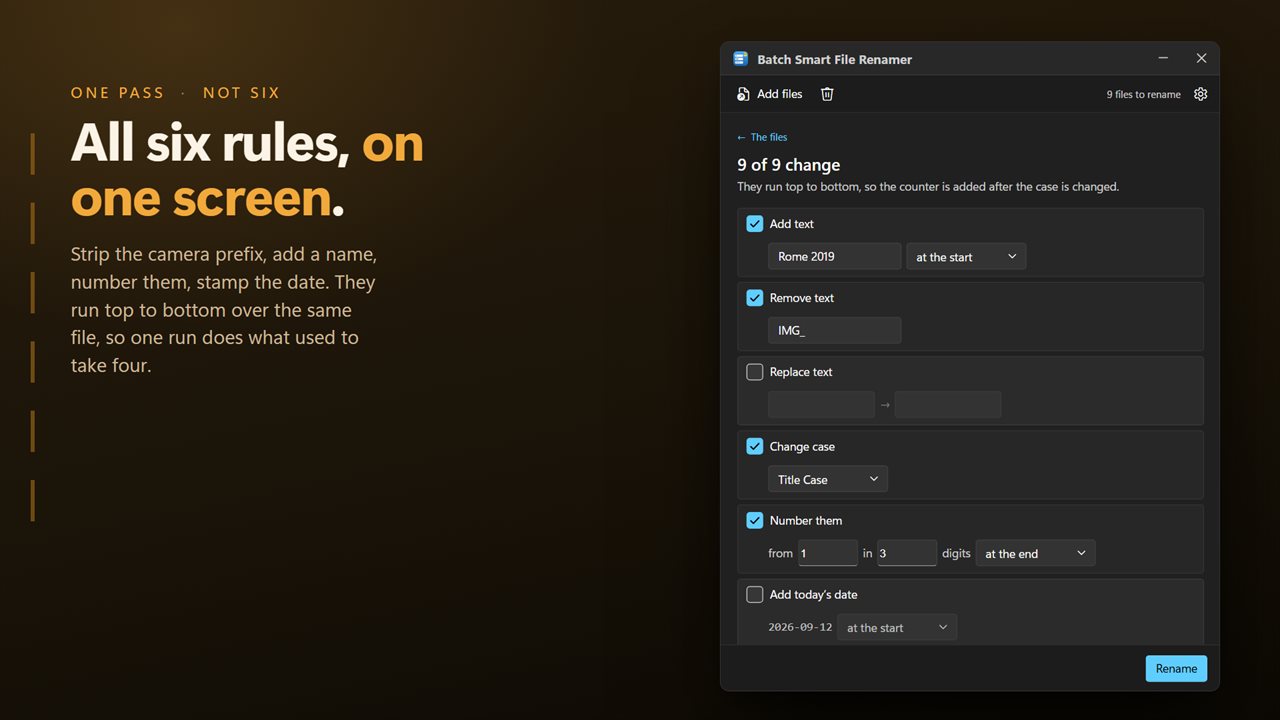
Six rules on one screen, applied together in one pass.
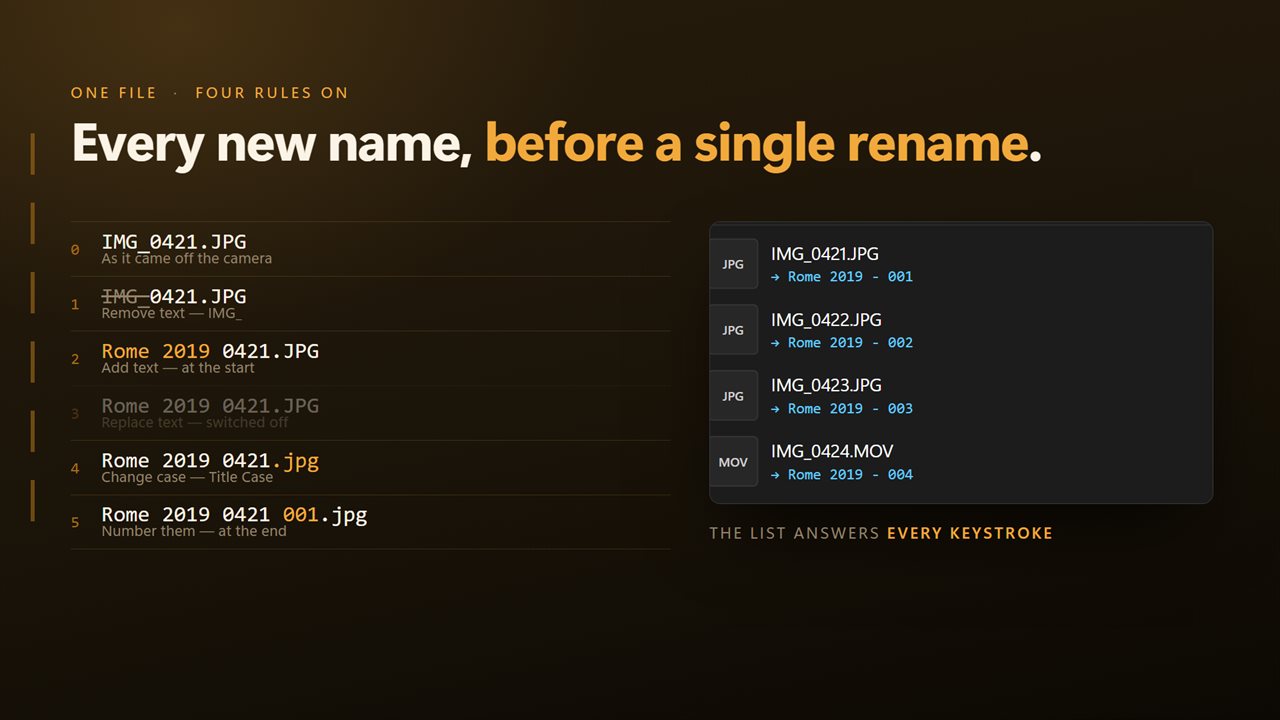
Every new name, before a single file is renamed.
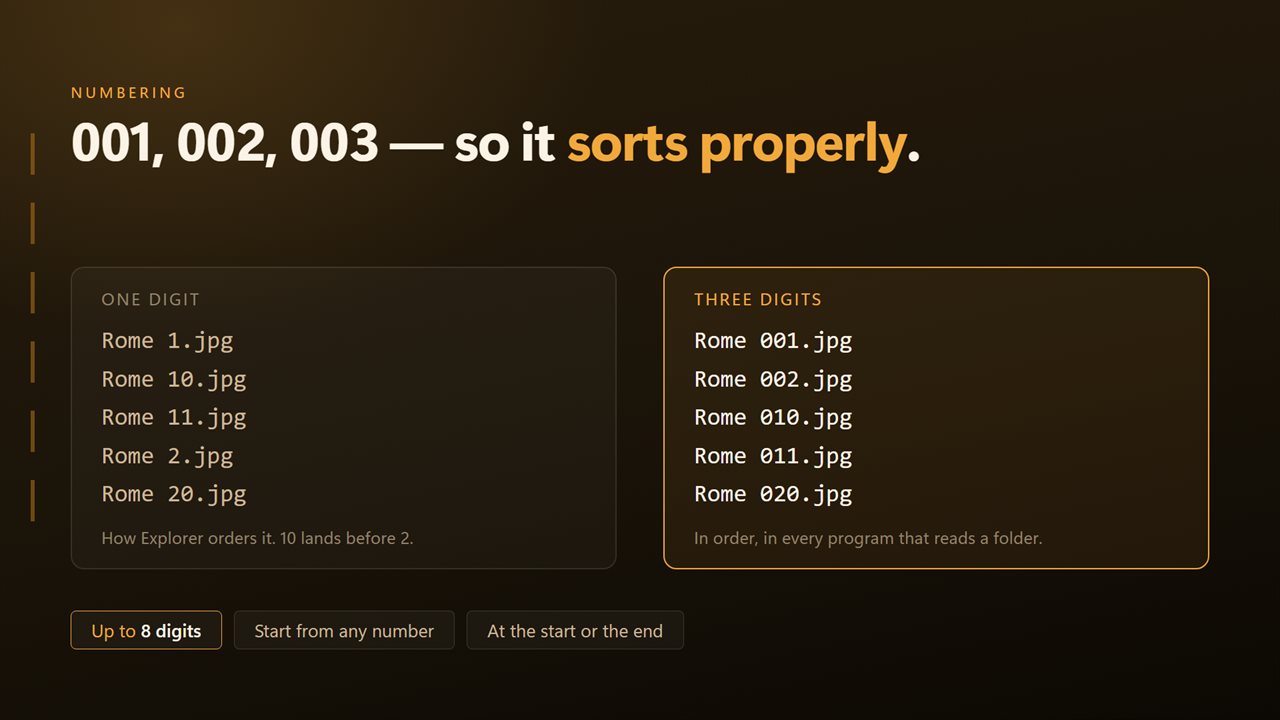
Numbering that sorts properly: 001, 002, 003.
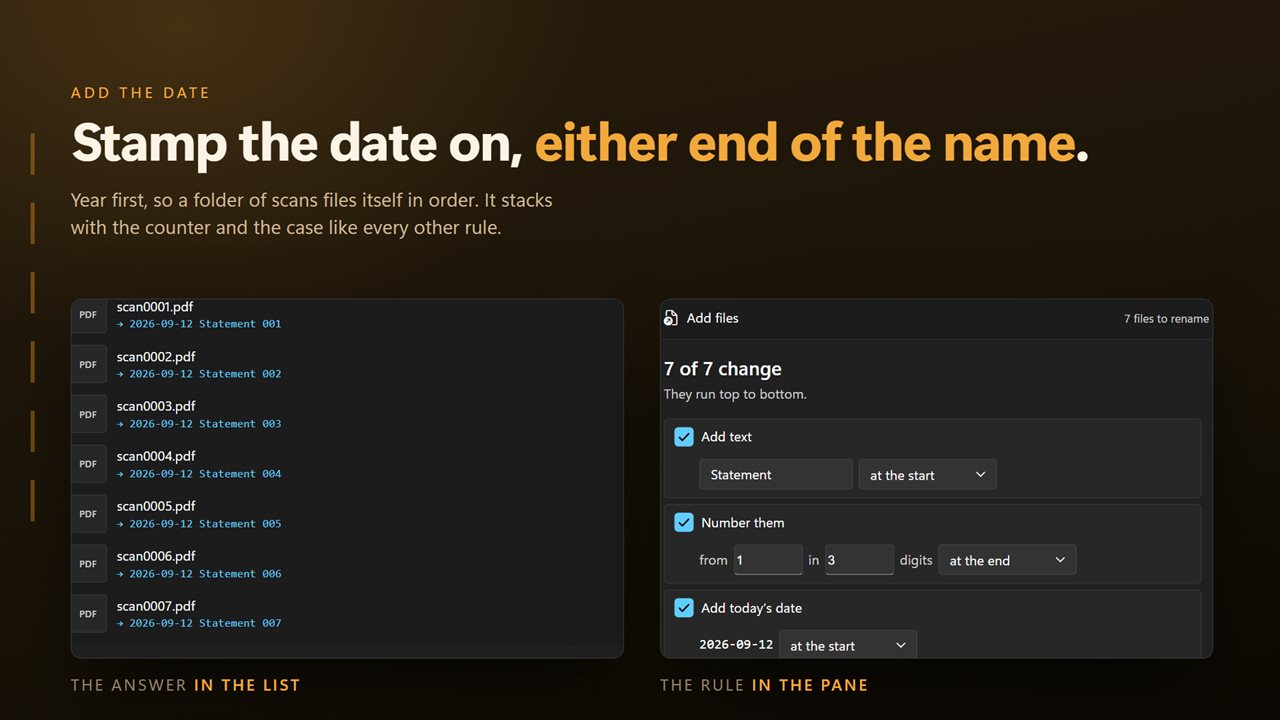
Stamp the batch with today's date, front or back.
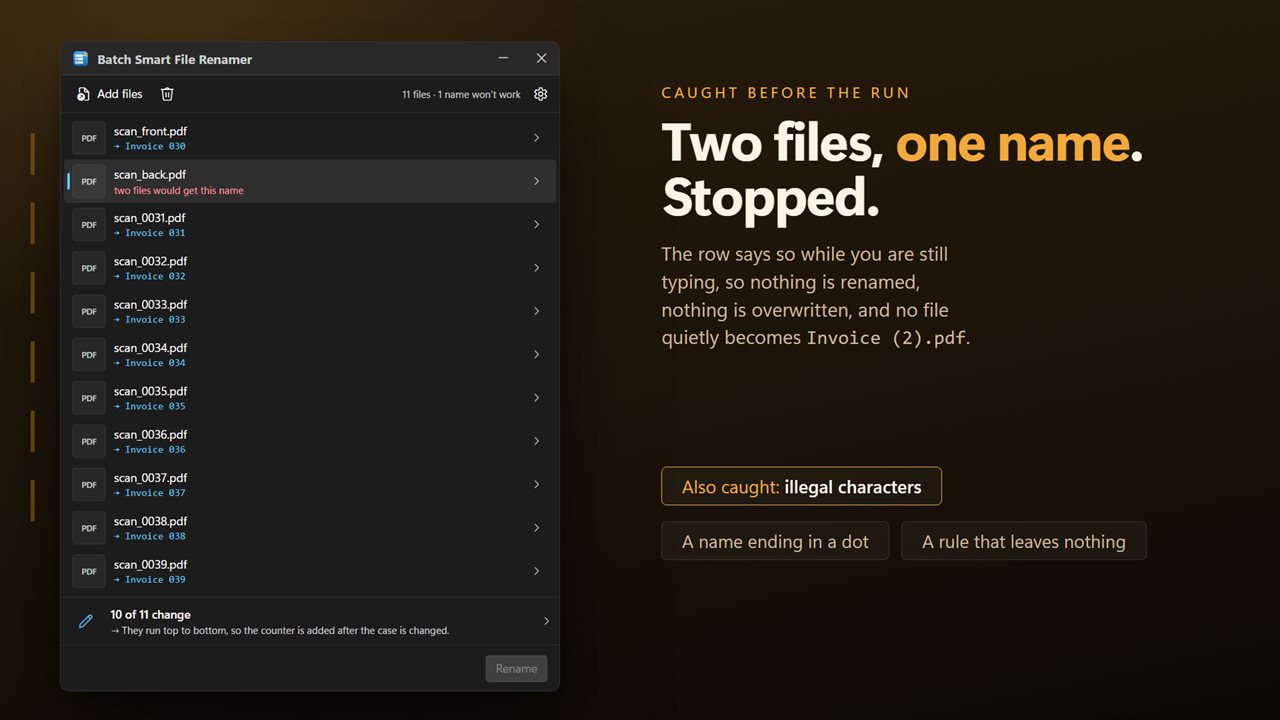
Two files heading for the same name are caught before the run.

Six rules on one screen, applied together in one pass.

190,000+downloads of EvlarSoft apps
Signed by EvlarSoftVerified US publisher
14-day money-backNo questions asked
Updates includedNo upgrade fees

Batch rename files with a preview you can trust

Windows can batch rename files on its own, after a fashion: select a group, rename one, and the rest get the same name with (1), (2), (3) after it. You cannot choose the starting number, pad it with zeros, add a date, or strip the camera prefix in the same step. Batch Smart File Renamer covers those jobs.

Its side pane, titled The rules and what they make, holds six rules: Add text, Remove text, Replace text, Change case, Number them and Add a date. Switch on as many as you need. Each file in the list shows its current name and the name it will become, and the preview updates on every keystroke, so you can tune a rule until the names read right.

The new name you see is the one that gets written. The preview and the rename come from the same calculation, and Rename stays unavailable until at least one rule would actually change a name.

How to rename multiple files at once

A typical job, turning DSC_0001.JPG and its neighbors into Rome 2019 001.JPG and onward, takes four steps.

  • Click Choose files, or use Add folder to bring in every file directly inside a folder. Files from different folders can share one list.
  • Open Number them, type Rome 2019 in New name (optional), and leave Start counting from at 1 with How many digits at 3.
  • Check the list. Each row should now read Rome 2019 001, Rome 2019 002 and so on, in list order.
  • Press Rename. If you want a second pass with different rules, the list already holds the new names.

Rename files with sequential numbers that sort correctly

Unpadded numbers sort badly: File 1, File 10, File 100, File 2. The cure is padding, and Number them lets you choose between 1 and 8 digits so a folder of 400 scans comes out 001 through 400 and stays in order in any file manager or upload form.

You decide where counting starts, anywhere from 0 to 99,999, which is useful when you are adding a new batch to a set that already ends at 250. Where the number goes puts it at the start or end of the name, and the Separator box holds whatever goes between number and name: a space by default, or a dash, an underscore, or anything else you type.

Add the date to file names, or clean names up

Add a date stamps each name with a date taken from Which date: the file's modified date, its created date, or today's date. Date format offers six layouts, from 2026-10-21 and 20261021, which sort chronologically by name, to 10-21-2026, 21-10-2026, October 21, 2026, and 2026-10-21 14.05 when the time matters. The time uses a dot because Windows does not accept colons in names.

For cleanup, Remove text deletes a fragment wherever it occurs, such as IMG_ or a trailing copy, and Replace text swaps one string for another, both with an Ignore case option. Change case gives lower case, UPPER CASE, Title Case or Sentence case.

The rules always run in a fixed order: text changes first, then case, then numbering and the date. That order is what lets you strip a prefix, retitle a set, number it and date it in a single pass without the case rule touching your numbers.


What Batch Smart File Renamer does

  • Six combinable rulesAdd, remove, replace, change case, number and date
  • Live old-name and new-name preview for every file
  • Zero-padded numbering of 1 to 8 digits from any start between 0 and 99,999
  • Modified, created or today's date in six formats, at the start or end
  • Optional new base name when numbering a set
  • Case-insensitive remove and replace
  • Extensions are never altered by any rule
  • Clashing names flagged before running, and no file is ever renamed over another
  • Files from several folders in one list, or a whole folder at once

Who uses a batch file renamer

Photographers

Replace DSC_ and IMG_ camera names with the shoot name and a padded sequence number.

Office and records work

Put the modified date at the front of invoices or scans as 2026-10-21 so the folder sorts by date.

Course and media libraries

Number lessons, episodes or tracks so they play and list in the right order everywhere.

What's new in 2.0.5

  • All six rules are on one screen and stack together. They used to be on separate pages, one at a time — a set can now be stripped, renamed, numbered and dated in a single pass
  • Every file's new name is shown as you change a rule, before anything is renamed
  • Numbering takes a starting number and a digit padding, so 001, 002, 003 sorts correctly
  • Two files that would end up with the same name are flagged before the run, not discovered during it
  • A name Windows cannot store is refused with the offending character named, and nothing is ever renamed over an existing file
  • Extensions are left out of every rule, so a rename can no longer change which program opens a file
  • Files from any number of different folders can be renamed in one run
  • A redesigned interface, in light or dark, and it can follow Windows instead if you prefer

Questions

Anything else? Ask us

What renaming rules does it have?

Six: add text at the start or end, remove text, replace text, change case (lower, UPPER, Title or Sentence), number the files, and add a date. You can turn on several at once, and they always run in that order, top to bottom.

Can I see the new names before anything is renamed?

Yes. Each file in the list shows the name it will get, and it updates as you type into a rule. Nothing is renamed until you press Rename.

Does it change file extensions?

No. The rules only change the part of the name before the last dot, so photo.jpg stays a .jpg whatever the name becomes. Changing an extension is not something this app can do.

How does numbering work?

You choose the starting number, from 0 to 99,999, and pad it to between 1 and 8 digits, so 001, 002, 003. The number goes at the start or end with a separator you choose, and you can give the files a new base name at the same time. Files are numbered in the order they appear in the list.

Which dates can it add to file names?

Each file's modified date, its created date, or today's date. The formats are 2026-10-21, 10-21-2026, 21-10-2026, 20261021, October 21, 2026, and 2026-10-21 14.05, which uses a dot because Windows does not allow colons in names.

What happens if two files would get the same name?

The list marks them before you run anything. A file is never renamed on top of an existing file: that one fails with a message and both files stay as they were. Names with characters Windows does not allow, or that Windows reserves such as CON, are refused too.

How do I rename files without the (1), (2) Windows adds?

Use Number them instead of renaming in File Explorer. Give the set a New name (optional), choose the starting number and digits, and each file gets a clean padded number such as Holiday 001.

Can I remove the same word from many file names at once?

Yes. Turn on Remove text and type the word. It is removed from every name in the list, and Ignore case catches it in any capitalization.

Can I rename files in Title Case?

Yes. Turn on Change case and pick Title Case. Every word in the name gets a capital first letter and the rest goes lower case; Sentence case capitalizes only the first word.

Which versions of Windows does it run on?

Windows 10 (version 1809 or later) and Windows 11.

Is it a subscription?

No. Batch Smart File Renamer is a one-time purchase of $2.49, and updates are included.

How do I get it?

Buy it on this page and your license key arrives by email. If the button says Notify me, Batch Smart File Renamer is not on sale here yet; leave your email and we will tell you when it is.