EEvlarSoft

MDF2ISO

Turn MDF disc dumps into standard ISO images Windows can mount, after checking what kind of dump each file really is.

Buy for $1.99
One payment. No subscription.
14-day money-back guarantee.
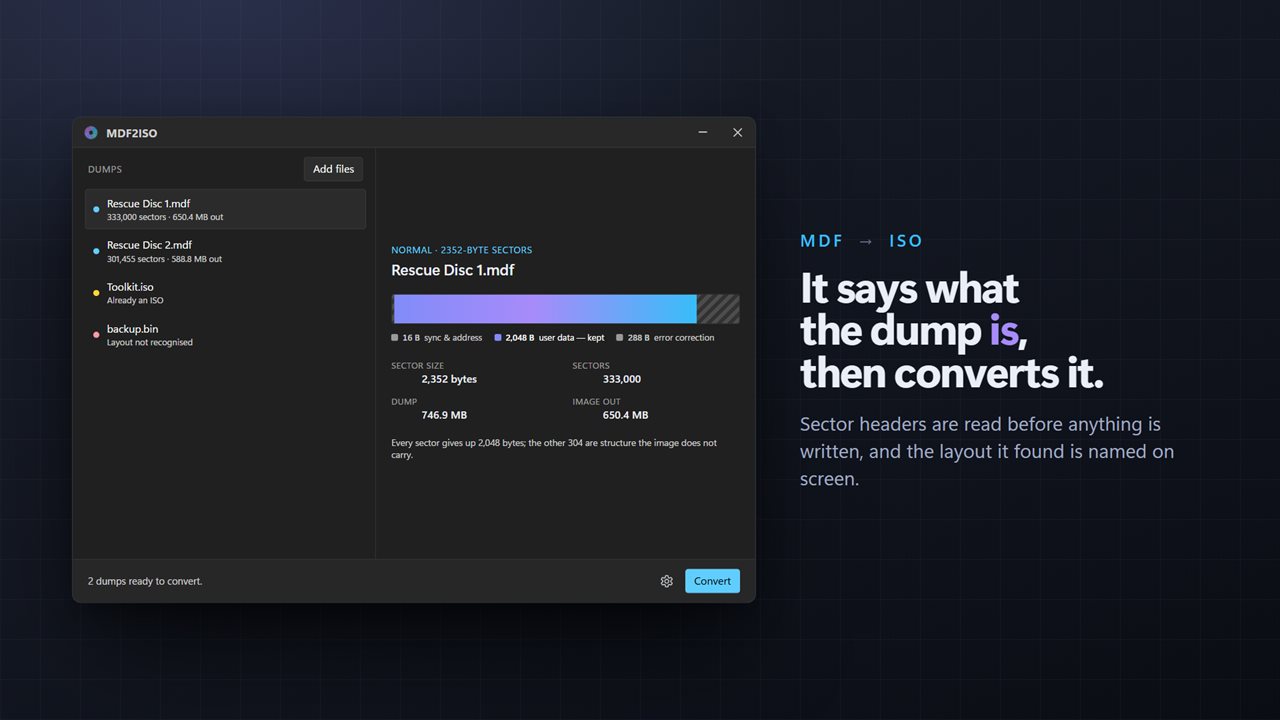
It says what the dump is — layout, sectors and the size of the ISO — then converts it.
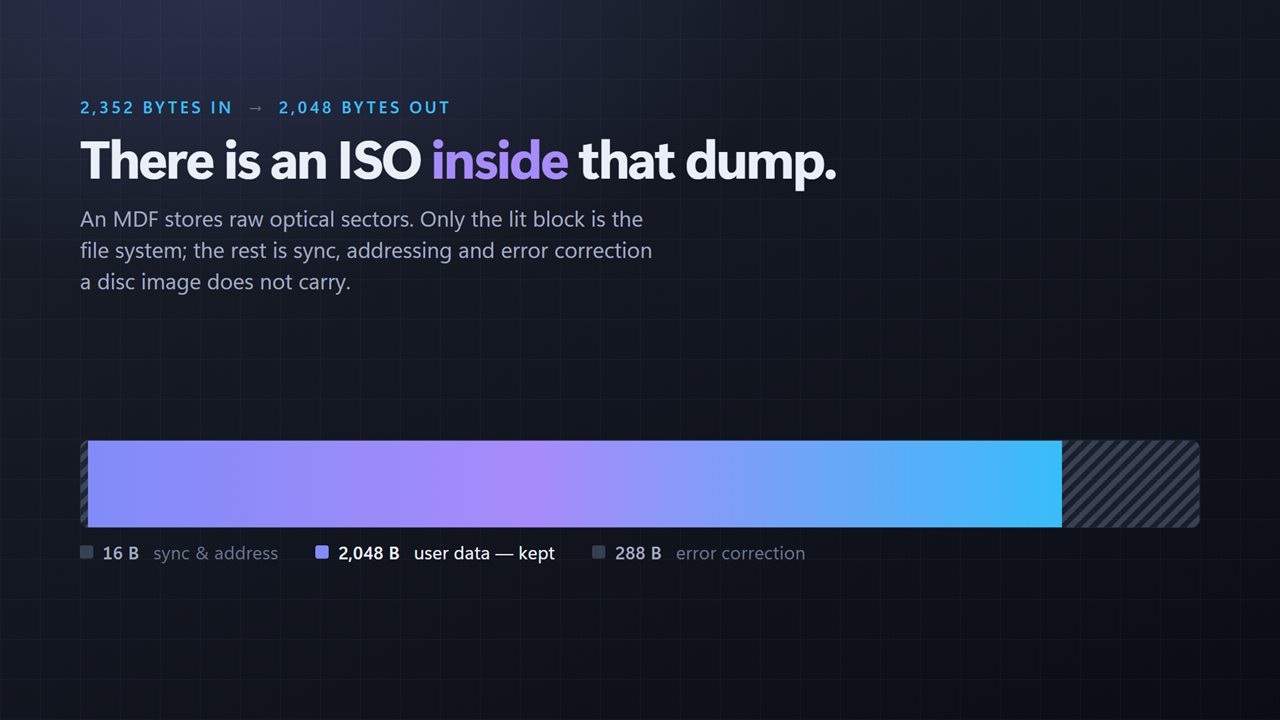
There is an ISO inside that dump: 2,352 bytes in, 2,048 bytes out, drawn to scale.
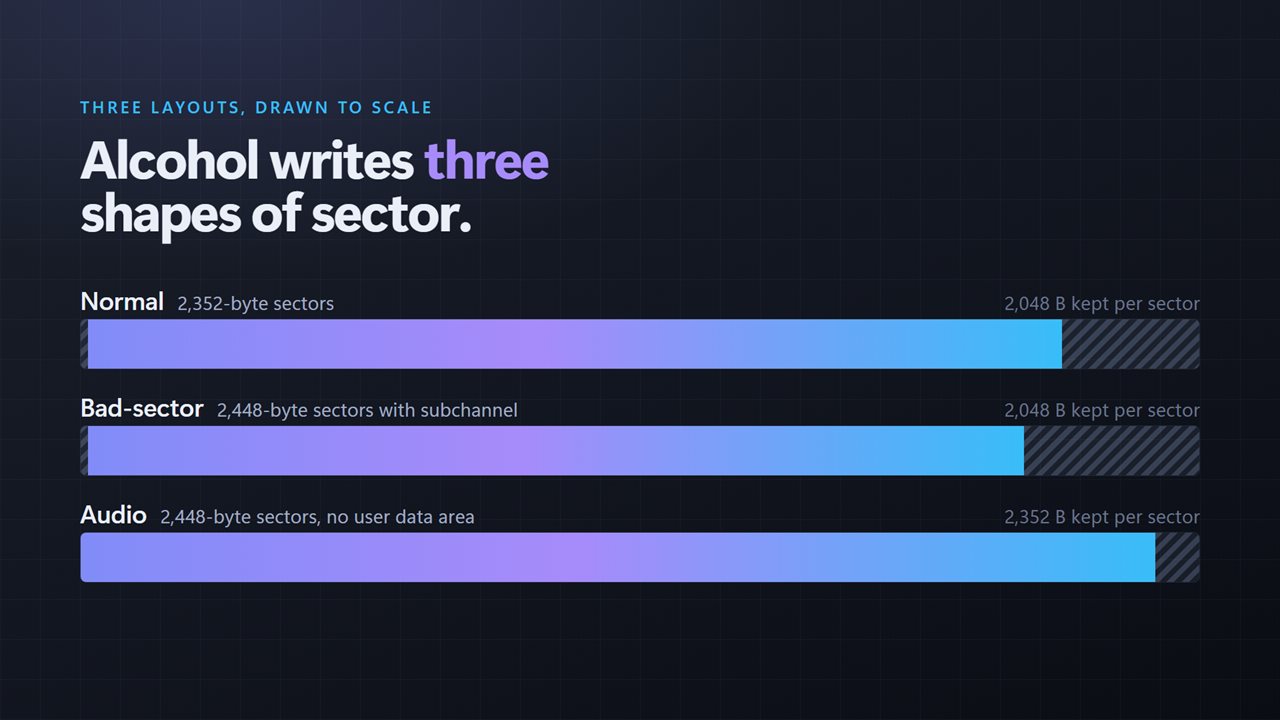
All three layouts Alcohol 120% writes — 2352, 2448 with subchannel, and audio.
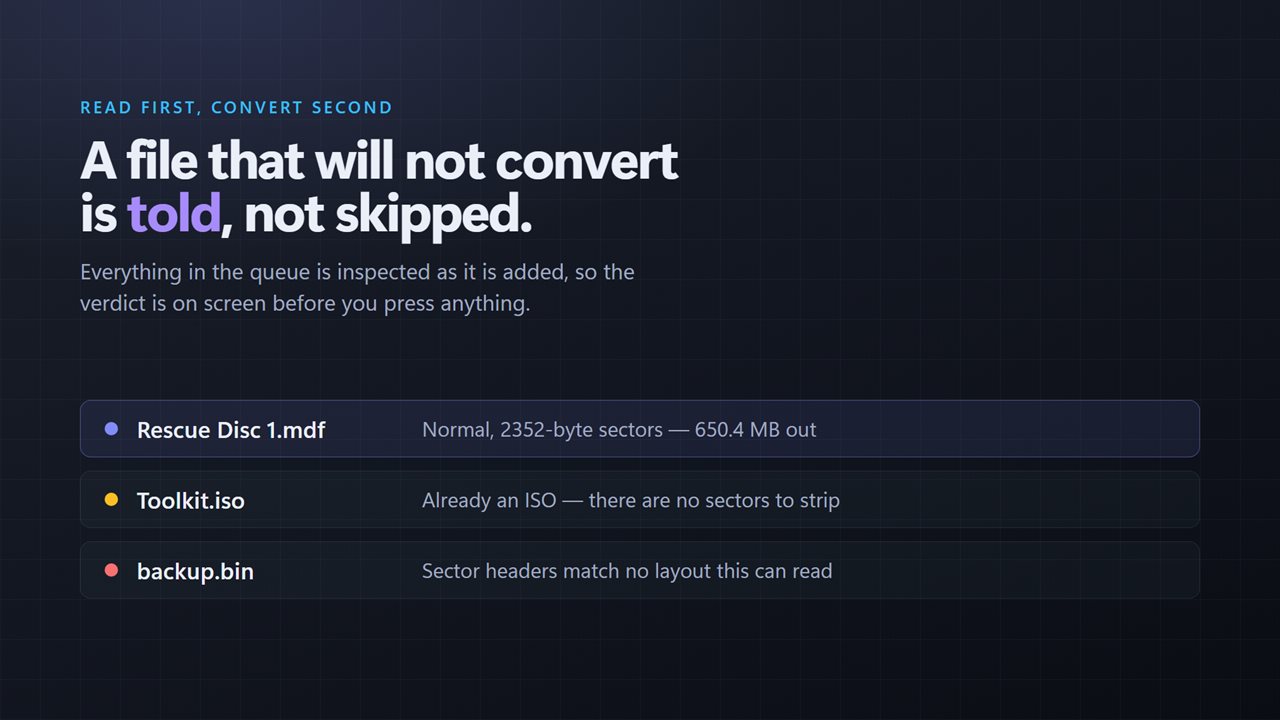
A file that will not convert is named, with the reason, before you press anything.
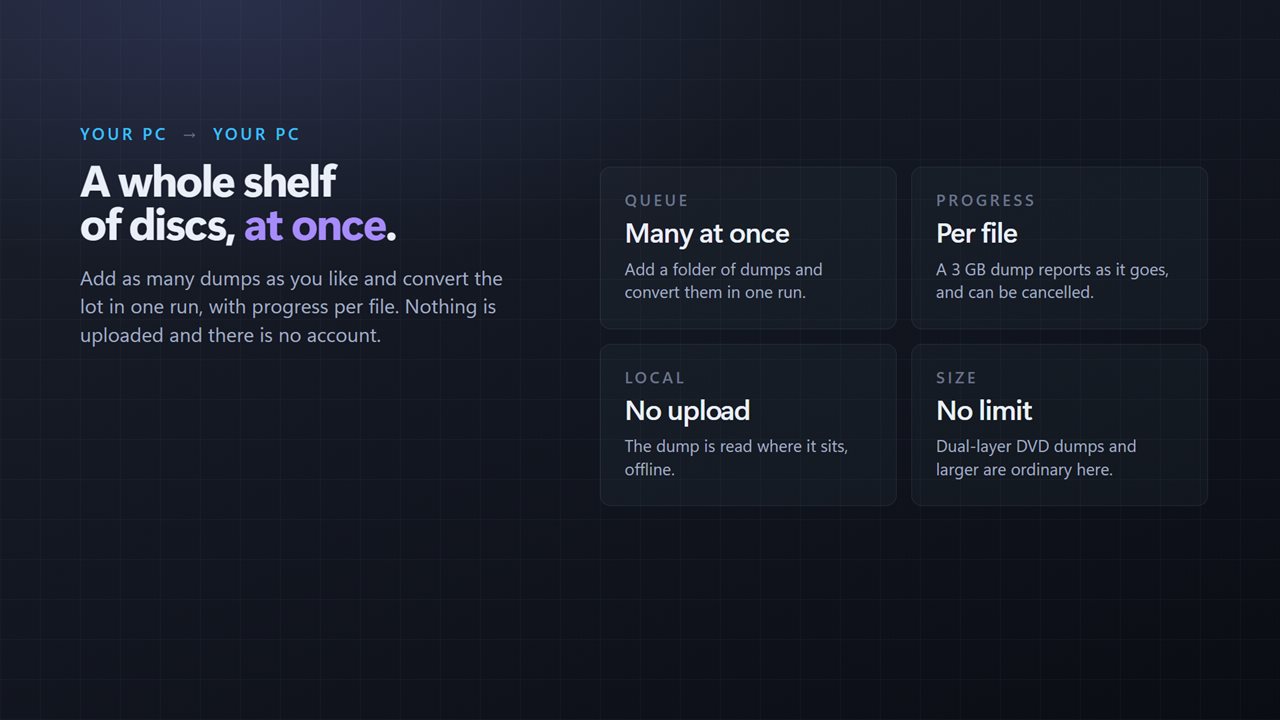
A whole queue in one run, with progress per file. Nothing is uploaded.

It says what the dump is — layout, sectors and the size of the ISO — then converts it.

190,000+downloads of EvlarSoft apps
Signed by EvlarSoftVerified US publisher
14-day money-backNo questions asked
Updates includedNo upgrade fees

How to convert MDF to ISO, and why renaming fails

Windows mounts an ISO with a double-click but has no idea what to do with an MDF. The usual tip is to rename the file to .iso, and it often produces an image that will not open. To convert MDF to ISO properly you have to understand what is inside the file.

An MDF holds raw sectors read straight off a CD or DVD. Each 2,352-byte sector carries 2,048 bytes of actual data surrounded by 16 bytes of sync and address and 288 bytes of error correction. An ISO holds only the data. Renaming keeps all the extra bytes in place, so the file system lands at the wrong offsets and the image looks corrupt. Stripping those bytes from every sector is the real conversion, and it is why a 747 MB dump comes out at roughly 650 MB.

MDF2ISO does that stripping, but first it checks every file you add. It reads the sector headers, names the layout it finds, and reports how many sectors it holds, how big it is now and how big the ISO will be, all before a single byte is written.

The three MDF layouts it recognizes

Disc-imaging software can write an MDF in more than one way, and a converter that assumes one layout will silently ruin the others. Each file in the queue is labeled with what it actually is:

  • Normal: 2,352-byte sectors, converted to a standard 2,048-byte-per-sector ISO.
  • Bad-sector: 2,448-byte sectors with 96 bytes of subchannel data appended to each one.
  • Audio: 2,448-byte sectors with no data area, from music CDs.

A single sector, drawn at true proportions

The main window shows a single sector stretched across it, in the true proportions of the layout that was detected. The bytes that survive into the ISO are lit and the ones discarded are hatched, so you can see at a glance where the size difference goes.

If a file is already a plain ISO 9660 image, it is flagged as such and left out, with a note suggesting a plain copy instead. A file whose headers match none of the three layouts is marked as not recognized and is not converted, rather than producing an output that only looks like success.

How to mount an MDF file in Windows after converting

Press Add a dump, pick one or more files, and check the layout each one reports. Then press Convert, or Convert followed by the number of files when there are several, and choose where each ISO should be saved. Progress is tracked per file, so a multi-gigabyte DVD dump never looks like a frozen window.

When the ISO is written, double-click it in File Explorer, or right-click and choose Mount, and Windows gives it a drive letter like a physical disc. If you set "When a dump is finished" to Open the folder it went to, the folder opens for you automatically.

What MDF2ISO does

  • Inspects each dump's sector headers and names its layout on arrival
  • Handles 2,352-byte, 2,448-byte subchannel and 2,448-byte audio layouts
  • Shows sector count, dump size and resulting ISO size before converting
  • Visual of one sector with kept and discarded bytes marked
  • Detects files that are already ISO 9660 and leaves them alone
  • Marks files with an unknown layout by name instead of writing a broken ISO
  • Batch conversion of many dumps, each reporting its own progress
  • Never modifies the original; each ISO is saved to a new file you name

What's new in 2.0.4

  • New: the sector layout is detected and named before anything is converted, with one sector drawn to scale
  • Added support for the 2448-byte bad-sector and audio layouts. Only 2352-byte dumps converted before
  • A file that is already an ISO, or whose layout is unreadable, is now named instead of failing quietly
  • Added a queue: convert many dumps in one run, with progress per file and a working cancel
  • Redesigned interface that follows the Windows light and dark themes

Questions

Anything else? Ask us

Do I need the MDS file to convert an MDF?

No. It reads only the MDF itself and works out the sector layout from the sector headers inside it. The .mds file is never opened.

Which MDF layouts can it convert?

The three layouts Alcohol 120% writes: normal 2352-byte sectors, 2448-byte sectors with subchannel data, and 2448-byte audio sectors. It shows which one it found, the sector count and the size of the output before you convert.

Can it convert .bin or .img files too?

Yes, if they use the same raw sector layout. The file picker accepts .mdf, .img, .bin and .iso, and the layout is decided by the sector headers rather than the file extension. A file whose headers match none of the three layouts is marked as not recognized and is not converted.

Does an audio CD dump become a mountable ISO?

No. For the audio layout it keeps the full 2,352-byte audio frame from each sector and drops the subchannel, so the result is raw audio data rather than a file system Windows can mount.

Is my original MDF changed?

No. The dump is only read, and the ISO is written to a new file you name in a save dialog. A file that is already an ISO is pointed out and left out of the conversion.

Can I convert several dumps at once?

Yes. Add as many as you like and press Convert; it asks where to save each one in turn. There is no button to stop a conversion once it has started, and an error stops the rest of the queue.

Is this for SQL Server .mdf database files?

No. SQL Server also uses the .mdf extension for database files, but those are a different format. MDF2ISO converts optical disc images, the .mdf files that come with a matching .mds.

Why is the ISO smaller than the MDF?

Each raw sector in the MDF carries 304 bytes of sync, address and error-correction data around 2,048 bytes of user data. The ISO keeps only the user data, so it is about 13% smaller for a normal dump.

Which versions of Windows does it run on?

Windows 10 (version 1809 or later) and Windows 11.

Is it a subscription?

No. MDF2ISO is a one-time purchase of $1.99, and updates are included.

How do I get it?

Buy it on this page and your license key arrives by email. If the button says Notify me, MDF2ISO is not on sale here yet; leave your email and we will tell you when it is.