EEvlarSoft

DateStamp Modifier

Rewrite the Created, Modified and Accessed timestamps on a stack of files at once, using a date you pick, the photo's own date taken, or the date in its name.

Buy for $1.99
One payment. No subscription.
14-day money-back guarantee.
3.0
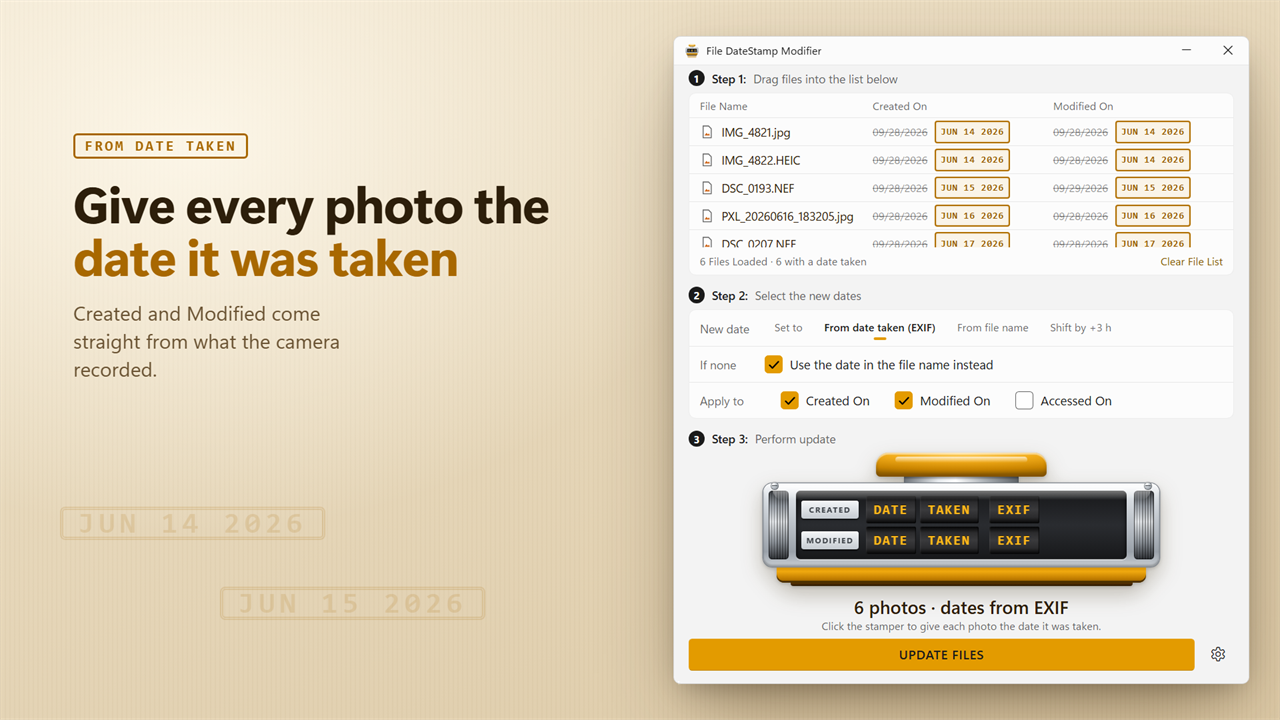
Give every photo the date it was taken.
Set a date, use the date taken, read it from the file name, or shift it.
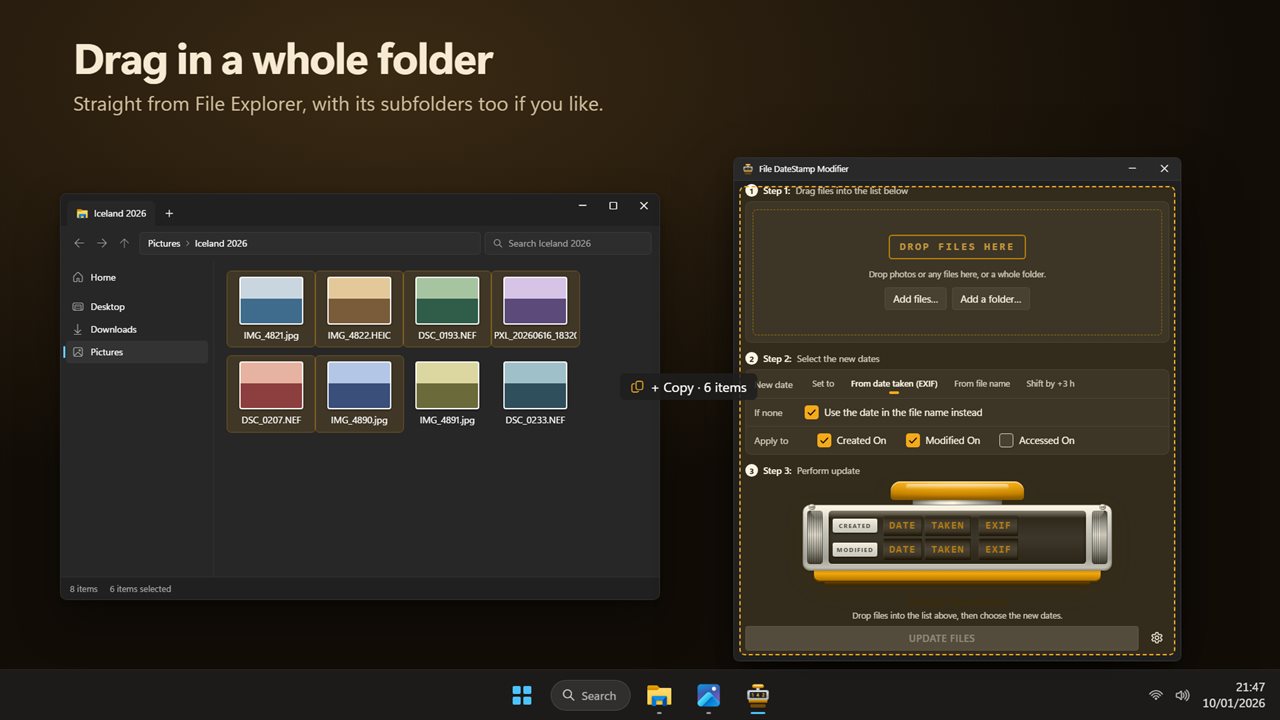
Drag in a whole folder from File Explorer.
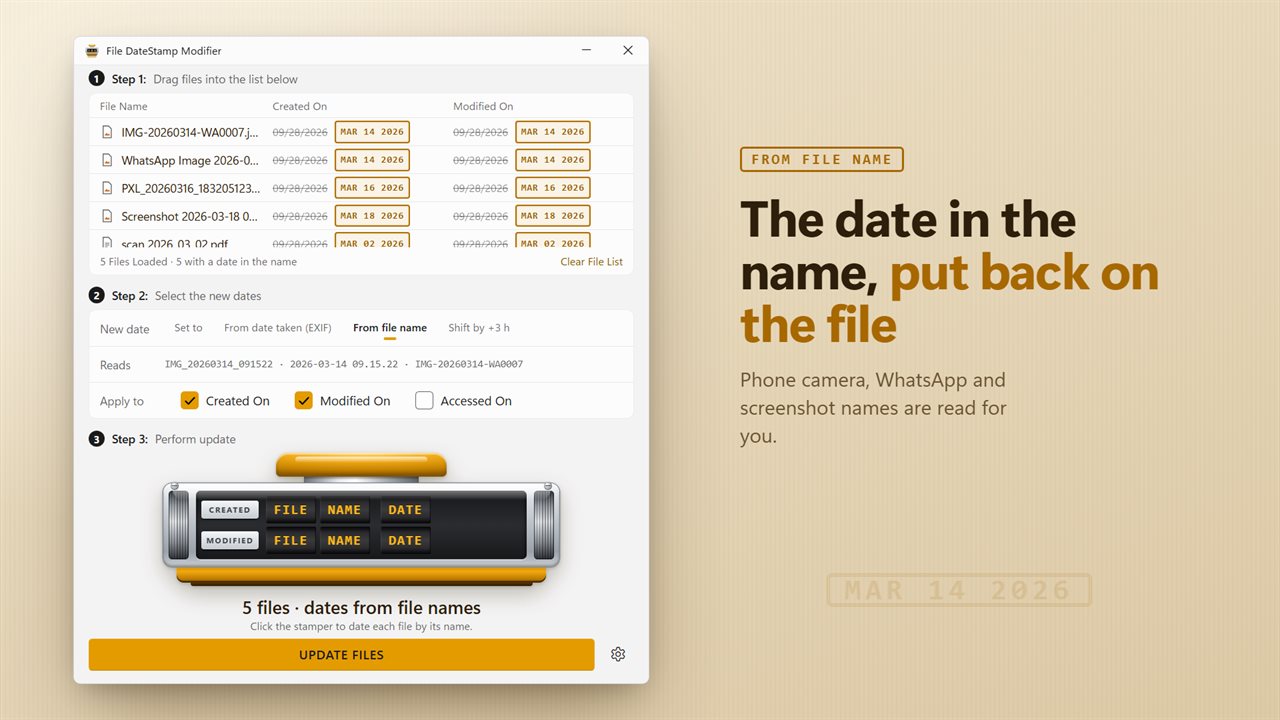
The date in the file name, put back on the file.
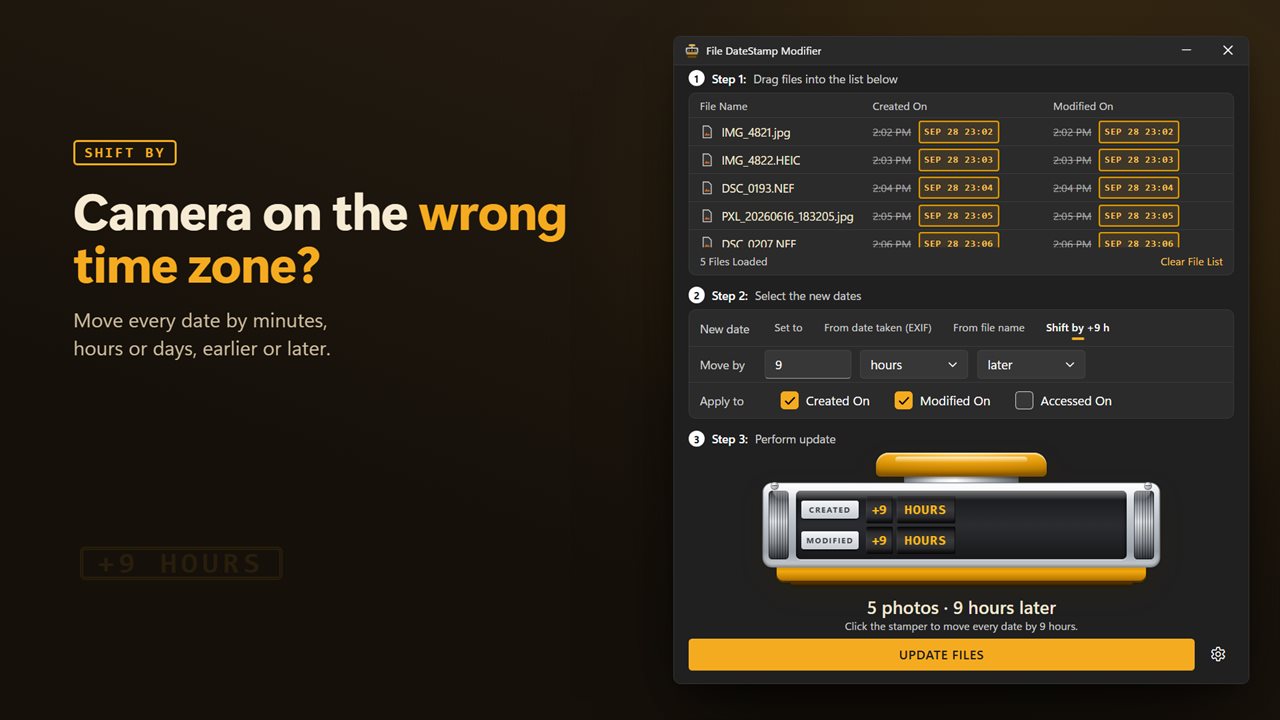
Camera on the wrong time zone? Shift every date at once.
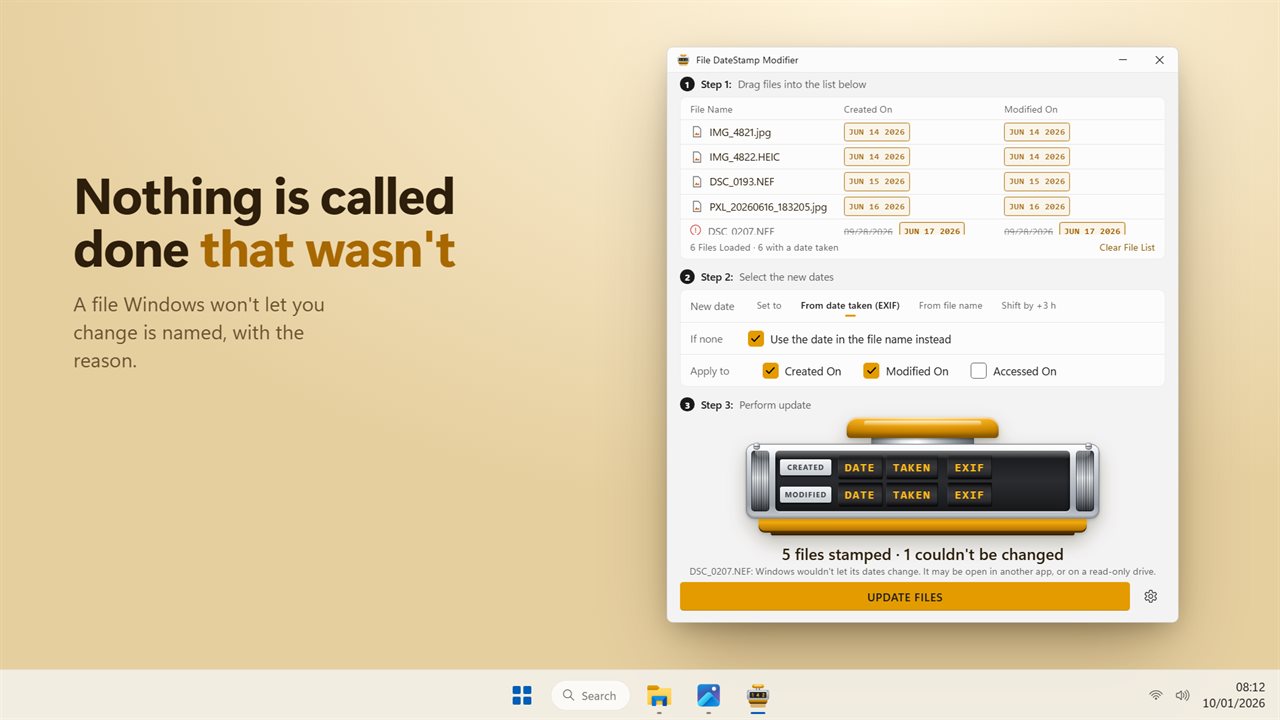
Files that couldn't be changed are named, with the reason.

Give every photo the date it was taken.

190,000+downloads of EvlarSoft apps
Signed by EvlarSoftVerified US publisher
14-day money-backNo questions asked
Updates includedNo upgrade fees

How to change the date created and modified of a file

Windows shows a file's Date created and Date modified in File Explorer and sorts by them, yet its Properties dialog offers no way to edit either. The usual workarounds are a PowerShell one-liner per file or a command-line tool. File DateStamp Modifier puts the same job in a window, for one file or a folder of hundreds.

The layout follows three numbered steps. Step 1, Drag files into the list below, accepts any file type, plus Add files… and Add a folder… buttons. Step 2, Select the new dates, is where you choose Where the new date comes from and tick Apply to: Created On, Modified On and Accessed On, in any combination. Step 3, Perform update, is the stamper: click it and the new dates are written.

Before you press it, every row in the list shows the current date crossed out next to the new one, so the effect is visible file by file. Files that need no change say so, and any file Windows refuses to update, for example one open in another program, is named with the reason rather than counted as done.

Four ways to choose the new file date

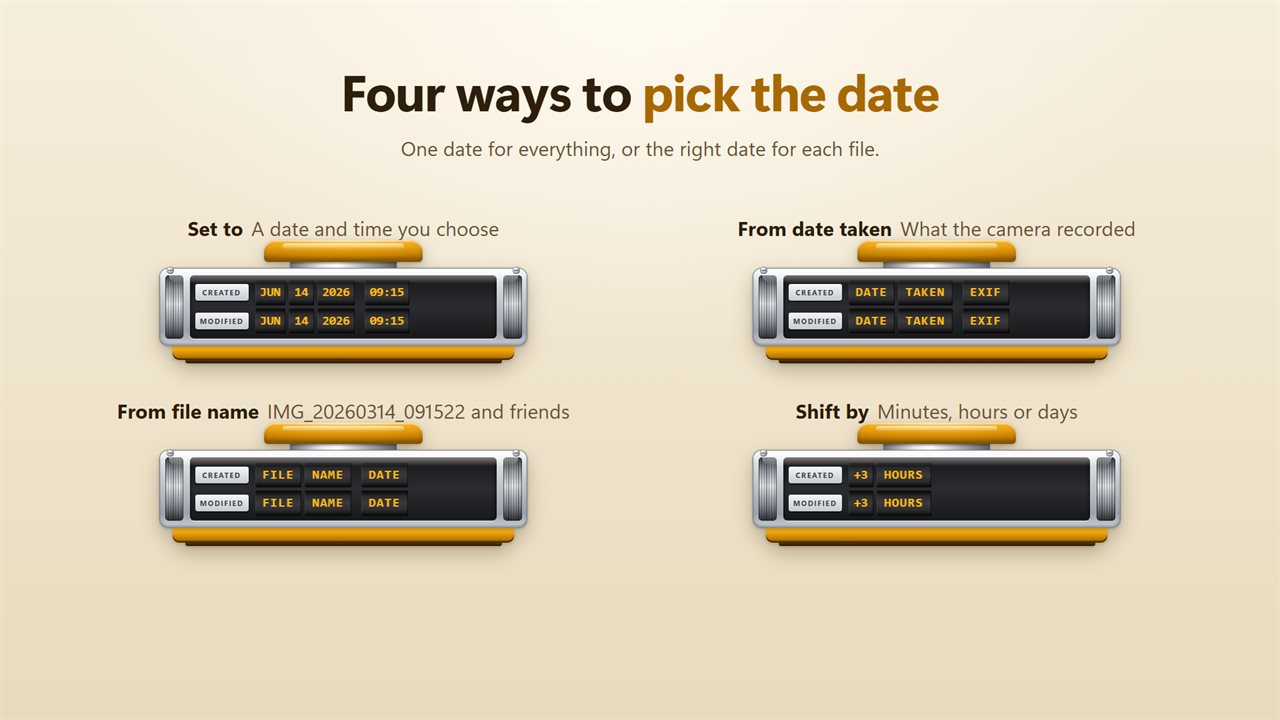
Where the new date comes from has four choices, and the right one depends on why the dates are wrong.

  • Set to: give every file the same date and time. Created and Modified each get their own field, so a document can look created at 9:00 and edited at 17:30.
  • From date taken (EXIF): copy the moment the camera recorded into each photo onto the file dates.
  • From file name: read the date that phones and apps write into names like IMG_20260314_091522 or WhatsApp Image 2026-03-14 at 09.15.22.
  • Shift by: move each file's existing date forward or back by a set number of days, hours or minutes.

Fix photo dates after copying or downloading

Copying photos off a phone, restoring from backup or downloading a shared album often resets each file's dates to the day of the copy. Every picture then sorts as if it were taken on the same afternoon, and gallery apps that rely on file dates lump them together.

From date taken (EXIF) fixes this in one pass. It picks up the capture date stored inside JPEG, HEIC, PNG, WebP, TIFF and several raw formats, and writes it back onto the file. The photo's pixels and its EXIF block are not rewritten; only the file system dates move. If a picture has no date taken, the If none option can use the date written in its file name, which covers most images saved from messaging apps.

Change file timestamps in bulk for a time zone mistake

A camera left on home time after a flight stamps every photo hours off, which scrambles the order once they are mixed with a phone's pictures. Shift by moves each file by the same amount, say +6 h or −3 h, so the set lines up with local time and keeps its internal order. Pick the amount, choose minutes, hours or days, and set Direction to later or earlier.

Dropping a folder adds the files directly inside it. Turn on Include subfolders in Settings when a whole tree of dated folders needs the same correction. Your choices are remembered for next time.


What File DateStamp Modifier does

  • Edits Created On, Modified On and Accessed On, together or separately
  • Set to a chosen date, with separate created and modified times
  • Copies each photo's EXIF date taken onto its file dates
  • Reads dates from phone, screenshot and messaging app file names
  • Shifts existing dates forward or back by days, hours or minutes
  • Before-and-after preview on every file in the list
  • Folder intake, with an Include subfolders setting
  • Leaves file contents and embedded metadata unwritten
  • Lists any file Windows refused to update, and why

When file dates need changing

Restored photo libraries

Put the real capture date back on thousands of pictures that a copy or backup stamped with today.

Travel photos from two devices

Shift a camera's photos by the time difference so they interleave correctly with your phone's.

Tidy document archives

Give scanned or migrated files a consistent date so they sort the way the originals did.

What's new in 2.0.2

  • New: give photos the date they were taken, read from the photo itself
  • New: use the date in the file name, including phone, WhatsApp and screenshot names
  • New: shift every date by minutes, hours or days
  • New: change the Accessed date too
  • New: see every old and new date side by side before you stamp
  • New: files that could not be changed are named with the reason
  • New: dark theme

Questions

Anything else? Ask us

Does it change the date taken stored inside my photos?

No. It changes the file's Created, Modified and Accessed dates, the ones File Explorer shows and sorts by. The photo's EXIF data and the file's contents are not written to.

Which photo types can it read the date taken from?

JPEG, PNG, WebP, HEIC, HEIF, AVIF, JPEG XL, TIFF, and the TIFF-based raw formats DNG, NEF, NRW, CR2, ARW, SRW and PEF. It uses the date the photo was taken, or the digitized date a scanner writes when that is missing. CR3, RAF, ORF and RW2 raw files are not read.

What file names can it read a date from?

Names with a date written year first, such as IMG_20260314_091522, 2026-03-14 09.15.22, WhatsApp Image 2026-03-14 at 09.15.22, IMG-20260314-WA0007 and Screenshot 2026-03-14 at 9.15.22 PM. A name with a date but no time gets noon on that day.

Can I fix photos taken with the camera set to the wrong time zone?

Yes. Choose Shift by and move every date earlier or later by a number of minutes, hours or days. Each file's own date is moved by that amount, so the photos keep their order.

What happens to a photo that has no date taken?

With Use the date in the file name instead turned on, which is the default, it takes the date from its name. If there is no date there either, the file is left as it is and shown as kept.

Does it change files in subfolders?

Only if you turn on Include subfolders in Settings. It is off by default, so dropping a folder adds just the files directly inside it.

Can I change the date modified without changing the date created?

Yes. Under Apply to, tick only Modified On. Each of the three dates is a separate checkbox, and only the ticked ones are written.

Why does a photo show the wrong date in File Explorer?

Explorer's Date created and Date modified describe the file, not the picture, so copying or downloading resets them. Choose From date taken (EXIF) to copy the camera's own date back onto the file.

Can I set a specific date and time on many files at once?

Yes. Choose Set to, enter the date and time, tick the dates to change and click the stamper. Every file in the list gets that date.

Which versions of Windows does it run on?

Windows 10 (version 1809 or later) and Windows 11.

Is it a subscription?

No. DateStamp Modifier is a one-time purchase of $1.99, and updates are included.

How do I get it?

Buy it on this page and your license key arrives by email. If the button says Notify me, DateStamp Modifier is not on sale here yet; leave your email and we will tell you when it is.