EEvlarSoft

HTTP Server

A small HTTP server for Windows that puts any folder on your local network, so another device can open its pages, photos and videos in a browser.

Buy for $3.29
One payment. No subscription.
14-day money-back guarantee.
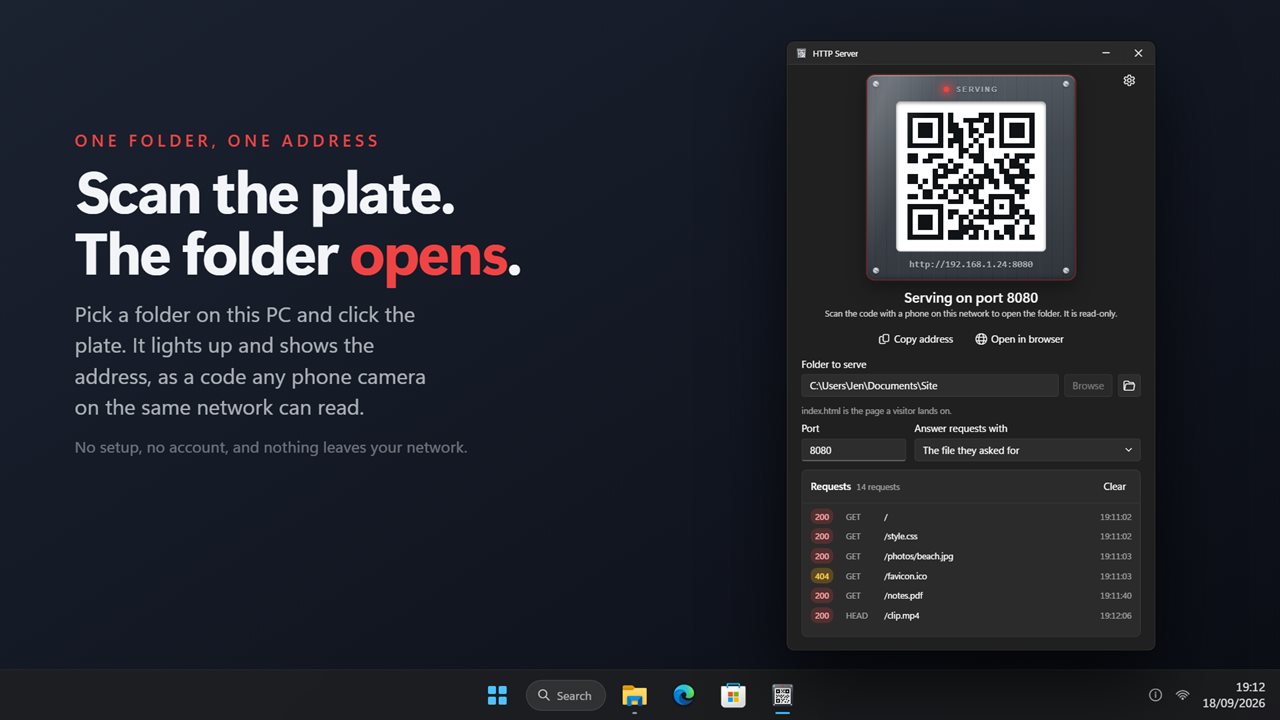
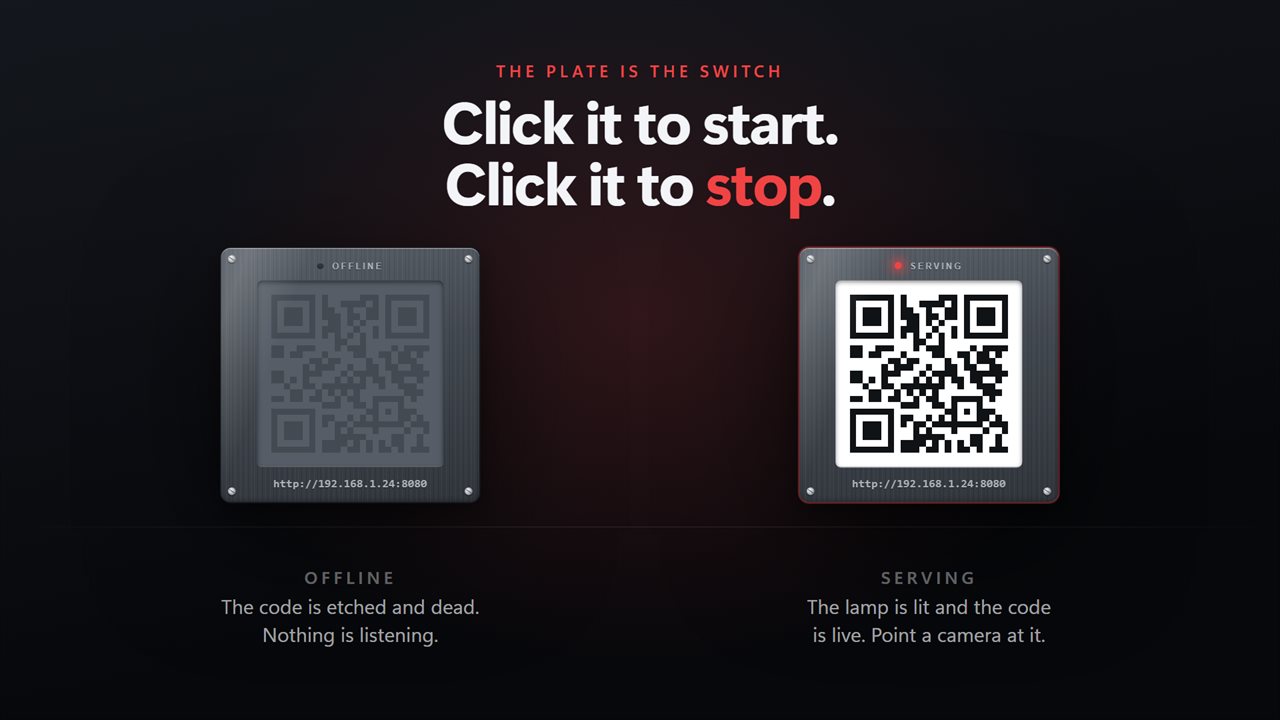
Click the plate and scan the code with a phone on the same network.
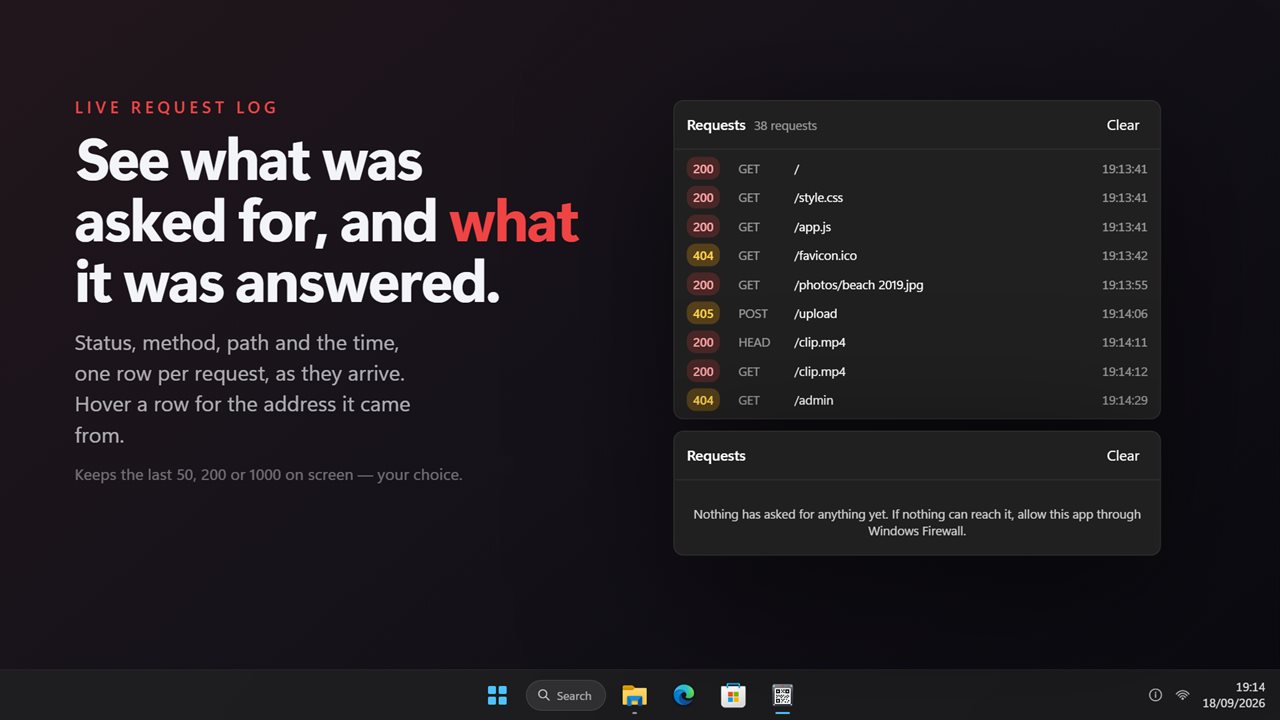
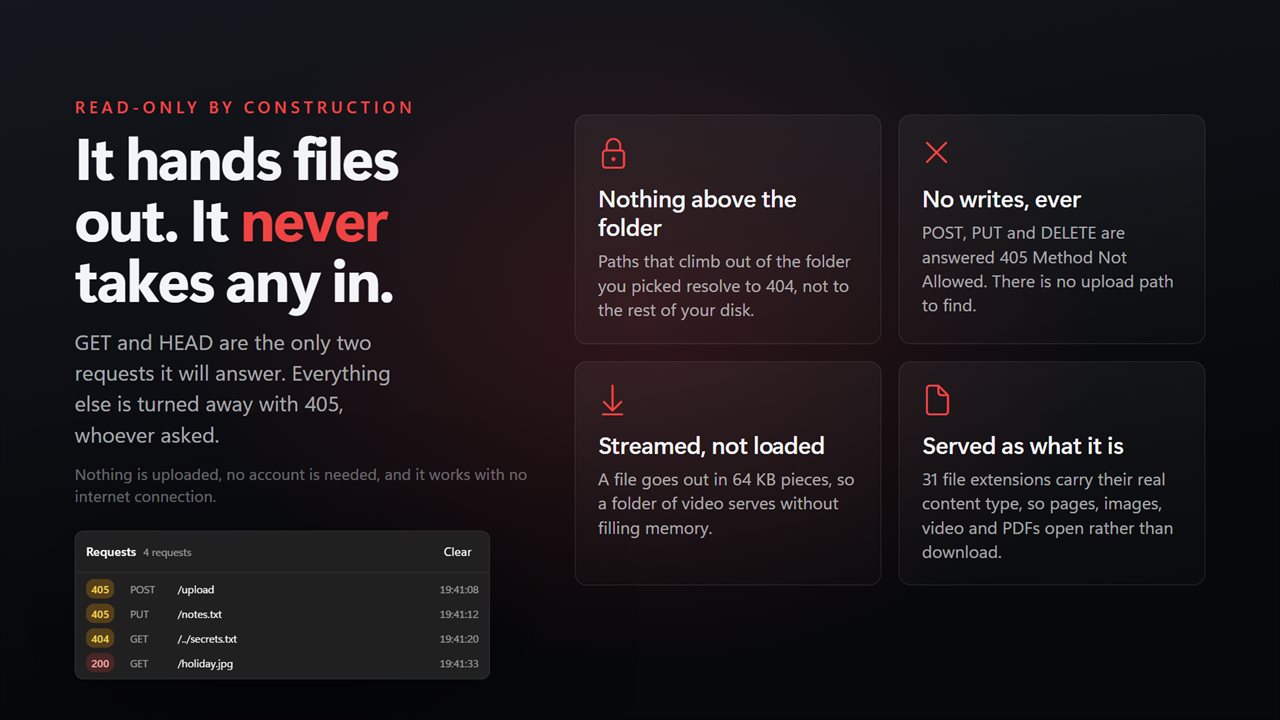
Every request listed as it arrives, with the status it was answered.
The plate is the switch: dark when offline, lit when serving.
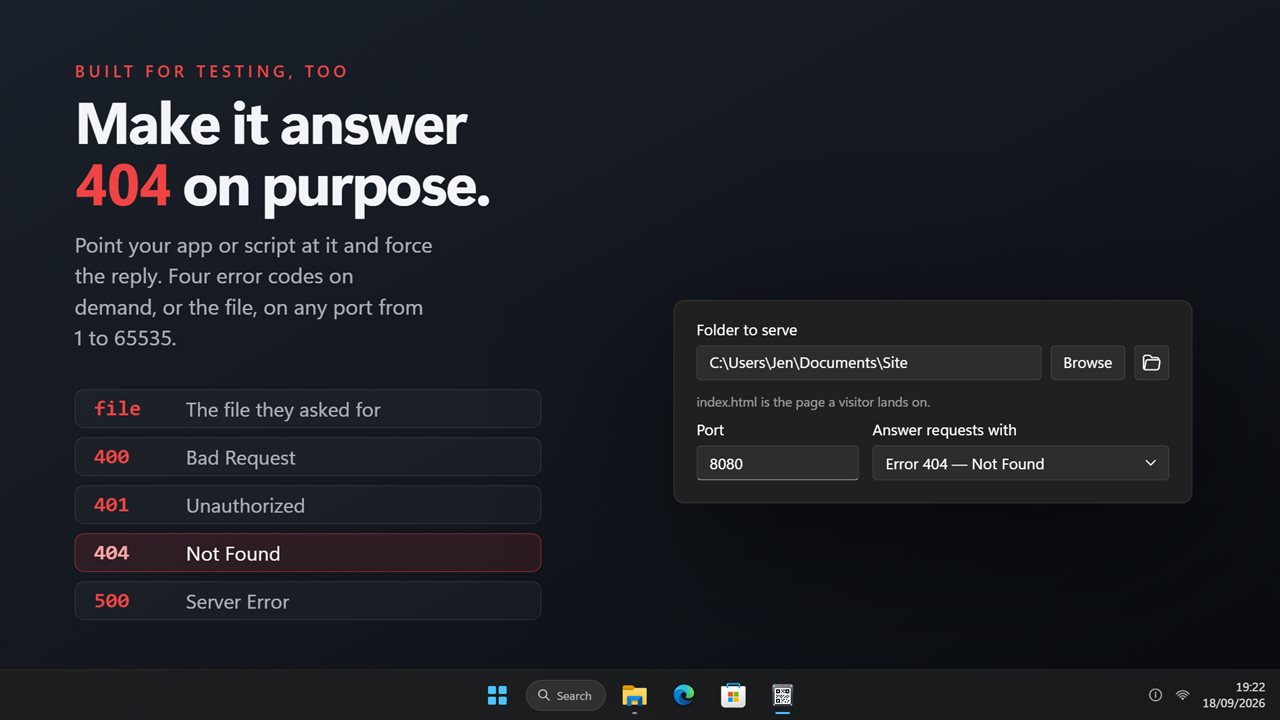
Force every reply to 400, 401, 404 or 500 to test a client.
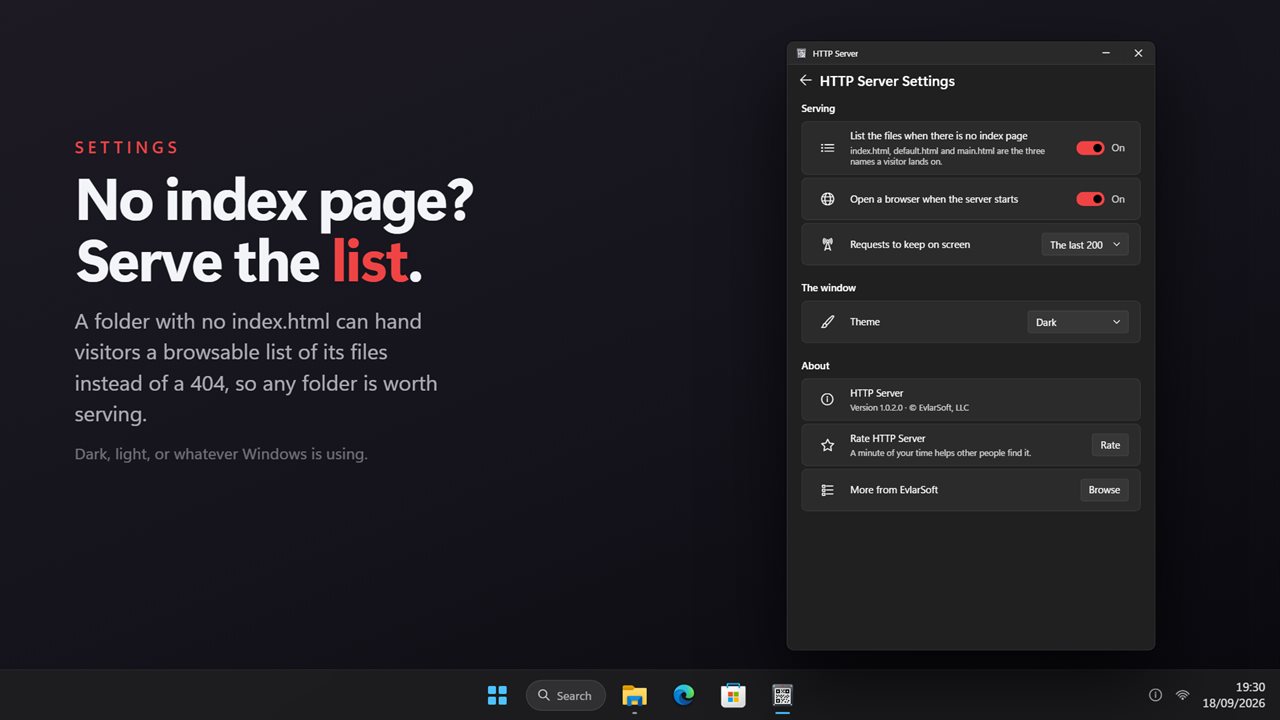
A folder with no index page can serve a list of its files.
Read-only: GET and HEAD only, and nothing above the folder.

Click the plate and scan the code with a phone on the same network.

190,000+downloads of EvlarSoft apps
Signed by EvlarSoftVerified US publisher
14-day money-backNo questions asked
Updates includedNo upgrade fees

What a local HTTP server does, and when you need one

An HTTP server answers browser requests with files. Run one on your PC and a folder you choose gets an address such as http://192.168.1.20:8080, which any phone, tablet, laptop or smart TV on the same network can type or scan to see what is inside.

Developers often reach for a one-line command-line server for this, which means having a runtime installed and remembering the syntax. This app is the same idea in a window. Choose the Folder to serve, click the plate, and it is live. Click the plate again to shut it down.

The address appears on the plate as a scannable code, so a phone camera opens the folder without anyone typing an IP address. Copy address and Open in browser sit beside it for the PC side.

How to start a simple HTTP server on Windows

The server listens on every network connection the PC has, so wired and wireless clients both reach it. With Open a browser when the server starts switched on, your own browser opens the address as a quick check.

  • Next to Folder to serve, press Browse and pick the directory.
  • Leave Port at 8080 or type any number from 1 to 65535. If another program already holds it, you are told so instead of left guessing.
  • Click the plate. The status changes to Serving and the code goes live.
  • On the other device, scan the code or enter the address in a browser.
  • If nothing connects, Windows Firewall is the usual cause: allow this app through it when Windows asks, or add the rule yourself.

A local web server for testing pages on a phone

Point it at a static site build and each folder's index.html, default.html or main.html loads as the landing page, worked out per folder rather than once at launch. Files go out with their proper content type, so HTML renders, images display, video plays and PDFs open in the browser instead of downloading.

That makes it a quick way to see a layout on a real phone screen without deploying anywhere. When a folder has no landing page, visitors get a clickable list of its files. Turn off List the files when there is no index page if you would rather they see a 404.

A mock server for error handling

The Answer requests with setting turns the server into a stub for error testing. Leave it on The file they asked for for normal use, or switch it to Error 400 — Bad Request, Error 401 — Unauthorized, Error 404 — Not Found or Error 500 — Server Error, and every request gets that status. Aim an app or script at the address and confirm it copes with each failure.

The Requests panel logs each call as it arrives: status, method, path and time, with the client's address on hover. Keep The last 50, The last 200 or The last 1000 on screen, and Clear the list between runs.

What visitors can and cannot do

The server is read-only. It answers GET and HEAD, and refuses every other method with 405, so nobody on the network can upload, rename or delete a file through it. Requests that try to step above the chosen folder resolve to nothing. There is no password and no HTTPS, though, so anyone who can reach the port can read that folder while it is being served. Stop it when you are finished.

Features

  • Serves one chosen folder over plain HTTP on any port from 1 to 65535
  • Scannable address code for phones, plus Copy address and Open in browser
  • Landing page found per folderIndex.html, default.html or main.html
  • Optional file listing for folders without a landing page
  • Correct content types for 31 file extensions
  • Large files sent in 64 KB chunks to keep memory use flat
  • Forced 400, 401, 404 or 500 replies for client testing
  • Live request log with a 50, 200 or 1000 row limit
  • Read-onlyGET and HEAD only, and no path outside the folder

Common jobs for it

Show photos or a video on the TV

Serve the folder, open the address in the TV's browser, and play files from the PC without copying them to a stick.

Preview a static site on real devices

Serve the build output and check the layout on a phone and tablet at once, then watch their requests appear in the log.

Grab a file from a PC that is not yours

On a shared network, scan the code and download what you need, then stop the server so the folder is closed again.

What's new in 2.0.3

  • New: a steel plate carrying the address as a scannable code — click it to start and stop
  • New: a live request log with the status, method, path and time of every request
  • New: a browsable file list for folders with no index page, where 1.x answered 404
  • New: force every reply to 400, 401, 404 or 500 for testing a client
  • New: files stream out instead of being read whole, so large files no longer fill memory
  • New: the address is the one a phone on your Wi-Fi can actually reach
  • New: dark theme by default, with light and match-Windows options
  • Fixed: the index page is found per folder, so a subfolder's own index is used
  • Removed: two settings that never worked — keep-alive, which parked the browser, and chunked replies, which returned 500 on every file

Questions

Anything else? Ask us

Can a phone or another PC on my network open the folder?

Yes. The server listens on every network connection of this PC on the port you choose, and the plate shows the address on your main network adapter as a code a phone camera can scan. If the PC has no network address, the address falls back to localhost, which only this PC can open.

Can I protect the folder with a password or use HTTPS?

No. It serves plain HTTP with no sign-in, so anyone who can reach this PC on that port can read the files in the folder while the server is running. Stop it when you are done.

Can people upload, change or delete files?

No. Only GET and HEAD requests are answered; anything else gets 405 Method Not Allowed. Paths that try to reach outside the folder you picked are not served.

What does a visitor see if the folder has no index.html?

The app looks for index.html, default.html or main.html in each folder a visitor opens. If none is there, it shows a clickable list of the files and subfolders, or a 404 if you turn the list off in Settings.

Can I use it to test how my app handles server errors?

Yes. Set it to answer every request with 400, 401, 404 or 500 instead of the file, and watch each request arrive in the log with its status, method, path and time. Any port from 1 to 65535 can be used, and it tells you if the port is already taken.

Can it serve large video files?

Yes. Files are sent in 64 KB pieces, so a large video does not have to fit in memory. It does not answer partial (range) requests, so some players may not let you skip ahead in a video.

Why can't my phone connect to the HTTP server on my PC?

Check that both are on the same network and that Windows Firewall allows this app on the port you chose. The app carries a reminder about the firewall for exactly this case.

What port should I use for a local HTTP server?

8080 is the default and rarely in use. Port 80 lets visitors leave the port out of the address, but another program may already hold it; the app tells you if the port is taken.

Which versions of Windows does it run on?

Windows 10 (version 1809 or later) and Windows 11.

Is it a subscription?

No. HTTP Server is a one-time purchase of $3.29, and updates are included.

How do I get it?

Buy it on this page and your license key arrives by email. If the button says Notify me, HTTP Server is not on sale here yet; leave your email and we will tell you when it is.