EEvlarSoft

C and C++ Compiler for Windows

A C and C++ compiler for Windows that is ready the moment it opens: type a program, press F5, and read its output in the same window.

Buy for $1.99
One payment. No subscription.
14-day money-back guarantee.
4.0
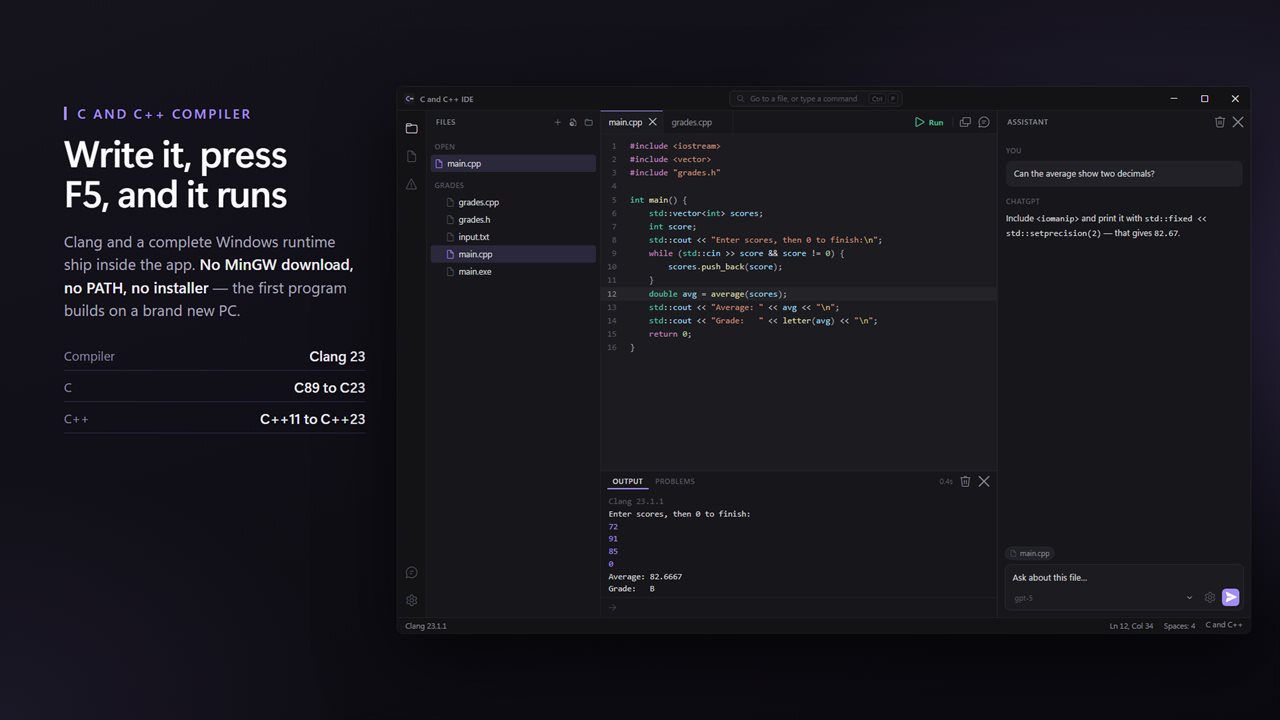
Write C or C++ and press F5. Clang ships inside the app, so there is nothing to install first.
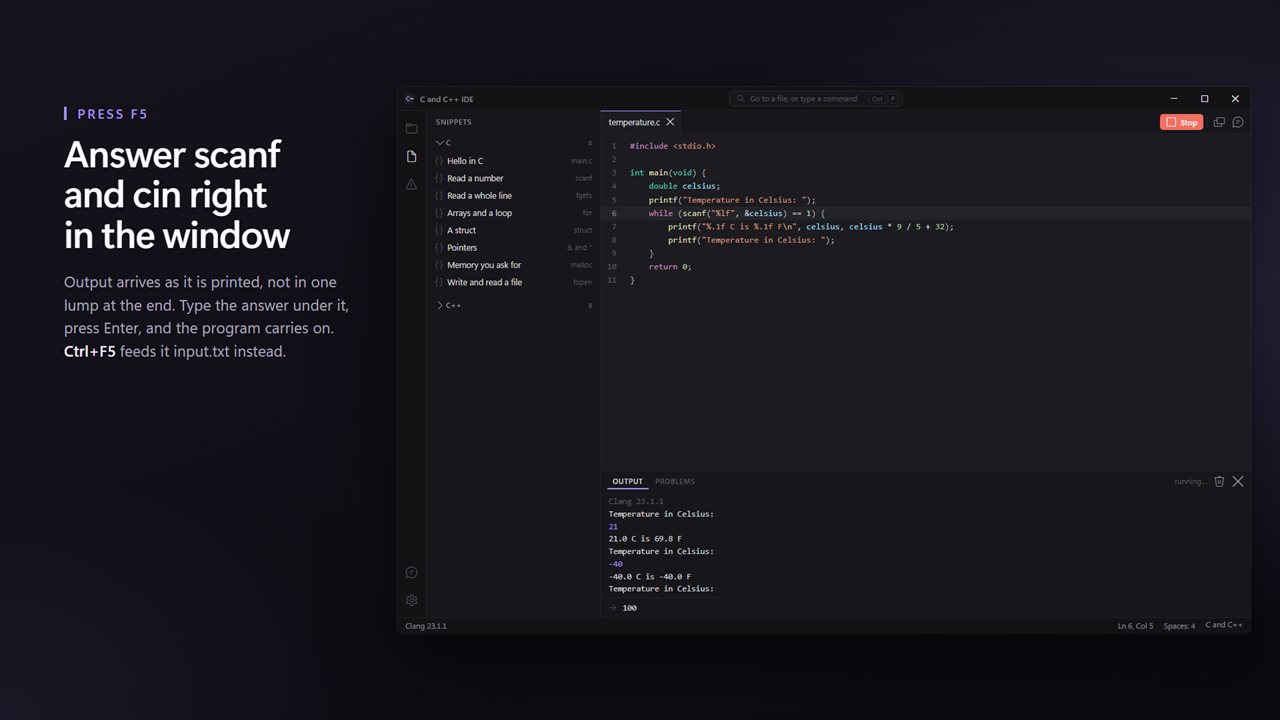
Output arrives as it is printed, and you answer scanf and cin right in the window.
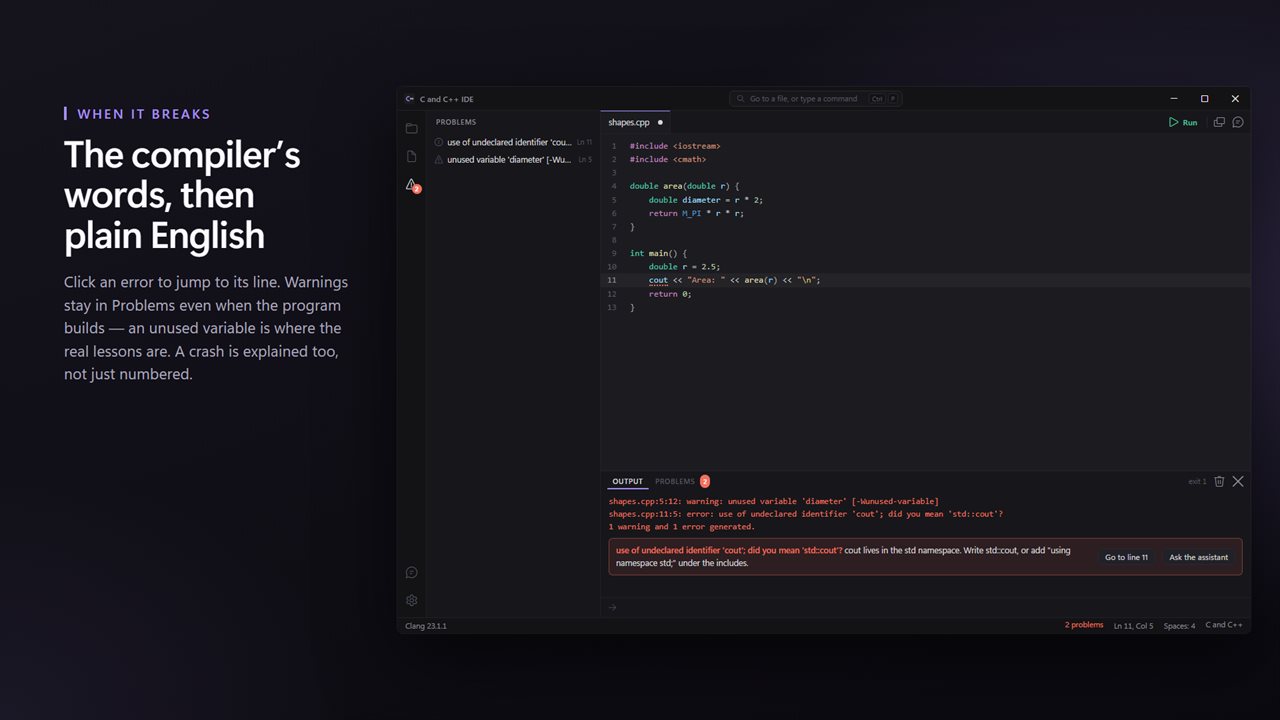
A compiler error becomes a line you can click and a sentence you can read. Warnings show up too.
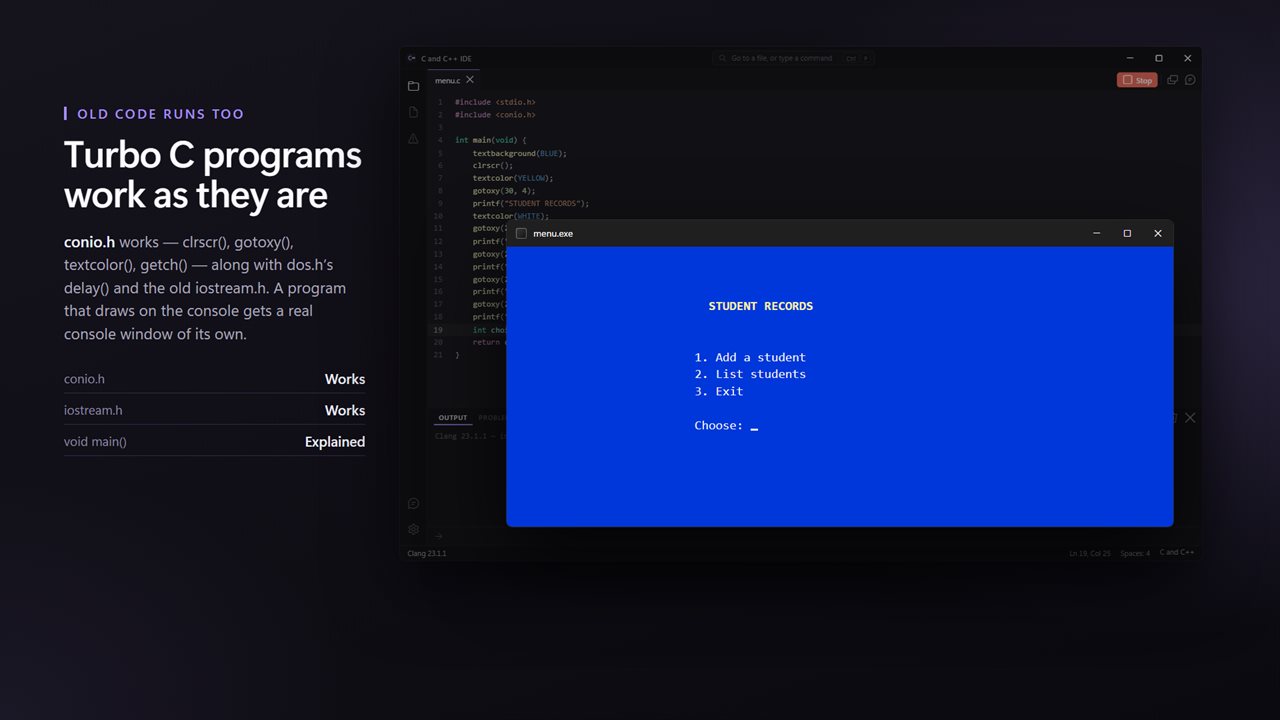
Old Turbo C programs run as they are: conio.h, clrscr(), gotoxy() and getch(), in a console window of their own.
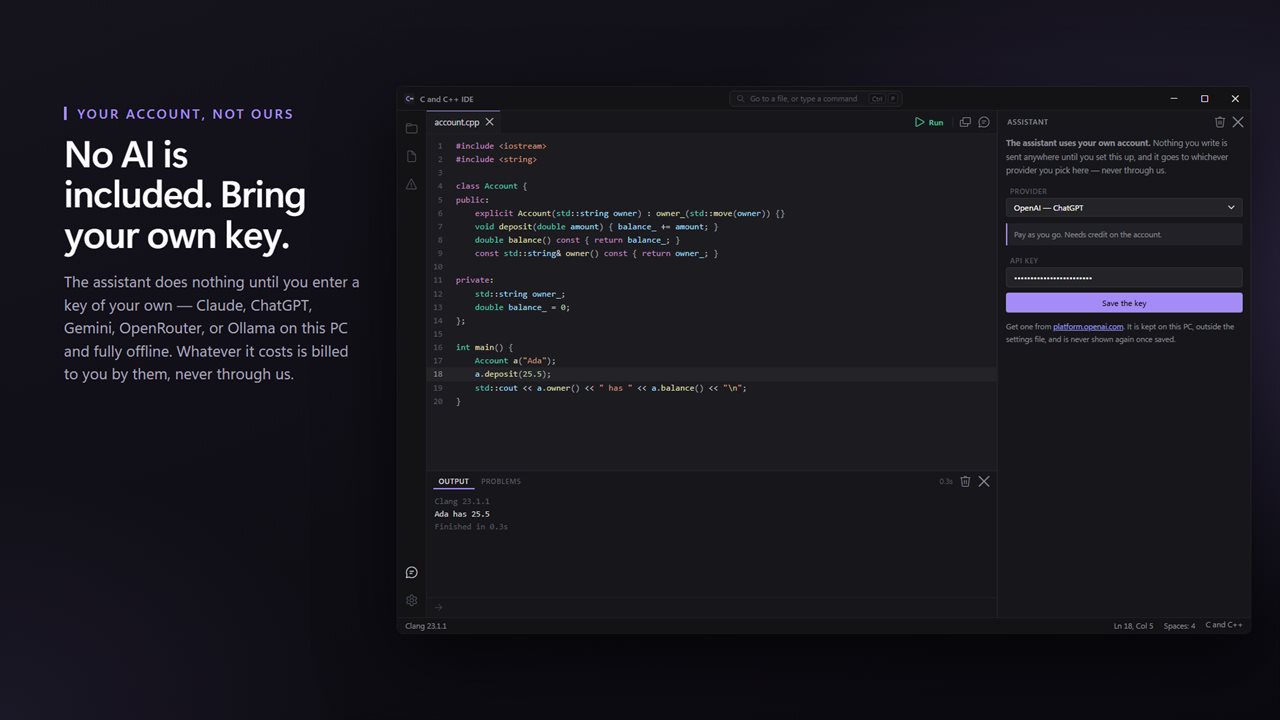
No AI is included: the assistant is inert until you enter a key of your own. Claude, ChatGPT, Gemini, OpenRouter — or Ollama, offline.
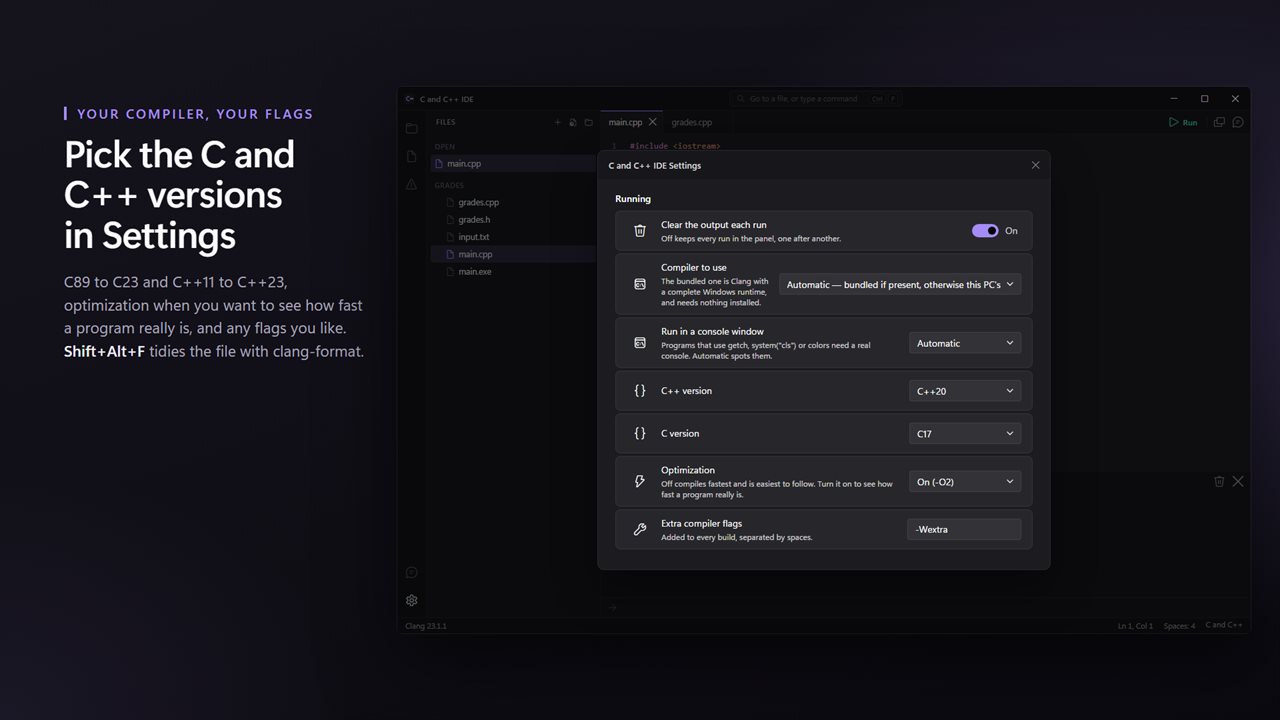
Pick the C and C++ versions, optimization and flags in Settings, over the code they change.

Write C or C++ and press F5. Clang ships inside the app, so there is nothing to install first.

190,000+downloads of EvlarSoft apps
Signed by EvlarSoftVerified US publisher
14-day money-backNo questions asked
Updates includedNo upgrade fees

Looking for a C or C++ compiler for Windows that just works?

Windows does not ship with a C or C++ compiler, and the usual advice for getting one is a chore: download MinGW or a GCC build, add its bin folder to PATH, open a terminal, and type gcc commands by hand. C and C++ IDE skips every step. Clang from the llvm-mingw toolchain, with the Windows headers and runtime it needs, is packaged inside the app, so the first program you write compiles without installing anything else.

The editor and the compiler live in one window. Write your code in a tab, press F5, and the build runs and the program starts. Whatever it prints appears in the panel below as it happens, and when it waits on scanf or cin you type the answer into that same panel. Shift+F5 stops a program that will not end.

Each build is linked statically, so the .exe left next to your source file does not depend on DLLs from the app and can be copied to another Windows PC and run there.

A C++ compiler with modern standards and the old ones

Files ending in .c are treated as C and default to C17. Files ending in .cpp, .cc or .cxx are C++ and default to C++20. Both can be changed in Settings under C version and C++ version, which reach from C89 (ANSI C) up to C23 and from C++11 up to C++23. Optimization can be left Off or set to -O2 or -O3, and an Extra compiler flags box passes anything else straight to Clang.

Every build has -Wall switched on, so warnings about unused variables, suspicious comparisons and format mismatches show up in the Problems list even when the program compiles. Ctrl+Shift+M opens that list, and each entry jumps to its line.

Compiler errors and crashes, translated

Clang's messages are precise but not always friendly to someone in their first month of C. Along with the raw text, the app recognizes common mistakes and adds a short plain explanation. A few examples of what it catches:

  • cout or vector used without std::, with the two ways to fix it
  • A missing semicolon, pointing you to the end of the previous line
  • An unclosed brace, a function called before it is declared, or a header name that does not exist
  • void main() from older textbooks, and why modern C++ wants int main()
  • A program still running that blocks the new .exe from being written

Run conio.h and Turbo C++ programs on Windows 10 and 11

Many courses still hand out code written for Turbo C. Rather than making you rewrite it, the app supplies compatibility headers so clrscr(), gotoxy(), textcolor(), getch() and delay() compile, along with the pre-standard iostream.h, fstream.h and iomanip.h. When the source uses console calls like these, the program is launched in its own console window automatically. The Run in a console window setting can force that on or off.

If a program crashes instead of exiting, the panel names what happened, such as an access violation from a bad pointer or a stack overflow from runaway recursion, instead of leaving you with a bare exit code.

Inside the editor

  • Bundled Clang toolchain, with the option to point Settings at another clang.exe
  • F5 to build and run, Shift+F5 to stop, Ctrl+F5 to run with input.txt from the same folder
  • Multi-file programsOpen a folder and sibling .c and .cpp files compile in, skipping any with their own main()
  • Shift+Alt+F reformats the file with clang-format
  • Sixteen starter programs, eight in C and eight in C++, from reading a line to timing code
  • Ctrl+P command palette, a file tree on Ctrl+Shift+E, and Ctrl+N, Ctrl+O and Ctrl+S for files
  • An assistant panel that works with your own API key or a local model server and can see your file and the last failed build

Who uses it

Students in a first C course

Install one app, open the assignment, press F5. Nothing to configure before the lab, and errors come with a hint about what they mean.

Competitive programmers

Save the sample input as input.txt beside your solution and press Ctrl+F5 to feed it in on every run.

Anyone with old coursework

Programs built around conio.h and iostream.h from older textbooks compile on a current Windows PC with no edits for the common calls.

What's new in 1.0.2

  • Clang 23 and a complete Windows runtime ship inside
  • F5 compiles and runs; output streams as it prints
  • scanf and cin answered in the window
  • Turbo C's conio.h, dos.h and iostream.h work, in a console window when a program needs one
  • Compiler errors and warnings explained in plain English, with a clickable line
  • Crashes explained, not just numbered
  • Multi-file programs build from the open folder
  • Ctrl+F5 runs with input.txt; Shift+Alt+F formats the file
  • C89 to C23 and C++11 to C++23, optimization and extra flags in Settings
  • An assistant on your own key: Claude, ChatGPT, Gemini, OpenRouter, or Ollama offline
  • 16 runnable snippets in C and C++
  • Light and dark, following Windows

Questions

Anything else? Ask us

Do I need to install MinGW or another compiler first?

No. Clang 23 from the llvm-mingw toolchain, with its Windows runtime and headers, is included in the app. You can point it at a different clang.exe in Settings if you prefer.

Which C and C++ standards can it compile?

.c files compile as C17 and .cpp files as C++20 by default. Settings offers C89, C99, C11, C17 and C23, and C++11 through C++23, plus optimization levels -O2 and -O3 and a box for extra compiler flags.

Will old Turbo C programs with conio.h run?

Yes, for console programs. clrscr(), gotoxy(), textcolor(), textbackground(), getch(), kbhit() and delay() work, and so do the old iostream.h, fstream.h and iomanip.h headers. Turbo C's graphics.h is not supported.

How does my program read input from scanf or cin?

Type your answer into the output panel while the program runs. Ctrl+F5 feeds it the input.txt file from the same folder instead. A program that uses conio.h, getch() or system("cls") opens in its own console window automatically.

Can it build a program made of several files?

Yes, when you open the folder. The other .c and .cpp files in the same folder as the one you run are compiled in with it, except files that have their own main(). Files in subfolders are not included.

Does it include an AI assistant or a debugger?

There is no debugger and no breakpoints. The assistant only works with your own API key for Claude, ChatGPT, Gemini or OpenRouter, or with a local server such as Ollama. The key is saved in a separate file on your PC, ai-keys.json, which is not encrypted.

Does graphics.h work?

No. graphics.h is Turbo C's drawing library and has no Windows version in this app; a program that includes it gets an error saying so. The Turbo C console calls in conio.h and dos.h, such as clrscr(), gotoxy() and delay(), do work.

Where does the compiled .exe go?

It is written next to your source file. Because programs are linked statically, that .exe can be copied to another Windows PC and run without extra runtime files.

How do I stop a program stuck in an infinite loop?

Press Shift+F5, or choose Stop from the command palette (Ctrl+P). The program is ended and you can edit and run again.

Which versions of Windows does it run on?

Windows 10 (version 1809 or later) and Windows 11.

Is it a subscription?

No. C and C++ Compiler is a one-time purchase of $1.99, and updates are included.

How do I get it?

Buy it on this page and your license key arrives by email. If the button says Notify me, C and C++ Compiler is not on sale here yet; leave your email and we will tell you when it is.