EEvlarSoft

Python Script IDE

Edit a Python script, press F5, and watch it print.14 is already inside, and each traceback points to the line and says what went wrong.

Buy for $1.99
One payment. No subscription.
14-day money-back guarantee.
3.4
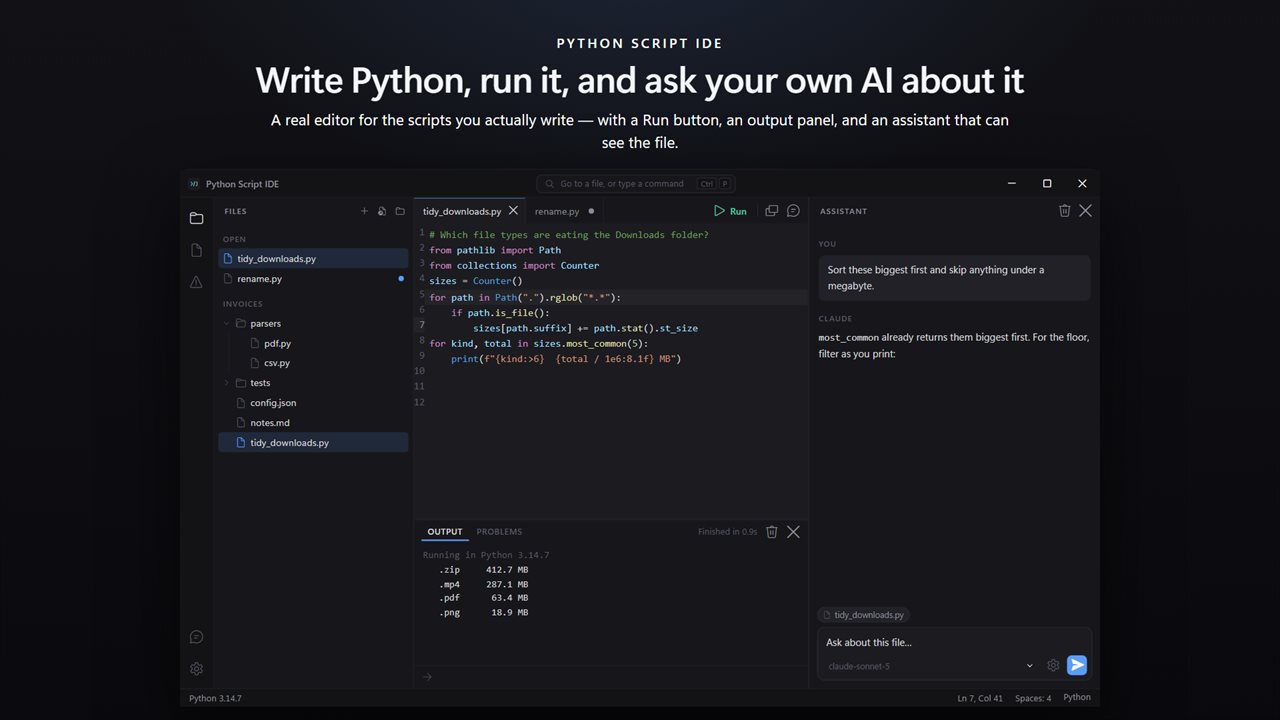
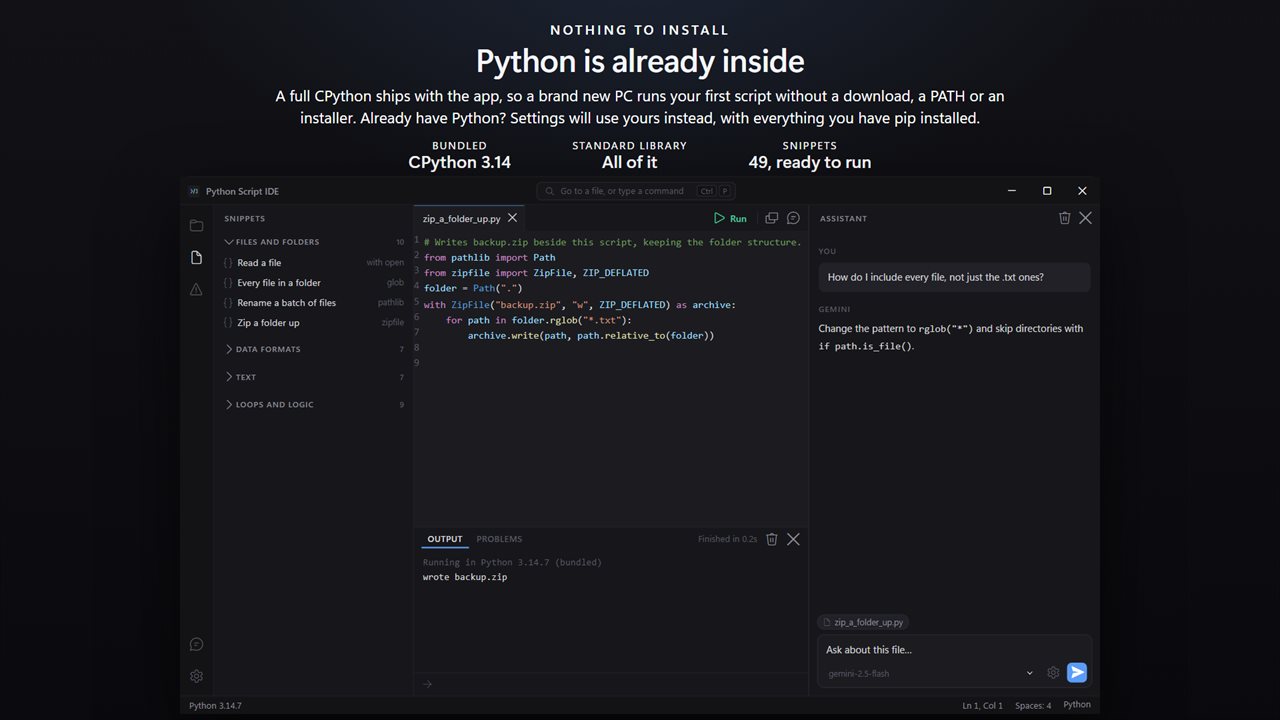
An editor, a Run button and an assistant that can see your file — in one window, with nothing to configure.
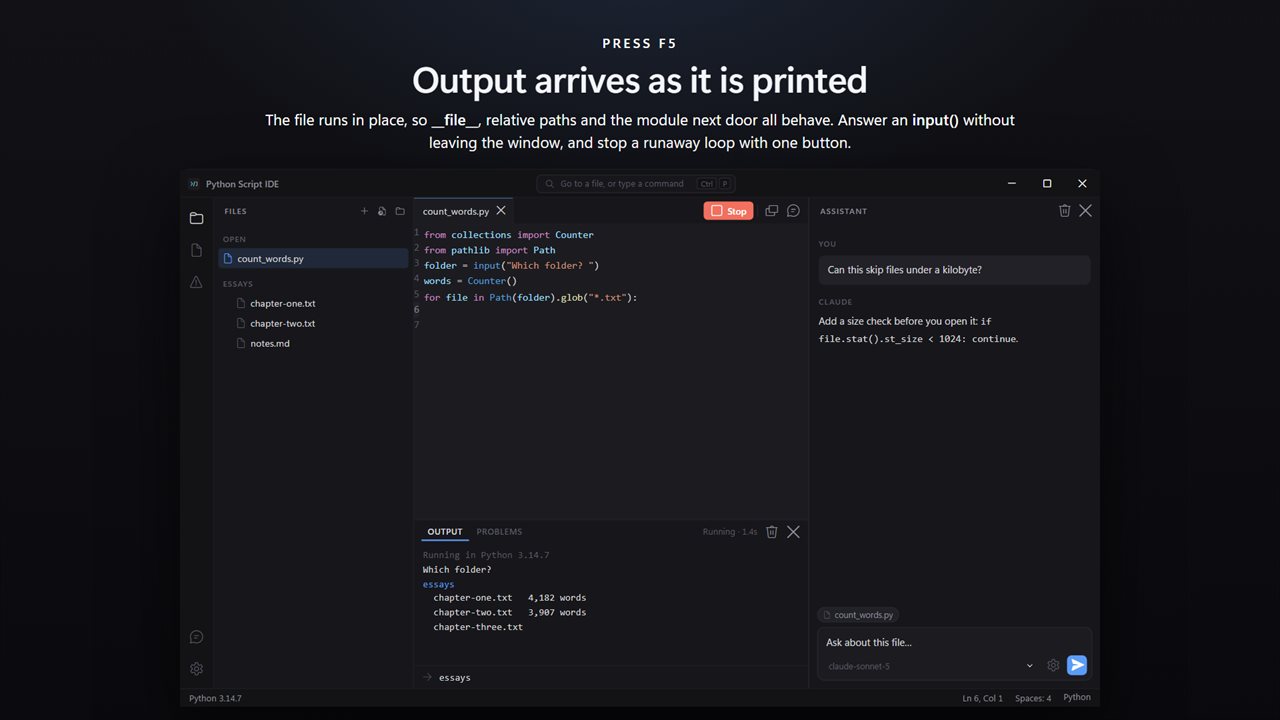
Output arrives as it is printed. Answer an input() prompt in the window, and stop a runaway loop with one button.
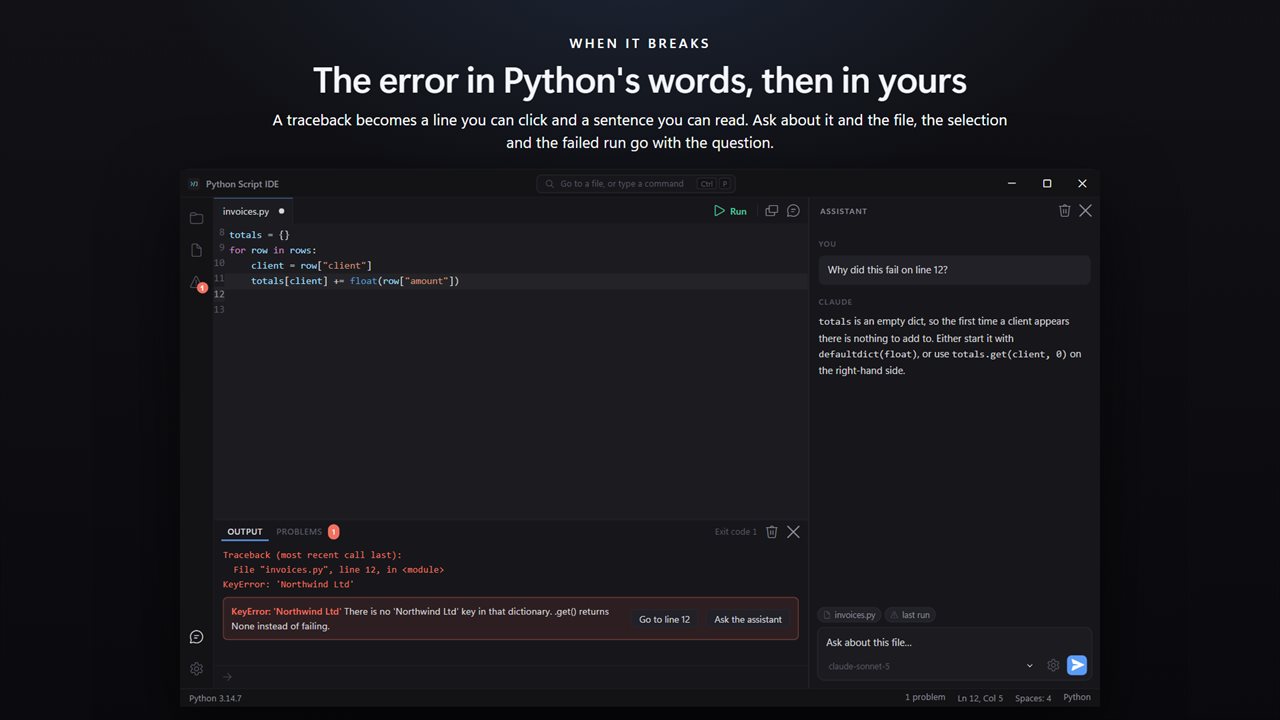
A traceback becomes a line you can click and a sentence you can read. Ask about it and the failed run goes too.
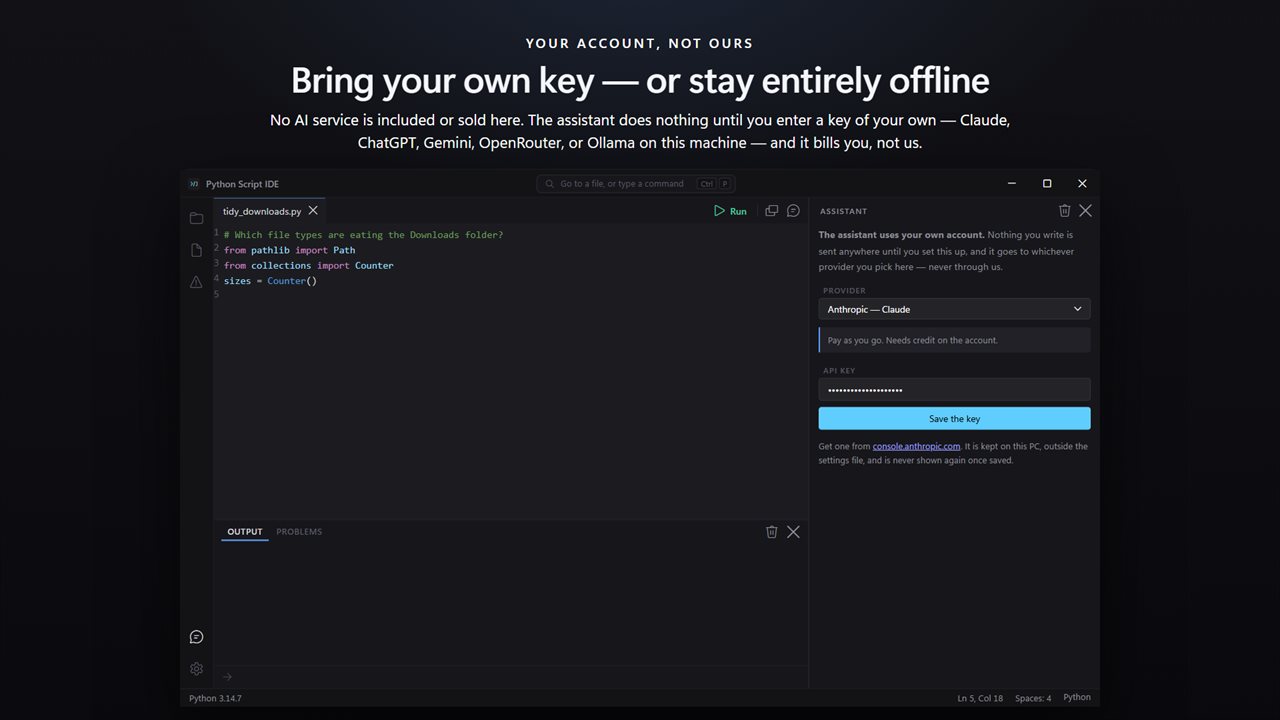
No AI is included: the assistant is inert until you enter a key of your own. Claude, ChatGPT, Gemini, OpenRouter — or Ollama, offline.
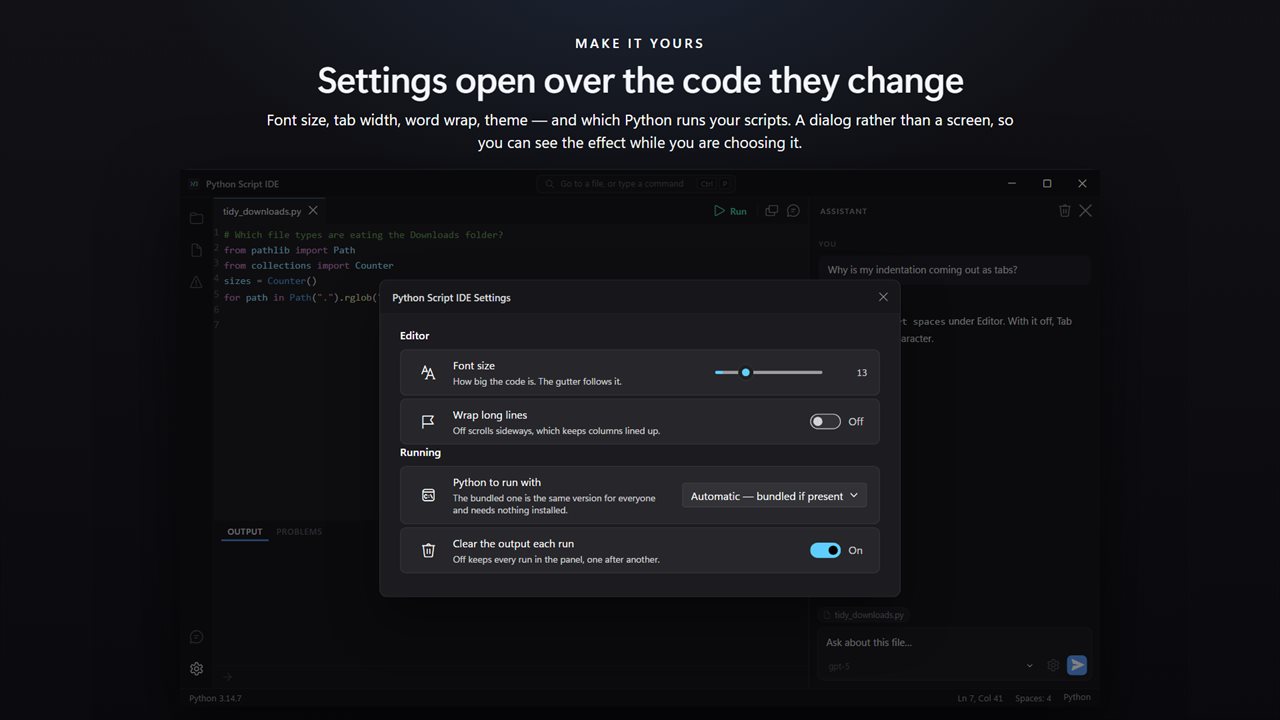
Settings open over the code they change, so you can see the effect while you are choosing it.
Forty-nine snippets that each open as a whole script and run as they are. Python 3.14 ships inside the app.

An editor, a Run button and an assistant that can see your file — in one window, with nothing to configure.

190,000+downloads of EvlarSoft apps
Signed by EvlarSoftVerified US publisher
14-day money-backNo questions asked
Updates includedNo upgrade fees

A Python IDE for people who write scripts, not projects

A lot of Python is written by people who just want a script to rename some files, tidy a CSV or call an API. The usual routine for them is a .py file in Notepad and a command prompt in a second window. Python Script IDE is a Python IDE built for exactly that job: one window that edits the file, runs it with F5, and shows what it printed.

It also removes the install step. A full CPython 3.14 is bundled, so the first script runs on a Windows PC that has never had Python. If you already rely on your own Python and the packages you added with pip, the Python to run with setting can use that interpreter instead, or a specific python.exe. Whichever one ran is always shown in the status bar.

Output is unbuffered, so a long loop reports its progress while it runs rather than all at once at the end, and input() prompts are answered in a box under the output.

How to run a Python file on Windows without the command prompt

Scripts run from their own folder, so open("data.txt"), __file__ and importing a module that sits beside the script all behave as they would if you had typed python script.py in that directory.

  • Drop a .py file on the window, press Ctrl+O, or open the whole folder to see every file in the tree.
  • Press F5. Lines appear in the output panel as the script prints them.
  • Answer input() in the box under the output, or press Ctrl+F5 to feed it an input.txt from the same folder.
  • Press Shift+F5 to stop a script that is stuck or meant to run forever.

Python tracebacks, read for you

A traceback names a file, a line and an exception type, and then leaves you to work out the rest. Here the last line of the traceback becomes a clickable entry that jumps to the line, with a sentence underneath saying what the error usually means in practice.

The explanations cover the errors beginners and occasional scripters meet most: NameError, ModuleNotFoundError, the three flavors of IndentationError and TabError, unclosed brackets, adding an int to a str, an object that is not subscriptable, IndexError and KeyError, a failed int() conversion, a missing attribute, FileNotFoundError, a PermissionError when another program has the file open, and RecursionError.

To keep indentation errors from happening at all, Tab inserts four spaces by default. Settings lets you choose 2, 4 or 8 and real tabs if a file needs them.

49 Python script examples to start from

Each starter opens in its own tab as a complete, runnable script with its sample data included, so pressing F5 shows you what it does before you adapt it. They are grouped into six sections:

  • Files and folders: walk subfolders, rename a batch, hash a file to check it, zip a folder
  • Data formats: JSON, CSV by column name, summing a column, an SQLite database, fetching a URL
  • Text: regular expression matching and replacing, named groups, number formatting, wrapping
  • Loops and logic: counting, grouping into a dict, sorting by a key, chunking, retrying on failure
  • Structure: functions with defaults, classes, dataclass-style records, command-line arguments, type hints
  • This machine: environment variables, dates, timing, running another program, free disk space
What you get

  • CPython 3.14 bundled, plus Automatic, bundled, this PC's Python or a specific python.exe in Settings
  • Syntax coloring, folding and completion for keywords, builtins and common standard-library modules
  • A project tree that lists every file in the folder, and other file types such as JSON, Markdown and SQL open with their own coloring
  • An Insert a main guard command that adds the if __name__ == "__main__" block
  • Clear the output each run, or keep every run stacked in the panel
  • Text size from 10 to 22 px, word wrap, line numbers and Dark, Light or Match Windows themes
  • An optional assistant that works with a key you supply or a model on this PC, and sees your file, selection and latest traceback

Where it fits

Office automation

Rename a folder of downloads, merge CSV exports or pull numbers out of text files with a script you can rerun in one key.

Learning Python

Start on a PC with nothing installed, and let the explained tracebacks teach you what each exception means.

Data scripts with your own packages

Point Settings at the Python where you installed pandas or requests, and keep the same editor and run key.

What's new in 4.0.3

  • A real Python editor: syntax colour, folding, bracket matching and completion
  • A tab per file, each with its own undo history
  • F5 runs the file in place; output streams into the panel as it prints
  • input() answered in the window, and one button to stop a runaway script
  • Tracebacks explained in plain English, with a clickable line
  • An assistant that sees the open file, the selection and the last failed run
  • Your own key: Claude, ChatGPT, Gemini, OpenRouter, or Ollama offline on this PC
  • CPython 3.14 ships inside, so nothing needs installing first
  • Or use the Python you already have, with the packages you already installed
  • 49 runnable snippets in six collapsible sections
  • A file tree for the whole project, not only the Python in it
  • Light and dark, following Windows

Questions

Anything else? Ask us

Do I need to install Python first?

No. A copy of Python 3.14 comes with the app, so your scripts run on a PC that has never had Python installed.

Can I use packages I installed with pip, like requests or numpy?

Yes, through your own Python. In Settings, choose the Python installed on this PC or point it at a specific python.exe, and your scripts can import whatever you have installed for it. The app does not install packages for you.

Does input() work?

Yes. While the script runs, type your answer in the box under the output and press Enter. You can also put an input.txt next to the script and press Ctrl+F5, and its contents go in as if you had typed them.

Do relative file paths and imports from the same folder work?

Yes. A saved script runs from its own folder, so open("data.txt") and importing a module that sits next to it work the same way they do from a command prompt.

Does it have a debugger with breakpoints?

No. There are no breakpoints and no stepping through code. When a script fails, you can click the error to jump to the line, and the error is explained in plain English.

Does it work without an internet connection?

Yes. Editing and running scripts happen on your PC with the included Python. Only the optional AI assistant needs a connection, and it can use Ollama or LM Studio on the same PC instead.

What does IndentationError: expected an indented block mean?

The line before it ends in a colon, as an if, for, def or class line does, so Python needs the next line indented under it. Indent the line, or add pass if the block is meant to be empty. The app shows that explanation under the error and jumps to the line.

Can I pass command-line arguments to my script?

Not from the Run key. One of the Structure starters shows how sys.argv and argparse work, but F5 starts the script without arguments, so read values with input() or from input.txt.

Can I open non-Python files in the editor?

Yes. Opening a folder lists every file in it, and formats such as JSON, Markdown and SQL get their own syntax coloring, so you can edit the data and notes your script works with.

Which versions of Windows does it run on?

Windows 10 (version 1809 or later) and Windows 11.

Is it a subscription?

No. Python Script IDE is a one-time purchase of $1.99, and updates are included.

How do I get it?

Buy it on this page and your license key arrives by email. If the button says Notify me, Python Script IDE is not on sale here yet; leave your email and we will tell you when it is.