EEvlarSoft

PC Shutdown Timer

A PC shutdown timer you set by turning a dial: when it reaches zero, Windows shuts down, restarts, sleeps, hibernates, locks or logs you off.

Buy for $2.49
One payment. No subscription.
14-day money-back guarantee.
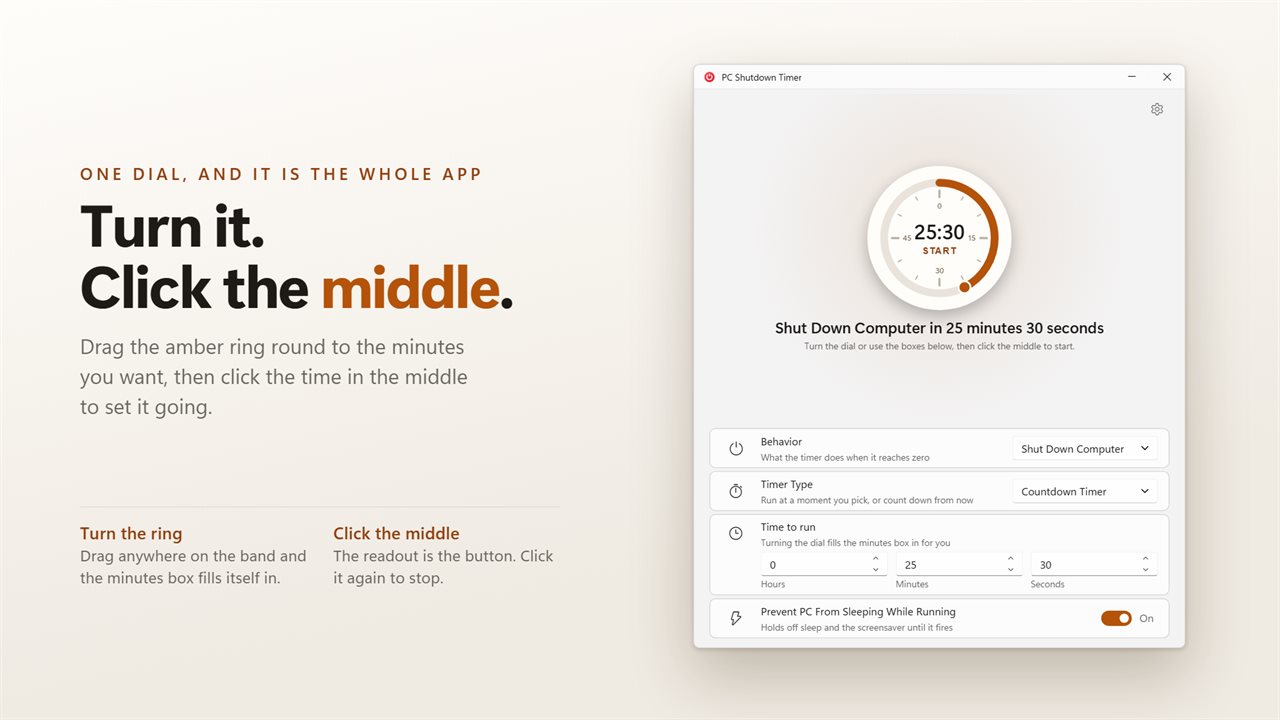
The dial is the app: turn the ring to set the time, click the middle to start.
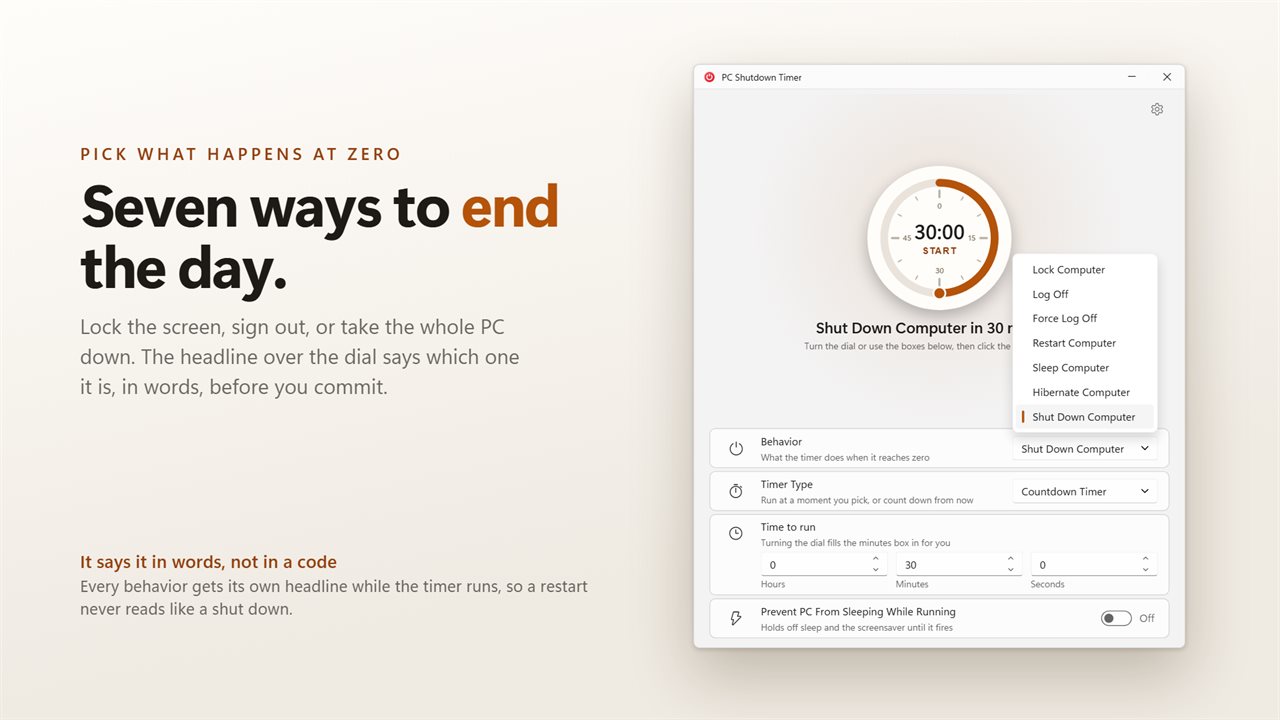
Seven things it can do at zero, from locking the screen to a full shut down.
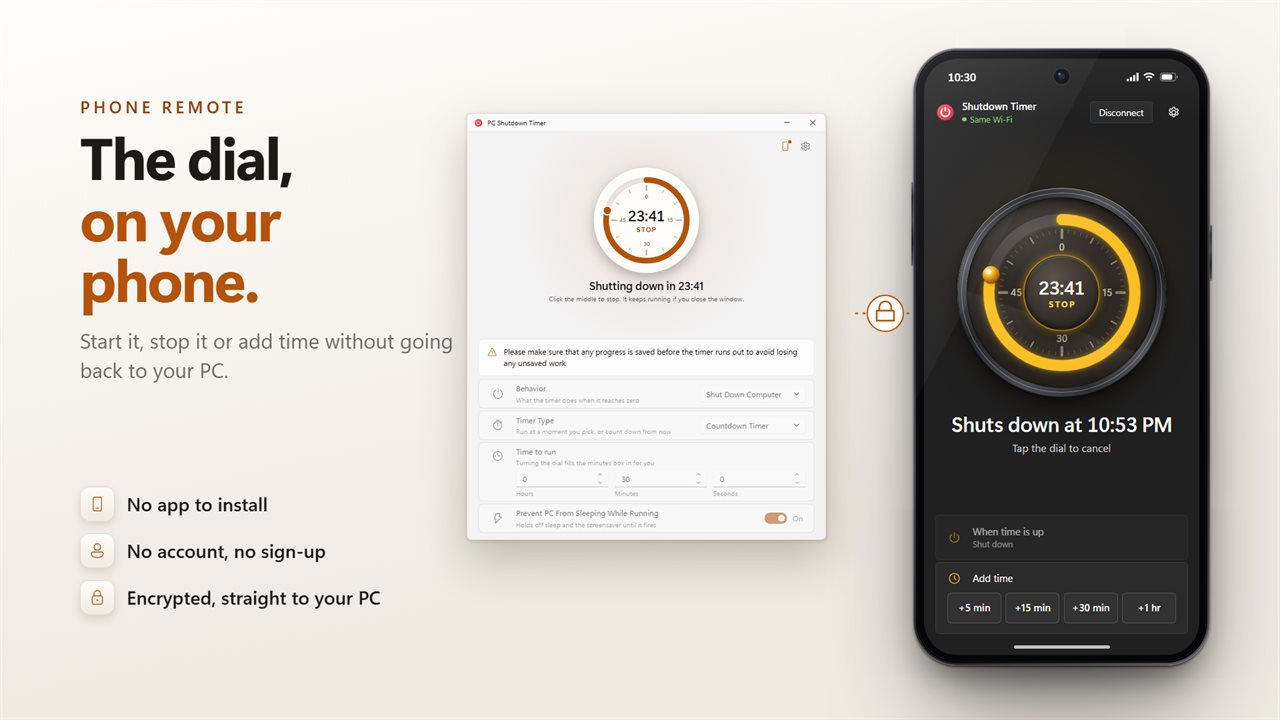
Use your phone as the dial: start, stop or add time from across the room. No app to install, no account, and an encrypted link straight to your PC.
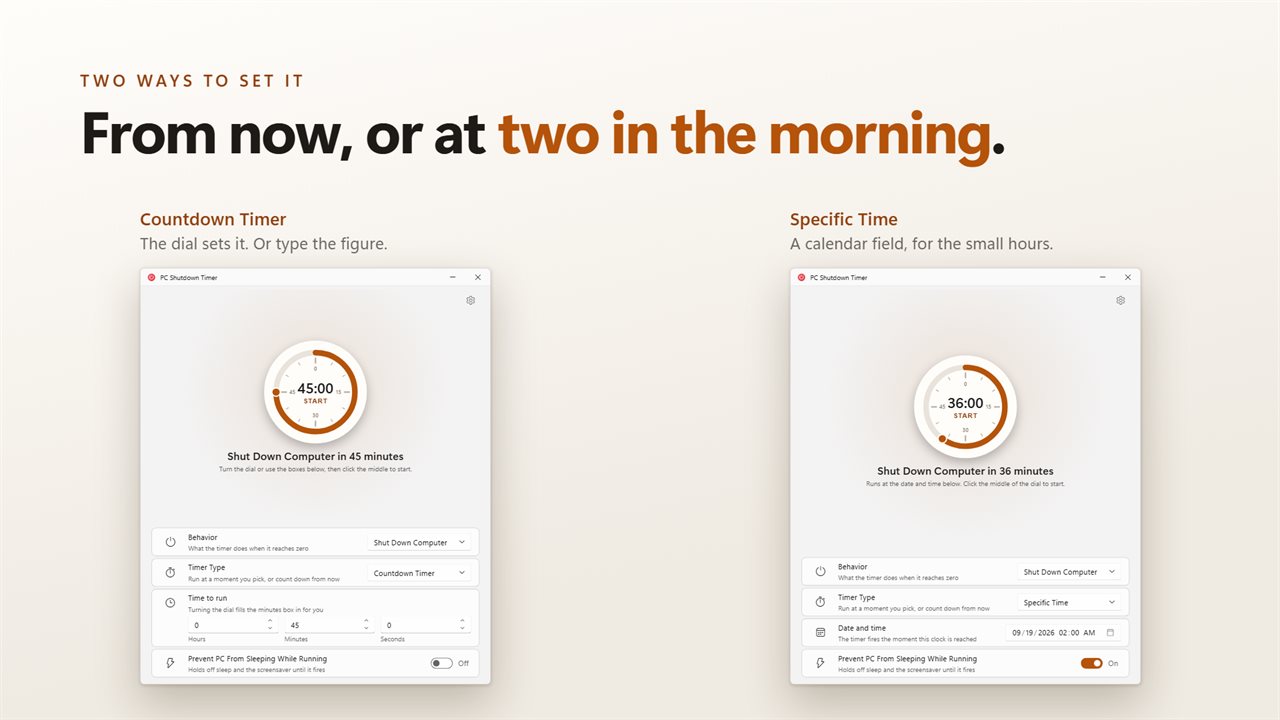
Count down from now, or give it a date and time to fire at.
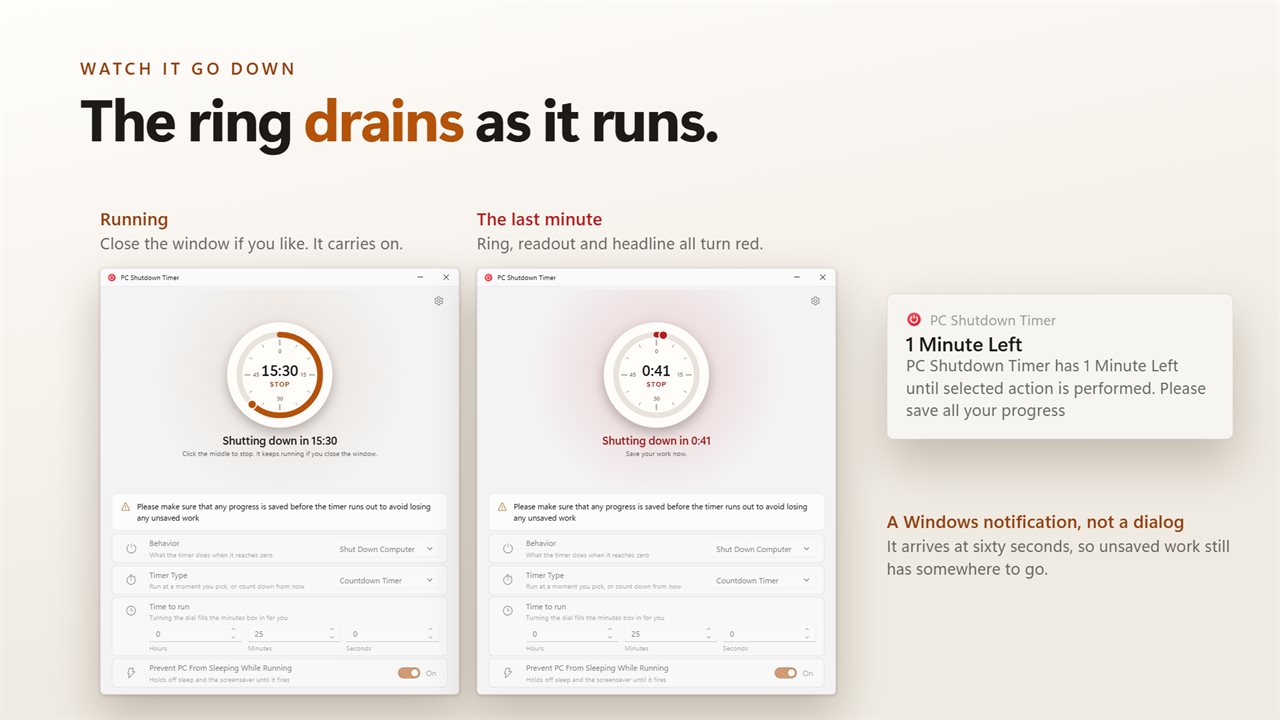
The ring drains as it runs, and the last minute brings a Windows notification.
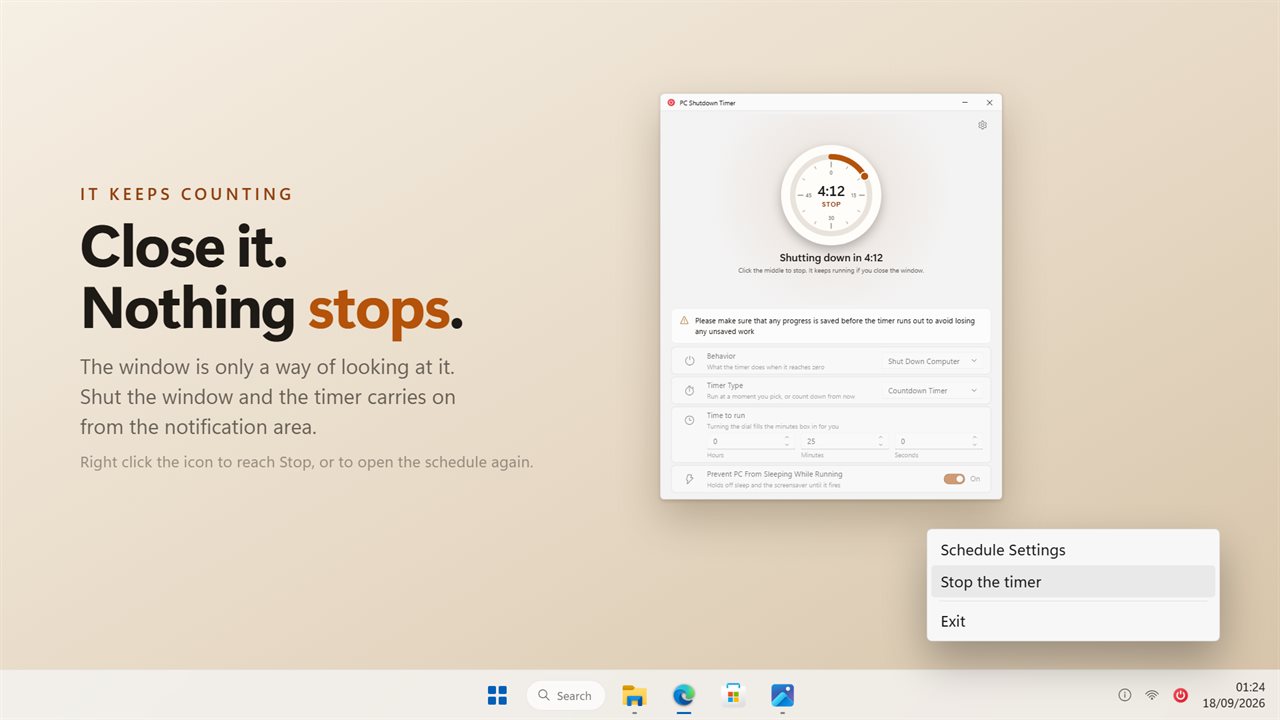
Close the window and it keeps counting from the notification area.

The dial is the app: turn the ring to set the time, click the middle to start.

190,000+downloads of EvlarSoft apps
Signed by EvlarSoftVerified US publisher
14-day money-backNo questions asked
Updates includedNo upgrade fees

A PC shutdown timer you can see counting

Search for a PC shutdown timer and nearly every result teaches the same trick: press Windows + R and type shutdown /s /t 3600. It works, but the number is in seconds, nothing on screen shows how long is left, and the only way to cancel is to remember shutdown /a before the deadline. If you wanted sleep or a lock instead of a full power-off, the command does not help at all.

PC Shutdown Timer puts the whole job on one round dial. Drag around the ring to pick the minutes, or enter figures into the Hours, Minutes and Seconds boxes below it. The time in the center of the dial is also the button: click it to start, and click it again to stop. As the countdown runs, the ring drains so you can read the time left from across the room.

Above the dial, a plain sentence says what is going to happen and when, such as Shut Down Computer in 2 hours. You read it before you commit, not after the screen goes black.

How to set a shutdown timer in Windows 11

The steps are the same on Windows 10.

  • Open the Behavior list and pick what should happen at zero: Lock Computer, Log Off, Force Log Off, Restart Computer, Sleep Computer, Hibernate Computer or Shut Down Computer.
  • Under Timer Type, choose Countdown Timer to count down from now, or Specific Time to fire at a date and time on the calendar field.
  • For a countdown, turn the ring or fill in Hours, Minutes and Seconds.
  • Click the time in the middle of the dial. Close the window if you like; the countdown keeps going as an icon by the clock.
  • To cancel, click the middle of the dial again, or right-click the tray icon and choose Stop the timer.

Schedule a shutdown for a clock time, not just a delay

A delay is fine when you know how long a job takes. Often you only know when you want the machine off: after a download that should be done by 2 a.m., or before the office closes. Specific Time handles that case without any arithmetic. Pick the date and time and the app works out the countdown for you.

If the moment you choose has already gone by, the headline says Set a time further ahead instead of firing straight away, so a typo in the hour cannot switch the PC off on the spot.

A sleep timer for your PC, with a warning first

Not every night ends in a full shutdown. Choose Sleep Computer or Hibernate Computer and the same dial becomes a sleep timer for your PC, handy for music or a film you fall asleep to. Lock Computer suits stepping away from a shared desk on a timer.

With Warn one minute before turned on in Settings, a Windows notification appears when sixty seconds remain, giving you time to save or stop the countdown. A separate option, Prevent PC From Sleeping While Running, holds off sleep and the screensaver until the timer fires, so a long render or upload is not cut short by your power plan before the planned shutdown arrives.

Powering off or rebooting requires a Windows right that not every account holds. The app asks for it the moment you press start, so if your account is not allowed, you see the message right then instead of finding the PC still on in the morning.

What PC Shutdown Timer does

  • Seven actions at zero, from Lock Computer to Shut Down Computer, including Hibernate and Force Log Off
  • A dial ring for minutes plus Hours, Minutes and Seconds boxes for exact figures
  • Start and stop by clicking the time readout in the center of the dial
  • Countdown Timer or Specific Time, with a date and time picker
  • Optional notification one minute before the action
  • Keeps counting from the notification area after the window is closed, with Stop the timer on the tray menu
  • Optional hold on sleep and the screensaver while the timer runs
  • Run the same dial from your phone's browser by scanning a code, with no app to install
  • Light and dark themes, or follow Windows

When people reach for a shutdown timer

Overnight downloads

Set Specific Time for an hour after the download should finish, turn on the sleep hold, and go to bed. The PC stays up for the job, then shuts down.

Falling asleep to a film

Pick Sleep Computer, give the dial 45 minutes, and the laptop puts itself to sleep instead of running all night.

Kids' screen time

Choose Log Off or Lock Computer with a countdown, so the session ends on schedule and the one-minute notification gives fair warning.

Questions

Anything else? Ask us

What can PC Shutdown Timer do when the countdown reaches zero?

It can lock the PC, log off, force log off, restart, sleep, hibernate or shut down. You can count down from now or pick a date and time for it to happen.

Will a timed shutdown close apps that have unsaved work?

No. Shut Down, Restart and Log Off are asked of Windows without forcing, so an app with unsaved work can hold them up. Only Force Log Off closes apps without asking them first.

Does it warn me before the PC shuts down?

Yes. With the warning on, a Windows notification appears when one minute is left, as long as the timer was set for more than a minute. The action at zero does not ask again.

Does the timer keep running if I close the window or restart the PC?

Closing the window keeps it running from the notification area, where the menu has Stop. The timer is not saved, so choosing Exit, or the PC restarting before zero, cancels it.

Can it keep the PC awake until the timer finishes?

Yes. Turn on the option to hold off sleep and the screensaver, and it applies only while a timer is counting. When the action is Sleep or Hibernate, wake timers are turned off for that sleep, so a scheduled task will not wake the PC again.

Can I control the timer from my phone?

Yes. Scan the code the app shows with your phone's camera and the dial opens in the phone's browser, with no app to install. From there you can start a timer of up to 24 hours, see the time left, add 5, 15, 30 or 60 minutes, or stop it.

What is the difference between this and the shutdown /s /t command?

The command takes a delay in seconds, shows no running countdown and only shuts down or restarts. PC Shutdown Timer shows the time left on a dial, can also sleep, hibernate, lock or log off, can fire at a set clock time, and stops with one click.

How do I cancel a scheduled shutdown?

Click the time in the middle of the dial, or right-click the app's icon in the notification area and choose Stop the timer.

Does the shutdown timer work on Windows 10?

Yes. It is built for Windows 11 and runs on Windows 10 as well, with the same seven actions.

Which versions of Windows does it run on?

Windows 10 (version 1809 or later) and Windows 11.

Is it a subscription?

No. PC Shutdown Timer is a one-time purchase of $2.49, and updates are included.

How do I get it?

Buy it on this page and your license key arrives by email. If the button says Notify me, PC Shutdown Timer is not on sale here yet; leave your email and we will tell you when it is.