EEvlarSoft

Driver Query

Every installed driver on your PC, running or not, in one list you can search, filter for unsigned files, and export in a keystroke.

Buy for $2.99
One payment. No subscription.
14-day money-back guarantee.
Every driver on your PC, and everything about each one.
The file, the maker and what it needs, for any driver.
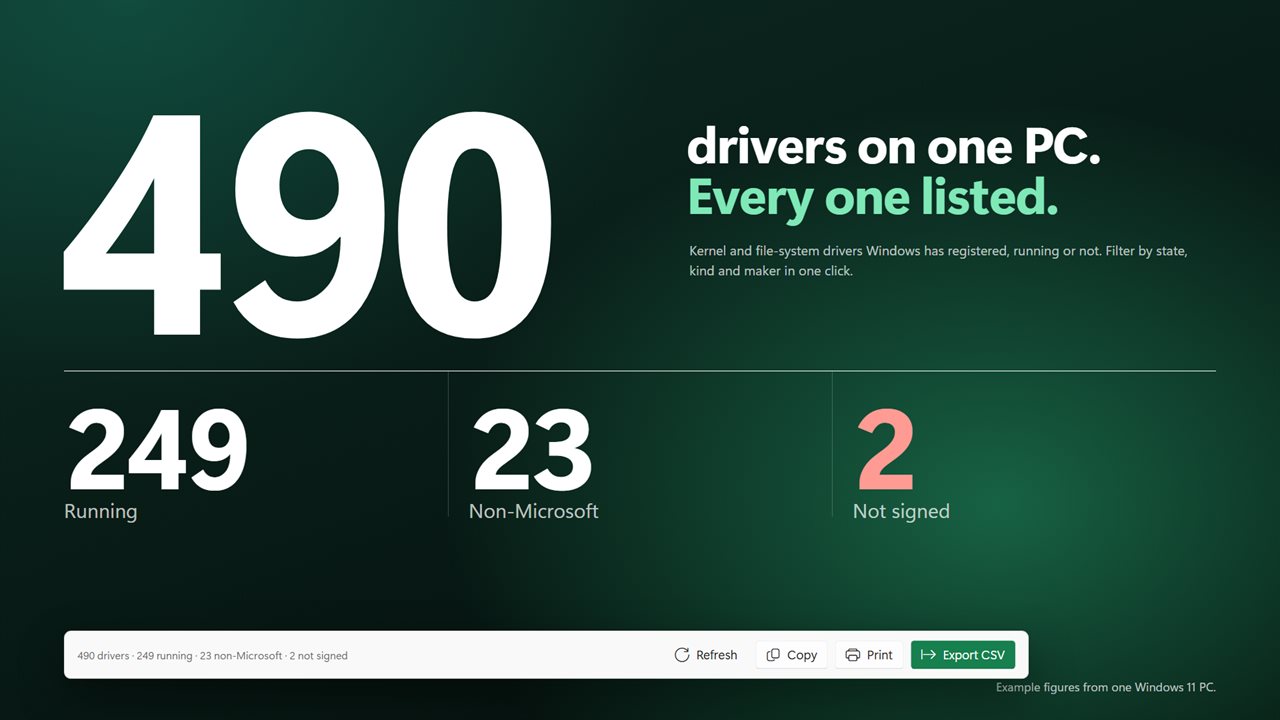
Running, non-Microsoft and unsigned drivers, counted.
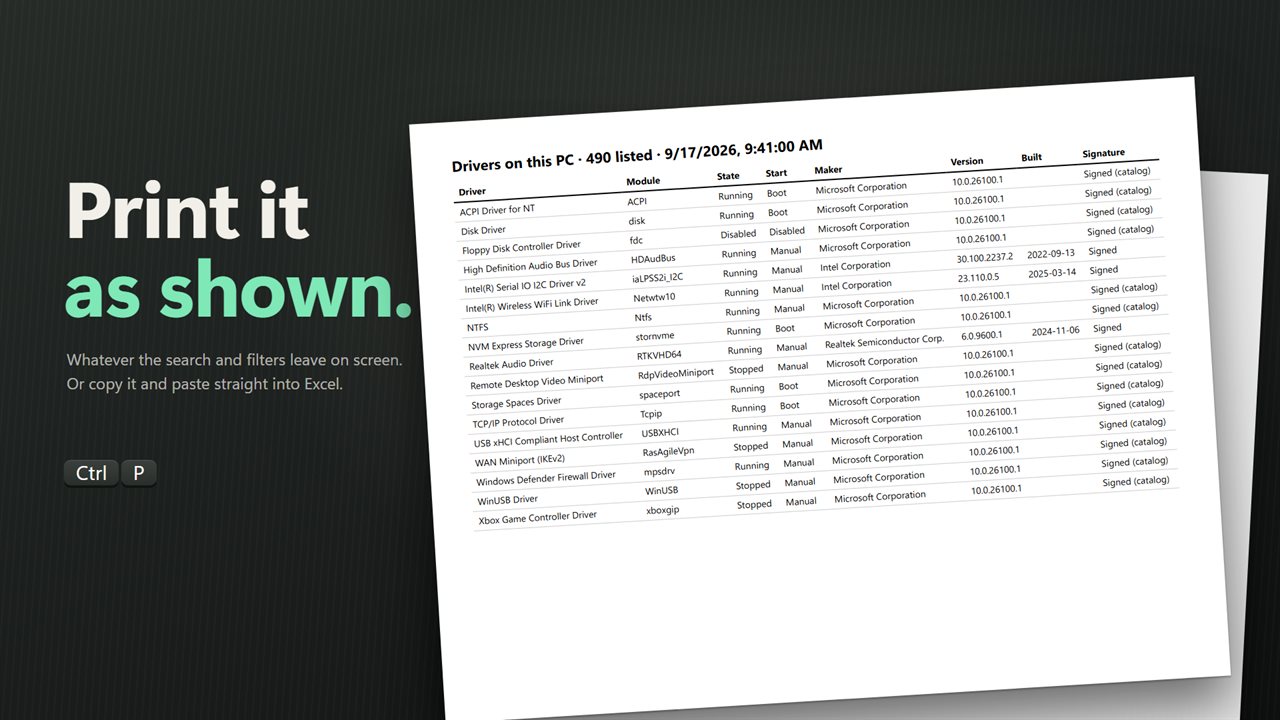
Print the list as shown, or copy it into Excel.
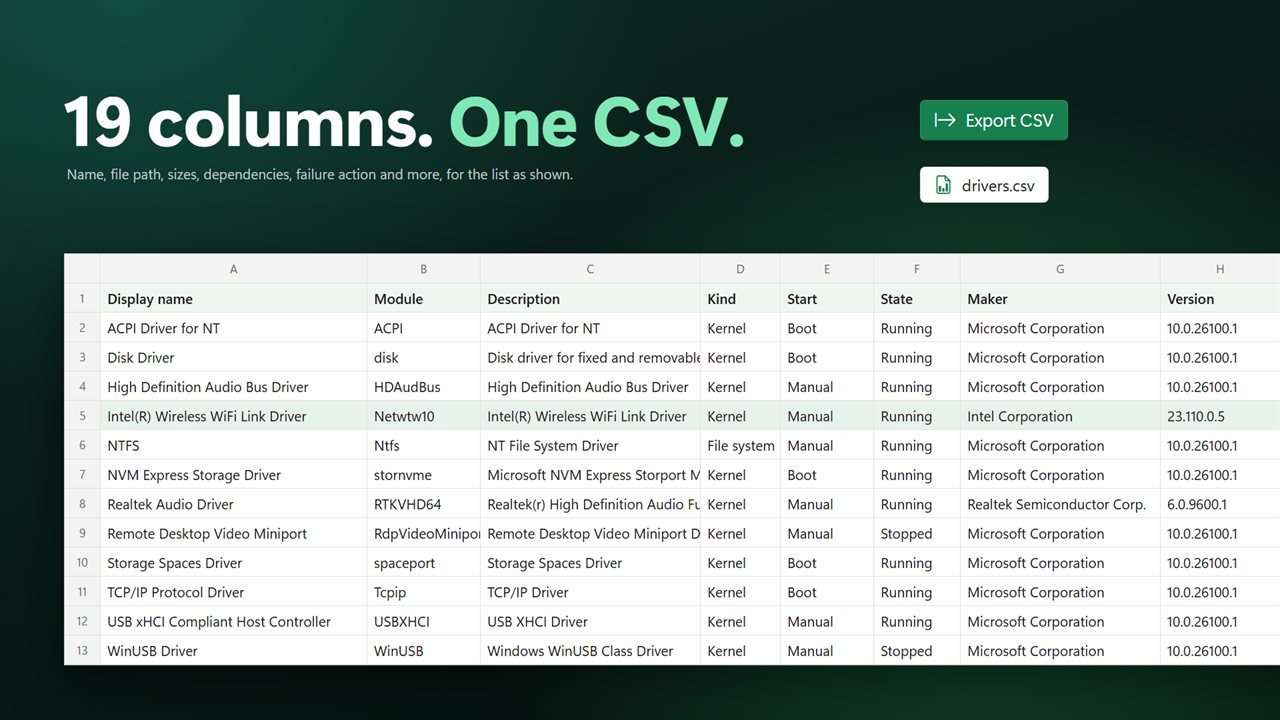
Export the list as a CSV spreadsheet with 19 columns.

Every driver on your PC, and everything about each one.

190,000+downloads of EvlarSoft apps
Signed by EvlarSoftVerified US publisher
14-day money-backNo questions asked
Updates includedNo upgrade fees

How to see installed drivers without reading console output

The standard answer to seeing your installed drivers is to open Command Prompt, type driverquery, then add /v for more columns and a redirect to save it. The result is a wall of fixed-width text. Device Manager goes device by device instead. Neither puts the signature, the maker and the build date of every driver side by side.

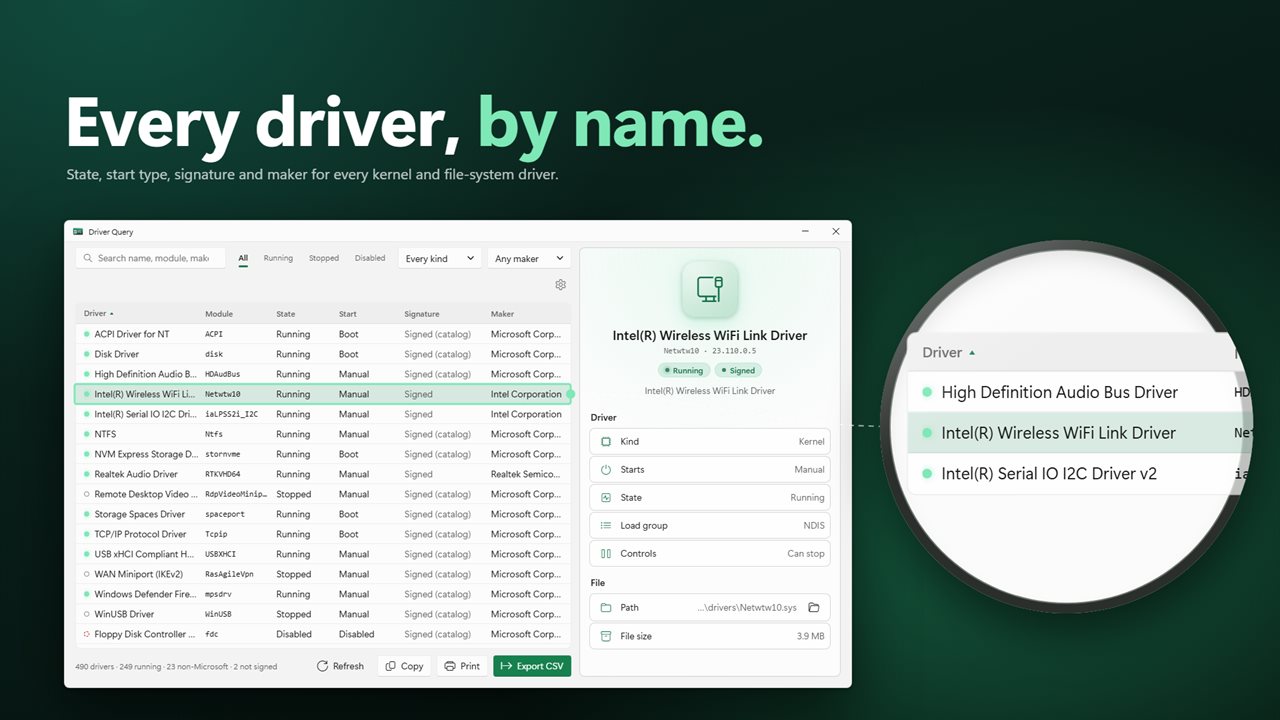
Driver Query reads the same registered driver list directly from Windows and puts it in a dense, sortable table: Driver, Module, State, Start, Signature, Maker, Version, Built and Kind. Click a header to sort, type in the search box to narrow it by name, module, maker or path, and widen the window to reveal more columns.

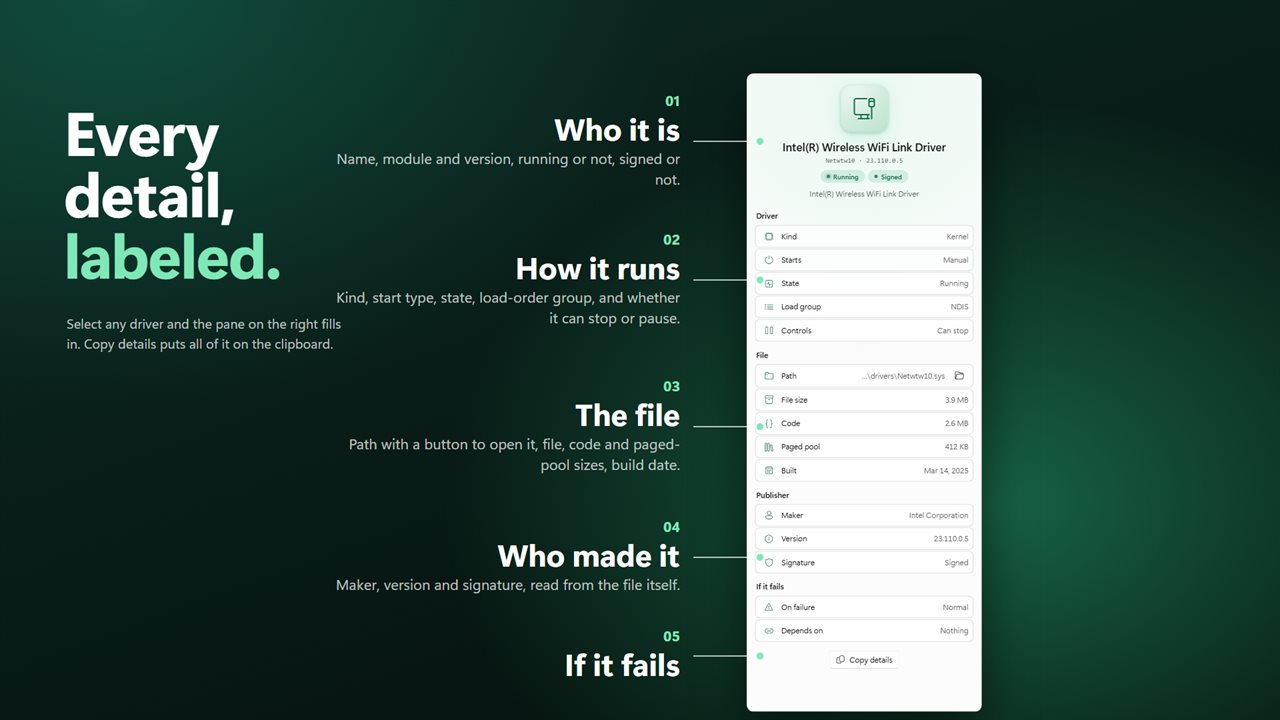
Select a row and the details pane opens the driver up. It shows the kind, how it Starts, its State and Load group, whether it accepts stop or pause Controls, the full Path with an Open file location button, File size, Code and Paged pool sizes, the Built date, and what it Depends on and what Windows does On failure.

Find unsigned drivers in one filter

Once the list loads, every driver file is put through Windows' own trust check, both against the signed catalogs and against any signature embedded in the file. The Signature column then reads Signed (catalog), Signed, Not signed or File missing.

Set the maker filter to Not signed to see only the drivers that failed. That is the shortlist worth looking at when you are chasing a blue screen after installing new hardware, or auditing a machine for leftover kernel software from an old VPN, game anti-cheat or hardware utility. On a slow disk, turn off Check driver signatures in Settings and the column reads Not checked.

Drivers list filters: running, disabled, kernel, non-Microsoft

Three filters sit above the table and combine with the search box. State narrows to All, Running, Stopped or Disabled. Kind narrows to Kernel or File system drivers. Maker picks Microsoft, Non-Microsoft or Not signed, using the company name stored in each file's version information.

Non-Microsoft is the quickest way to see what third-party drivers a PC carries, and sorting that view by Built shows which ones are years older than the rest.

How to export a driver list to CSV, Excel or paper

Everything you see can leave the app, and the keyboard covers each step.

  • Ctrl+S or Export CSV saves the list as currently shown, filters and all, as a spreadsheet with 19 columns.
  • Ctrl+C copies the selected drivers, or Copy the list as shown copies everything, in a form that pastes into Excel as rows and columns.
  • Ctrl+P prints the list as it appears.
  • Ctrl+A selects every visible driver, and Ctrl or Shift clicks build a selection by hand.
  • Ctrl+F jumps to the search box and F5 reads every driver again.
Features

  • Every kernel and file-system driver registered with Windows, loaded or not
  • Signature check per fileCatalog-signed, embedded-signed, not signed or missing
  • Version, maker and build date read from the driver file itself
  • Code and paged pool sizes, load group, dependencies and failure action
  • Search across name, module, maker, description and path
  • State, kind and maker filters that stack with the search
  • Open file location for any driver in File Explorer
  • Copy, CSV export with 19 columns, and print
  • Works in any Windows display language, since nothing is parsed from command text
  • Window remembers its size, and wider windows show more columns

Who it's for

Troubleshooting a crash

When a stop error names a .sys file, search for the module to see its maker, version, build date and whether it is signed, then open its folder.

IT inventory and audits

Export the Non-Microsoft drivers on each machine to CSV and compare them side by side in a spreadsheet.

Cleaning up after old hardware

Sort by Built and filter to Stopped to find drivers from devices and software that left the PC long ago.

What's new in 2.0.3

  • New: a dense, sortable list with search and filters
  • New: select a driver to see all of its details
  • New: signature check for every driver file
  • New: copy, export to CSV and print the list
  • New: open a driver’s file location
  • New: reads drivers directly from Windows, so it works in any language
  • New: resizable window, dark theme by default

Questions

Anything else? Ask us

Can Driver Query update, disable or uninstall drivers?

No. It only reads what Windows has registered and opens drivers with query access, so nothing about a driver is changed. It can open a driver file's location in File Explorer.

How is it different from the driverquery command?

It reads the same driver list straight from the Windows Service Control Manager instead of parsing the command's text, so it works in any display language. It adds search, filters, a signature check and details such as the file's version, maker and build date.

How does it check whether a driver is signed?

After the list loads, each driver file is checked with Windows' own trust verification, against its signed catalogs and the file's embedded signature. Each driver shows Signed (catalog), Signed, Not signed or File missing, and the check can be switched off in settings on a slow disk.

Can I export the driver list to Excel?

Yes. Export saves the list as shown as a CSV file with 19 columns, including path, version, maker, signature, dependencies and sizes. You can also copy selected drivers or the whole list and paste it straight into Excel, or print it.

How does it decide whether a driver is from Microsoft?

By the company name stored in the driver file's version information. The Microsoft and Non-Microsoft filters use that maker field, while the Not signed filter uses the signature check.

How do I check a driver's version on Windows?

Find the driver by name or module with the search box. The Version column shows the version read from the driver file's own version information, and the details pane repeats it with the maker and the date the file was built.

Does it show drivers that are not currently running?

Yes. It lists every driver Windows has registered, whether Running, Stopped or Disabled. Use the state filter to show only one of those.

What does File missing mean in the Signature column?

Windows still has the driver registered, but the file at its recorded path is not on this PC, so there is nothing to check. The details pane says The file is not on this PC. These entries are often left behind by uninstalled hardware or software.

Which versions of Windows does it run on?

Windows 10 (version 1809 or later) and Windows 11.

Is it a subscription?

No. Driver Query is a one-time purchase of $2.99, and updates are included.

How do I get it?

Buy it on this page and your license key arrives by email. If the button says Notify me, Driver Query is not on sale here yet; leave your email and we will tell you when it is.