EEvlarSoft

File and Folder Encryptor

Encrypt sensitive files and folders on your PC, and back them up to the cloud in a form only your password can open, file names included.

Buy for $1.99
One payment. No subscription.
14-day money-back guarantee.
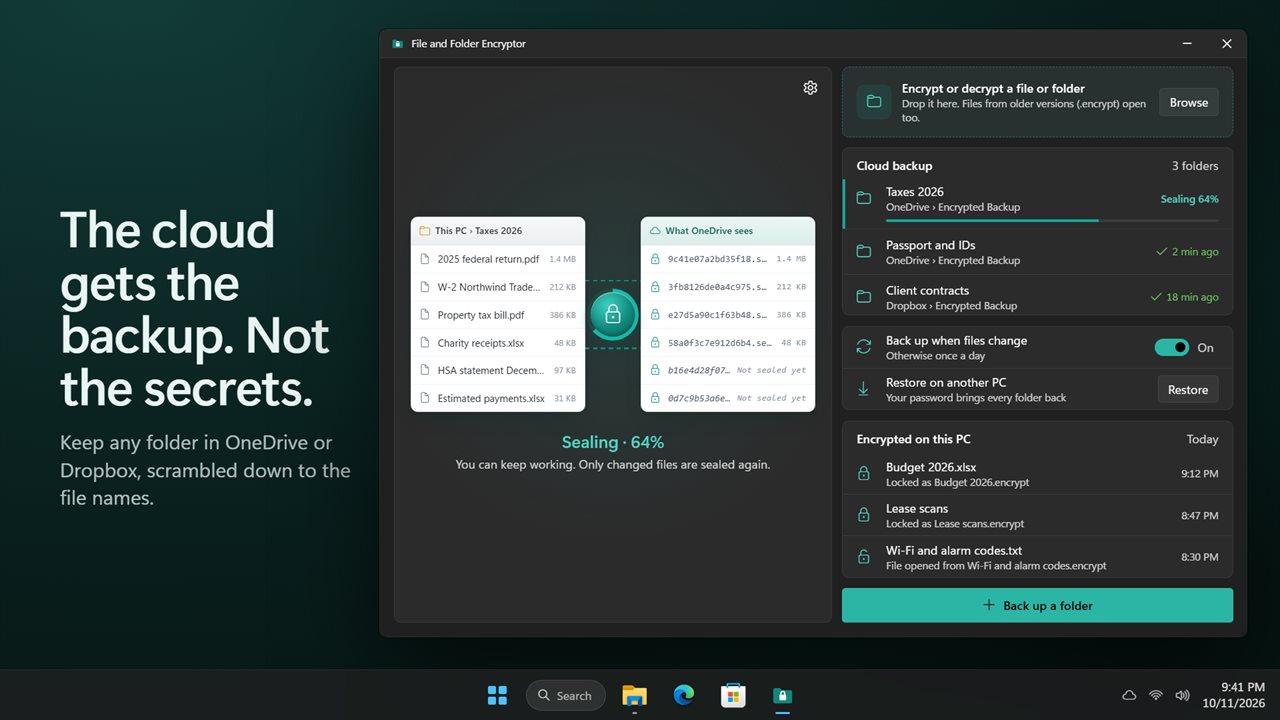
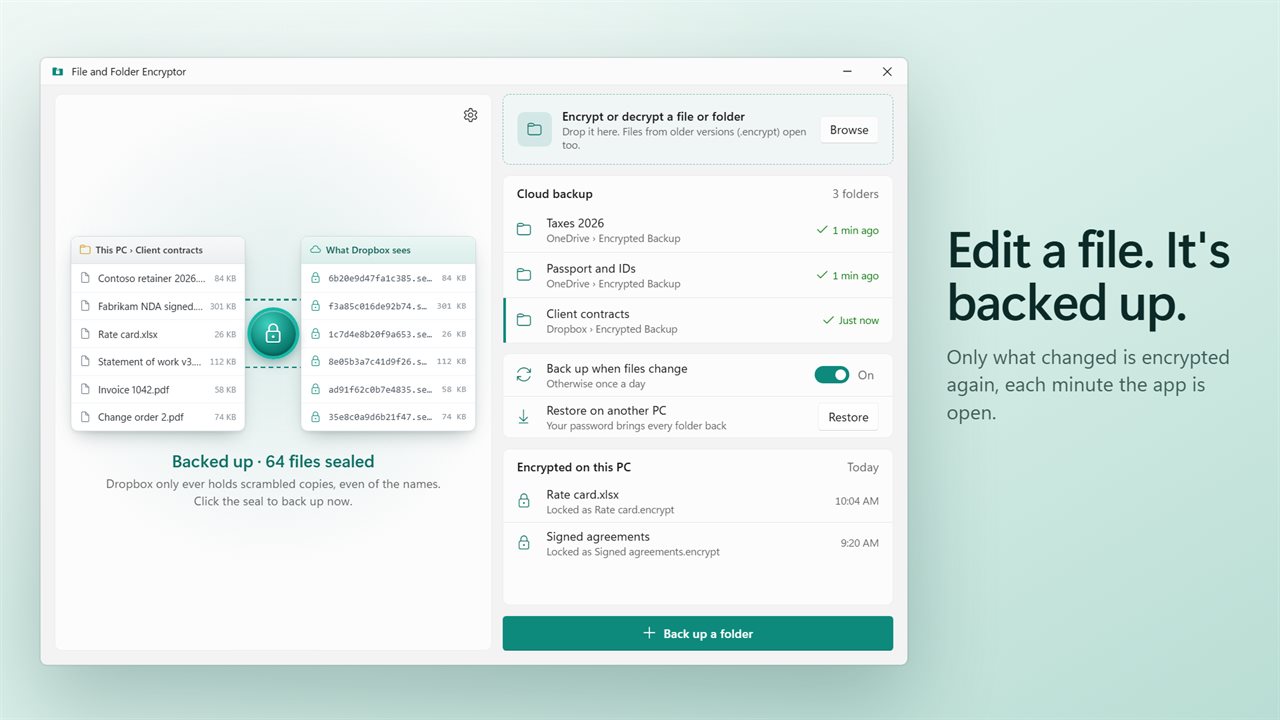
Your files on one side, what the cloud sees on the other.
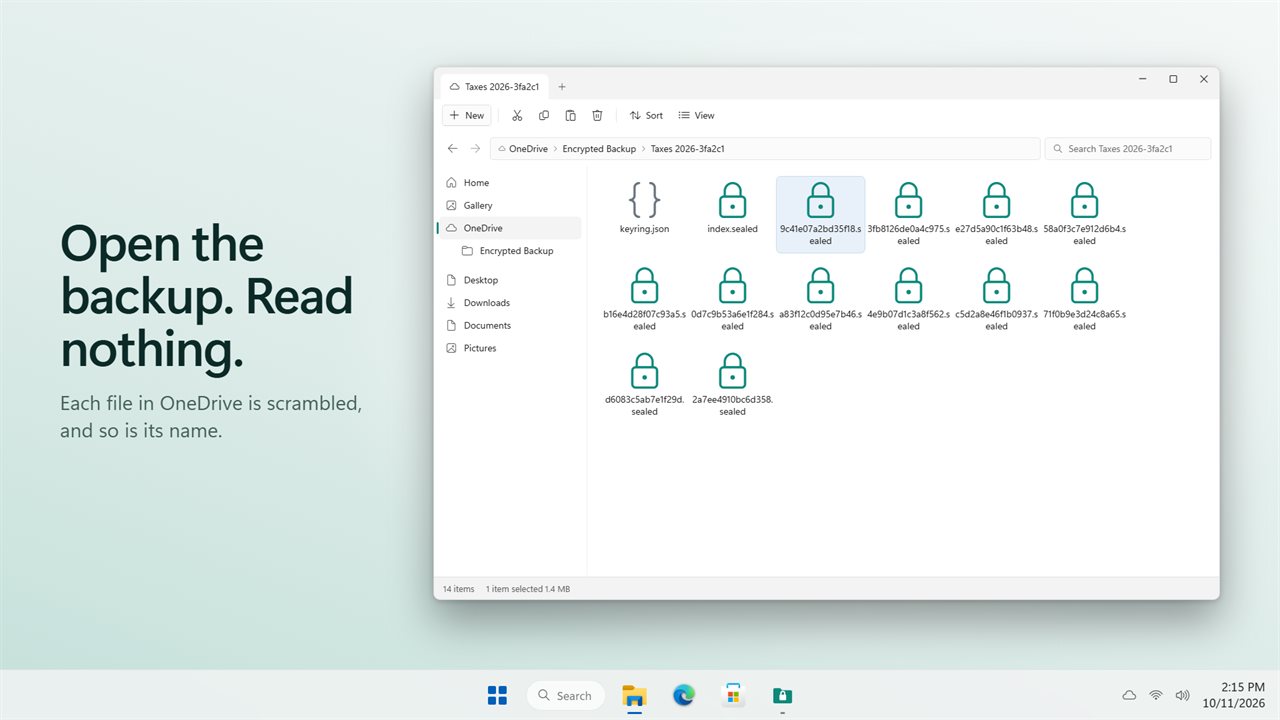
OneDrive holds scrambled copies, even of the names.
Only changed files are encrypted again, every minute while the app is open.
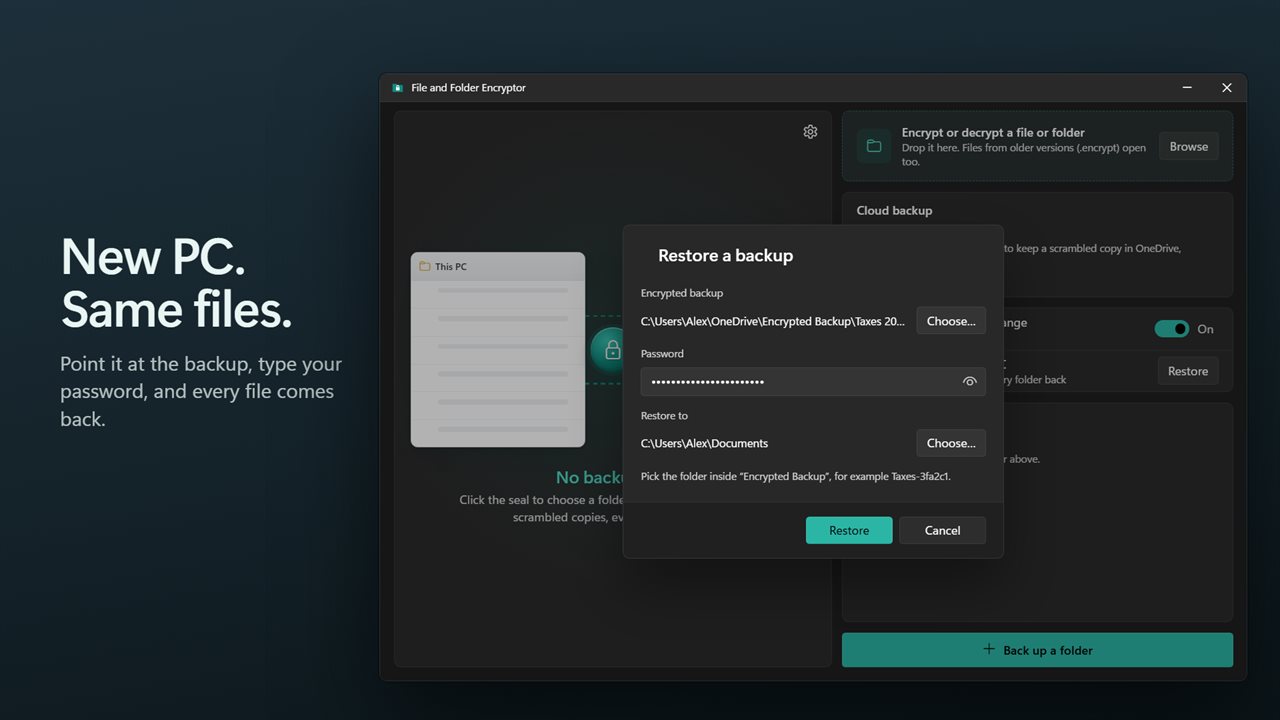
Restore every file on another PC with one password.
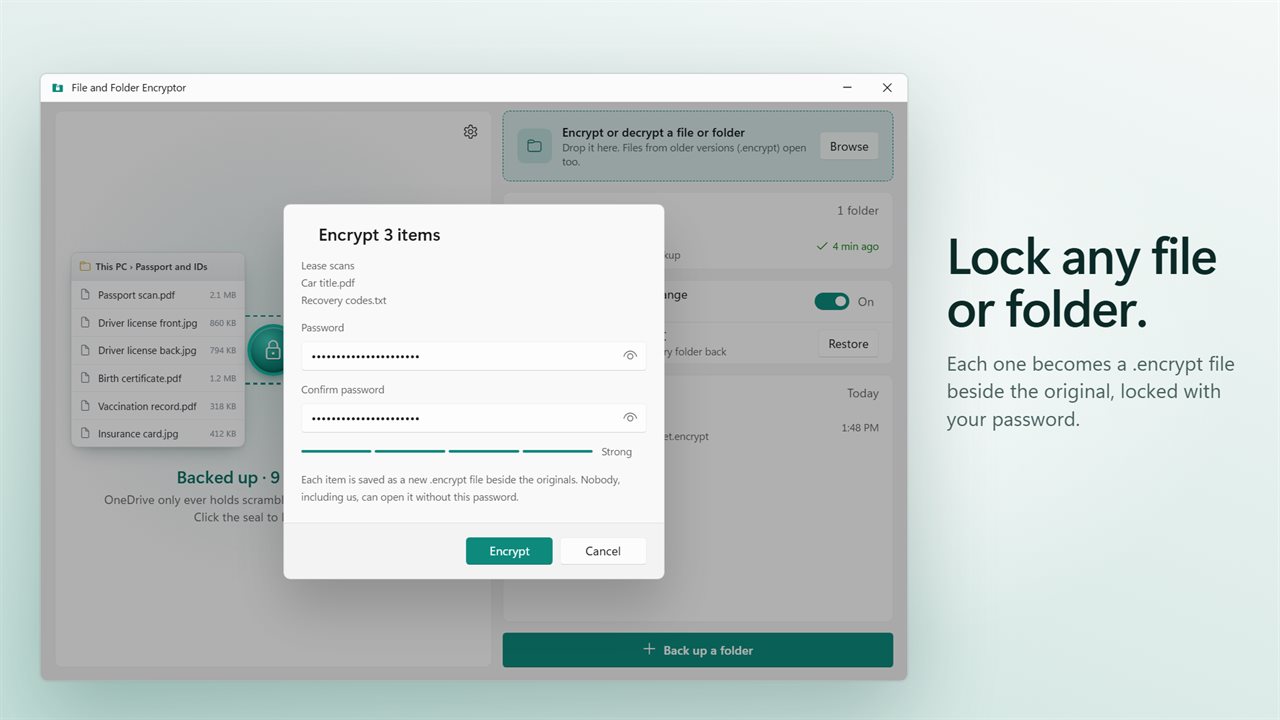
Encrypt any file or folder with a password.
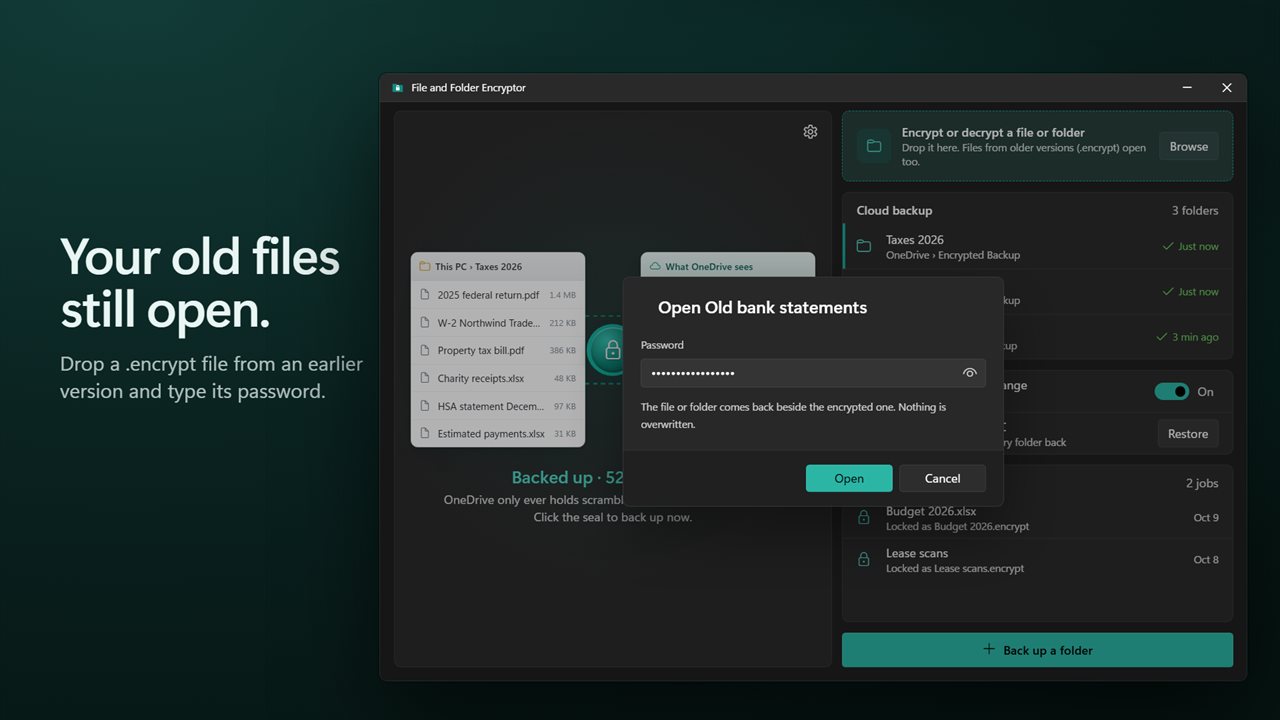
Your .encrypt files from older versions still open.

Your files on one side, what the cloud sees on the other.

190,000+downloads of EvlarSoft apps
Signed by EvlarSoftVerified US publisher
14-day money-backNo questions asked
Updates includedNo upgrade fees

File encryption software for files that live in the cloud

Cloud storage encrypts your files on its own servers, but it holds the keys, so the provider, anyone who gets into your account, and anyone the provider is compelled to hand data to can read them. Drive encryption built into Windows protects a laptop that is stolen, not the copies you sync. The usual workaround is to zip sensitive folders with a password by hand before every upload, and to remember to do it again each time something changes.

File and Folder Encryptor is file encryption software that does that step for you, continuously. Choose a folder such as tax returns or ID scans, pick a destination, whether a OneDrive or Dropbox folder, a NAS share or an external drive, and set a backup password. The app writes an encrypted copy of every file into the destination. Each file's name is replaced with a random one, and the list of real names is encrypted too, so a person browsing the cloud folder learns nothing about what is inside.

The main window shows both halves at once: This PC on one side, What OneDrive sees or What Dropbox sees on the other. The seal between them is the Back up now button.

Secure cloud backup that keeps itself current

With Back up when files change on, the app looks at your folders about once a minute while running and seals only files that are new or modified. Turning it off moves to one backup a day while the app is open. A file you delete from the folder is removed from the backup on the next run, so the cloud mirrors the folder as it is now rather than keeping old versions.

To get everything back on a new PC, install the app, choose Restore on another PC, select the backup location and type the backup password. The app keeps no copy of that password anywhere online and has no way to reset it, so write it down somewhere safe.

How to encrypt a file or folder with a password

For a single document or a folder you want to send or store as one sealed file, the drop zone in the main window does it without any backup set up.

  • Drop files or folders on Encrypt or decrypt a file or folder, or click Browse.
  • Type a password and repeat it under Confirm password. A hint warns when the password is short and easy to guess.
  • Click Encrypt. Each item is saved as a new .encrypt file next to the original; a folder is packed and sealed as one file.
  • To open one later, drop the .encrypt file on the window and click Open. The file or folder reappears beside it and nothing existing is overwritten.

What zero-knowledge encryption means here

Encryption happens on your PC before anything is written to the destination, and there is no account or server involved. Contents are sealed with XChaCha20-Poly1305, an authenticated cipher, so a tampered file fails to open rather than opening wrong. Your password is turned into the key by Argon2id, which makes guessing passwords slow and expensive.

If you want the unencrypted originals gone after encrypting, switch on Remove the original after encrypting in Settings. The original is only removed after the new .encrypt file has been opened again and checked against it.
Features

  • Encrypted mirrors of chosen folders in a cloud-synced or local folder
  • Random file names in the backup, with the real names encrypted
  • Side-by-side view of the real folder and its sealed copy
  • Incremental sealing of new and changed files, roughly every minute while open
  • Deleted files removed from the backup on the next run
  • Restore on another PC with the backup password alone
  • Password-encrypt many files and folders in one go into .encrypt files
  • Opens .encrypt files made by older versions of the app
  • Optional removal of originals, only after the encrypted copy is verified
  • Encrypted on this PC list, with Show in Explorer for each item

What people protect with it

Tax returns and financial records

Keep years of statements backed up in the cloud without the provider being able to read a single figure or file name.

ID scans and medical documents

Passport scans and health records are exactly what an account breach exposes. In the backup they are random names and unreadable bytes.

Sending a file through email or a USB stick

Encrypt it into a .encrypt file, send it, and share the password another way. Without the password the file is just noise.

What's new in 2.0.1

  • New: encrypted cloud backup. Keep a scrambled copy of any folder in OneDrive, Dropbox or any folder, names included
  • New: backs up changed files every minute while the app is open, or once a day
  • New: restore a backup on another PC with only its password
  • New: encrypt or open many files and folders at once
  • New: a confirm field and a strength hint for the password
  • New: optionally remove the original after the encrypted copy is checked
  • Your .encrypt files from older versions still open
  • Fixed: two files with the same name no longer overwrite each other's .encrypt file
  • Fixed: a folder holding only other folders can now be encrypted

Questions

Anything else? Ask us

Can OneDrive or Dropbox see my file names in the backup?

No. Each file is stored under a random-looking name and the list of real names is itself encrypted. The backup folder is still named after the folder you back up, followed by a short random code, so choose a folder name you do not mind showing.

Does the backup run when the app is closed?

No. Backups run only while the app is open. With Back up when files change on, it checks about once a minute and encrypts only new or changed files; with it off, it backs up once a day while open.

What happens in the backup when I delete a file?

Its encrypted copy is removed from the backup at the next run. The backup mirrors the folder as it is now and does not keep older versions.

Can I restore my files on a new PC?

Yes. Point the app at the backup folder, enter the backup password and choose where to put the files. The password cannot be reset, so without it the backup cannot be opened.

Does it delete the original after encrypting?

Only if you turn that on. The original is removed only after the new .encrypt file has been opened again and compared with it byte for byte, and if that check fails the original is kept.

Which encryption does it use?

XChaCha20-Poly1305 for the contents, with the key derived from your password by Argon2id using 64 MB of memory and three passes. A folder is zipped and then encrypted into a single .encrypt file.

Is OneDrive encrypted already?

Cloud services encrypt stored files, but they manage the keys themselves. File and Folder Encryptor encrypts on your PC first, with a key made from your password, so the copy in the cloud cannot be read without that password.

What happens if I forget the password?

The files cannot be opened. The app sends your password nowhere and keeps no recovery copy, so there is no reset. That is the same property that keeps anyone else out, so keep the password in a password manager or on paper.

Can I stop backing up a folder without losing the backup?

Yes. Choose Stop backing up for that folder. The encrypted copies stay where they are and can still be restored with the backup password.

Which versions of Windows does it run on?

Windows 10 (version 1809 or later) and Windows 11.

Is it a subscription?

No. File and Folder Encryptor is a one-time purchase of $1.99, and updates are included.

How do I get it?

Buy it on this page and your license key arrives by email. If the button says Notify me, File and Folder Encryptor is not on sale here yet; leave your email and we will tell you when it is.