EEvlarSoft

Break Bingo

A break reminder that plays like bingo: every half hour a bell calls a square with a quick move, and doing it brings you one step closer to a full line.

Buy for $1.99
One payment. No subscription.
14-day money-back guarantee.
5.0
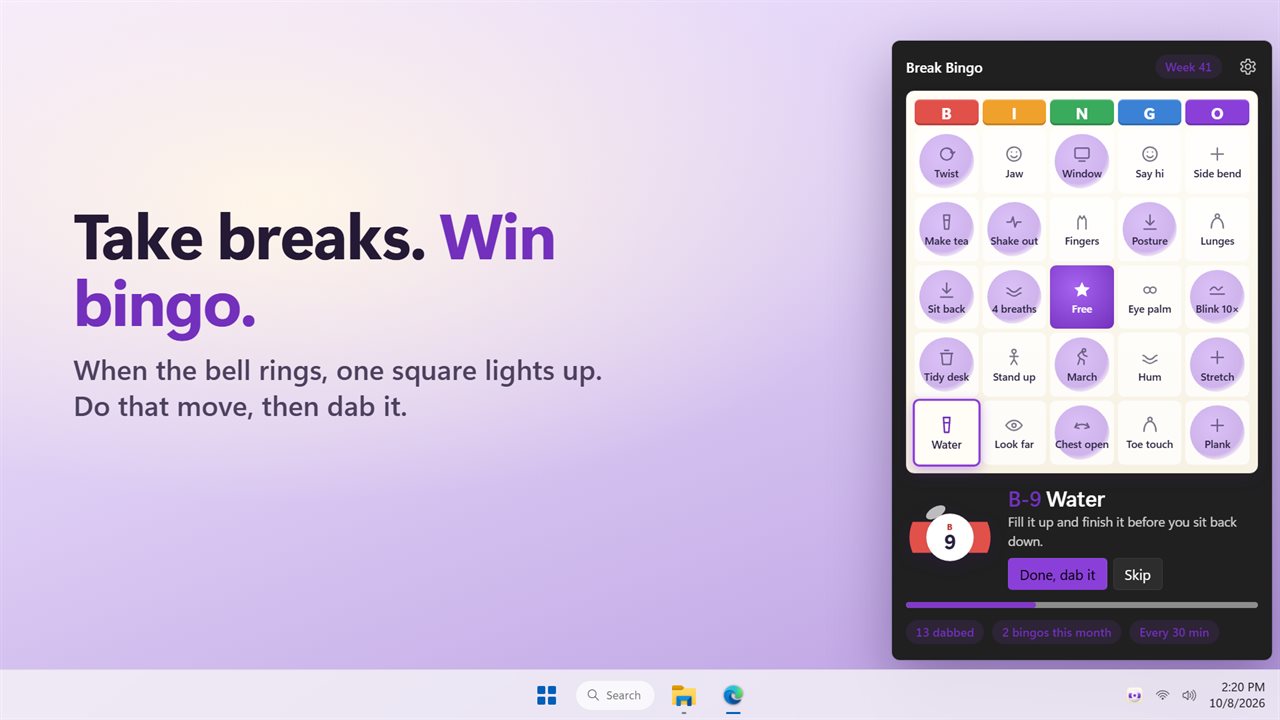
Each break lights up one square on your weekly bingo card.
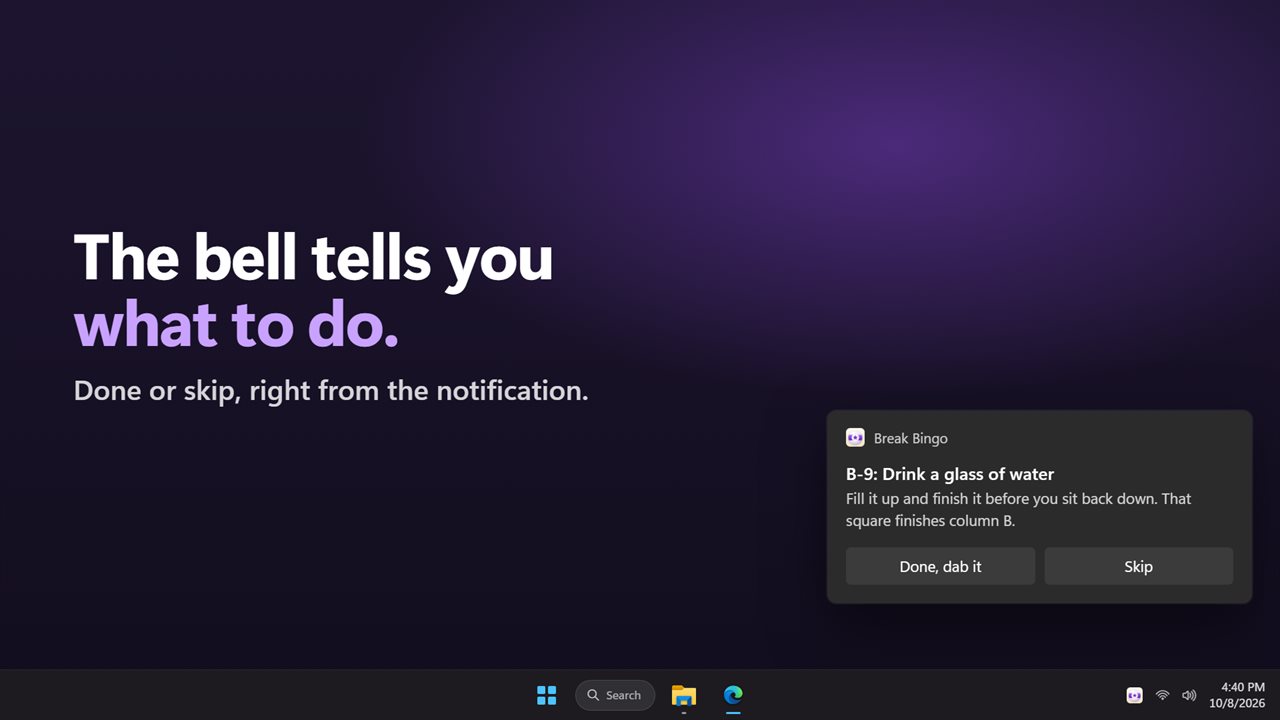
The bell rings with your move. Done, dab it, or skip.
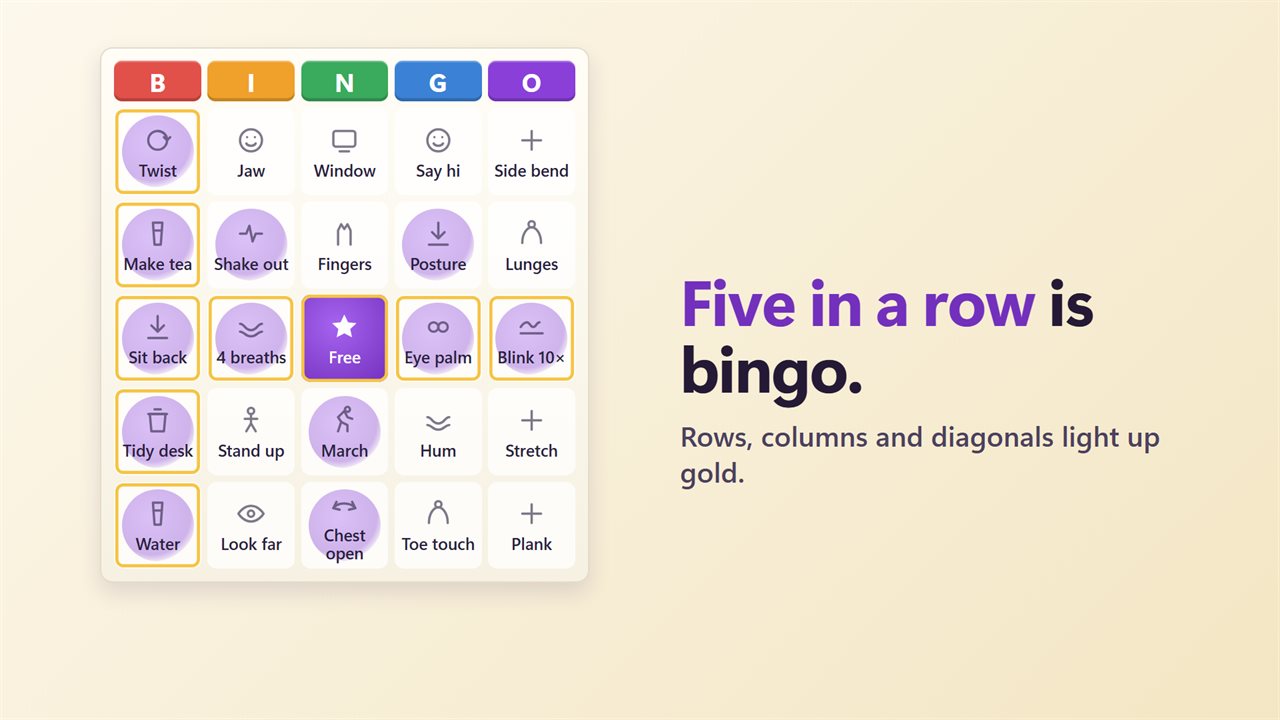
Line up a row, a column or a diagonal and it lights up gold.
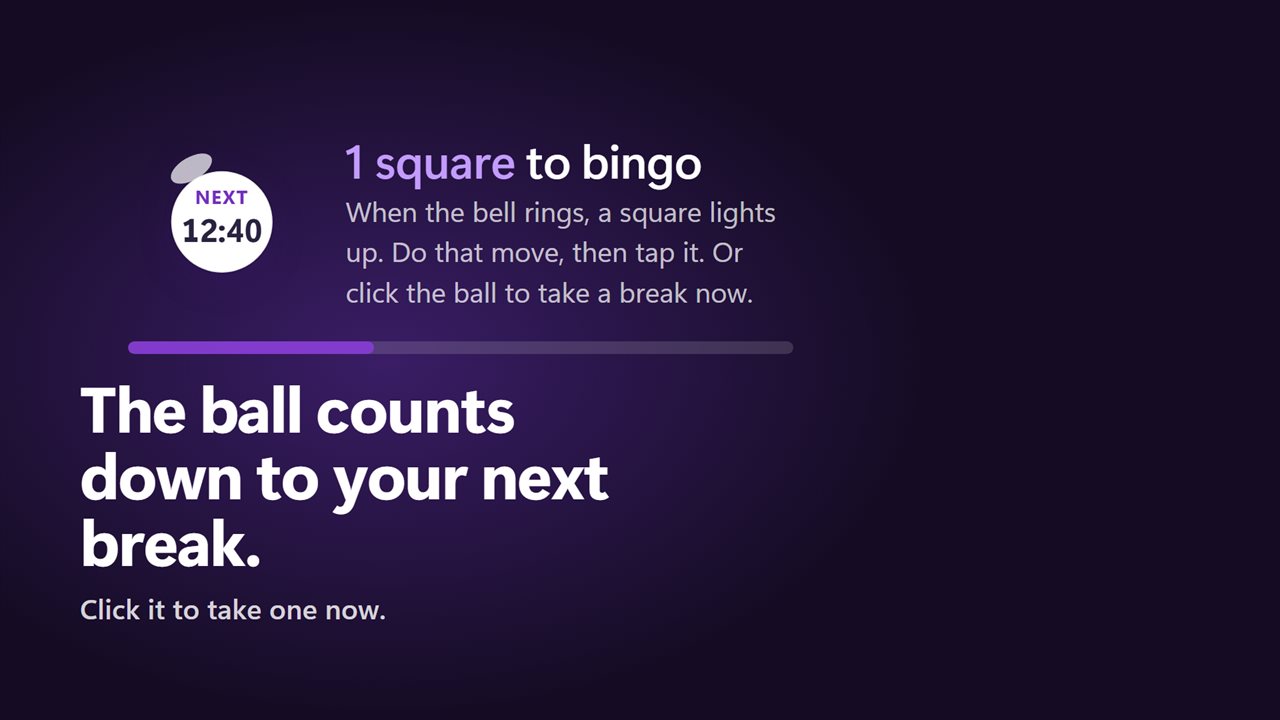
The ball counts down to your next break. Click it to take one now.
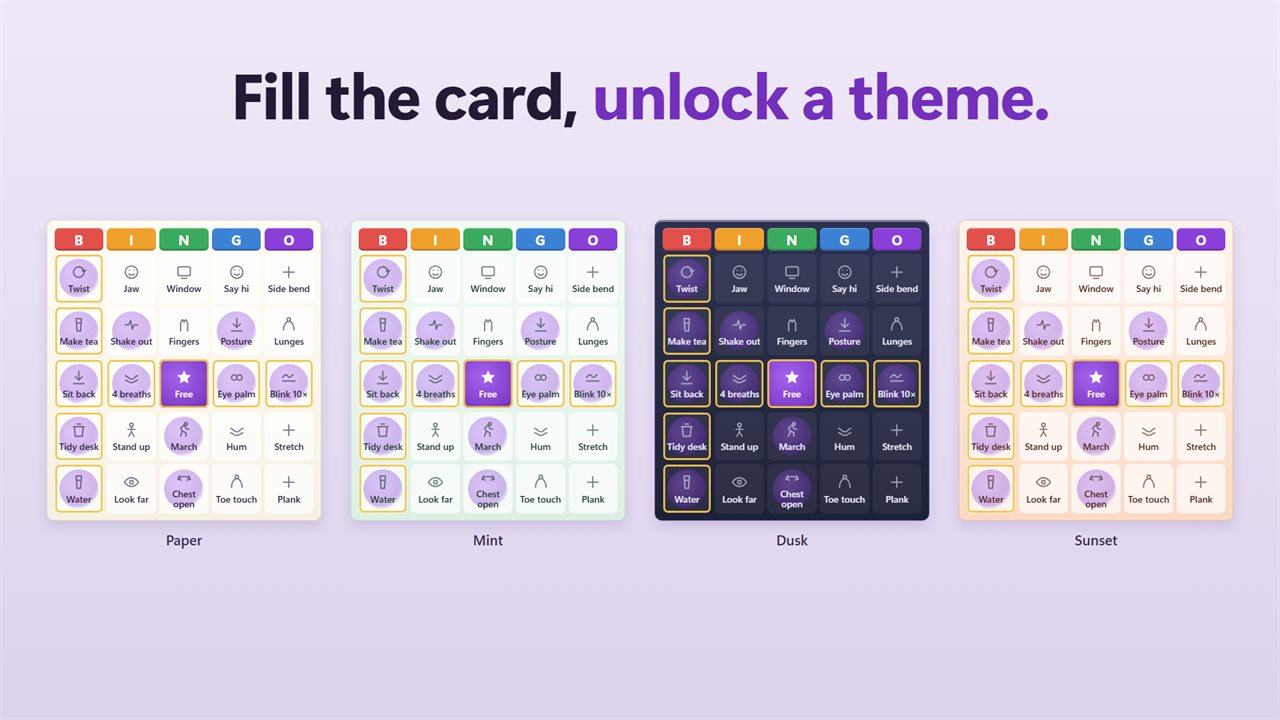
Fill the whole card to unlock a new card theme.
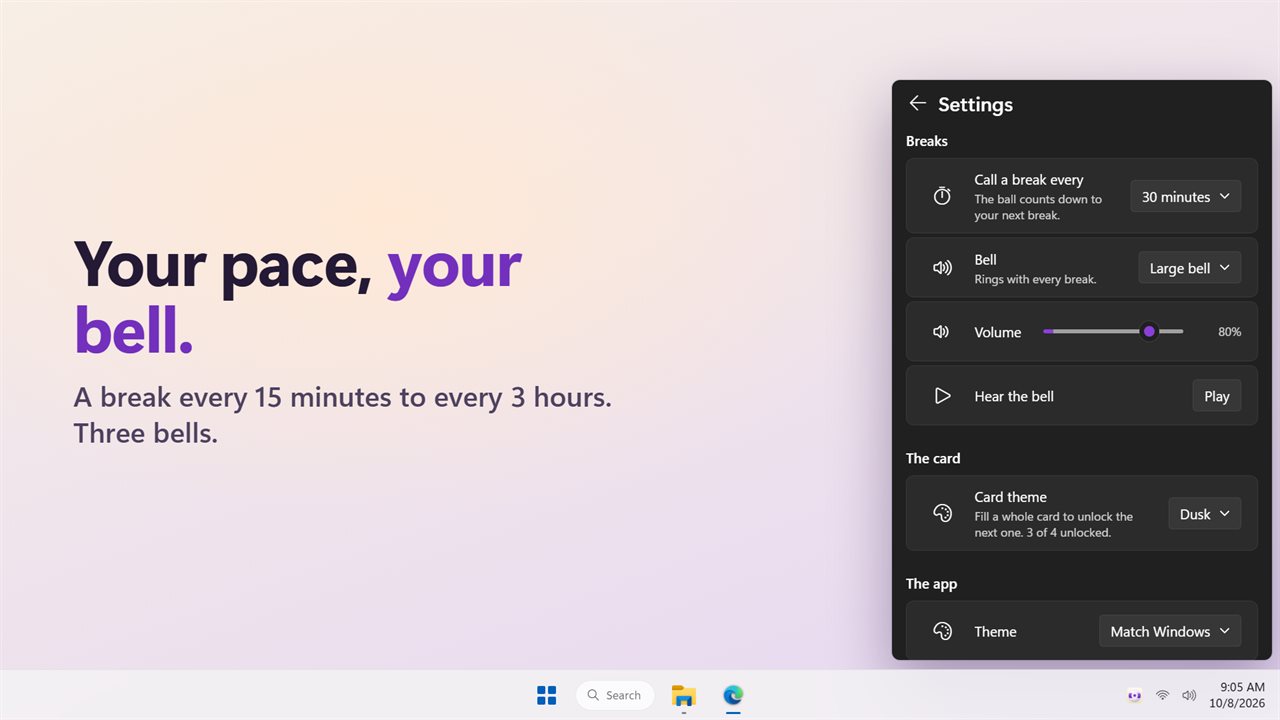
Your interval, three bells and their volume.

Each break lights up one square on your weekly bingo card.

190,000+downloads of EvlarSoft apps
Signed by EvlarSoftVerified US publisher
14-day money-backNo questions asked
Updates includedNo upgrade fees

A break reminder you will not want to dismiss

The trouble with a break reminder is that the tenth one looks exactly like the first, so you click it away without getting up. Break Bingo gives each break a reason to count. Your breaks live on a 5 by 5 bingo card, and every reminder is a call, the way a caller reads a ball at a bingo hall: I-22: Roll your neck slowly.

At each bell a single square glows and Windows shows a notification naming the move; its buttons are Done, dab it and Skip. Do the move, dab the square, and it is marked on your card. Complete five in a row, down a column or along a diagonal and the line turns gold.

Skipping costs nothing. A square you skip or miss simply stays open, and the next call picks from the squares you have not dabbed yet.

Desk stretches and quick moves on the card

Each week's card holds 24 moves drawn from a pool of 44, around a free center square. Every square carries a short label and a single sentence explaining it, so you never have to look anything up. A sample of what turns up:

  • Body: Neck roll, Shoulders, Wrists, Chin tuck, Wall angel, Side bend, Calf raise, Squats, Lunges, Plank.
  • Eyes: Look far, which asks you to find something 20 feet away and hold it for 20 seconds; Blink 10×; Eye palm; Near, far.
  • Away from the desk: Walk 2 min, Stairs, Fresh air, Daylight, Refill, Make tea.
  • Reset: 4 breaths, Posture, Jaw, Hum, Gratitude, Tidy desk.

How often to take a break, and how to change it

The default is a call every 30 minutes. Under Call a break every in Settings you can choose 15, 20, 30 or 45 minutes, or 1, 1.5, 2 or 3 hours. Pick the Subtle mallet, Large bell or Long bell, set its Volume, and use Hear the bell to try it.

The bingo ball on the card doubles as the timer, counting down to the next call. Click it when you want a break right now and a square is called immediately, with the next reminder a full interval after that. Pause reminders stops calls entirely, until you resume, either on the card or in the notification area menu.

Weekly cards, bingos and themes

A new card arrives every Monday. The headline keeps score as you go, showing how many squares stand between you and a bingo, and the strip under the card counts your bingos this month and the squares dabbed this week.

Fill the entire card before Monday for a Blackout, and the next card theme unlocks. You start with Paper; Mint, Dusk and Sunset follow, and you can switch among the ones you have earned under Card theme.

Wellness bingo for a whole team

Every copy of the app builds the same card for a given week, with the same moves on the same squares and the same B-1 to O-75 numbers. That makes it an easy office wellness bingo: everyone plays their own card on their own schedule, and on Friday you can compare who got a line, or who managed a Blackout.

Features

  • Bingo-card break reminders with a free center square
  • 24 of 44 moves on each weekly card, each explained in a sentence
  • A bell and a Windows notification you can answer directly
  • Gold rows, columns and diagonals, and a monthly bingo count
  • Eight interval choices, 30 minutes by default
  • Three bells with their own volume
  • Countdown ball that calls a break on demand
  • Four card themes unlocked by filling whole cards
  • Pause from the card or the tray menu
  • Opens as a flyout from the notification area, optional start with Windows

What's new in 2.0.2

  • New: each break lights up a square on your weekly bingo card. Do the move, then dab it
  • New: a notification with Done, dab it and Skip arrives with the bell
  • New: rows, columns and diagonals light up gold. Fill the card to unlock a new theme
  • New: click the bingo ball to take a break now
  • The three bells are still here, and your settings carry over. Intervals now run from 15 minutes to 3 hours

Questions

Anything else? Ask us

How often does it remind me to take a break?

Every 30 minutes unless you change it. You can pick 15, 20, 30 or 45 minutes, or 1, 1.5, 2 or 3 hours, and pause reminders at any time from the card or the tray menu.

What kind of breaks does it suggest?

Short moves like walking for two minutes, looking 20 feet away, neck rolls, squats, drinking water and slow breathing. Each week's card holds 24 of the 44 moves, each with a one-line how-to.

What happens if I miss or skip a break?

Nothing is lost. A skipped or missed square stays open, and the next bell calls another square from the ones you have not dabbed yet. Only the square that was called can be dabbed.

Can I take a break before the timer runs out?

Yes. Click the bingo ball and a square is called right away, without the bell, and the next break is a full interval from then.

Does the card reset?

Yes, every Monday. The squares you dabbed start over with a new card, while your bingo count for the month and the card themes you have unlocked carry on.

Which sounds can I choose?

Three bells: Subtle mallet, Large bell and Long bell, with their own volume setting and a Play button to hear them.

Will it tell me when a break would complete a line?

Yes. When the called square would finish a row, a column or a diagonal, the notification says so under the move, so you know that dabbing this one gets you a bingo.

Does everyone get the same bingo card?

Yes, for a given week. The card is built from the week of the year, so everyone running the app sees the same squares, which makes it easy to play as a team.

Where does the card open?

Clicking the notification area icon pops the card up as a flyout. Click anywhere else and it tucks away again, while the timer keeps running.

Which versions of Windows does it run on?

Windows 10 (version 1809 or later) and Windows 11.

Is it a subscription?

No. Break Bingo is a one-time purchase of $1.99, and updates are included.

How do I get it?

Buy it on this page and your license key arrives by email. If the button says Notify me, Break Bingo is not on sale here yet; leave your email and we will tell you when it is.